
1. Uvod
The Ameta Morpho Drone (Model DR-ATM10B) is a compact and user-friendly quadcopter designed for beginners and young pilots. It features a 1080P HD camera for capturing aerial photos and videos, real-time First Person View (FPV) transmission, and 32 vibrant RGB lights with multiple effects. Built with durability in mind, it includes propeller guards and a loss prevention buzzer for enhanced safety and ease of use. This manual provides comprehensive instructions for safe operation, setup, and maintenance of your Ameta Morpho Drone.

Image 1.1: Ameta Morpho Drone with its main accessories.
2. Varnostne smernice
- Dron vedno upravljajte na odprtih, čistih območjih, stran od ljudi, živali in ovir.
- Ensure the drone is fully charged before each flight.
- Do not fly the drone in strong winds or adverse weather conditions.
- Prste in lase držite stran od vrtečih se propelerjev.
- Za uporabnike, mlajše od 14 let, je priporočljiv nadzor odrasle osebe.
- Avoid flying near airports, restricted airspace, or private property.
- If the drone flies out of range, use the built-in buzzer to locate it.
3. Vsebina paketa
Preverite, ali so v paketu prisotne vse komponente:
- Ameta Morpho Drone
- Daljinski upravljalnik
- Modularne baterije (x2)
- Rezervni propelerji
- USB polnilni kabel
- Orodje za odstranjevanje propelerja
- Uporabniški priročnik

Image 3.1: Complete package contents of the Ameta Morpho Drone.
4. Nastavitev
4.1. Namestitev in polnjenje baterije
- Insert the modular batteries into the drone's battery compartment until they click securely into place.
- Use the provided USB charging cable to charge the batteries. The indicator light on the cable will show charging status (e.g., red for charging, green for fully charged).
- For the remote controller, install 3 AAA batteries (not included) into its battery compartment.
4.2. Drone and Controller Pairing
- Dron postavite na ravno, vodoravno površino.
- Press and hold the power button on the drone until its indicator lights begin to flash.
- Turn on the remote controller. The controller will automatically pair with the drone. A solid light on both the drone and controller indicates successful pairing.
5. Navodila za uporabo
5.1 Osnovni elementi upravljanja leta
- Vzlet/pristanek z enim klikom: Press the dedicated button on the controller for automatic takeoff or landing.
- Zadrževanje višine: The drone maintains a stable altitude, allowing for easier control and smoother footage.
- Brezglavi način: In this mode, the drone's orientation is relative to the pilot, simplifying flight control regardless of the drone's front direction.
- Prilagoditev hitrosti: The drone offers multiple speed settings (e.g., low, medium, high) to suit different skill levels and environments.

Image 5.1: Beginner-friendly features like one-key takeoff, altitude hold, and headless mode.
5.2. Napredne funkcije letenja
- 3D-obrati: Execute impressive 360-degree flips with a press of a button and a joystick movement.
- Krožna muha: The drone can perform circular flight patterns, adding dynamic movement to your aerial displays.

Image 5.2: The drone executing 3D flips and circular flight patterns.
5.3. Optical Flow Positioning
The drone utilizes optical flow positioning for enhanced stability, especially during indoor flights. This technology helps the drone maintain its position accurately, contributing to smoother control and clearer video capture.

Image 5.3: Optical flow positioning ensures stable hovering.
5.4. Loss Prevention Buzzer
Should the drone fly out of sight or range, a built-in buzzer can be activated via the controller to help locate it, minimizing the risk of loss.
Image 5.4: The remote controller features a button to activate the drone's loss prevention buzzer.
6. Delovanje kamere
The Ameta Morpho Drone is equipped with an 80° 1080P HD camera, allowing you to capture clear photos and videos from an aerial perspective. Utilize the companion app for real-time FPV (First Person View) transmission directly to your smartphone, enabling you to see what the drone sees as it flies.
- Zajem fotografije: Use the app or a designated button on the controller to take still images.
- Snemanje videa: Start and stop video recording via the app or controller.
- FPV prenos: Povežite pametni telefon z omrežjem Wi-Fi drona, da view v živo footage.
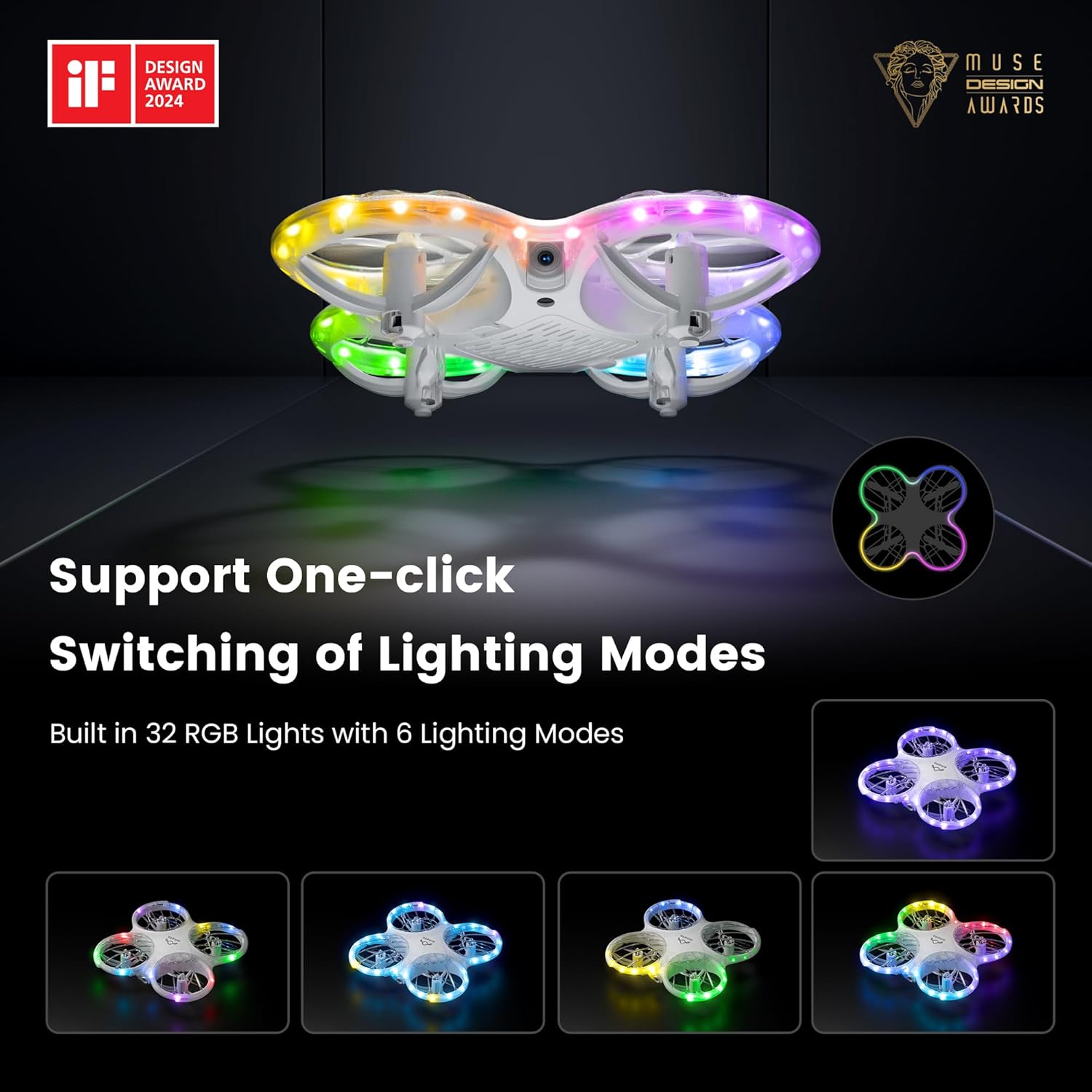
Image 6.1: The drone's 1080P HD camera for capturing high-definition media.
7. STEM Learning Module
The Ameta companion app integrates a simple STEM (Science, Technology, Engineering, and Mathematics) module. This feature allows users, particularly children, to engage in basic coding by combining flying modules, offering an educational approach to understanding drone technology and programming principles.

Image 7.1: The Ameta app's STEM module for programming flight paths.
8. RGB luči
The drone features 32 RGB lights with 6 dazzling effects, creating a visually engaging experience during flight. These lights enhance visibility and add an element of fun, especially when flying in low-light conditions.

Image 8.1: The drone showcasing its multiple RGB lighting modes.
9. Vzdrževanje
9.1. Zamenjava propelerja
In case of damage, replace propellers using the provided tool and spare parts. Ensure correct orientation (A and B markings) for optimal flight performance.
9.2. Skrb za baterijo
To prolong battery life, avoid overcharging or fully discharging the batteries. Store them in a cool, dry place when not in use.
9.3. Čiščenje
Gently wipe the drone with a soft, dry cloth to remove dust and debris. Avoid using liquids or harsh chemicals.
10. Odpravljanje težav
- Driftanje dronov: Calibrate the gyroscope as per the instructions in the app or manual. Check for damaged propellers.
- Brez napajanja: Prepričajte se, da so baterije popolnoma napolnjene in pravilno nameščene tako v dronu kot v krmilniku.
- Izguba povezave: Re-pair the drone and controller. Ensure no strong interference sources are nearby.
- Buzzer Not Working: Check battery levels. Ensure the drone is within operational range for the buzzer to function effectively.
11. Specifikacije
| Funkcija | Podrobnost |
|---|---|
| Znamka | Ameta |
| Ime modela | Morpho |
| Številka modela artikla | DR-ATM10B |
| Dimenzije izdelka | 13.8 x 13.4 x 3.4 cm |
| Teža predmeta | 72 g |
| Baterije | 2 litij-ionska baterija (priložena) |
| Kamera | 1080P HD, 80° FOV |
| Posebne lastnosti | Speed Adjustment, FPV, 32 RGB Lights, Optical Flow Positioning, Loss Buzzer, STEM Learning Module |
| Čas letenja | Do 18 minut (z 2 baterijama) |
| Starostna skupina (opis) | 14 years and above (with parental supervision for younger users) |
| Država izvora | Kitajska |
12. Garancija in podpora
For warranty information or technical support, please refer to the contact details provided on the product packaging or visit the official Ameta webspletno mesto. Shranite račun kot dokazilo o nakupu.


