
Uvod
This manual provides essential instructions for the safe and effective use of your Sony FX30 Digital Cinema Camera. The Sony FX30 is designed for content creators and filmmakers, featuring an APS-C sensor for cinematic capture. Please read this manual thoroughly before operating the camera and retain it for future reference.
Vsebina paketa
Preverite, ali so v paketu vsi spodaj navedeni predmeti. Če kateri koli predmet manjka ali je poškodovan, se obrnite na prodajalca.

Image: The Sony FX30 Digital Cinema Camera body with various accessories including a memory card, LED light, microphone, and stabilization grip.
Sony Manufacturer Items:
- Sony FX30 Digital Cinema Camera Body
- Sony NP-FZ100 Rechargeable Lithium-Ion Battery
- Sonyjev napajalnik
- Sonyjev pokrovček ohišja ALC-B1EM za fotoaparate serije E
- Sony Multi Interface Shoe Cap
- Kabel USB-A do USB-C (USB 3.2)
Bundled Items:
- SanDisk 128GB High Speed Extreme Pro SD Memory Card
- High Power LED Light with Diffusers
- Mikrofon puške
- Padded Deluxe Camera Bag
- U-Stabilization Grip
- Extra Replacement Battery (Compatible with NP-FZ100)
- Pistol Hand Grip
- Photo & Video Editing Software (1 Year Digital Download)
- USB Memory Card Reader
- Camera Hand Grip Strap
- Lens Pen
- Leč pihalnik
- Camera Starter Kit (Microfiber Cloth, Memory Card Case, Buds)
Nastavitev
1. Namestitev baterije
Insert the provided Sony NP-FZ100 battery into the battery compartment located at the bottom of the camera. Ensure it clicks into place securely. Charge the battery fully before first use using the supplied AC adapter and USB-A to USB-C cable.
2. Namestitev pomnilniške kartice
The FX30 supports SD memory cards. Open the memory card slot cover, typically located on the side of the camera. Insert the SanDisk 128GB Extreme Pro SD card with the label facing the correct direction until it clicks into place. The camera features dual card slots for extended recording or backup.

Slika: Zadaj view of the Sony FX30 showing the open memory card slots with two SD cards partially inserted.
3. Attaching the Body Cap
When no lens is attached, always keep the Sony ALC-B1EM Body Cap on the camera's E-mount to protect the sensor from dust and damage.
4. Začetni vklop
Press the power button to turn on the camera. Follow any on-screen prompts for initial setup, such as language selection and date/time settings.
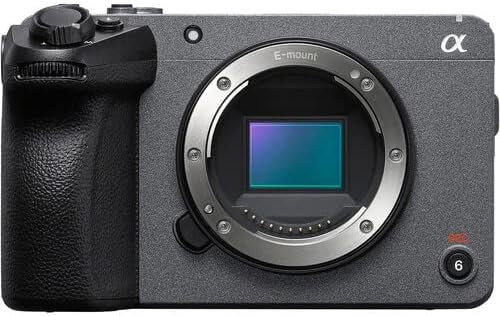
Slika: spredaj view of the Sony FX30 camera body, showcasing the E-mount lens interface and grip.
5. Pritrditev dodatne opreme
Attach the U-Stabilization Grip, Shotgun Microphone, and LED Light as needed for your shooting requirements. The camera features a Multi Interface Shoe for compatible accessories.
Upravljanje kamere
Osnovni nadzor nadview
Familiarize yourself with the camera's main controls for efficient operation.

Slika: Zadaj view of the Sony FX30, highlighting the LCD screen, MODE dial, MENU button, and various control buttons and dials.
- MODE Dial: Selects shooting modes.
- Gumb MENU: Dostopa do nastavitev in funkcij fotoaparata.
- FOCUS MAG: Magnifies the display for precise focusing.
- Gumb Fn (funkcija): Omogoča hiter dostop do pogosto uporabljenih nastavitev.
- Gumb DISP (Prikaz): Changes the information displayed on the screen.
- Krmilno kolo: Navigacija po menijih in prilagajanje nastavitev.
- Zebra/Peaking: Assists with exposure and focus.

Slika: Zgoraj view of the Sony FX30, showing the Multi Interface Shoe, IRIS, WB, ISO buttons, and the REC button.
- IRIS Button: Adjusts aperture.
- WB (White Balance) Button: Sets white balance.
- Gumb ISO: Prilagodi občutljivost ISO.
- Gumb REC: Začne in ustavi snemanje videa.
Delovanje zaslona na dotik
The FX30 features a touch-sensitive LCD screen for intuitive control. You can tap to select menu items, adjust focus, and navigate settings directly on the display.

Image: A hand interacting with the touch-sensitive LCD screen on the back of the Sony FX30 camera.
Snemanje videa
To begin recording, ensure a memory card is inserted and the battery is charged. Press the REC button to start recording. Press it again to stop. The camera supports video capture resolutions up to 4K and 1080p in MP4 format.
Povezljivost
The Sony FX30 supports Wi-Fi connectivity for remote control, file transfer, and other smart functions. Refer to the camera's on-screen menu for Wi-Fi setup instructions.
Vzdrževanje
- Čiščenje ohišja fotoaparata: Za brisanje ohišja fotoaparata uporabite mehko, suho krpo. Za trdovratno umazanijo rahlo obrišiteampkrpo sperite z vodo. Izogibajte se uporabi močnih čistilnih sredstev.
- Čiščenje leče in senzorja: Use a lens blower to remove dust from the lens and sensor. For smudges on the lens, use a lens pen or a specialized lens cleaning solution with a microfiber cloth. Sensor cleaning should be performed with extreme care or by a professional.
- Vzdrževanje baterije: Baterije shranjujte na hladnem in suhem mestu. Izogibajte se pogostemu popolnemu praznjenju baterij, da podaljšate njihovo življenjsko dobo.
- Shranjevanje: When not in use, store the camera in a dry, dust-free environment, preferably in the padded deluxe camera bag provided.
Odpravljanje težav
This section addresses common issues you might encounter. For more detailed troubleshooting, refer to the official Sony support webmesto.
- Camera Does Not Power On: Ensure the battery is fully charged and correctly inserted. Try using the extra replacement battery.
- Napaka pomnilniške kartice: Reinsert the memory card. Ensure it is formatted correctly by the camera. Try a different memory card if the issue persists.
- Brez snemanja videa: Check if the memory card has sufficient free space. Verify that the camera is in a video recording mode.
- Težave s kakovostjo slike: Check lens cleanliness. Ensure appropriate ISO, aperture, and shutter speed settings for your lighting conditions.
Specifikacije
| Funkcija | Podrobnost |
|---|---|
| Dimenzije izdelka | 3.3 x 3.1 x 3.3 palcev |
| Teža predmeta | 8 funtov |
| ASIN | B0D1RWMS36 |
| Številka modela artikla | CC-FX30BODY-41524 |
| Proizvajalec | Sony |
| Znamka | Sony |
| Tehnologija foto senzorja | APS-C |
| Ločljivost zajema videa | 1080p, 4K |
| Vrsta bliskovnega pomnilnika | SD |
| Format za zajem videa | MP4 |
| Podprt zvočni format | AAC, MP3 |
| Velikost zaslona | 3 palcev |
| Tehnologija povezljivosti | Wi-Fi |
| barva | Črna |
| Posebna funkcija | Brezžično |
Garancija in podpora
The Sony FX30 Digital Cinema Camera comes with a Limited 1-Year Manufacturer Warranty. Please retain your proof of purchase for warranty claims.
Za tehnično podporo, servis ali dodatne informacije obiščite uradno spletno mesto za podporo Sony. webali se obrnite na njihovo službo za stranke. Več informacij najdete na Podpora Sony Webmesto.