
1. Izdelek je končanview
The Zcargel 9 Inch Android Car Stereo Player is an advanced in-dash navigation system designed to enhance your driving experience. Featuring an Android 12 operating system, a 9-inch capacitive touch screen, and a powerful 4-core processor, this unit offers seamless integration with your vehicle's systems. It supports both wireless and wired Carplay, built-in GPS navigation, Bluetooth connectivity, and a reverse camera input.
Ključne značilnosti:
- HD 1080P Display: Full capacitive touch screen with a user-friendly interface.
- Vgrajen Wi-Fi: For online maps and internet connectivity.
- Wireless & Wired Carplay: Integrates iOS/Android devices for navigation, calls, messages, and music.
- Vgrajena GPS navigacija: Supports offline maps (requires internet for initial data download) and Google Maps with Wi-Fi.
- Nadzor na volanu: Allows convenient control of functions directly from your steering wheel.
- Bluetooth A2DP/Hands-free/Phone Book: For hands-free calling, music streaming, and automatic phone book loading.
- Podpora za zadnjo kamero: Compatible with AHD high-definition 720P camera image input (CVBS and AHD switchable).
- Operacijski sistem: Android 12.0 with 2GB RAM + 32GB ROM.
- Lastnosti DSP: High-fidelity sound reproduction.
2. Vključene komponente
Previdno razpakirajte škatlo in se prepričajte, da so prisotne vse naslednje komponente:

Image: The Zcargel 9 Inch Android Car Stereo Player with its main unit, a separate trim panel, a reverse camera, and various cables including power cables, USB cables, camera input cable, Canbus box, GPS antenna, instruction manual, and RCA input/output cables.
- Vehicle Navigation Unit (Main Head Unit)
- AHD kamera
- Napajalni kabli (x2)
- 2 USB kabel
- Vhodni kabel za kamero
- Canbus Box
- GPS antena
- RCA vhodni/izhodni kabli
- Navodila za uporabo (ta dokument)
3. Nastavitev in namestitev
3.1 Združljivost
This car stereo is compatible with the following Toyota Prius models:
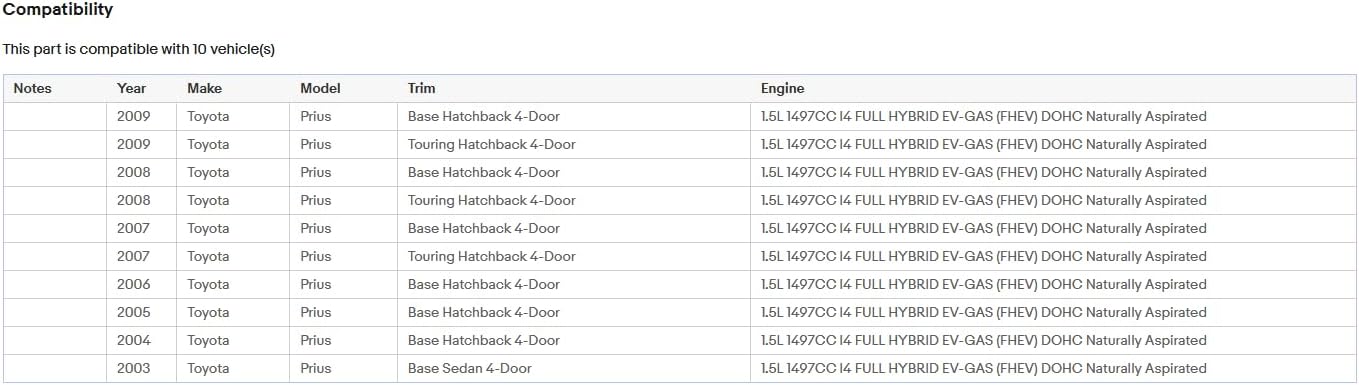
Image: A table detailing compatibility with Toyota Prius models from 2003 to 2009, including various trims like Base Hatchback 4-Door, Touring Hatchback 4-Door, and Base Sedan 4-Door, all with a 1.5L I4 FHEV engine.
3.2 Žične povezave
Refer to the diagram below for proper wiring connections. Ensure all cables are securely connected to their respective ports on the back of the head unit and to your vehicle's wiring harness.

Image: The rear panel of the Zcargel car stereo, displaying multiple ports and connected cables including power, USB, RCA, GPS antenna, and camera input. The image highlights the complexity of the wiring harness.
- Napajalni kabel: Connect the main power harness to the vehicle's power supply.
- GPS antena: Priključite GPS anteno in jo namestite na mesto z neoviranim vidnim poljem. view neba za optimalen sprejem signala.
- USB kabli: Za povezavo zunanje naprave priključite dva kabla USB.
- RCA vhod/izhod: Connect any external audio/video devices using the RCA cables.
- Vnos kamere: Connect the provided AHD camera to the camera input port.
- Canbus Box: If your vehicle requires CAN bus integration for steering wheel controls or other features, connect the Canbus box as per your vehicle's specific wiring diagram.
- Zunanji mikrofon: If using an external microphone, connect it to the designated port.
3.3 Začetni vklop
After all connections are made, turn on your vehicle's ignition. The stereo should power on automatically. Follow any on-screen prompts for initial setup, such as language selection and time zone.
4. Navodila za uporabo
4.1 Vmesnik zaslona na dotik
The unit features a responsive capacitive touch screen. Navigate through menus and applications by tapping, swiping, and pinching gestures similar to a smartphone.
4.2 Povezljivost Wi-Fi
Za povezavo z Wi-Fi:
- Pojdi na nastavitve v glavnem meniju.
- Izberite Omrežje in internet.
- Vklopi Wi-Fi in izberite želeno omrežje.
- Vnesite geslo, če ste pozvani.
Once connected, you can access online maps, download apps from the Play Store, and browse the internet.
4.3 GPS navigacija
The unit comes with built-in offline maps. For initial data download or to use Google Maps, ensure you have an active Wi-Fi connection. You can purchase additional offline maps directly from the Play Store.
4.4 Carplay (Wireless & Wired)
Carplay allows seamless integration with your iOS or Android device.
- Brezžični Carplay: Connect your device via Bluetooth. Once paired, you can use voice commands for navigation, calls, messages, and music.
- Wired Carplay: Napravo priključite s kablom USB.
4.5 Bluetooth funkcije
To pair your phone via Bluetooth:
- Pojdi na nastavitve in izberite Bluetooth.
- Enable Bluetooth on both the stereo and your phone.
- Iskanje available devices on your phone and select the stereo's name.
- Po potrebi potrdite kodo za seznanjanje.
Once paired, you can make hands-free calls, stream music (A2DP), and access your phone book.
4.6 Prikaz zadnje kamere
Ko vozilo prestavite v vzvratno prestavo, se prikaz samodejno preklopi na sliko s kamere za vzvratno vožnjo. view. To configure camera settings (e.g., switching between CVBS and AHD), navigate to the camera settings menu.
4.7 Nadzor na volanu
If your vehicle supports steering wheel controls and the Canbus box is correctly installed, you can map the steering wheel buttons to control various functions of the stereo. Refer to the stereo's settings for steering wheel control configuration.
4.8 Funkcija razdeljenega zaslona
The Android 12 operating system supports split-screen functionality, allowing you to run two applications simultaneously (e.g., navigation and music player). To activate, long-press the recent apps button or follow the specific instructions within the Android interface.
5. Vzdrževanje
- Čiščenje: Za čiščenje zaslona in enote uporabite mehko, suho krpo. Izogibajte se abrazivnim čistilom ali topilom.
- Posodobitve programske opreme: Periodically check for software updates through the system settings to ensure optimal performance and access to new features. A Wi-Fi connection is required for updates.
- Temperatura: Operate the unit within the specified working temperature range of -20℃ to 75℃.
6. Odpravljanje težav
- Brez napajanja: Check all power cable connections. Ensure the vehicle's ignition is on. Verify fuses.
- Ni zvoka: Check speaker connections. Verify volume levels on the stereo and any connected devices.
- Težave s signalom GPS: Prepričajte se, da je antena GPS pravilno priključena in nameščena na mestu z neoviranim vidnim poljem. view neba.
- Težave s povezovanjem Bluetooth: Ensure Bluetooth is enabled on both devices. Try unpairing and re-pairing. Clear Bluetooth cache if necessary.
- Zaslon na dotik se ne odziva: Poskusite znova zagnati napravo. Če težava ne izgine, bo morda potrebna ponastavitev na tovarniške nastavitve (opomba: s tem boste izbrisali vse uporabniške podatke).
- Zamrzovanje sistema: Perform a soft reset by pressing the reset button (if available) or by turning off the vehicle's ignition and restarting.
Če imate vztrajne težave, si oglejte razdelek za podporo, kjer so kontaktni podatki.
7. Specifikacije
| Funkcija | Specifikacija |
|---|---|
| Sistem | Android 12 |
| Čipset | 8227L-DEMO |
| Velikost zaslona | 9 palcev |
| Spomin | 2 GB (RAM) + 32 GB (ROM) |
| Ločljivost zaslona | 1024x600 |
| Radijski čip | MT6625 |
| Izhodna moč | 4*45W |
| Delovna temperatura | -20 ℃ do 75 ℃ |
| Nadzor na volanu | Podpora |
| Moč Amplifier čip | TDA7388 |
| Radijska skupina | FM/RDS |
| Video izhod | Podpora |
| Obrnjen vhod | AHD/CVBS |
| Zunanji mikrofon | Podpora |
| Razdeljen zaslon | Podpora |
| Zemljevidi | Built-in offline maps (internet required for data download) |
| WIFI | Podpora |
| USB | Dvojni USB vmesnik |
| Zvočni format | APE/FLAC/WAV/MP3/WMA itd |
| Video format | MKV/RMVB/AVI/MP4/MDV itd |
| Format slike | PNG/JPEG/JPG/GIF/WBMP/BNP itd |
| Dimenzije izdelka | 14.17 x 10.63 x 4.72 palcev |
| Operacijski sistem | Android |
| Resolucija | 1024 x 600 |
| Tehnologija povezljivosti | Bluetooth, USB, Wi-Fi |
| Posebna funkcija | Bluetooth, zaslon na dotik |
| Vrsta storitve vozila | avto |
| Vnos človeškega vmesnika | Mikrofon, Zaslon na dotik |
| Podprti jeziki | Chinese/English/French/Italian/Korean/Japanese/Arabic/Spanish/Portuguese/Russian/Turkish/Vietnamese/Hebrew/Polish/German |
8. Garancija in podpora
Zcargel is committed to providing high-quality products. If you have any questions or concerns regarding your Zcargel 9 Inch Android Car Stereo Player, please do not hesitate to contact us. We aim to respond to all inquiries within 24 hours.
If you are not satisfied with the product, please inform us via e-mail, and we will assist you in resolving the issue to your satisfaction.
For further support and to explore other products, please visit the official Zcargel store: Zcargel Store on Amazon