
waveshare USB TO UART/I2C/SPI/JTAG Pretvornik
waveshare USB to UART/I2C/SPI/JTAG Navodila za uporabo pretvornika
Comprehensive guide for setup, operation, and maintenance of your waveshare multi-interface converter.
1. Izdelek je končanview
The waveshare USB to UART/I2C/SPI/JTAG Converter is a versatile tool designed for developers and enthusiasts working with various communication protocols. It supports conversion from USB to 2-channel UART, or USB to 1-channel UART + 1-channel I2C + 1-channel SPI, or USB to 1-channel UART + 1-channel JTAG. This device offers high-speed communication, flexible voltage selection, and robust protection features, making it suitable for a wide range of embedded system development and debugging tasks.
Ključne značilnosti:
- Multi-Interface Support: Supports USB to 2-ch UART, or USB to 1-ch UART + 1-ch I2C + 1-ch SPI, or USB to 1-ch UART + 1-ch JTAG.
- High-Speed UART: Features 2-channel high-speed UART interfaces with up to 9Mbps baud rate, including CTS and RTS hardware automatic flow control.
- Vmesnik I2C: 1-channel I2C interface for easy operation of EEPROM or programming I2C devices like OLEDs and sensors.
- Vmesnik SPI: 1-channel SPI interface with two chip select signal pins, allowing control of two SPI slave devices simultaneously.
- JTAG Vmesnik: 1-channel JTAG interface, compatible with OpenOCD for debugging and testing (user evaluation recommended).
- Flexible Operating Level: Onboard 3.3V and 5V level conversion circuit for switching communication interface operating levels, ensuring broad compatibility.
- Robustna zaščita: Integrated resettable fuse and ESD protection circuit to prevent over-current and over-voltage, ensuring safe and stable communication.
- Trajna zasnova: Encased in an aluminum alloy with an oxidation dull-polish surface and CNC process opening, providing a solid and durable build.
- Visokokakovostni konektorji: Equipped with high-quality USB-B and DC connectors for smooth plug & pull, durability, and anti-reverse protection.
2. Vsebina paketa
The package for the waveshare USB to UART/I2C/SPI/JTAG Converter typically includes the following items:
- waveshare USB to UART/I2C/SPI/JTAG Converter unit
- kabel USB-B
- Assorted jumper wires for connections
Slika 2.1: Contents of the waveshare USB to UART/I2C/SPI/JTAG Converter package, showing the main unit, USB cable, and jumper wires.
3. Nastavitev
Follow these steps to set up your waveshare USB to UART/I2C/SPI/JTAG Pretvornik:
3.1 Namestitev gonilnika
Before connecting the device, ensure the necessary drivers are installed on your operating system. Drivers are typically available for Windows and Linux. Refer to the official waveshare product page or included documentation for specific driver download and installation instructions.

Slika 3.1: Example of driver installation guides for Windows and Linux operating systems, showing command line instructions and device manager views.
3.2 Povezava strojne opreme
- Povežite se z računalnikom: Use the provided USB-B cable to connect the converter to a USB port on your computer. The PWR indicator LED should light up, indicating power.
- Select Operating Voltage: Use the onboard toggle switch (labeled 5V/3V3) to select the appropriate operating voltage (3.3V or 5V) for your target device. Ensure this matches the voltage requirements of the device you are connecting to prevent damage.
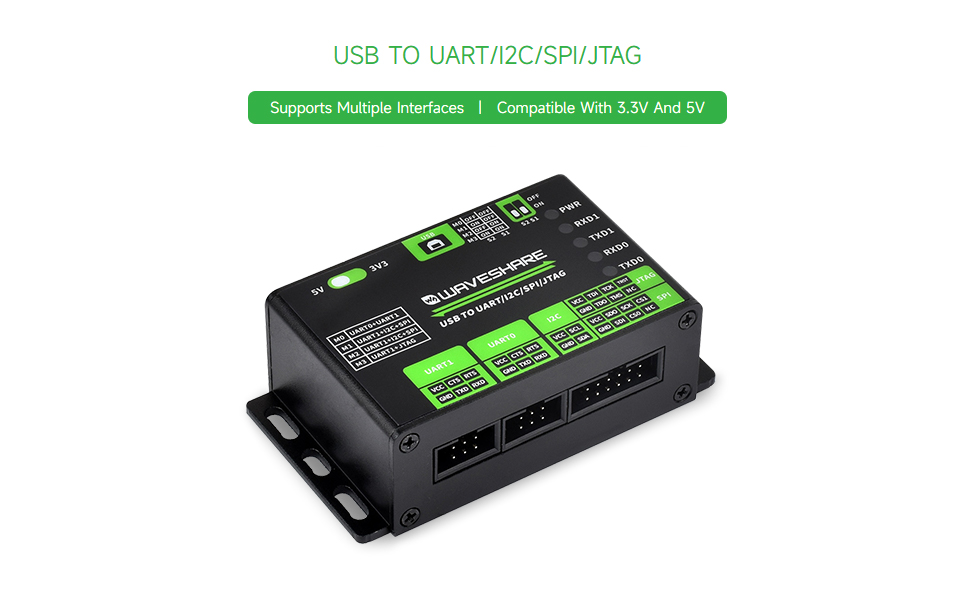
- Izberite način delovanja: Configure the DIP switches (S1, S2) on the back of the device to select the desired communication mode. Refer to the table below for mode configurations:
Table 3.1: Operating Mode Selection Mode (M0-M3) S2 S1 funkcija M0 IZKLOP IZKLOP UART0 + UART1 M1 IZKLOP ON UART1 + I2C + SPI M2 ON IZKLOP UART1 + I2C + SPI M3 ON ON UART1 + JTAG - Poveži ciljno napravo: Use the appropriate jumper wires to connect the converter's interface pins (UART0, UART1, I2C, SPI, JTAG) to your target device according to the selected mode. Pay close attention to pin assignments (VCC, GND, TXD, RXD, SCL, SDA, SCK, MISO, MOSI, CS, TDI, TDO, TCK, TMS, TRST).

Slika 3.2: The converter connected to a target device via jumper wires, illustrating a typical setup for communication.

Slika 3.3: Podrobno view of the converter's interface and mode description, including indicator lights and DIP switch settings.
4. Navodila za uporabo
Once the hardware is connected and drivers are installed, you can begin using the converter for communication with your target device.
4.1 Indikatorske lučke
The converter features several indicator lights to provide feedback on its status:
- PWR: Power indicator, lights up when the USB is connected and voltage je zaznan.
- RXD1: UART1 receiving indicator, lights up when the device sends data back.
- TXD1: UART1 sending indicator, lights up when the USB port sends data.
- RXD0: UART0 receiving indicator, lights up when the device sends data back.
- TXD0: UART0 sending indicator, lights up when the USB port sends data.
4.2 Using UART Interfaces
In M0 mode (UART0 + UART1), both UART channels are active. Use a serial terminal program on your computer to communicate. Configure the baud rate, data bits, parity, and stop bits to match your target device. The converter supports baud rates up to 9Mbps with hardware flow control (CTS/RTS).
4.3 Using I2C and SPI Interfaces
In M1 or M2 mode (UART1 + I2C + SPI), you can utilize the I2C and SPI interfaces. Dedicated software tools or custom scripts are typically used to interact with I2C EEPROMs, OLEDs, sensors, or SPI slave devices. The SPI interface provides two chip select pins (CS0, CS1) for controlling multiple slave devices.
4.4 Using JTAG Vmesnik
In M3 mode (UART1 + JTAG), the JTAG interface is enabled. This is primarily used for debugging and testing microcontrollers or FPGAs. Tools like OpenOCD can be used in conjunction with the JTAG interface. Users should verify compatibility and functionality with their specific JTAG debugging setup.
Posnetek 4.1: An official waveshare video demonstrating the features and usage of the USB to UART/I2C/SPI/JTAG converter, highlighting its multi-interface capabilities and application in IoT development.
5. Specifikacije
Below are the detailed technical specifications for the waveshare USB to UART/I2C/SPI/JTAG Pretvornik:
| Funkcija | Opis |
|---|---|
| Vmesnik gostitelja | USB |
| Napajalnik | USB port, 5V |
| Delovna raven | 3.3V/5V (selectable via onboard switch) |
| USB priključek | USB-B |
| Zaščita vmesnika | Resettable fuse, ESD protection |
| UART Channels | 2 (M0 mode: UART0 + UART1) |
| UART priključek | 6PIN IDC connector |
| Hitrost prenosa UART | 1200bps ~ 9Mbps |
| Nadzor pretoka UART | CTS and RTS |
| I2C Channel | 1 (M1/M2 mode) |
| Priključek I2C | 12PIN IDC connector (first 4 pins are I2C) |
| SPI Channel | 1 (M1/M2 mode) |
| SPI Connector | 12PIN IDC connector (last 8 pins are SPI) |
| JTAG Kanal | 1 (M3 mode) |
| JTAG Priključek | 12PIN IDC connector (last 8 pins are JTAG) |
| Dimenzije | 86.0 × 48.0 × 27.6 mm |
| Teža predmeta | 5.6 unč |
| Proizvajalec | Waveshare |

Slika 5.1: Technical drawing showing the outline dimensions of the converter in millimeters.
6. Vzdrževanje
Proper maintenance ensures the longevity and reliable operation of your waveshare converter:
- Ohranjajte na suhem: Avoid exposing the device to moisture or liquids, as this can cause short circuits and damage.
- Nežno očistite: Za čiščenje zunanjosti naprave uporabite mehko, suho krpo. Ne uporabljajte agresivnih kemikalij ali abrazivnih materialov.
- Ravnajte previdno: While durable, avoid dropping the device or subjecting it to strong impacts.
- Shranjevanje: Pretvornik shranjujte na hladnem in suhem mestu, stran od neposredne sončne svetlobe in ekstremnih temperatur, ko ga ne uporabljate.
- Upravljanje kablov: Ensure USB and jumper cables are not excessively bent or strained to prevent internal wire damage.
7. Odpravljanje težav
If you encounter issues with your waveshare converter, refer to the following troubleshooting tips:
- No Power (PWR LED off):
- Prepričajte se, da je kabel USB varno priključen tako na pretvornik kot na računalnik.
- Poskusite z drugim USB-vhodom ali USB-kablom.
- Verify your computer's USB port is functional.
- Napaka v komunikaciji:
- Težave z gonilniki: Reinstall the latest drivers from the waveshare website. For Linux, ensure kernel modules are correctly loaded and user-space software is properly configured. Some users have reported challenges with Linux driver support and Python sample code; consult community forums or waveshare support for updated resources.
- Incorrect Mode Selection: Double-check the DIP switch settings (S1, S2) to ensure the correct operating mode (M0-M3) is selected for your application.
- Nepravilna voltage Raven: Verify the 3.3V/5V toggle switch is set to match your target device's voltage.
- Nepravilno ožičenje: Previdno ponovnoview your connections between the converter and the target device. Ensure VCC, GND, TXD, RXD, and other protocol-specific pins are correctly matched.
- Baud Rate Mismatch (UART): Confirm that the baud rate in your serial terminal software matches the baud rate of your target device.
- Indikatorske lučke: Observe the RXD/TXD indicator lights. If they are not blinking during data transmission, it indicates a lack of communication.
- Operacijski sistem ne prepozna naprave:
- Check Device Manager (Windows) or `lsusb`/`dmesg` (Linux) to see if the device is detected.
- Ensure drivers are correctly installed and the device is not showing any errors.
8. Garancija in podpora
For warranty information, technical support, and additional resources, please visit the official waveshare website. You can find detailed documentation, driver downloads, and contact information for customer service there.
While the product is from waveshare, some related products from DSD TECH offer at least 12 months of warranty and lifetime technical support. Please refer to the specific product's warranty details provided by waveshare for accurate information regarding this converter.
Za dodatno pomoč se lahko obrnete tudi na waveshare Amazon Store.
Povezani dokumenti - USB TO UART/I2C/SPI/JTAG Pretvornik
 |
Waveshare USB v UART/I2C/SPI/JTAG Uporabniški priročnik za pretvornik Raziščite zmogljivosti Waveshare USB za UART/I2C/SPI/JTAG pretvornik. Ta priročnik podrobno opisuje njegove specifikacije, načine delovanja in uporabo za UART, I2C, SPI in JTAG vmesniki v sistemih Windows in Linux. |
 |
Podatkovni list za visokohitrostni razvojni modul FTDI UM232H USB Podatkovni list za FTDI UM232H, enokanalni razvojni modul USB Hi-Speed v serijski/FIFO. Podrobnosti o funkcijah, specifikacijah, razporeditvi pinov in možnostih konfiguracije za integracijo USB povezljivosti v elektronske sisteme. |
 |
FT4232HA Mini Module USB Hi-Speed Evaluation Module Datasheet Datasheet for the FTDI FT4232HA Mini Module, a USB 2.0 Hi-Speed evaluation board providing four configurable UART/MPSSE serial interfaces for rapid integration into electronic systems. |
 |
Traveo™ II Serial Communication Block (SCB) Training Workshop Explore the Traveo™ II Serial Communication Block (SCB) with Infineon's comprehensive training workshop. This guide details SPI, UART, and I2C protocols, target automotive microcontroller products (CYT series), and SCB features for embedded system development. |
 |
SmarElex FT232H Breakout: USB to GPIO, SPI, I2C, UART, JTAG Vmesniška plošča Explore the SmarElex FT232H Breakout board, a versatile USB-to-multiprotocol interface for controlling GPIO, I2C, SPI, UART, and JTAG. This guide covers its features, connectivity, wiring, driver installation for macOS, Linux, and Windows, and provides testing examples. |
 |
NVIDIA Jetson T5000 vs. Jetson AGX Orin: Interface Comparison and Migration Guide A comprehensive comparison of the Jetson T5000 and Jetson AGX Orin modules, detailing interface differences, pin mappings, and migration strategies for developers. Covers UPHY, PCIe, Ethernet, HDMI, DisplayPort, CSI, SDIO, Audio, DMIC, I2C, SPI, UART, PWM, and CAN interfaces. |
Ask a question about this manual
Ask about setup, troubleshooting, compatibility, parts, safety, or missing instructions. Manuals+ will review the question and use this page’s manual context to help answer it.