
1. Uvod
This manual provides essential information for the safe and effective use of your AURUM Type A replacement battery. This battery is designed to replace the original battery in various baby monitors, ensuring continued functionality and reliability.
The AURUM Bat-603 Type A battery features a 2-pin cable (red/black) and is compatible with numerous baby monitor brands and models, including:
- GHB
- BOIFUN
- ORETTI
- Luvion
- Cosansys
- Syosin
- Pravo življenje
- OLEKE
Please verify your baby monitor's original battery type and connector before installation to ensure compatibility.
2. Varnostne informacije in opozorila
Your safety is paramount. Please read and adhere to all safety instructions before handling or installing the battery. Failure to follow these warnings may result in fire, electric shock, serious injury, or property damage.
- Installation should only be performed by qualified personnel. Refer to your baby monitor's instruction manual for specific installation procedures.
- Keep the battery away from fire and temperatures exceeding 60°C (140°F).
- Do not bend, break, or open the battery.
- Keep the battery away from sharp or metallic objects to prevent short circuits.
- Hraniti izven dosega otrok.
- Baterijo uporabljajte samo v združljivih napravah.
- Only charge the battery with chargers recommended by the manufacturer of your baby monitor. A charger that is suitable for one type of battery may create a risk of fire when used with another battery.
- Ne povzročite kratkega stika baterije.
- Do not expose the battery to direct sunlight, heat, or moisture.
- Store the battery at an ambient temperature between 18°C and 40°C (64°F and 104°F). Charging outside this temperature range can damage the battery or decrease its lifespan.
- Rabljene baterije odvrzite odgovorno v skladu z lokalnimi predpisi. Ne odlagajte jih med gospodinjske odpadke.

Image: Back of the AURUM Bat-603 battery, displaying safety symbols indicating proper disposal, avoiding damage, and CE certification. Text warnings are in German, advising professional installation, keeping away from fire/heat, not bending/breaking/opening, and keeping away from children.

Image: A document showing multi-language safety warnings and precautions for the AURUM battery, emphasizing professional installation, temperature limits, and handling instructions.

Image: A document showing multi-language warnings about using compatible chargers for the AURUM battery, advising against using non-rechargeable batteries or incompatible chargers to prevent damage or fire.
3. Namestitev
The AURUM Bat-603 Type A battery is designed for specific baby monitor models. Always ensure the battery type (Type A with 2-pin cable) matches your device's requirements.
- Priprava: Before attempting installation, ensure your baby monitor is turned off and disconnected from any power source.
- Dostop do predala za baterije: Locate the battery compartment on your baby monitor. This is typically on the back or bottom of the parent unit. You may need a small screwdriver to open it.
- Odstranite staro baterijo: Carefully disconnect the old battery's connector from the baby monitor's circuit board. Gently remove the old battery.
- Vstavite novo baterijo: Connect the 2-pin cable (red/black) of the AURUM Bat-603 Type A battery to the corresponding port in the baby monitor. Ensure the connector is securely seated.
- Položaj baterije: Place the new battery into the compartment, ensuring it fits without forcing or bending.
- Zapri predal: Varno zaprite pokrov prostora za baterije.
- Začetni strošek: After installation, connect your baby monitor to its original charger and allow the new battery to fully charge before first use.
Pomembno: Always refer to your specific baby monitor's instruction manual for detailed battery replacement procedures. If you are unsure about any step, seek assistance from qualified personnel.
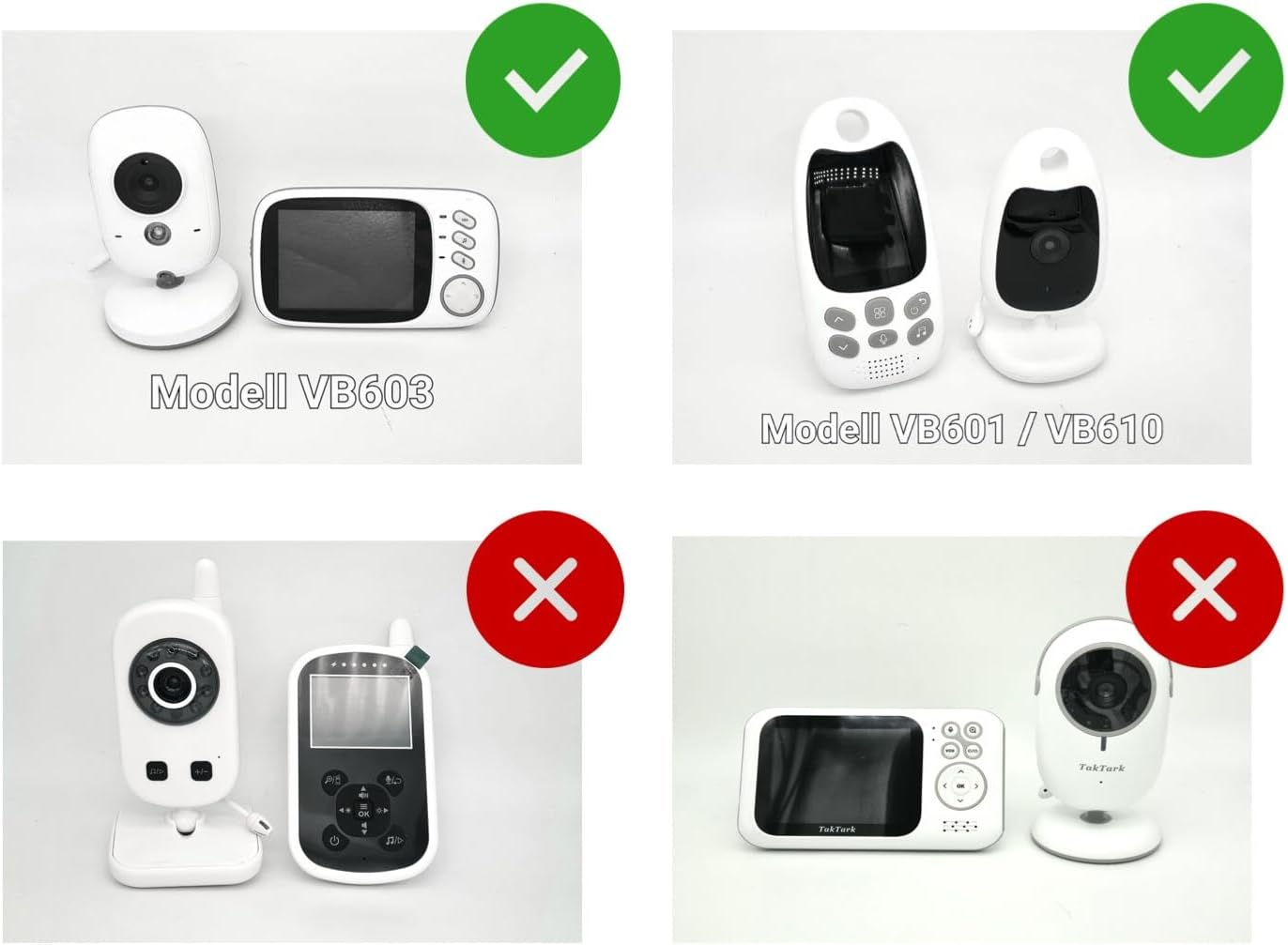
Image: Visual guide indicating compatibility with baby monitor models. It shows examples of models like VB603, VB601, and VB610 as compatible, and other models as incompatible, helping users identify the correct fit.
4. Delovanje
Once installed and fully charged, the AURUM Bat-603 battery will power your compatible baby monitor. The operational aspects of the battery are managed by the baby monitor itself.
- Polnjenje: Connect your baby monitor to its original power adapter to charge the battery. The charging indicator on your baby monitor will typically show the charging status.
- Življenjska doba baterije: The 750 mAh capacity provides reliable power. Actual battery life will vary depending on the baby monitor's usage, settings (e.g., screen brightness, sound sensitivity), and environmental factors.
- Polnilna: This Lithium-polymer battery is rechargeable. For optimal performance, avoid completely draining the battery frequently.
5. Vzdrževanje
Proper maintenance ensures the longevity and performance of your AURUM battery.
- Shranjevanje: If storing the battery for an extended period, ensure it is partially charged (around 50%) and stored in a cool, dry place, away from direct sunlight and extreme temperatures (ideally between 18°C and 40°C).
- Čiščenje: The battery itself does not require cleaning. If the baby monitor's battery compartment becomes dusty, clean it gently with a dry, soft cloth before inserting the battery.
- Izogibajte se prekomernemu polnjenju/praznjenju: While modern devices have protection circuits, it is good practice to disconnect the charger once the battery is full and to recharge before it is completely depleted.
6. Odpravljanje težav
If you encounter issues with your AURUM replacement battery, consider the following:
- Baterija se ne polni:
- Ensure the battery connector is securely plugged into the baby monitor.
- Verify that the baby monitor's power adapter is correctly connected to a working power outlet and the monitor.
- Confirm that the charger is the original one supplied with your baby monitor.
- Check for any visible damage to the battery or cables.
- Kratka življenjska doba baterije:
- Prepričajte se, da je baterija popolnoma napolnjena.
- Reduce screen brightness or other power-intensive settings on your baby monitor.
- Environmental factors (e.g., very cold temperatures) can affect battery performance.
- If the battery life remains significantly shorter than expected after several charge cycles, the battery may be nearing the end of its lifespan.
- Baby Monitor Not Turning On:
- Double-check battery installation and connection.
- Ensure the battery has some charge or connect the monitor to its power adapter.
- If the issue persists, the problem might be with the baby monitor itself, not the battery.
For persistent issues, consult your baby monitor's original manual or contact the manufacturer of your baby monitor or the AURUM support team.
7. Specifikacije

Slika: spredaj view of the AURUM Bat-603 Type A replacement battery, showing its compact size, yellow casing, and the attached 2-pin (red/black) connector cable.
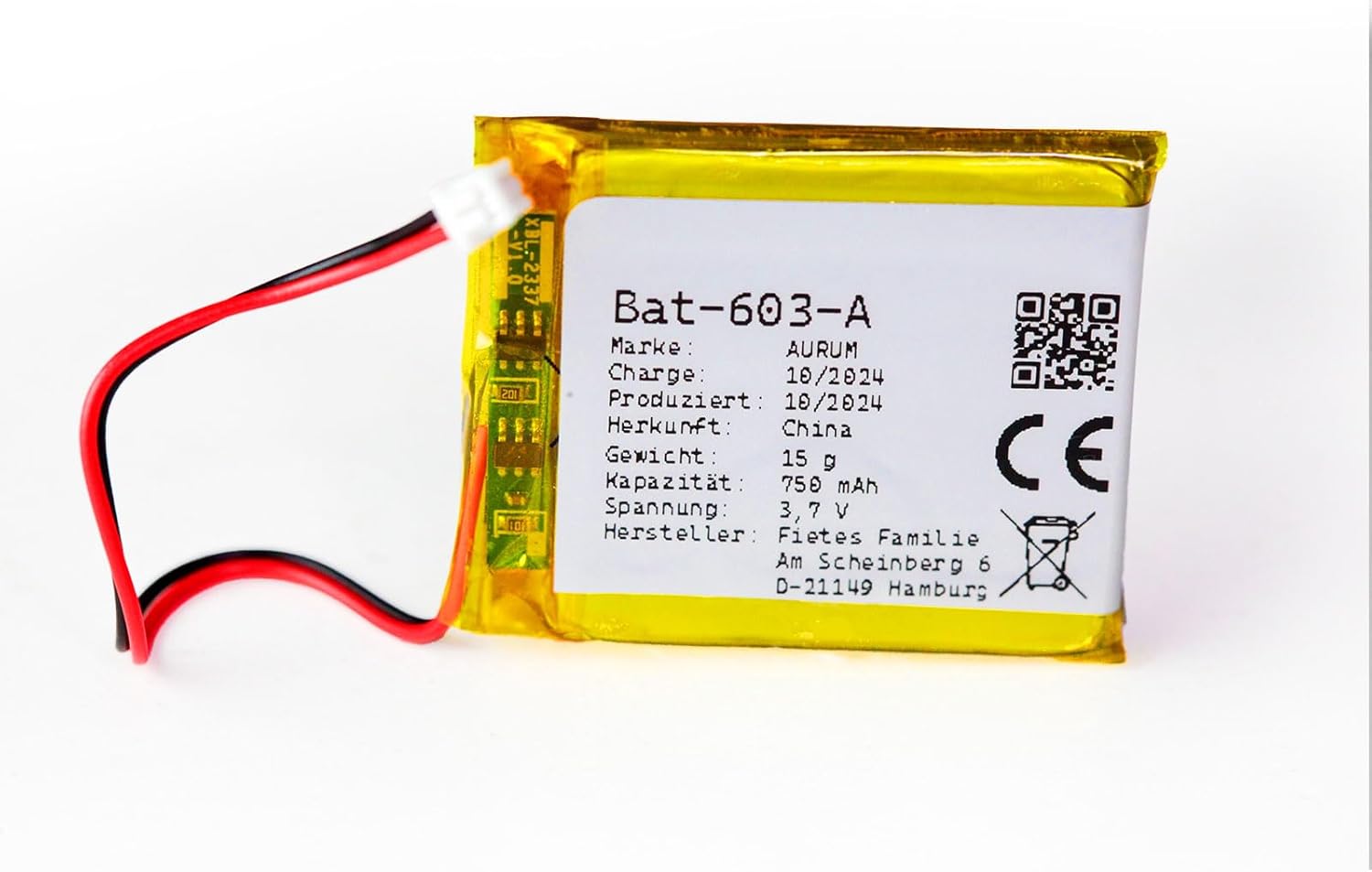
Image: Another perspective of the AURUM Bat-603 Type A battery, highlighting the connector and the battery's label with specifications.
| Funkcija | Specifikacija |
|---|---|
| Znamka | AURUM |
| Številka modela | Bat-603 |
| Vrsta baterije | Litij-polimer |
| Zmogljivost | 750 mAh |
| voltage | 3.7 V |
| Vrsta priključka | 2-pin cable (Red/Black) - Type A |
| Dimenzije (D x Š x V) | 50 x 30 x 5 mm |
| Teža | 15 g |
| Ponovno uporabnost | Polnilna |
| Združljive naprave | GHB, BOIFUN, ORETTI, Luvion, Cosansys, Syosin, TrueLife, Oleke baby monitors |
8. Garancija in podpora
AURUM provides support for its products to ensure customer satisfaction.
- Razpoložljivost rezervnih delov: Spare parts for this product are guaranteed for 2 years.
- Proizvajalec: SoftwareFair KSP GmbH
- Prodajalec: La famille Fiete (Hamburg, Germany)
- Podpora strankam: For any questions, concerns, or technical assistance, please contact the seller or AURUM customer support. Refer to your purchase documentation for contact details.