
1. Uvod
Thank you for choosing the superallure K6 Pro Max Solar Power Bank. This device is designed to provide reliable and versatile power on the go, featuring a high-capacity battery, multiple charging options including solar and wireless, and a powerful integrated flashlight. This manual provides essential information for safe and efficient operation of your power bank.
2. Značilnosti izdelka
- Ultra-visoka zmogljivost: 43800mAh battery for extended power supply.
- Učinkovito sončno polnjenje: Four high-conversion solar panels (16W, 1.68A input) for continuous charging under sunlight.
- Vsestranske možnosti izhoda: Built-in USB-A input cable, Type-C output cable, and iOS output cable. Additional USB output port and Type-C output/input port.
- Brezžično polnjenje: 15W Qi wireless fast charging compatible with various devices.
- Tehnologija hitrega polnjenja: Supports QC3.0 and 2.0 protocols for both input and output.
- Zmogljiva svetilka: Integrated 680 Lumen flashlight with SOS distress signal and strobe modes.
- Robusten dizajn: IP67 waterproof, dust-resistant, and drop-resistant for outdoor use.
- Napredna varnost: Upgraded smart chip with multi-protection features including overcharge, overcurrent, over-discharge, overvoltage, overpower, short circuit, recovery, electromagnetic field, and temperature protection.
3. Vsebina paketa
Prosimo, preverite paket za naslednje artikle:
- superallure K6 Pro Max Solar Power Bank
- USB Charging Cable (for wall charging the power bank)
- Vrvica
- Uporabniški priročnik

Image: The superallure K6 Pro Max Solar Power Bank, showcasing its foldable solar panels, built-in cables, and powerful flashlight.
4. Začetek uporabe (Nastavitev)
4.1 Začetna polnitev
Before first use, it is recommended to fully charge the power bank using a wall adapter. This ensures the internal battery is properly calibrated and ready for optimal performance.
- Connect the provided USB charging cable to the power bank's USB-C input port or use the built-in USB-A input cable.
- Plug the other end into a compatible USB wall adapter (not included).
- The power indicator lights will illuminate, indicating charging status. Allow the device to charge until all indicator lights are solid, signifying a full charge.
4.2 Razumevanje indikatorskih lučk

Image: Close-up of the power bank's indicator lights, showing red for fast charging, blue for power level, and green for solar charging.
- Rdeči indikator: Označuje, da je hitro polnjenje aktivno.
- Blue Indicators: Represent the current power level of the internal battery. Typically, multiple lights indicate a higher charge.
- Zeleni indikator: Illuminates when solar charging is active and sufficient sunlight is detected.
5. Navodila za uporabo
5.1 Polnjenje prenosne baterije
Your power bank can be charged via wall adapter or solar panels.

Image: Visual representation of the various ways to charge the power bank, including USB-C, solar panels, and USB-A.
5.1.1 Wall Charging (Recommended for fastest charge)
- Use the built-in USB-A input cable or a USB-C cable (not included) to connect the power bank to a wall adapter.
- Ensure the wall adapter provides sufficient power for fast charging (e.g., QC3.0 compatible).
- Prenosna baterija se bo samodejno začela polniti.

Image: A close-up showing the power bank's USB-C port labeled 'PD15W Input', indicating its fast charging capability.
5.1.2 Solarno polnjenje
The integrated solar panels provide a convenient way to recharge the power bank using sunlight, especially useful in outdoor environments. Solar charging is slower than wall charging and is primarily intended for emergency power or maintaining charge, not as a primary charging method.
- Razgrnite sončne panele in jih postavite na neposredno sončno svetlobo.
- Ensure the panels are facing the sun directly for maximum efficiency.
- The green solar charging indicator light will illuminate when sufficient sunlight is detected and charging is active.

Image: The power bank with its solar panels unfolded and attached to a backpack, demonstrating solar charging in an outdoor setting.
5.2 Polnjenje zunanjih naprav
The power bank offers multiple ways to charge your devices simultaneously.

Image: The power bank charging a smartphone and a tablet simultaneously using its built-in Type-C and iOS cables, highlighting its convenience for travel.
5.2.1 Wired Charging (Built-in Cables & USB Ports)
- Identify the appropriate built-in cable (Type-C or iOS) for your device, or use your own USB cable with the available USB-A or Type-C output ports.
- Priključite kabel na svojo napravo.
- The power bank will automatically detect the device and begin charging.

Slika: Pogled od zgoraj navzdol view of the power bank on a table, simultaneously charging a smartphone and a smartwatch, demonstrating its multi-device charging capability.
5.2.2 Brezžično polnjenje
The power bank supports 15W Qi wireless charging for compatible devices.
- Place your Qi-compatible device (e.g., smartphone) on the designated wireless charging pad area of the power bank.
- Za optimalno povezavo se prepričajte, da je naprava na polnilni plošči na sredini.
- The device's screen should indicate that wireless charging has begun.

Image: A smartphone wirelessly charging on the power bank's solar panel, illustrating the fast wireless charging feature with power output modes (5W, 7.5W, 10W).
5.3 Delovanje svetilke
The power bank features a powerful 680 Lumen flashlight with multiple modes.
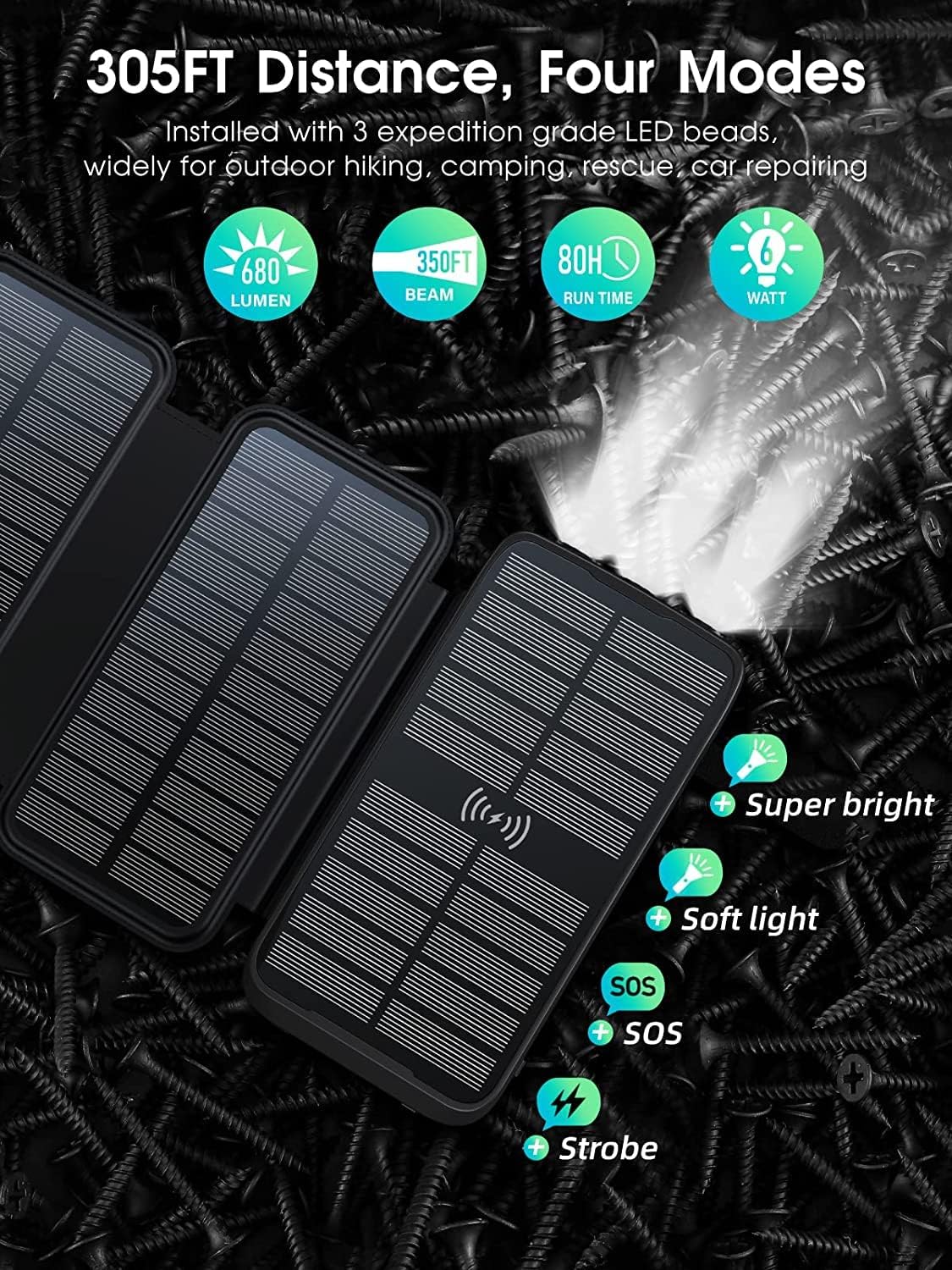
Image: The power bank's flashlight illuminating an area, with icons indicating its four modes: Super bright, Soft light, SOS, and Strobe.
- Za vklop/izklop: Pritisnite in držite gumb za vklop približno 3 sekundi.
- Za preklapljanje med načini: Once the flashlight is on, short press the power button to switch between modes: Super Bright > Soft Light > SOS > Strobe.
- Izklopiti: Press and hold the power button again for 3 seconds, or cycle through all modes until it turns off.

Image: The power bank's flashlight beam extending into a dark outdoor environment, demonstrating its powerful illumination for camping ali pohodništvo.
6. Vzdrževanje in nega
- Čiščenje: Prenosno baterijo obrišite z mehko, suho krpo. Izogibajte se uporabi agresivnih kemikalij ali abrazivnih materialov.
- Shranjevanje: Store the power bank in a cool, dry place away from direct sunlight and extreme temperatures. For long-term storage, ensure the battery is charged to about 50-70% and recharge every 3-6 months to prevent deep discharge.
- Vodoodpornost: While the device is IP67 waterproof, avoid prolonged submersion in water. Ensure all ports are dry before charging.
- Odpornost na padce: The rugged design offers protection against drops, but avoid intentional impacts or dropping from excessive heights.

Image: A hand holding the power bank under running water, illustrating its waterproof feature.

Image: A visual depicting the power bank in mid-air above a set of stairs, symbolizing its drop-resistant construction.

Image: The power bank partially covered in sand, demonstrating its dust-resistant properties suitable for outdoor use.
7. Odpravljanje težav
| Težava | Možen vzrok | rešitev |
|---|---|---|
| Powerbank se ne polni | Cable not connected properly; Wall adapter faulty; Power bank fully charged; Insufficient sunlight for solar charging. | Ensure cables are securely connected; Try a different wall adapter/cable; Check power indicators; Move to direct sunlight for solar charging. |
| Naprava se ne polni iz power bank | Power bank battery depleted; Cable not connected properly; Device not compatible with wireless charging; Device requires more power than available. | Recharge the power bank; Ensure cables are securely connected; Verify device supports Qi wireless charging and is placed correctly; Check device power requirements. |
| Počasno polnjenje | Using a non-fast charging adapter/cable; Solar charging in low light; Multiple devices charging simultaneously. | Use a QC3.0 compatible adapter/cable; Ensure direct, strong sunlight for solar charging; Charge fewer devices at once. |
| Svetilka ne deluje | Power bank battery depleted; Button not pressed correctly. | Recharge the power bank; Press and hold the power button for 3 seconds to activate. |
8. Specifikacije
| Funkcija | Podrobnost |
|---|---|
| Številka modela | K6 Pro Max |
| Kapaciteta baterije | 43800 mAh |
| Moč sončne celice | 16W (4 panels) |
| Solarni vhodni tok | 1.68A |
| Žični vhod | USB-A (built-in), USB Type-C (PD15W) |
| Žični izhod | USB Type-C (built-in), iOS (built-in), USB Type-A, USB Type-C |
| Izhod za brezžično polnjenje | 15W Qi združljiv |
| Protokoli hitrega polnjenja | QC3.0, QC2.0 |
| Svetlost svetilke | 680 lumnov |
| Ocena vodotesnosti | IP67 |
| Dimenzije | 7.48 x 4.96 x 1.73 palcev |
| Teža | 1.46 funtov |
| barva | Črna |
9. Varnostne informacije
Please read and follow these safety guidelines to prevent damage to the device or injury:
- Naprave ne razstavljajte, spreminjajte ali popravljajte sami.
- Keep the power bank away from fire, high temperatures, and direct heat sources.
- Avoid exposing the device to extreme cold.
- Do not use the power bank in wet environments or submerge it in water beyond its IP67 rating. Ensure ports are dry before use.
- Hraniti izven dosega otrok.
- Do not drop, hit, or shake the device violently.
- Uporabljajte samo odobrene polnilne kable in adapterje.
- If the power bank swells, overheats, or emits an unusual odor, discontinue use immediately and contact support.

Image: A grid of icons illustrating the power bank's multi-protection features, including overcharge, overcurrent, over-discharge, overvoltage, overpower, short circuit, recovery, electromagnetic field, and temperature protection.
10. Garancija in podpora
The superallure K6 Pro Max Solar Power Bank comes with a standard manufacturer's warranty. For specific warranty details, duration, and terms, please refer to the warranty card included in your product packaging or contact superallure customer support directly.
For technical support, troubleshooting assistance, or any product-related inquiries, please visit the official superallure brand store or contact their customer service department. Contact information can typically be found on the product packaging or the brand's official webmesto.
V ta priročnik ni bilo mogoče vdelati nobenih uradnih videoposnetkov izdelkov.