
Contixo E9
Contixo E9 Smart Floodlight Security Camera User Manual
Model: E9
1. Uvod
The Contixo E9 Smart Floodlight Security Camera is designed to provide comprehensive outdoor surveillance with advanced features. This manual will guide you through the installation, setup, and operation of your new security camera, ensuring optimal performance and security for your property.
Ključne značilnosti:
- 2.5K (3MP) Full HD Video: High-resolution live streaming and recording.
- Adjustable Bright Floodlight: Up to 1000 Lumens for enhanced visibility and deterrence.
- Colored & Infrared Night Vision: Clear surveillance even in low-light conditions.
- Dvosmerni zvok: Komunicirajte z obiskovalci ali odvrnite vsiljivce na daljavo.
- PIR zaznavanje gibanja: Accurate detection with customizable sensitivity.
- Alarm sirene: Deter unwanted activity with an audible alarm.
- Vodoodpornost IP65: Trpežna zasnova za zunanjo uporabo v različnih vremenskih razmerah.
- Cloud/SD Card Storage: Flexible options for video footage shranjevanje.
- Nadzor pametne aplikacije: Manage settings and view feeds via the Xodo Smart App.
- Integracija glasovnega pomočnika: Združljivo z Amazon Alexa in Google Assistantom.
2. Kaj je v škatli
Prosimo, preverite vsebino paketa, da se prepričate, da so vsi predmeti prisotni in v dobrem stanju.
- 1x Contixo E9 Smart Floodlight Security Camera
- 1x Uporabniški priročnik (ta dokument)
- 4x pritrdilni vijaki
- 1x USB kabel
- 1x napajalnik
3. Nastavitev in namestitev
Follow these steps to install and set up your Contixo E9 camera.
3.1 Kontrolni seznam pred namestitvijo
- Ensure you have a 2.4GHz Wi-Fi network available at the installation location. The camera does not support 5GHz Wi-Fi.
- Identify a suitable outdoor location with access to a power outlet. The camera requires a wired power connection and is not battery-operated.
- Prenesite Xodo Smart App iz trgovine z aplikacijami na vašem pametnem telefonu (iOS ali Android).
3.2 Fizična namestitev
- Izberite mesto namestitve: Izberite lokacijo, ki zagotavlja želeno viewing angle and is within reach of a power outlet. The camera is IP65 weatherproof, suitable for outdoor environments.
- Namestite kamero: Use the provided screws to securely mount the camera to a wall or suitable surface. Ensure the mounting is stable.
- Priključite napajanje: Plug the USB cable into the camera and connect the power adapter to a nearby electrical outlet. The camera will power on.

Image: The Contixo E9 camera showing its USB power cable and plug adapter, highlighting the easy DIY installation process. A power socket is required for operation.
3.3 Nastavitev in seznanjanje aplikacije
- Open Xodo Smart App: Launch the Xodo Smart App on your smartphone. If you are a new user, register an account.
- Dodaj napravo: Tap the "+" icon or "Add Device" to begin the pairing process. Select "Security Camera" or "Smart Floodlight Camera" from the device list.
- Sledite navodilom na zaslonu: The app will guide you through connecting the camera to your 2.4GHz Wi-Fi network. This typically involves scanning a QR code displayed on your phone with the camera lens.
- Poimenujte svojo kamero: Once connected, assign a name to your camera (e.g., "Front Yard Camera," "Back Door Floodlight").

Image: A smartphone screen showing the Xodo Smart App, illustrating the various controls available for the camera, including live view, dimming, siren activation, and real-time notifications.
4. Navodila za uporabo
Learn how to use the various functions of your Contixo E9 camera.
4.1 V živo View in Snemanje
- Dostop do vira v živo: Open the Xodo Smart App and select your camera to view the live 2.5K HD video stream.
- Manual Recording/Snapshots: Use the controls within the app to manually record video or take still images from the live feed.
- Predvajanje: Dostop do posnetega footage from the cloud storage (subscription required) or a locally inserted Micro SD card (not included).

Image: The Contixo E9 camera mounted on a building, with a smartphone showing its live 2.5K Full HD video feed, demonstrating real-time monitoring.
4.2 Dvosmerni zvok
The camera features a built-in microphone and speaker for two-way communication.
- Začni pogovor: Medtem ko viewing the live feed, tap the microphone icon in the app to speak through the camera's speaker.
- poslušaj: The camera's microphone will pick up audio from its surroundings, allowing you to hear what's happening.
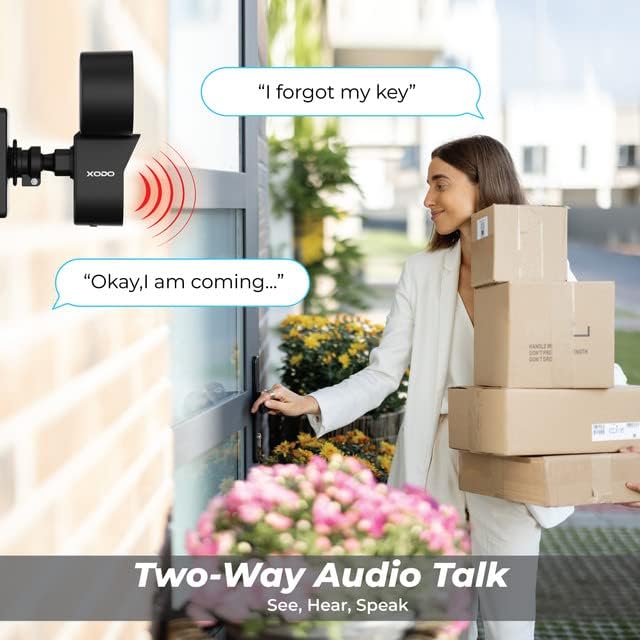
Image: A visual representation of the two-way audio feature, showing a user communicating with a delivery person via the camera.
4.3 Zaznavanje gibanja in opozorila
The E9 camera uses PIR motion detection to identify activity and send alerts.
- Omogoči/onemogoči: Adjust motion detection settings within the Xodo Smart App.
- Občutljivost: Customize the PIR sensitivity to reduce false alarms (e.g., from passing cars or small animals).
- Obvestila: Prejemajte takojšnja potisna obvestila na pametni telefon, ko zazna gibanje.
- Alarm sirene: Activate the built-in siren manually or set it to trigger automatically upon motion detection via the app.

Image: The Contixo E9 camera detecting a figure at night, with icons indicating flashlight alarm, siren alert, and motion detection notifications, highlighting its security capabilities.
4.4 Night Vision and Floodlight Control
The E9 camera offers versatile night vision options and an adjustable floodlight.
- Colored Night Vision: The floodlight can illuminate the area to provide full-color video at night.
- Infrardeči nočni vid: For discreet monitoring, the camera can use infrared LEDs for black and white night vision without the floodlight.
- Svetlost reflektorja: Adjust the floodlight brightness (800lm-1000lm) and schedule its operation through the Xodo Smart App.

Image: Comparison of Smart Mode, Color Light Mode, and Infrared Mode for night vision, illustrating the camera's ability to provide clear footage v različnih svetlobnih pogojih.
4.5 Integracija pametnega pomočnika
Integrate your Contixo E9 camera with Amazon Alexa or Google Assistant for voice control.
- Connect Accounts: Link your Xodo Smart account to your Alexa or Google Home app.
- Glasovni ukazi: Use commands like "Alexa, show me the backyard" or "Hey Google, show the front door camera" to view your live feed on compatible smart displays.

Image: A user interacting with a smart assistant to view the camera feed, highlighting compatibility with Amazon Alexa and Google Assistant.
5. Vzdrževanje
Pravilno vzdrževanje zagotavlja dolgo življenjsko dobo in optimalno delovanje vašega fotoaparata.
- Čiščenje: Periodically clean the camera lens and floodlight cover with a soft, damp krpo, da odstranite prah in umazanijo. Ne uporabljajte agresivnih kemikalij.
- Posodobitve vdelane programske opreme: Regularly check the Xodo Smart App for available firmware updates. Updates often include performance improvements and security enhancements.
- Napajalni priključek: Prepričajte se, da je napajalni kabel varno priključen in nepoškodovan.
6. Odpravljanje težav
If you encounter issues with your Contixo E9 camera, refer to the following common solutions.
| Težava | Možna rešitev |
|---|---|
| Kamera se ne povezuje z omrežjem Wi-Fi. |
|
| Ni v živo view ali snemanje. |
|
| Motion detection is too sensitive/not sensitive enough. |
|
| Dvosmerni zvok je nejasen ali ne deluje. |
|
If these solutions do not resolve your issue, please contact Contixo customer support.
7. Specifikacije
| Funkcija | Podrobnost |
|---|---|
| Ime modela | E9 |
| Video ločljivost | 2.5K (3MP), 2304 pixels |
| Povezljivost | Wired Power, Wi-Fi (2.4GHz only) |
| Nočni vid | Colored & Infrared Night Vision |
| Svetlost reflektorja | 800lm-1000lm (Adjustable) |
| Avdio | 2-Way Audio (Microphone & Speaker) |
| Zaznavanje gibanja | PIR senzor gibanja |
| Možnosti shranjevanja | Cloud Storage (subscription), Micro SD Card (not included) |
| Ocena vremenske odpornosti | IP65 |
| Združljive naprave | Smartphone (iOS/Android), Amazon Alexa, Google Assistant |
| Vir napajanja | Električni na kabel |
| Mere predmeta | 7.1 x 4.7 x 5.5 palcev |
| Teža predmeta | 1.4 funta |
8. Garancija in podpora
8.1 Informacije o garanciji
Contixo products are covered by a limited warranty. For specific details regarding your product's warranty period and terms, please refer to the warranty card included in your product packaging or visit the official Contixo webmesto.
8.2 Podpora strankam
If you require further assistance, technical support, or have questions not covered in this manual, please contact Contixo customer support:
- Spletna podpora: Obiščite Contixo Store on Amazon ali njihov uradnik webspletno mesto za pogosta vprašanja in vire za podporo.
- Kontaktni podatki: Refer to your product packaging or the Contixo webspletnega mesta za najnovejše kontaktne podatke (telefon, e-pošta).
Ask a question about this manual
Ask about setup, troubleshooting, compatibility, parts, safety, or missing instructions. Manuals+ will review the question and use this page’s manual context to help answer it.