Uvod
Welcome to the user manual for your ARMODD Silentwatch 4 Pro Smartwatch. This guide provides comprehensive instructions for setting up, operating, maintaining, and troubleshooting your device. The Silentwatch 4 Pro is designed to enhance your daily life with features such as Bluetooth calling, health monitoring, and various sports modes, all within a durable IP67 waterproof design.
Please read this manual carefully to ensure proper use and to maximize the functionality of your smartwatch.
Konec izdelkaview
The ARMODD Silentwatch 4 Pro features a 1.32-inch touch screen with a sharp 360x360 pixel resolution, housed in a high-quality stainless steel body. It is compatible with both iOS and Android smartphones.

Slika 1: Spredaj view of the ARMODD Silentwatch 4 Pro, displaying the time and step count on its black watch face.

Figure 2: The ARMODD Silentwatch 4 Pro worn by a man, showcasing its classic and robust design.
Nastavitev
1. Polnjenje naprave
Before first use, fully charge your smartwatch. A full charge takes approximately 2 hours. The battery lasts up to 3 days with normal use and up to 15 days in standby mode.
- Magnetni polnilni kabel priključite na polnilne priključke na zadnji strani ure.
- Priključite USB konec kabla v standardni USB napajalnik (ni priložen) ali USB vrata računalnika.
- Zaslon ure bo prikazoval stanje polnjenja.
2. Installing the WearPro Application
The ARMODD Silentwatch 4 Pro requires the WearPro application for full functionality and synchronization with your smartphone.
- Scan the QR code provided in the watch's initial setup screen or in the small printed manual to download the WearPro app. Alternatively, search for "WearPro" in your smartphone's app store (Google Play Store for Android, Apple App Store for iOS).
- Namestite aplikacijo na svoj pametni telefon.
- Open the WearPro app and follow the on-screen instructions to create an account or log in.
3. Seznanjanje s pametnim telefonom
Prepričajte se, da je Bluetooth na vašem pametnem telefonu omogočen.
- Turn on your ARMODD Silentwatch 4 Pro by pressing and holding the power button.
- In the WearPro app, navigate to the "Device" or "Add Device" section.
- The app will search for available devices. Select "Silentwatch 4 Pro" from the list.
- Po potrebi potrdite zahtevo za seznanjanje tako na uri kot na pametnem telefonu.
- Once paired, the watch's time and date will synchronize with your phone, and you can begin customizing settings.
Navodila za uporabo
Osnovna navigacija
- Zaslon na dotik: Swipe up, down, left, or right to navigate through menus and functions. Tap to select.
- Stranski gumbi: The watch features multiple side buttons. Typically, one acts as a power/home button, while others may provide quick access to specific functions or act as rotatable crowns for scrolling.
- Zaslon za prebujanje: Raise your wrist or press a side button to wake the screen.
Ključne funkcije
- Bluetooth klici:
Make and receive calls directly from your watch. Access the dial pad or contacts through the watch menu. The watch has a built-in speaker and microphone.
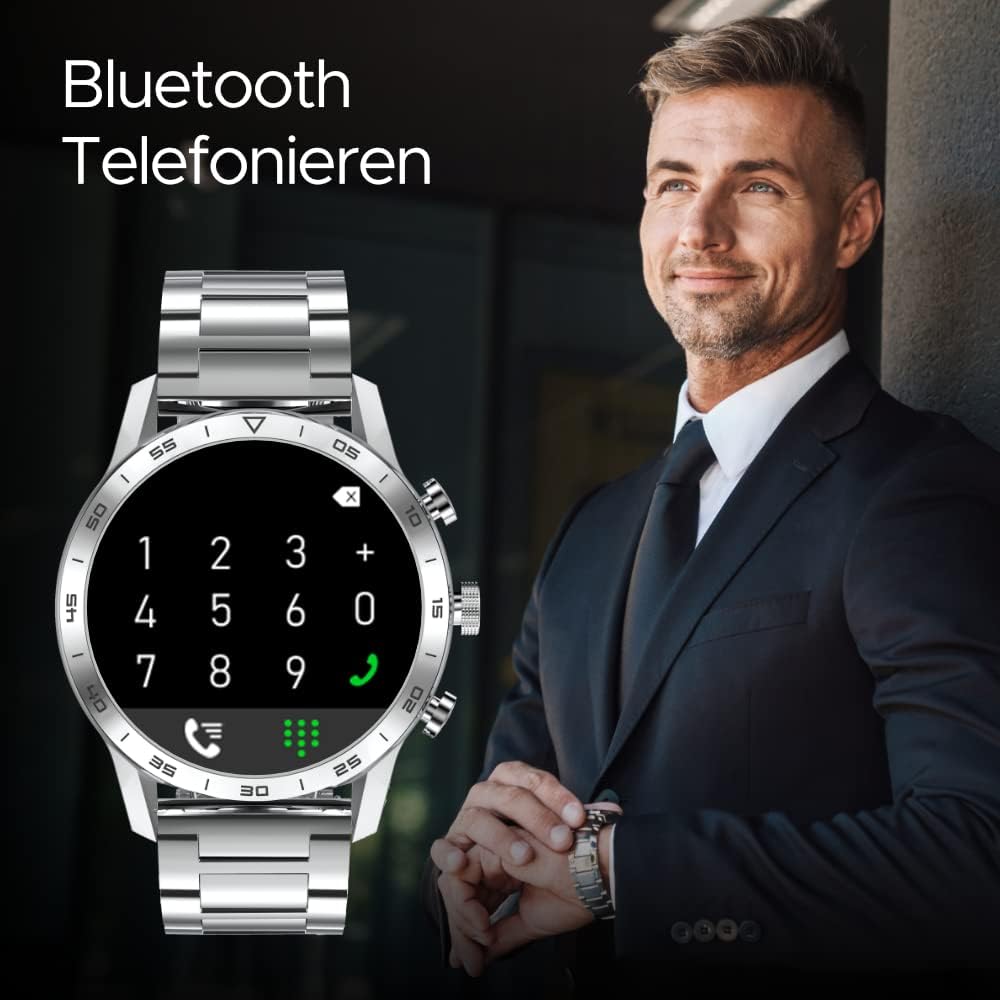
Figure 3: The smartwatch displaying the dial pad for making Bluetooth calls directly from your wrist.
- Spremljanje zdravja:
Monitor your heart rate, blood pressure, ECG, and sleep patterns. Access these features from the watch's health menu. Data is synchronized with the WearPro app for detailed analysis.

Figure 4: The smartwatch displaying real-time heart rate measurements with a graphical representation.
- Športni načini:
The watch supports seven sports modes: walking, running, cycling, jump rope, badminton, basketball, and soccer. Select your activity to track pedometer steps, distance, and calories burned.
- Obvestila:
Receive notifications for incoming calls, SMS messages, and alerts from applications like Facebook and Messenger. Ensure notification permissions are enabled in the WearPro app.
- Obrazi za gledanje:
Customize your watch face from 12 pre-installed options or over 100 additional designs available in the WearPro app. You can also use your own photos as a watch face.

Slika 5: Predstavitev pametnih urasing a customizable blue watch face with multiple sub-dials.

Figure 6: The smartwatch displaying a clean white watch face with blue accents and battery indicator.

Figure 7: The smartwatch featuring a vibrant green watch face with a date display.
- Druge lastnosti:
Includes remote phone camera shutter, music control, find phone function, alarm clock (vibration), weather updates, calculator, breath training, and password protection.
Vzdrževanje
Čiščenje
- Zaslon in ohišje ure obrišite z mehko krpo, ki ne pušča vlaken.
- Za trdovratne madeže, dampKrpo rahlo navlažite z vodo. Izogibajte se uporabi agresivnih kemikalij ali abrazivnih materialov.
- Pred polnjenjem se prepričajte, da so polnilni kontakti čisti in suhi.
Vodoodpornost (IP67)
The ARMODD Silentwatch 4 Pro is IP67 waterproof, meaning it is protected from dust and can withstand immersion in water up to 1 meter for up to 30 minutes. It is suitable for daily use, such as washing hands or light rain exposure. It is not recommended for swimming, diving, or showering with hot water, as steam and high pressure can compromise the seal.
Zamenjava traku
The 22-mm wide strap is replaceable. A silicone strap is included as a gift in the package. To replace the strap, locate the quick-release pins on the underside of the strap and gently slide them to detach the strap from the watch body. Attach the new strap by aligning the pins with the holes on the watch and releasing the pins into place.
Odpravljanje težav
| Težava | Možen vzrok | rešitev |
|---|---|---|
| Ura se ne vklopi. | Nizka baterija. | Uro polnite vsaj 30 minut. |
| Seznanitev s pametnim telefonom ni mogoča. | Bluetooth is off; app not running; watch not discoverable. | Ensure Bluetooth is on. Restart WearPro app. Restart watch. Forget device in phone's Bluetooth settings and re-pair. |
| Obvestila niso bila prejeta. | Dovoljenja za obvestila niso odobrena; aplikacija se ne izvaja v ozadju. | Check WearPro app settings for notification permissions. Ensure app is allowed to run in the background. Check phone's notification settings. |
| Netočni zdravstveni podatki. | Nepravilna uporaba; zamašen senzor. | Ensure the watch is worn snugly on the wrist, not too tight or too loose. Clean the sensor on the back of the watch. Note that health data is for reference only and not for medical diagnosis. |
| Bluetooth call quality is poor. | Distance from phone; environmental interference. | Keep the watch within close proximity to your paired smartphone. Avoid environments with strong electromagnetic interference. |
Specifikacije
| Funkcija | Podrobnost |
|---|---|
| Ime modela | Silentwatch 4 Pro |
| Znamka | ARMODD |
| Velikost zaslona | 1.32 palcev |
| Ločljivost zaslona | 360 x 360 slikovnih pik |
| Vrsta zaslona | Digitalno |
| Vodoodpornost | IP67 |
| Združljivost | iOS, Android |
| Povezljivost | Bluetooth |
| Vrsta baterije | Litij-ionska (1 priložena) |
| Življenjska doba baterije (normalna uporaba) | Do 3 dni |
| Življenjska doba baterije (pripravljenost) | Do 15 dni |
| Čas polnjenja | Pribl. 2 ur |
| Teža | 70 g |
| Vključene komponente | Silikonski trak |
| Spremljanje zdravja | Heart Rate Monitor, Sleep Duration, ECG, Blood Pressure (reference only) |
| Športni načini | Walking, Running, Cycling, Jump Rope, Badminton, Basketball, Soccer |
| GPS | Brez GPS-a |
Garancija in podpora
ARMODD provides a 2-letna garancija for the Silentwatch 4 Pro. For any technical issues, questions, or warranty claims, please contact ARMODD customer service through their official webspletnega mesta ali kontaktnih podatkov, navedenih v dokumentaciji o nakupu.
Prosimo, shranite dokazilo o nakupu za potrditev garancije.