
Uvod
This manual provides comprehensive instructions for the use and care of your new Remote brand compatible remote control. This remote is specifically designed to function seamlessly with Nordmende ND40S3000J SMART televisions, offering full functionality without the need for complex programming.
Prosimo, da natančno preberete ta priročnik, da zagotovite pravilno nastavitev in delovanje daljinskega upravljalnika.
Nastavitev
1. Namestitev baterije
The remote control requires alkaline batteries (not included). Follow these steps to install them:
- Poiščite pokrov prostora za baterije na zadnji strani daljinskega upravljalnika.
- Potisnite pokrov navzdol ali pritisnite zapah, da ga odprete.
- Insert two new alkaline batteries, ensuring the positive (+) and negative (-) terminals match the diagrams inside the compartment.
- Namestite pokrov predalčka za baterije in ga potisnite nazaj na svoje mesto, dokler se ne zaskoči.
Pomembno: Always use new alkaline batteries for optimal performance. Do not mix old and new batteries, or different types of batteries.
2. Začetna uporaba (programiranje ni potrebno)
This compatible remote control is pre-programmed for the Nordmende ND40S3000J SMART TV model. No additional programming or setup steps are required. Once batteries are installed, the remote is ready for immediate use with your television.
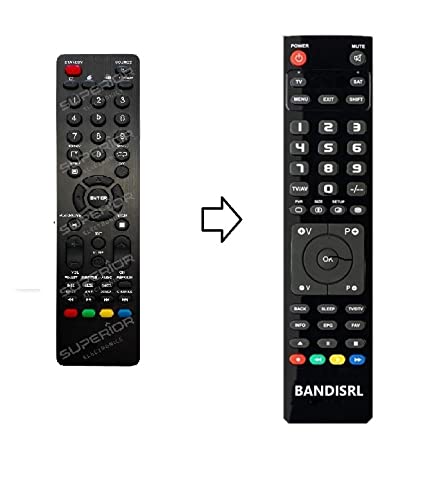
Slika 1: The Remote compatible remote control. This image displays the layout of the buttons and the overall design of the remote, ready for use with your Nordmende TV.
Navodila za uporabo
To operate your Nordmende ND40S3000J SMART TV with this remote control, point the remote directly at the television's infrared receiver. Ensure there are no obstructions between the remote and the TV.
- Gumb za vklop: Pritisnite, da vklopite ali izklopite televizor.
- Povečanje/zmanjšanje glasnosti: Prilagodi glasnost zvoka.
- Kanal gor/dol: Zaporedno preklaplja TV-kanale.
- Številski gumbi (0-9): Neposredna izbira TV-kanalov.
- Navigacijski gumbi (puščične tipke, V redu): Krmarite po menijih in izbirajte možnosti.
- Gumbi pametnega televizorja: Access specific Smart TV functions or applications (e.g., Home, Apps, Netflix, YouTube, etc., depending on the remote's layout and TV's features).
- Gumb za izklop zvoka: Utiša zvok televizorja.
- Gumb za vir/vhod: Preklaplja med razpoložljivimi vhodnimi viri (HDMI, AV itd.).
Refer to your Nordmende TV's original user manual for specific details on its menu structure and Smart TV functionalities.
Vzdrževanje
Čiščenje daljinskega upravljalnika
Za čiščenje daljinskega upravljalnika uporabite mehko, suho krpo. Za trdovratno umazanijo rahlo obrišiteampen the cloth with water. Do not use abrasive cleaners, alcohol, or solvents, as these can damage the remote's surface and internal components.
Zamenjava baterije
Replace batteries when the remote control's response becomes sluggish or stops working. Always replace both batteries simultaneously with new alkaline batteries. Dispose of used batteries according to local regulations.
Shranjevanje
Daljinski upravljalnik shranjujte na hladnem in suhem mestu, stran od neposredne sončne svetlobe in ekstremnih temperatur. Če daljinskega upravljalnika ne boste uporabljali dlje časa, je priporočljivo, da odstranite baterije, da preprečite puščanje.
Odpravljanje težav
- Daljinski upravljalnik ne deluje:
- Preverite, ali so baterije pravilno vstavljene s pravilno polarnostjo (+/-).
- Replace the batteries with new alkaline batteries.
- Prepričajte se, da med daljinskim upravljalnikom in infrardečim sprejemnikom televizorja ni ovir.
- Prepričajte se, da daljinski upravljalnik usmerite neposredno v televizor.
- Preverite, ali je televizor vklopljen.
- Nekateri gumbi se ne odzivajo:
- This remote is designed for the Nordmende ND40S3000J SMART TV. If you are using it with a different model, some advanced functions may not be compatible.
- Ensure the buttons are clean and free from debris.
- TV responds intermittently:
- Baterije so morda prazne; zamenjajte jih.
- Ensure a clear line of sight to the TV's infrared sensor.
- Avoid strong light sources (like direct sunlight) that might interfere with the infrared signal.
If troubleshooting steps do not resolve the issue, please refer to the Support section.
Specifikacije
| Znamka: | Remote (Manufacturer: Bandisrl) |
| Združljive naprave: | Nordmende ND40S3000J SMART Television |
| Tehnologija povezljivosti: | Infrardeči (IR) |
| Posebna lastnost: | Programiranje ni potrebno |
| Vrsta baterije: | Alkalna |
| Priložene baterije: | št |
| barva: | Črna |
| Število gumbov: | 25 |
| Vrsta regulatorja: | Nadzor gumbov |
Garancija in podpora
Informacije o garanciji
Specific warranty details for this compatible remote control are not provided in this manual. Please refer to the purchase documentation or contact the seller/manufacturer (Bandisrl) for information regarding warranty coverage and terms.
Podpora uporabnikom
For further assistance, technical support, or inquiries regarding compatibility with other TV models, please contact the manufacturer, Bandisrl. Contact information can typically be found on the product packaging or the seller's webmesto.
If you own a different TV model than the Nordmende ND40S3000J SMART, it is recommended to contact Bandisrl to confirm compatibility before purchase or use.