
1. Uvod
This manual provides detailed instructions for the installation, operation, and maintenance of your iTOPVIS V110U3 10X USB3.0 PTZ Camera. This camera is designed for high-quality video capture in various professional settings, including video conferencing, live streaming, broadcasting, and educational environments. It features 10X optical zoom, 1080p resolution, and multiple output interfaces including USB3.0, HDMI, and IP streaming.

Figure 1: iTOPVIS V110U3 PTZ Camera and Remote Control
This image displays the iTOPVIS V110U3 PTZ camera, a compact black unit with a lens and a pan/tilt base, alongside its dedicated remote control. The remote control features numerical buttons, camera selection, PTZ controls, and focus/zoom adjustments.
2. Vsebina paketa
Prosimo, preverite, ali so v paketu vsi spodaj navedeni predmeti. Če kateri koli predmet manjka ali je poškodovan, se nemudoma obrnite na prodajalca.

Figure 2: Package Listing
This image illustrates the complete package contents. It includes the PTZ camera, a remote control, power adapter, wall bracket, mounting screws, user manual, RS232 cable, and a USB cable. The camera's rear panel with its various output interfaces is also highlighted.
- iTOPVIS V110U3 PTZ Camera
- Daljinski upravljalnik
- Napajalni adapter
- Stenski nosilec
- Montažni vijaki
- Uporabniški priročnik (ta dokument)
- RS232 kabel
- USB kabel
3. Izdelek je končanview
3.1 Ključne lastnosti
- 10-kratni optični zoom: Provides clear magnification for distant subjects.
- Full HD 1080p Ločljivost: Delivers crisp and detailed video output.
- Multiple Video Output Interfaces: Supports USB3.0, HDMI, and IP streaming for versatile connectivity.
- Funkcionalnost premikanja/nagibanja/povečave (PTZ):
- Pan: 0° do 340°
- Nagib: -30° do 90°
- Advanced Network Transmission: Compatible with ONVIF, RTSP, RTMPS, RTCP, RTP, TCP/IP protocols for easy integration with live streaming platforms.
- Efficient Video Encoding: Supports H.265 and H.264 formats for optimized video streams in various bandwidth conditions.
- Več načinov upravljanja: Can be controlled via remote control, PTZ control keyboard, or software.

Figure 3: Pan and Tilt Capabilities
This image demonstrates the pan (horizontal rotation) and tilt (vertical movement) range of the USB PTZ camera, indicating its flexibility in capturing different angles.

Figure 4: Detailed Pan and Tilt Movement
A bližje view illustrating the vertical (tilt) and horizontal (pan) movement of the camera head on its base.
3.2 Vmesniki
The rear panel of the iTOPVIS V110U3 camera provides various ports for connectivity and control:

Figure 5: Rear Panel Interfaces
This image shows the rear panel of the camera with its various input and output ports, including CVBS, HDMI, RS485, RS232, USB 3.0, LAN, Audio Input, and DC12V power input.
- CVBS Output Interface
- Izhodni vmesnik HDMI
- RS485 Input Interface
- RS232 Input Interface
- Vmesnik USB 3.0
- LAN Port (IP Streaming)
- Avdio vhodni vmesnik (linijski vhod)
- DC12V Input Power Socket
4. Nastavitev
4.1 Načini namestitve
The iTOPVIS V110U3 camera supports multiple installation methods to suit various environments:
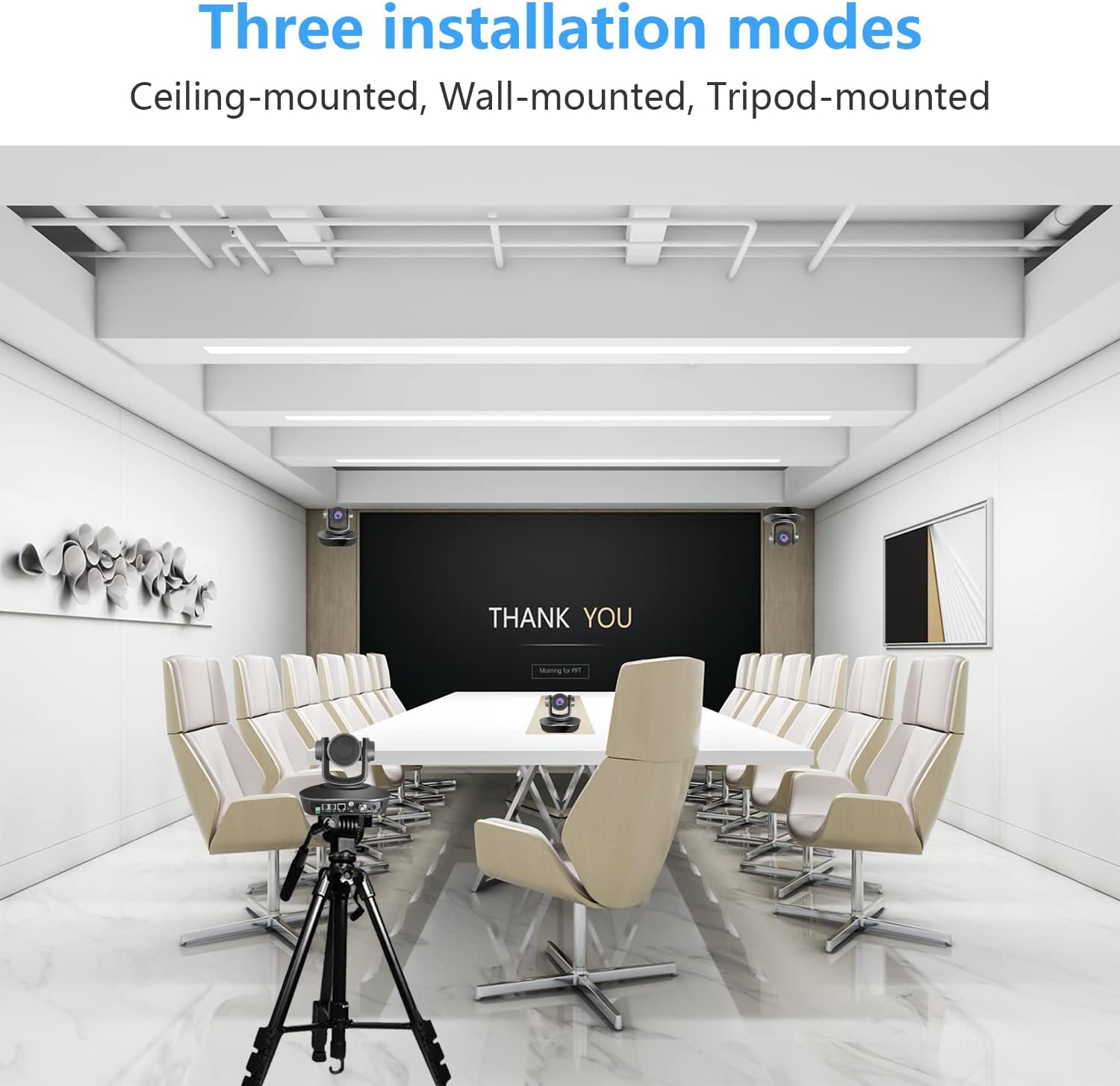
Slika 6: Možnosti namestitve
This image displays three common installation methods for the camera: ceiling-mounted, wall-mounted, and tripod-mounted, demonstrating its adaptability to different room setups.
- Stropna montaža: Use the provided wall bracket and mounting screws to attach the camera to the ceiling. Ensure the camera is securely fastened and oriented correctly.
- Montaža na steno: Attach the camera to a wall using the wall bracket and mounting screws. Position it at an optimal height for your application.
- Tripod-mounted: The camera can be mounted on a standard tripod for portable or temporary setups.
Always ensure the camera is securely mounted to prevent accidental falls and damage.
4.2 Začetna povezava
- Napajalni priključek: Connect the provided power adapter to the DC12V input socket on the camera and then to a power outlet.
- Video izhod:
- For USB connection: Connect the USB 3.0 cable from the camera to your computer.
- For HDMI connection: Connect an HDMI cable from the camera to a display or capture device.
- For IP streaming: Connect an Ethernet cable from the LAN port to your network router or switch.
- Avdio vhod: If external audio is required, connect an audio source to the Audio Input (Line-in) interface.
- Control Connection (Optional):
- For RS232 control: Connect the RS232 cable from the camera to a control device.
- For RS485 control: Connect the RS485 cable from the camera to a control device.
5. Delovanje
5.1 Nadzorne metode
The camera offers flexible control options:

Figure 7: PTZ Control Options
This image illustrates the three primary methods for controlling the PTZ camera: via a handheld remote control, a dedicated PTZ control keyboard, or through software on a computer.
- Daljinski upravljalnik: Use the included IR remote control to adjust pan, tilt, zoom, focus, and recall presets.
- PTZ Control Keyboard: Connect a compatible PTZ control keyboard (e.g., via RS232/RS485 or IP) for professional control. Supports VISCA, PELCO-D, and PELCO-P protocols.
- Nadzor programske opreme: Utilize compatible software on a computer connected via USB or IP to control camera functions.

Figure 8: Multi-Camera IP Control Setup
This diagram shows how multiple cameras can be connected to a router/hub and controlled by an IP controller or a PC, demonstrating a scalable control solution.
5.2 Združljivost programske opreme
The iTOPVIS V110U3 camera is compatible with a wide range of video conferencing and streaming software:

Figure 9: Compatible Software
This image displays logos of various compatible software platforms, including GoToMeeting, Zoom, Join.me, OBS Studio, YouTube, Broadsoft, Cisco Webex, Lifesize, Facebook, Skype, Lync, and Google Meet, highlighting the camera's broad integration capabilities.
Supported operating systems include Windows, Chrome OS, Android V5.0+, Mac OS, and Linux.
5.3 Scenariji uporabe
The camera is suitable for diverse professional applications:

Slika 10: Različni scenariji uporabe
This image showcases various environments where the camera can be effectively used, such as video conferences, tele-medicine, educational settings, government projects, church services, and interrogation rooms.
- Videokonference
- Tele-medicine
- Education (Classroom, University)
- Live Streaming (Church, Broadcast)
- Government Projects
- Sodelovanje
6. Vzdrževanje
- Čiščenje: Za čiščenje ohišja fotoaparata uporabite mehko, suho krpo. Za objektiv uporabite posebno krpo in raztopino za čiščenje objektivov. Izogibajte se agresivnim kemikalijam ali abrazivnim materialom.
- Shranjevanje: Ko fotoaparata dlje časa ne uporabljate, ga shranite v suhem in brezprašnem okolju.
- Ravnanje: Avoid dropping or subjecting the camera to strong vibrations, which can damage internal components.
- moč: Pred čiščenjem ali premikanjem fotoaparata vedno izključite napajalnik.
7. Odpravljanje težav
If you encounter issues with your iTOPVIS V110U3 camera, refer to the following common problems and solutions:
| Težava | Možen vzrok | rešitev |
|---|---|---|
| Ni video izhoda |
|
|
| Camera not responding to remote control |
|
|
| Slaba kakovost slike |
|
|
| IP streaming issues |
|
|
8. Specifikacije
| Funkcija | Podrobnost |
|---|---|
| Znamka | iTOPVIS |
| Model | V110U3 |
| Optični zoom | 10x |
| Ločljivost zajema videa | 1080p |
| Tehnologija foto senzorja | CMOS (1/2.8" CMOS Sensor, 2.1 MP) |
| Največja zaslonka | 2.4 f |
| Tehnologija povezljivosti | USB 3.0, HDMI, IP (LAN), RS232, RS485 |
| Posebna funkcija | Infrardeči |
| Paletni domet | 0° do 340° |
| Razpon nagiba | -30° do 90° |
| Dimenzije izdelka | 7.87 x 6.89 x 6.89 palcev |
| Teža predmeta | 5.71 funtov |
| Podprti protokoli | VISCA, PELCO-D, PELCO-P, ONVIF, RTSP, RTMPS, RTCP, RTP, TCP/IP |
| Video kodiranje | H.265, H.264 |
9. Garancija in podpora
iTOPVIS products are designed for reliability and performance. For specific warranty details, please refer to the warranty card included with your product or visit the official iTOPVIS website. For technical support, troubleshooting assistance, or service inquiries, please contact iTOPVIS customer support through the contact information provided on their official webspletnega mesta ali prek vaše nakupovalne platforme.
Za dodatne vire in informacije o izdelkih lahko obiščete iTOPVIS Brand Store on Amazon.