
1. Uvod
This manual provides essential information for the safe and efficient use of your HP Envy x360 13.3-inch 2-in-1 laptop. Please read this manual thoroughly before operating your device to ensure optimal performance and longevity. This device combines the functionality of a traditional laptop with the versatility of a tablet, featuring a responsive touchscreen and a 360-degree hinge.
2. Značilnosti izdelka
- 13.3-inch Full HD IPS Touch-Screen Display: Experience vibrant visuals and intuitive interaction with the responsive touch display.
- 11th Generation Intel Core i5-1135G7 Processor: Delivers efficient performance for multitasking, productivity, and entertainment.
- 8 GB DDR4 RAM-a: Provides substantial memory for smooth operation of multiple applications.
- 256GB PCIe NVMe SSD: Offers fast boot-up times and quick data access with solid-state storage.
- Osvetljena tipkovnica: Enables comfortable typing in various lighting conditions.
- Čitalec prstnih odtisov: Enhances security and provides quick, convenient login.
- Operacijski sistem Windows 10 Home: Pre-installed for a familiar and productive user experience.
- 360-stopinjski tečaj: Allows the device to transform between laptop, tent, stand, and tablet modes.
- Grafična kartica Intel Iris Xe: Integrated graphics for clear visuals and light creative tasks.
- Bang & Olufsen Audio with Three Speakers: Zagotavlja bogat in poglobljen zvok.
- HP Wide Vision HD Camera with Camera Shutter: For video calls and privacy.
3. Fizični overview
Familiarize yourself with the various components and ports of your HP Envy x360 laptop.

Slika 3.1: Pod kotom view of the HP Envy x360 laptop in traditional laptop mode, displaying the keyboard and screen.
Vrata in priključki:
- Vrata USB 3.0 tipa A (x2): For connecting external devices such as USB drives, mice, or keyboards.
- Vrata HDMI (x1): Za priključitev na zunanje zaslone ali projektorje.
- Micro SD Card Reader (x1): For reading and writing data to Micro SD cards.
- Kombinirani priključek za slušalke/mikrofon (x1): Za priklop slušalk ali zunanjega mikrofona.
- Vrata USB-C (x1): For data transfer, charging, and display output (Thunderbolt compatible).
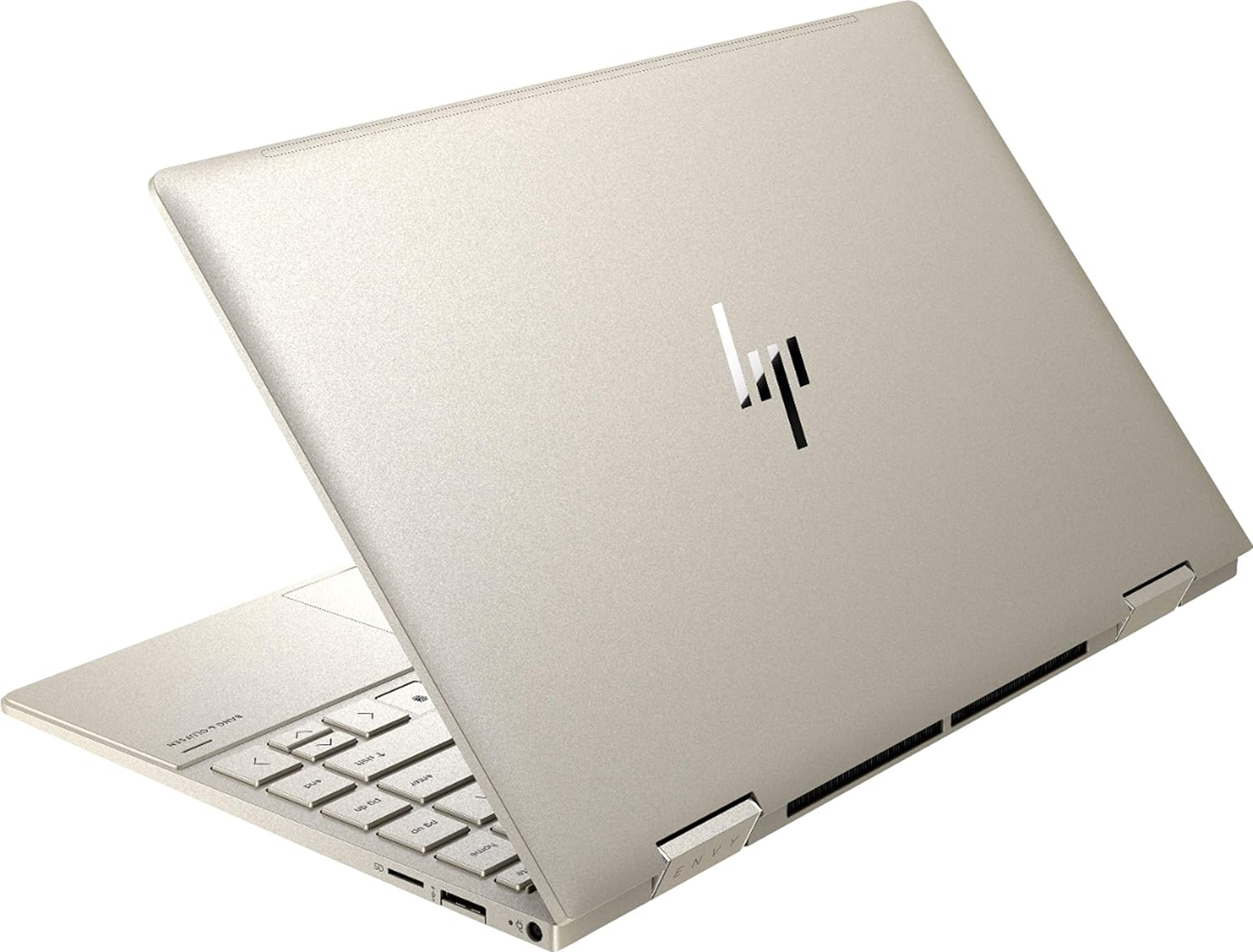
Slika 3.2: Zadaj view of the HP Envy x360 laptop, highlighting the sleek design and port placement on the sides.
4. Nastavitev
4.1 Začetni vklop
- Unpack your HP Envy x360 laptop and included accessories.
- Priključite napajalnik na polnilno vtičnico prenosnika in nato v električno vtičnico.
- Press the power button, typically located on the side or keyboard deck, to turn on the laptop.
- Sledite navodilom na zaslonu, da dokončate namestitev sistema Windows 10 Home, vključno z izbiro jezika, omrežno povezavo in ustvarjanjem uporabniškega računa.
4.2 Priključitev zunanjih naprav
Connect your mouse, external display, or other USB devices to the available ports as described in Section 3. For wireless devices, enable Bluetooth in Windows settings and pair your devices.
5. Navodila za uporabo
5.1 Using the 2-in-1 Modes
Your HP Envy x360 features a versatile 360-degree hinge, allowing for multiple usage modes:
- Način prenosnika: Traditional laptop orientation for typing and productivity.
- Način šotora: Zaslon prepognite nazaj v obliko obrnjene črke 'V', kar je idealno za gledanje videoposnetkov ali predstavitev v zaprtih prostorih.
- Način stojala: Fold the screen back further, resting the keyboard face down, to use the display for media consumption or touch-based applications.
- Način tabličnega računalnika: Fold the screen completely back against the base, transforming the device into a tablet for touch interaction.

Figure 5.1: The HP Envy x360 laptop configured in tent mode, suitable for media viewing.

Figure 5.2: The HP Envy x360 laptop fully folded into tablet mode, ready for touch input.
5.2 Uporaba zaslona na dotik in tipkovnice
- Zaslon na dotik: Use gestures similar to a smartphone or tablet for navigation, zooming, and interaction with applications.
- Osvetljena tipkovnica: Press the function key (Fn) and the appropriate F-key (usually F5 or F4, check keyboard icons) to toggle the keyboard backlight on/off or adjust brightness.
- Čitalec prstnih odtisov: Enroll your fingerprint through Windows Hello settings for secure and fast login.
6. Vzdrževanje
Regular maintenance helps prolong the life of your laptop.
- Čiščenje: Za čiščenje zaslona in ohišja uporabite mehko krpo, ki ne pušča vlaken. Za trdovratne madeže dampkrpo obrišite z vodo ali čistilom za zaslone. Izogibajte se agresivnim kemikalijam.
- Posodobitve programske opreme: Regularly update Windows and HP drivers to ensure optimal performance and security.
- Vzdrževanje baterije: Izogibajte se pogostemu popolnemu praznjenju baterije. Za dolgotrajno shranjevanje baterijo napolnite na približno 50–70 %.
- Prezračevanje: Ensure the laptop's vents are not obstructed to prevent overheating. Use on a hard, flat surface when possible.
7. Odpravljanje težav
Ta razdelek obravnava pogoste težave, na katere lahko naletite.
7.1 Težave z napajanjem
- Prenosnik se ne vklopi: Ensure the power adapter is securely connected and the outlet is functional. Try a different outlet or power adapter if available.
- Baterija se ne polni: Verify the power adapter connection. Check for any damage to the cable or port.
7.2 Težave z zaslonom
- Zaslon je prazen: Priključite zunanji monitor, da preverite, ali je težava v zaslonu prenosnika. Poskusite znova zagnati prenosnik.
- Zaslon na dotik se ne odziva: Restart the laptop. Ensure all drivers are up to date via Windows Update or HP Support Assistant.
7.3 Težave z zmogljivostjo
- Počasna zmogljivost: Close unnecessary applications. Check Task Manager for resource-intensive processes. Ensure sufficient free space on the SSD.
- Pregrevanje: Clean vents. Ensure proper airflow. Reduce workload if consistently hot.
8. Specifikacije
| Funkcija | Podrobnost |
|---|---|
| Znamka | HP |
| Ime modela | HP Envy x360 |
| Velikost zaslona | 13.3 palcev |
| Ločljivost zaslona | 1920 x 1080 (Full HD) |
| Vrsta zaslona | LED IPS Touch Screen |
| Procesor | 11th Generation Intel Core i5-1135G7 (2.4 GHz, up to 4.2 GHz with Turbo Boost) |
| RAM pomnilnik | 8 GB DDR4 |
| Shranjevanje | 256 GB SSD |
| Operacijski sistem | Windows 10 Home |
| Grafika | Grafična kartica Intel Iris Xe (vgrajena) |
| Posebne lastnosti | Osvetljena tipkovnica, bralnik prstnih odtisov |
| Avdio | Bang & Olufsen Audio with Three speakers |
| Povezljivost | Wireless-AX, Bluetooth, USB, HDMI |
| Pristanišča | 2x USB 3.0 Type-A, 1x HDMI, 1x Micro SD Card Reader, 1x Headphone/Microphone Combo, 1x USB-C |
| Dimenzije (D x Š x V) | 12.07 cm x 7.66 cm x 0.65 cm |
| Teža | 2.92 funt |
| barva | Bledo zlato |
9. Kaj je v škatli
The following items are included with your HP Envy x360 laptop:
- HP Envy x360 13.3-inch 2-in-1 Laptop
- Napajalni adapter
- Podloga za miško

Figure 9.1: The HP Envy x360 laptop shown alongside the included mouse pad.
10. Garancija in podpora
Your HP Envy x360 laptop comes with a standard manufacturer's warranty. For detailed warranty information, please refer to the warranty card included in your product packaging or visit the official HP support webZa tehnično pomoč, prenos gonilnikov ali zahteve za storitve se obrnite na HP-jevo podporo strankam.
HP-jeva podpora Webspletno mesto: support.hp.com