
1. Uvod
The iTOPVIS NV-VA101 is a versatile 3-in-1 conference device integrating a Full HD 1080P webcam, an omnidirectional microphone, and a speaker. Designed for video conferencing, it offers a wide-angle view and clear audio for various meeting environments. This manual provides instructions for setup, operation, maintenance, and troubleshooting to ensure optimal performance of your device.

Slika 1.1: Spredaj view of the iTOPVIS NV-VA101 3-in-1 Conference Webkamera, šovasing its integrated design with camera, microphone, and speaker.
2. Izdelek je končanview in komponente
The NV-VA101 combines essential conferencing tools into a single, compact unit. Familiarize yourself with its main components:

Image 2.1: Labeled diagram of the iTOPVIS NV-VA101, indicating the microphone, Full HD camera, speaker, camera indicator, bracket, audio inverted phase port, and USB connection cable.
2.1 Ključne lastnosti
- Kamera polne visoke ločljivosti 1080P: Provides high-definition video resolution.
- Integrirana zasnova: Kombinira webcam, omnidirectional microphone, and speaker in one unit.
- Širokokotni objektiv: Polje 105 stopinj view da bi zajeli vse udeležence.
- Vsesmerni mikrofon: 360° sound pickup with a range of up to 3 meters.
- Audio DSP Technology: Features Automatic Gain Control (AGC), Acoustic Echo Cancellation (AEC), and Automatic Noise Suppression (ANS) for clear audio.
- Vgrajeni zvočnik: Optimized for small room acoustics.
- Plug & Play: USB 2.0 connectivity requires no additional drivers.
- Univerzalna sponka: Compatible with laptops, LCDs, monitors, and tripods.
2.2 Vsebina paketa
Prepričajte se, da so v paketu prisotni vsi elementi:
- 1 x VA101 Conference Camera
- 1 x potrdilo o kvalifikaciji
- 1 x uporabniški priročnik
3. Navodila za nastavitev
The iTOPVIS NV-VA101 is designed for simple plug-and-play installation.
- Remove Screen Protector: Before installation, gently remove the protective film from the camera lens.
- Namestite napravo: Use the integrated universal clip to securely attach the camera to the top of your laptop screen, desktop monitor, or Smart TV. Alternatively, the device can be mounted on a tripod.
- Povežite se z računalnikom: Plug the USB 2.0 cable from the NV-VA101 into an available USB port on your Mac, PC, or laptop.
- Prepoznavanje sistema: Your operating system (Windows, macOS, Linux) will automatically recognize the device. No additional drivers are typically required.
- Preverite povezavo: The camera indicator light will illuminate when the device is active and connected.

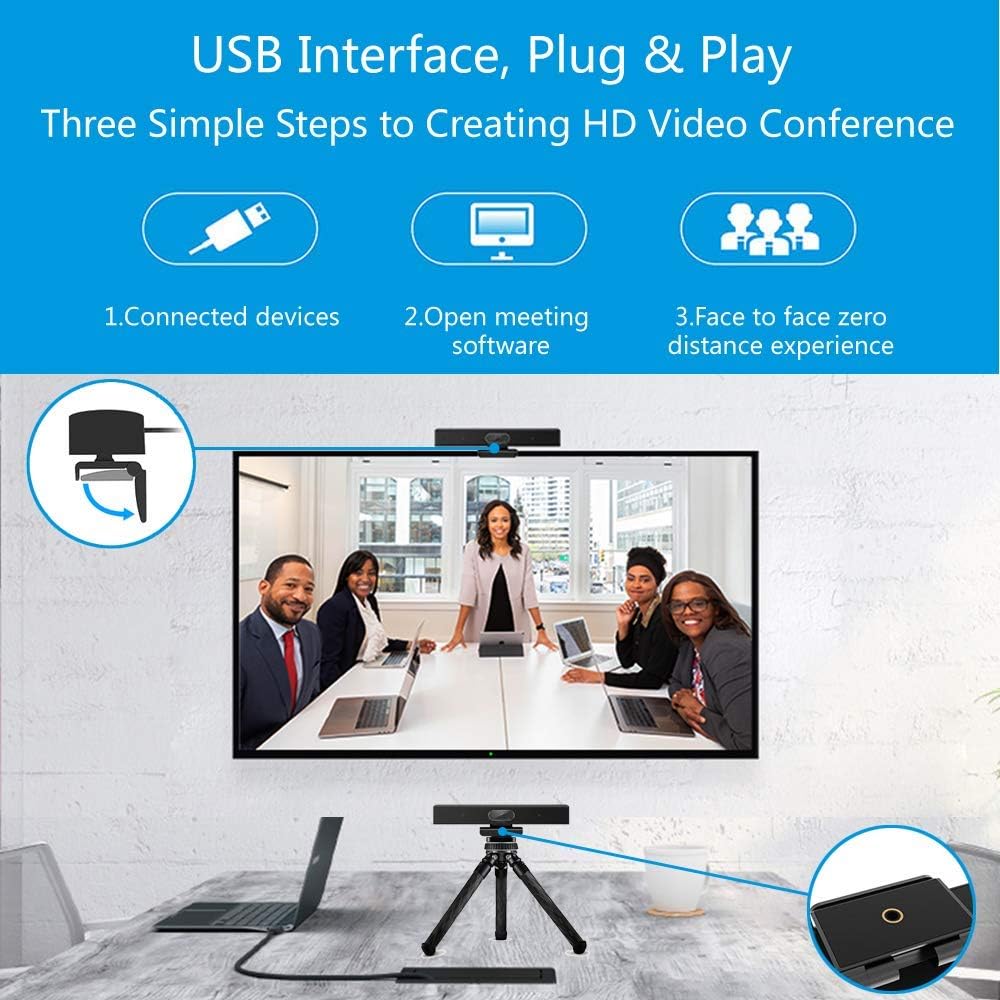
Image 3.1: Visual guide for USB Plug & Play setup, showing connection to a device, opening meeting software, and starting a video conference.
4. Navodila za uporabo
Once connected, the iTOPVIS NV-VA101 is ready for use with your preferred video conferencing software.
- Select Device in Software: Open your video conferencing application (e.g., Zoom, Skype, Microsoft Teams, WebEx). Navigate to the audio and video settings within the application.
- Choose Camera: Select "iTOPVIS NV-VA101" or a similar name as your video input device.
- Choose Microphone: Select "iTOPVIS NV-VA101" or a similar name as your microphone input device.
- Choose Speaker: Select "iTOPVIS NV-VA101" or a similar name as your speaker output device.
- Start Conference: Begin your video call or meeting. The camera indicator light will confirm active video transmission.

Image 4.1: The iTOPVIS NV-VA101 positioned above a monitor, displaying a video conference with multiple participants, highlighting its wide-angle capability.
4.1 Zvočne funkcije
The integrated microphone and speaker are optimized for clear communication:
- Vsesmerni prevzem: The microphone captures sound from all directions, suitable for small meeting rooms.
- DSP Algorithms: Automatic Gain Control (AGC) adjusts microphone sensitivity, Acoustic Echo Cancellation (AEC) removes echoes, and Automatic Noise Suppression (ANS) reduces background noise.

Image 4.2: Diagram illustrating the 3-meter omnidirectional sound pickup range of the integrated microphone, suitable for small meeting environments.
Slika 4.3: Bližnji posnetek view of the built-in speaker and the audio inverted phase port, designed to enhance sound quality for conference calls.
5. Specifikacije
| Kategorija | Specifikacija |
|---|---|
| Ime modela | NV-VA101 |
| Slikovni senzor | 1/2.7" CMOS (Sony IMX307) |
| Efektivne slikovne pike | 2 milijonov slikovnih pik |
| F/NO (Max) | F2.5 |
| EFL (mm) | F=3.0 mm |
| FOV (Diagonal) | 105° |
| Resolucija | 1080P |
| Video format | MJPEG |
| Hitrost sličic | 1920x1080@30fps, 1280x720@30fps, 800x600@30fps, 640x480@30fps, 320x240@30fps |
| Brightness/Contrast/White Balance | Avto |
| Minimalna osvetlitev | 0.5 luksov |
| Minimum Camera Distance | 50 cm |
| Usmerjenost mikrofona | Vsesmerno |
| Microphone Pick Up Range | 3 metrov |
| Frekvenca mikrofona | 20Hz~20KHz |
| Občutljivost mikrofona | -33 dBFS |
| Zvočni algoritmi DSP | AEC, ANS, AGC supported |
| Frekvenca zvočnika | 20Hz~20KHz |
| Speaker Rated Impedance | 4Ω |
| Nazivna moč zvočnika | 2W |
| Vmesnik | USB 2.0 tipa A |
| Poraba energije | 5 V/500 mA |
| Dolžina kabla | 1.8m |
| Dimenzije izdelka | 230 mm x 60 mm x 56 mm |
| Teža izdelka | 0.45 kg |
| Združljivi operacijski sistemi | Linux, Windows 7/8.1/10/11, Mac OS 10.10 or higher |
| Združljive naprave | Desktop, Laptop, Smart TV |
6. Vzdrževanje
To ensure the longevity and optimal performance of your iTOPVIS NV-VA101, follow these maintenance guidelines:
- Čiščenje: Use a soft, dry cloth to clean the exterior of the device. For the camera lens, use a lens cleaning cloth and solution specifically designed for optics. Avoid abrasive cleaners or solvents.
- Shranjevanje: Ko naprave ne uporabljate, jo hranite na hladnem in suhem mestu, stran od neposredne sončne svetlobe in ekstremnih temperatur.
- Ravnanje: Pazite, da vam naprava ne pade ali da je ne izpostavljate močnim udarcem. Ne poskušajte razstaviti naprave, saj boste s tem razveljavili garancijo.
- Skrb za kabel: Do not bend or crimp the USB cable excessively. Ensure the cable is not under tension when connected.
7. Odpravljanje težav
If you encounter issues with your iTOPVIS NV-VA101, refer to the following common troubleshooting steps:
7.1 Brez video izhoda
- Preverite povezavo USB: Ensure the USB cable is securely plugged into both the camera and your computer. Try a different USB port.
- Preverjanje prepoznavanja naprave: Check your computer's Device Manager (Windows) or System Information (macOS) to confirm the camera is recognized.
- Izbira programske opreme: In your video conferencing application, ensure the iTOPVIS NV-VA101 is selected as the active camera device.
- Restart Application/Computer: Close and reopen the video conferencing application. If the issue persists, restart your computer.
- Indikator kamere: Confirm the camera indicator light is on when the camera is in use.
7.2 No Audio Input (Microphone)
- Izbira programske opreme: In your video conferencing application's audio settings, ensure the iTOPVIS NV-VA101 is selected as the microphone input device.
- System Volume/Mute: Check your computer's microphone volume settings and ensure the microphone is not muted.
- Application Mute: Ensure the microphone is not muted within the video conferencing application.
7.3 No Audio Output (Speaker)
- Izbira programske opreme: In your video conferencing application's audio settings, ensure the iTOPVIS NV-VA101 is selected as the speaker output device.
- System Volume/Mute: Check your computer's speaker volume settings and ensure the speaker is not muted.
- Application Volume: Adjust the volume within the video conferencing application.
8. Garancija in podpora
The iTOPVIS NV-VA101 comes with a Qualification Certificate, indicating it meets quality standards. For specific warranty terms and conditions, please refer to the documentation provided with your purchase or contact iTOPVIS customer support.
For technical assistance or further inquiries, please contact your retailer or the manufacturer's support channels. Keep your purchase receipt and product model number (NV-VA101) available when seeking support.