
Uvod
This manual provides detailed instructions for the installation, operation, maintenance, and troubleshooting of the HP ProDesk 400 G3 MS-7957 motherboard. Please read this manual thoroughly before proceeding with any installation or operation to ensure proper functionality and safety.
Varnostne informacije
Vedno upoštevajte naslednje varnostne ukrepe, da preprečite poškodbe matične plošče ali telesne poškodbe:
- Pred nameščanjem ali odstranjevanjem kakršnih koli komponent izključite napajalnik iz stenske vtičnice.
- Preden se lotite matične plošče, si na zapestje nadenite antistatično zapestnico ali se pogosto dotikajte ozemljenega kovinskega predmeta, da sprostite statično elektriko.
- Matično ploščo prijemajte za robove, da se izognete dotikanju občutljivih komponent.
- Zagotovite ustrezno prezračevanje v ohišju računalnika, da preprečite pregrevanje.
- Matično ploščo hranite stran od vlage in ekstremnih temperatur.
Konec izdelkaview
The HP ProDesk 400 G3 MS-7957 is a MicroATX motherboard designed for Intel processors with an LGA 1151 socket. It supports DDR4 RAM and features a B250 chipset, offering a reliable foundation for desktop computing.
Ključne značilnosti
- Compatible CPU Brand: Intel
- Vrsta vtičnice: LGA 1151/Socket H4
- Faktor oblike: MicroATX
- V/I priključki: Ethernet (RJ-45), USB 2.0, USB 3.0, VGA, DisplayPort, HD Audio Jack
Identifikacija komponente
Familiarize yourself with the layout of the motherboard to facilitate proper installation and connection of components.

Slika 1: Pod kotom view of the HP ProDesk 400 G3 MS-7957 motherboard. This image highlights the CPU socket (LGA 1151), four DDR4 RAM slots, PCIe slots, and various headers for front panel connections and storage devices.
Nastavitev in namestitev
Preden začnete
- Ensure your computer case is compatible with the MicroATX form factor.
- Gather all necessary components: CPU, RAM, CPU cooler, power supply, storage devices, and graphics card (if not using integrated graphics).
- Prepare your workspace by ensuring it is clean, well-lit, and static-free.
Namestitev matične plošče
- Install the CPU into the LGA 1151 socket. Carefully align the CPU with the socket's notch and gently lower it into place. Close the retention arm.
- Na procesor nanesite termalno pasto in namestite hladilnik procesorja v skladu z navodili proizvajalca.
- Install the DDR4 RAM modules into the designated slots. Ensure they are fully seated until the clips lock into place.
- Mount the motherboard into the computer case using the appropriate standoffs and screws.
- Glavni 24-pinski napajalni priključek ATX in 4-pinski ali 8-pinski napajalni priključek CPU priključite iz napajalnika na matično ploščo.
- Install any expansion cards (e.g., graphics card) into the PCIe slots.

Slika 2: Nagnjeno od zgoraj navzdol view of the HP ProDesk 400 G3 MS-7957 motherboard. This perspective provides a clear view of the processor socket, memory slots, and the layout of the various internal connectors and components.
Povezovanje zunanjih naprav
- Connect SATA storage devices (HDDs/SSDs) to the SATA ports on the motherboard.
- Connect front panel headers (power button, reset button, USB ports, audio jacks) to their respective pins on the motherboard. Refer to your case manual for specific pin assignments.
- Connect external peripherals such as monitor, keyboard, mouse, and Ethernet cable to the rear I/O panel.
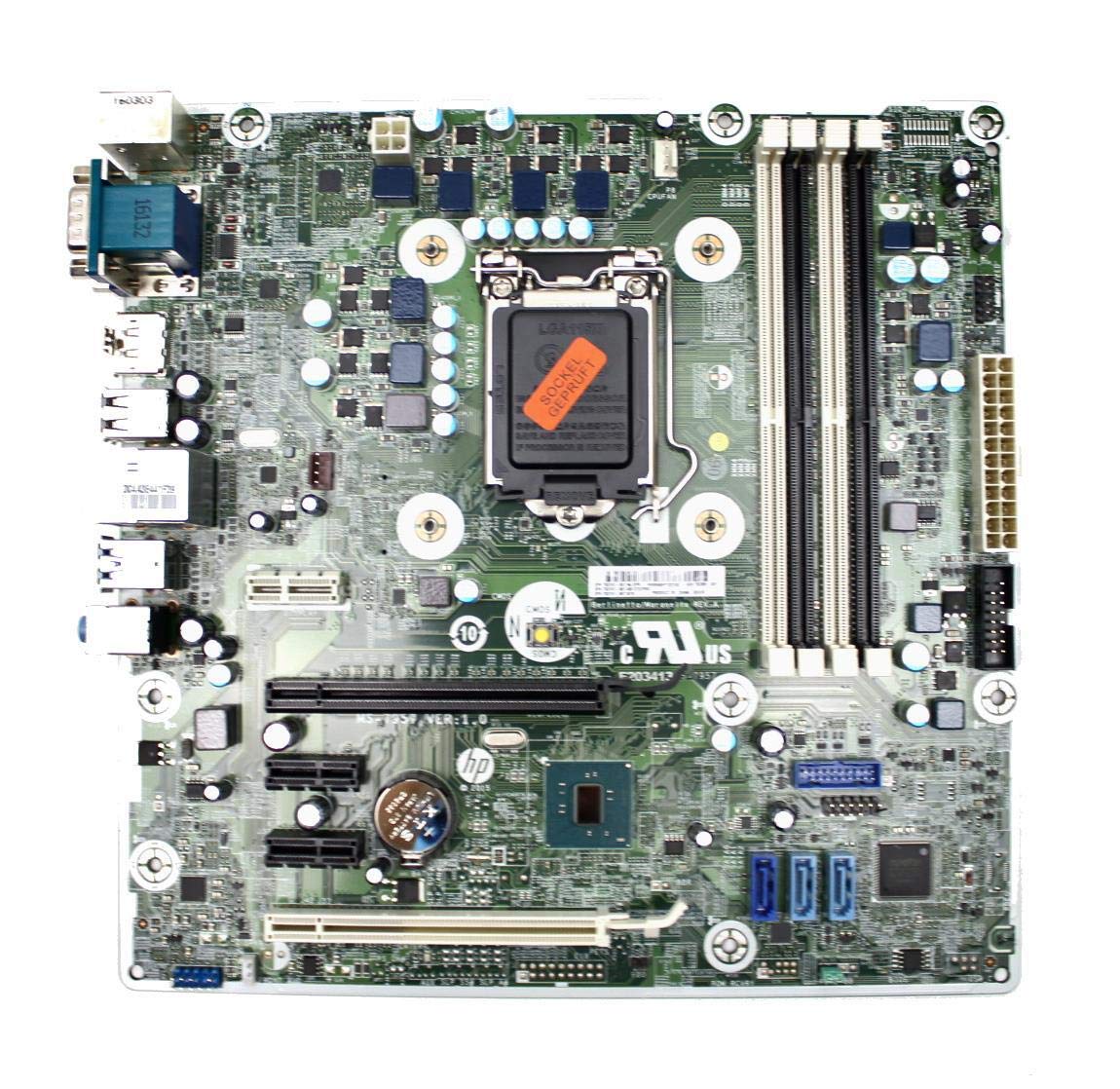
Figure 3: Rear I/O panel of the HP ProDesk 400 G3 MS-7957 motherboard. This image displays the available external connectivity options, including PS/2 ports, serial port, VGA, DisplayPort, USB 2.0, USB 3.0, Ethernet (RJ-45), and HD audio jacks.
Navodila za uporabo
Začetni vklop
After all components are installed and connected, connect the power cable to the power supply and press the power button on your computer case. The system should initiate the boot process.
Konfiguracija BIOS-a/UEFI-ja
Za dostop do orodja za nastavitev BIOS/UEFI pritisnite določeno tipko (običajno Del, F2, F10, oz F12) during the initial boot sequence. Here you can configure boot order, system time, and other hardware settings.
Namestitev gonilnika
After installing your operating system, it is crucial to install the latest drivers for your motherboard's chipset, integrated graphics, audio, and network adapter. These drivers can typically be found on the HP support webspletno mesto ali proizvajalca čipov webmesto.
Vzdrževanje
- Čiščenje: Redno čistite prah z matične plošče in komponent s stisnjenim zrakom. Pred čiščenjem se prepričajte, da je sistem izklopljen in izklopljen iz električnega omrežja.
- Posodobitve BIOS-a/UEFI-ja: Periodically check for BIOS/UEFI updates from HP's official support website. Updates can improve stability, compatibility, and performance. Follow update instructions carefully to avoid system damage.
- Posodobitve gonilnikov: Keep all system drivers updated to ensure optimal performance and compatibility with new software and hardware.
Odpravljanje težav
V tem razdelku so rešitve za pogoste težave, na katere lahko naletite:
- Brez napajanja: Check all power connections, including the 24-pin ATX and CPU power cables. Ensure the power supply is switched on and the wall outlet is functional.
- Brez zaslona: Verify that your monitor is connected to the correct video output (VGA or DisplayPort) and is powered on. Reseat the graphics card (if applicable) and RAM modules.
- Nestabilnost/zrušitve sistema: This could be due to overheating, faulty RAM, or outdated drivers. Check CPU and GPU temperatures, run memory diagnostic tools, and update drivers.
- Periferna naprava ni zaznana: Ensure the peripheral is properly connected. Try a different port or update the relevant drivers.
- Težave z BIOS-om/UEFI-jem: If you encounter issues after changing BIOS settings, try resetting the CMOS by removing the CMOS battery for a few minutes or using the clear CMOS jumper (refer to motherboard diagram for location).
Specifikacije
| Funkcija | Specifikacija |
|---|---|
| Znamka | HP |
| CPU vtičnica | LGA 1151 |
| Združljive naprave | Namizni računalnik |
| Tehnologija RAM-a | DDR4 |
| Združljivi procesorji | Intel Core i3-6xxx, Intel Core i5-6xxx, Intel Core i7-6xxx, Intel Core i3-7xxx, Intel Core i5-7xxx, Intel Core i7-7xxx, Intel Core i3-8xxx, Intel Core i5-8xxx, Intel Core i7-8xxx |
| Vrsta čipseta | Intel B250 |
| Platforma | Windows |
| Ime modela | MS-7957 |
| Model procesorja | Core i3 (Note: Supports i3, i5, i7 as listed above) |
| Tip glavnega napajalnega priključka | 24 zatič |
| Vmesnik grafične kartice | PCI Express |
| Available Memory Slots | 4 |
| Total SATA Ports | 6 |
| Skupno število vrat USB | 2 (Note: Refers to internal headers, rear I/O has more) |
| Skupno število ethernetnih vrat | 1 |
| Total PCIe Ports | 3 |
| Proizvajalec | Computer Store Berlin (Reseller/Supplier) |
| Številka dela | 4061435962741 |
| ASIN | B08CS13PTQ |
Garancija in podpora
Ta izdelek je opremljen z 1-letna garancija od datuma nakupa. Ta garancija pokriva napake v materialu in izdelavi pri normalni uporabi.
For technical support, warranty claims, or further assistance, please contact your point of purchase or refer to the official HP support resources for the ProDesk 400 G3 series.