
ORIENTEK T15M
Orientek T15M Optical Light Source User Manual
Model: T15M (TLS-25M-RL)
1. Uvod
The Orientek T15M Optical Light Source is a compact and reliable instrument designed for testing singlemode fiber optic networks. It provides stable light output at 1310nm and 1550nm wavelengths, essential for accurate fiber loss measurements when paired with an optical power meter. This manual provides detailed instructions for the proper setup, operation, and maintenance of your T15M device.
2. Varnostne informacije
Pred uporabo naprave preberite in razumite vsa varnostna navodila. Neupoštevanje teh navodil lahko povzroči telesne poškodbe ali škodo na opremi.
- Lasersko sevanje: This device emits invisible laser radiation. Avoid direct exposure to the laser beam. Do not look directly into the optical output port.
- Varnost baterije: Use only specified battery types (2 AAA 1.5V batteries). Do not mix old and new batteries, or different types of batteries. Dispose of batteries according to local regulations.
- Okoljski pogoji: Do not operate the device in explosive atmospheres or near flammable materials. Avoid exposure to extreme temperatures, humidity, or dust.
- Čiščenje: Only clean the optical connector with approved fiber optic cleaning tools and solutions. Refer to the Maintenance section for details.
3. Vsebina paketa
Ob razpakiranju preverite, ali so vsi predmeti prisotni:
- Orientek T15M Optical Light Source Unit
- Silikonski zaščitni etui
- Uporabniški priročnik (ta dokument)
4. Izdelek je končanview
The T15M Optical Light Source features an ergonomic design for comfortable one-handed operation. It is equipped with a removable silicone protective case that provides shock-proof and drop-proof capabilities, enhancing durability. The device also includes an LED lighting function for improved visibility in low-light conditions.

Slika 4.1: Orientek T15M Optical Light Source with its protective silicone case.

Slika 4.2: Ergonomic design and dimensions of the T15M device.
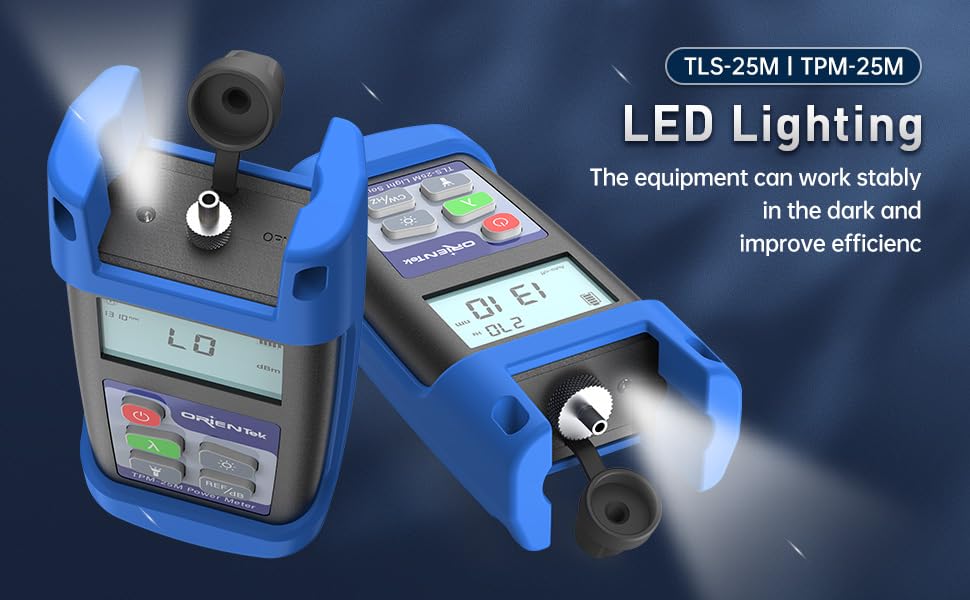
Slika 4.3: The T15M features integrated LED lighting for dark environments.
5. Nastavitev
5.1. Namestitev baterije
- Poiščite predal za baterijo na zadnji strani naprave.
- Odprite pokrov baterije.
- Vstavite dve (2) bateriji AAA 1.5 V in pri tem pazite na pravilno polarnost (+/-).
- Varno zaprite pokrov baterije.
5.2. Attaching the Protective Case
The silicone protective case is designed to fit snugly around the T15M unit. Carefully slide the device into the case, ensuring all buttons and ports are accessible and aligned.

Slika 5.1: The removable silicone protective case provides enhanced durability.
5.3. Connecting Fiber Optic Cables
The T15M features a 2.5mm universal interface for connecting various fiber optic connectors. Ensure the fiber end-face is clean before connection.

Slika 5.2: The 2.5mm universal interface supports SC, ST, FC, and optional LC connectors.
6. Navodila za uporabo
6.1. Vklop/izklop
- Za vklop naprave pritisnite in držite Moč gumb (
 ) približno 2 sekundi.
 - Za izklop pritisnite in držite tipko Moč gumb držite, dokler se zaslon ne izklopi.
6.2. Wavelength Selection
The T15M supports 1310nm and 1550nm wavelengths for singlemode fiber testing.
- Pritisnite Lambda (λ) gumb () to cycle between 1310nm and 1550nm. The selected wavelength will be displayed on the screen.

Slika 6.1: Wavelength selection for singlemode fiber testing.
6.3. Modulation Carrier Output
The T15M can output a continuous wave (CW) or modulated signals at specific frequencies.
- Pritisnite CW/Hz gumb () to cycle through the modulation frequencies: Continuous Wave (CW), 270Hz, 1KHz, and 2KHz. The selected modulation frequency will be displayed.
6.4. LED osvetlitev
- Pritisnite Svetloba gumb () to turn the integrated LED light on or off.
6.5. Funkcija samodejnega izklopa
The device features an auto-off function to conserve battery life. If no operation is performed for a set period, the device will automatically power off. This status is indicated by "Auto-off" on the display.

Slika 6.2: The T15M Light Source in operation, typically used with an Optical Power Meter.
7. Vzdrževanje
7.1. Cleaning the Optical Connector
A clean optical connector is crucial for accurate measurements and to prevent damage to the fiber. Always clean the connector before use.
- Use a high-quality, lint-free fiber optic cleaning wipe or a specialized fiber optic cleaning stick.
- Apply a small amount of isopropyl alcohol (99% pure) to the cleaning material.
- Gently clean the end-face of the optical connector.
- Allow the connector to dry completely before re-connecting any fiber.
- Always keep the dust cap on the optical port when not in use.
7.2. Nega naprave
- Keep the device dry. If it gets wet, wipe it immediately with a soft, dry cloth.
- Avoid dropping the device or subjecting it to strong impacts, even with the protective case.
- Napravo shranjujte v čistem in suhem okolju, ko je ne uporabljate.
- Če naprave ne boste uporabljali dlje časa, odstranite baterije, da preprečite puščanje.
8. Odpravljanje težav
| Težava | Možen vzrok | rešitev |
|---|---|---|
| Naprava se ne vklopi | Prazne ali prazne baterije; nepravilna namestitev baterij | Replace batteries with new AAA 1.5V batteries; Check battery polarity. |
| Brez svetlobne moči | Device not powered on; Incorrect wavelength selected; Damaged optical port | Ensure device is on; Verify correct wavelength (1310nm/1550nm) is selected; Inspect optical port for damage or contamination. |
| Unstable or incorrect readings (when used with OPM) | Dirty optical connector; Damaged fiber cable; Mismatched wavelength with OPM | Clean optical connector on both OLS and fiber; Replace fiber cable if damaged; Ensure OLS and OPM are set to the same wavelength. |
| Auto-off activates too quickly | Standard feature to save battery | This is normal operation. To prevent auto-off during extended use, periodically press a button. |
9. Specifikacije
Technical specifications for the Orientek T15M Optical Light Source:

Slika 9.1: Detailed specifications for the T15M Light Source.
| Parameter | Vrednost |
|---|---|
| Valovna dolžina (nm) | 1310/1550 |
| Typical Output Power | -5dBm |
| Optični priključek | 2.5mm universal (SC/FC/ST; LC optional, purchased separately) |
| Napajalnik | Alkalna baterija (2 AAA 1.5 V baterije) |
| Stabilnost izhoda | ±0.05dB/15mins; ±0.1dB/8hours |
| Modulation Frequencies | CW, 270Hz, 1KHz, 2KHz |
| Mere (mm) | 130 x 65 x 35 |
| Teža | 180 g |
| Delovna temperatura | -10 to +60(℃) |
| Temperatura shranjevanja | -25 to +70(℃) |
10. Informacije o garanciji
Orientek products are typically covered by a limited warranty against defects in materials and workmanship. Please refer to the warranty card included with your product or contact Orientek customer support for specific warranty terms and conditions applicable to your region and purchase date.
11. Podpora strankam
For technical assistance, troubleshooting beyond this manual, or warranty inquiries, please contact Orientek customer support. Contact information can typically be found on the official Orientek webspletnem mestu ali na embalaži izdelka.
Webspletno mesto: www.orientek.com (Prosimo, preverite uradno webspletno mesto za najnovejše kontaktne podatke.)
Ask a question about this manual
Ask about setup, troubleshooting, compatibility, parts, safety, or missing instructions. Manuals+ will review the question and use this page’s manual context to help answer it.