
1. Uvod
Hvala za nakupasing the OREI DVD-Z9H Region Free HDMI DVD Player. This manual provides essential information for the proper setup, operation, and maintenance of your new device. Please read these instructions thoroughly before use and retain them for future reference.
The OREI DVD-Z9H is designed to play DVDs from any region (0-6) and supports both PAL and NTSC formats, with built-in conversion. It offers 1080p upscaling for enhanced video quality and includes a USB input for media playback.
2. Varnostne informacije
- Napajanje: Ensure the player is connected to a power source within the specified voltage razpon (100-240V).
- Prezračevanje: Ne blokirajte prezračevalnih odprtin. Okoli predvajalnika pustite dovolj prostora za pravilen pretok zraka.
- Vlaga: Keep the player away from water or excessive moisture. Do not operate with wet hands.
- Čiščenje: Use a soft, dry cloth for cleaning. Avoid liquid or aerosol cleaners.
- Servisiranje: Do not attempt to service the player yourself. Refer all servicing to qualified personnel.
- Laserska varnost: This product utilizes a laser. Do not open the player casing as it may expose you to invisible laser radiation.
3. Vsebina paketa
Preverite, ali so v paketu prisotni vsi elementi:
- 1 x OREI DVD-Z9H HDMI DVD Player
- 1 x daljinski upravljalnik (baterije niso vključene)
- 1 x AV kabel (RCA)
- 1 x Navodila za uporabo (ta dokument)
Opomba: Kabel HDMI ni priložen in ga je treba za povezljivost HDMI kupiti posebej.
4. Izdelek je končanview
4.1. Sprednja plošča
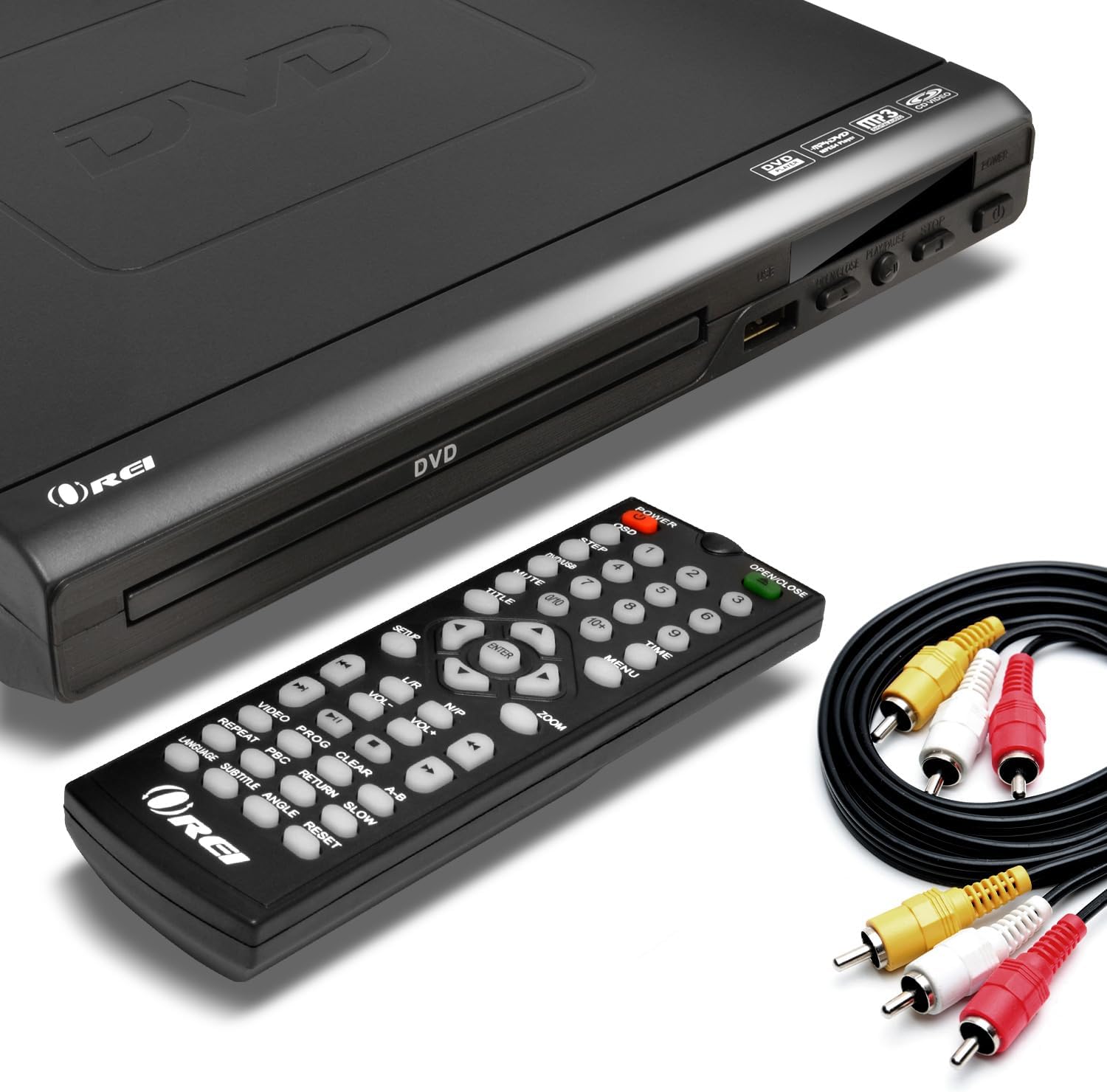
Image: The OREI DVD-Z9H DVD player, its remote control, and included AV cables. The player features a disc tray, power button, and USB port on the front.
- Pladenj za disk: Vstavite DVD-je ali CD-je.
- Vrata USB: Connect a USB flash drive for media playback.
- Gumb za vklop: Vklopi ali izklopi predvajalnik.
- Play/Pause, Stop, Open/Close Buttons: Basic control functions.
4.2. Zadnja plošča

Image: The rear panel of the OREI DVD-Z9H DVD player, displaying the HDMI output, composite video/audio (RCA) outputs, coaxial audio output, and power input. Labels indicate model number DVD-Z9H and power specifications.
- HDMI izhod: Poveže se s televizorjem ali zaslonom za visokoločljivostno sliko in zvok.
- Composite Video/Audio Output (RCA x3): Connects to older TVs using red, white, and yellow RCA cables.
- Koaksialni avdio izhod: For digital audio connection to a compatible receiver.
- Vhodna moč: Priključite napajalni kabel tukaj.
4.3. Daljinski upravljalnik

Image: The OREI DVD-Z9H DVD player with its remote control positioned above it. The remote features numerous buttons for playback, menu navigation, volume, and special functions.
The remote control provides full functionality for the DVD player. Insert two AAA batteries (not included) into the remote before use. Key functions include:
- moč: Vklop/izklop.
- Odpri/Zapri: Odpre in zapre pladenj za disk.
- Številčni gumbi (0-9): For direct track selection.
- Navigation (Up/Down/Left/Right, Enter): Za navigacijo po meniju.
- Play, Pause, Stop, Fast Forward, Rewind: Nadzor predvajanja.
- Glasnost +/-: Prilagodi raven zvočnega izhoda.
- Nastavitev: Dostopi do menija sistemskih nastavitev.
- Subtitle, Audio, Angle: Controls for DVD features.
- Zoom: Adjusts screen zoom level.
5. Nastavitev
5.1. Priključitev na televizor
Izberite enega od naslednjih načinov povezave:
- Priključek HDMI (priporočen za HD):
- Connect one end of an HDMI cable (not included) to the HDMI OUT port on the back of the DVD player.
- Connect the other end of the HDMI cable to an HDMI IN port on your television.
- Z daljinskim upravljalnikom televizorja izberite ustrezni vhod HDMI.

Image: A diagram illustrating how to connect the OREI DVD-Z9H DVD player to a TV using an HDMI cable and how to connect a USB flash drive to the player.
- Composite Video/Audio Connection (Standard Definition):
- Connect the yellow plug of the supplied AV cable to the VIDEO OUT port on the DVD player.
- Connect the red and white plugs of the AV cable to the AUDIO OUT (R/L) ports on the DVD player.
- Connect the other ends of the AV cable to the corresponding VIDEO IN and AUDIO IN ports on your television.
- Select the corresponding AV input on your TV.
5.2. Napajalni priključek
- Priključite napajalni kabel v vhod za napajanje na zadnji strani DVD predvajalnika.
- Drugi konec napajalnega kabla priključite v standardno električno vtičnico.
5.3. Začetna nastavitev
After connecting and powering on the player, you may need to configure basic settings:
- Pritisnite NASTAVITEV gumb na daljinskem upravljalniku.
- Navigate through the menu to set preferences such as:
- jezik: Select your preferred menu and audio language.
- TV sistem: Choose between NTSC or PAL based on your region (the player has built-in conversion).
- Razmerje stranic: Select 16:9 for widescreen TVs or 4:3 for standard TVs.
- Kakovost videa: Adjust brightness, contrast, etc.
- Pritisnite NASTAVITEV ponovno za izhod iz menija.
6. Navodila za uporabo
6.1. Playing a DVD/CD
- Pritisnite MOČ gumb za vklop predvajalnika.
- Pritisnite ODPRTO/ZAPRI gumb za odpiranje pladnja za disk.
- DVD ali CD postavite na pladenj za diske z nalepljeno stranjo navzgor.
- Pritisnite ODPRTO/ZAPRI znova zaprite pladenj.
- Predvajalnik bo samodejno začel predvajanje ali prikazal meni diska.
- Use the remote control's navigation and playback buttons (PLAY, PAUSE, STOP, FF, REW) za upravljanje predvajanja.

Image: The OREI DVD-Z9H DVD player and its remote control in front of a television displaying a movie scene, illustrating the player's ability to play DVDs from any region.
6.2. Predvajanje medijev USB
The player supports playback of video, picture, and music files ključka USB.
- Insert a USB 2.0 flash drive (up to 16GB) into the USB port on the front of the player.
- The player should automatically detect the USB drive and display a menu for file selection. If not, press the USB button on the remote (if available) or navigate to the USB input source.
- Use the navigation buttons to browse files in pritisnite ENTER za izbiro in predvajanje.
Podprti formati: DVD, AVI, CD, CD-R/RW, DVD-R/RW, DVD+R/RW, Vc1, MPEG1, MPEG-2, MP3.
Note: The HDMI DVD player can only support USB 2.0 Flash drives up to 16 GB and plays video files up to 720p via USB. Blu-ray discs are not supported.

Image: The OREI DVD-Z9H DVD player positioned below a TV displaying a high-definition image. Icons represent various supported media formats including DVD, AVI, CD, CD-R/RW, DVD-R/RW, VCI, MPEG1, MPEG-2, and MP3, highlighting its 1080p upscaling capability.
7. Vzdrževanje
7.1. Čiščenje predvajalnika
- Unplug the player from the power outlet before cleaning.
- Use a soft, dry, lint-free cloth to wipe the exterior of the player.
- Do not use liquid cleaners, abrasive pads, or chemical solvents, as these can damage the finish.
7.2. Nega diska
- Plošče prijemajte za robove, da preprečite prstne odtise na predvajalni površini.
- Keep discs clean and free from scratches. Wipe discs gently from the center outwards with a soft, dry cloth if cleaning is necessary.
- Ko diskov ne uporabljate, jih shranite v škatle.
8. Odpravljanje težav
If you encounter issues with your OREI DVD-Z9H player, refer to the following common problems and solutions:
| Težava | Možen vzrok | rešitev |
|---|---|---|
| Brez moči | Napajalni kabel ni priključen; vtičnica ni aktivna | Ensure power cord is securely plugged into player and outlet; Test outlet with another device. |
| Ni slike na televizorju | Incorrect TV input selected; Loose video cable connection | Select the correct HDMI or AV input on your TV; Check that HDMI or AV cables are securely connected. |
| Brez zvoka | TV/player volume too low; Loose audio cable connection; Incorrect audio settings | Increase volume on TV and player; Check audio cable connections; Verify audio settings in the player's setup menu. |
| Disk se ne predvaja / napaka »Ni diska« | Disc inserted incorrectly; Disc is dirty or scratched; Unsupported disc format | Insert disc with label side up; Clean disc with a soft cloth; Ensure disc is a supported format (not Blu-ray). |
| Daljinski upravljalnik ne deluje | Batteries are dead or inserted incorrectly; Obstruction between remote and player | Replace batteries with new ones, ensuring correct polarity; Remove any objects blocking the remote's signal path to the player's sensor. |
| Težave s predvajanjem prek USB-ja | Unsupported USB drive size/type; Unsupported file format; Video resolution too high | Use a USB 2.0 flash drive up to 16GB; Ensure files are in supported formats (e.g., AVI, MPEG); Video resolution should not exceed 720p. |
9. Specifikacije
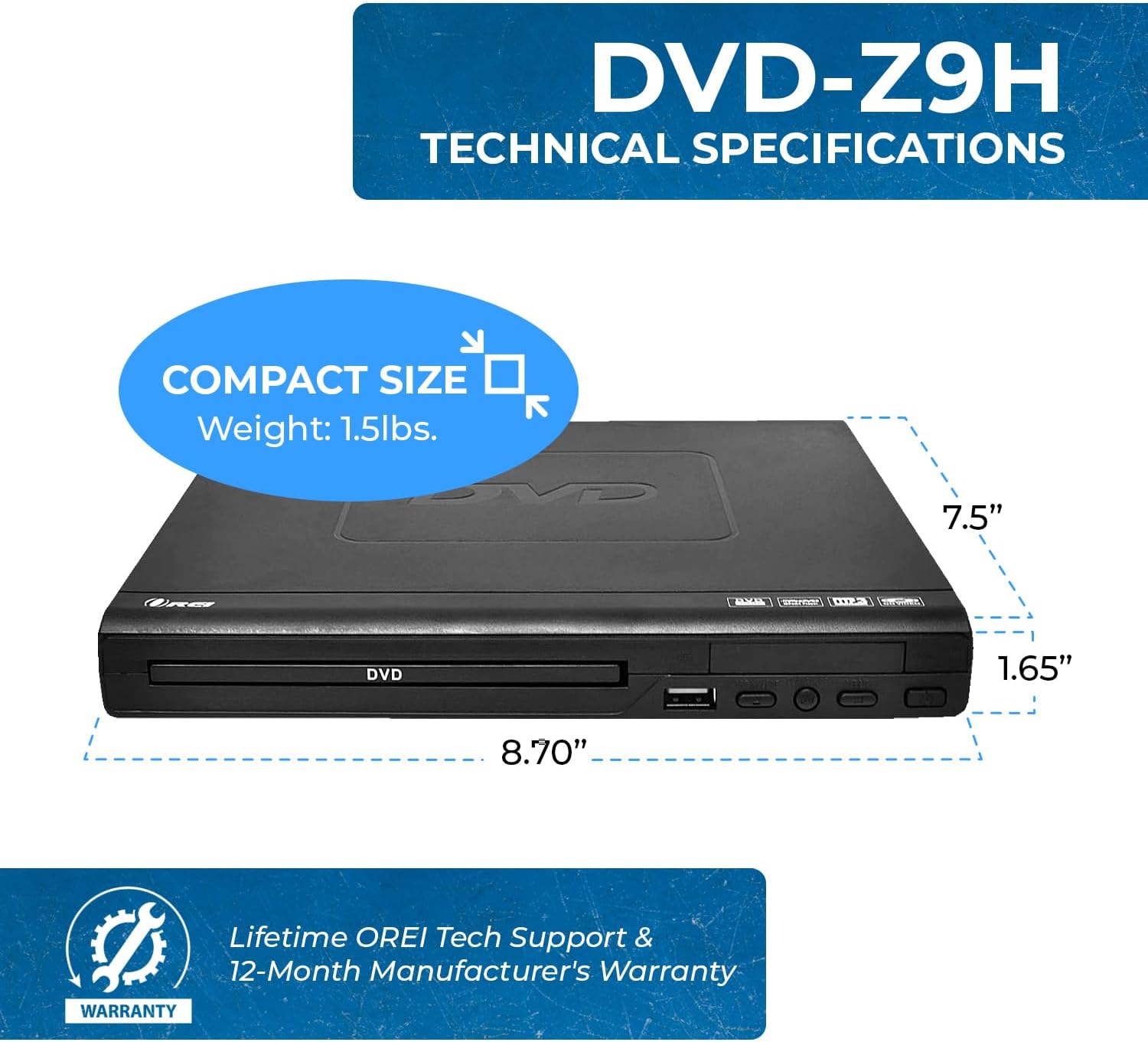
Image: The OREI DVD-Z9H DVD player shown with its compact dimensions: 8.70 inches (length), 7.5 inches (width), and 1.65 inches (height), and a weight of 1.5 lbs.
- Model: DVD-Z9H
- Dimenzije (D x Š x V): Približno 8.70 x 7.5 x 1.65 palcev (22.1 x 19.05 x 4.19 cm)
- Teža: Približno 1.5 lbs (0.68 kg)
- Vrsta medija: CD, DVD (Does not support Blu-ray discs)
- Podprti formati: DVD, AVI, CD, CD-R/RW, DVD-R/RW, DVD+R/RW, Vc1, MPEG1, MPEG-2, MP3
- Resolucija: 1080p (upscaling)
- Povezljivost: HDMI, RCA (Composite Video/Audio), Coaxial Audio, USB 2.0
- USB podpora: Up to 16GB USB 2.0 flash drives, video files up to 720p
- voltage: Worldwide Dual Voltage (100-240 V)
- Posebne lastnosti: Region Free (0-6), Built-in PAL/NTSC Converter
10. Garancija in podpora
The OREI DVD-Z9H comes with a 1-letna garancija proizvajalca from the date of purchase. OREI also offers a 30-day money-back guarantee.
For technical support, warranty claims, or any product-related inquiries, please contact OREI customer service. Refer to the contact information provided with your purchase or visit the official OREI webstran za pomoč.