
Teltonika FMB140
Uporabniški priročnik Teltonika FMB140
GNSS/GSM/BLE Terminal with CAN Bus Support
1. Uvod
This user manual provides comprehensive instructions for the installation, operation, and maintenance of the Teltonika FMB140 GNSS/GSM/BLE terminal. The FMB140 is an advanced tracking device with integrated CAN bus data reading capabilities, designed for various fleet management and vehicle tracking applications. Please read this manual carefully before using the device to ensure proper functionality and safety.
2. Izdelek je končanview
The Teltonika FMB140 is a compact and reliable GNSS/GSM/BLE terminal equipped with an internal Li-ion battery and advanced features for vehicle data acquisition. It supports GNSS (Global Navigation Satellite System) for precise positioning, GSM for communication, and Bluetooth Low Energy (BLE) for connectivity with various sensors and accessories. Its key feature is the ability to read CAN bus data from vehicles, providing valuable insights into vehicle performance and status.

Slika 2.1: Spredaj view of the Teltonika FMB140 device, showing its compact design and branding.
2.1. Ključne značilnosti
- GNSS (GPS, GLONASS, GALILEO, BEIDOU) positioning
- GSM/GPRS connectivity
- Bluetooth 4.0 LE for external devices
- CAN bus data reading (J1939, J1708, FMS)
- Internal Li-ion battery (3.7V, 170mAh)
- Internal GNSS and GSM antennas
- Digital Inputs/Outputs, Analog Inputs
- 1-Wire data interface
- Posodobitve po zraku (OTA).
3. Varnostne informacije
Please observe the following safety precautions to prevent damage to the device and ensure safe operation:
- Naprave ne razstavljajte ali spreminjajte.
- Zagotovite ustrezno napajanje voltage (10-30V DC) as specified.
- Naprave ne izpostavljajte ekstremnim temperaturam, vlagi ali neposredni sončni svetlobi.
- Napravo hranite stran od močnih magnetnih polj.
- Pred kakršnim koli ožičenjem ali vzdrževanjem izklopite napajanje.
- Namestitev mora opraviti usposobljeno osebje.
4. Vsebina paketa
Preverite, ali so v paketu prisotni vsi elementi:
- Teltonika FMB140 device
- Power/data cable (may be sold separately depending on region/bundle)
- Quick Start Guide (digital version available online)
5. Nastavitev in namestitev
5.1. Vstavljanje SIM kartice
- Poiščite režo za kartico SIM na napravi.
- Insert a valid Micro-SIM card with an active data plan. Ensure the SIM card is inserted correctly according to the diagram on the device or in the quick start guide.
- Dobro zaprite pokrov kartice SIM.
5.2. Električna shema in povezave
The FMB140 features a 2x6 socket for power, digital inputs/outputs, analog inputs, and 1-Wire data, as well as a dedicated CAN bus connector. Refer to the diagram below for pin assignments.
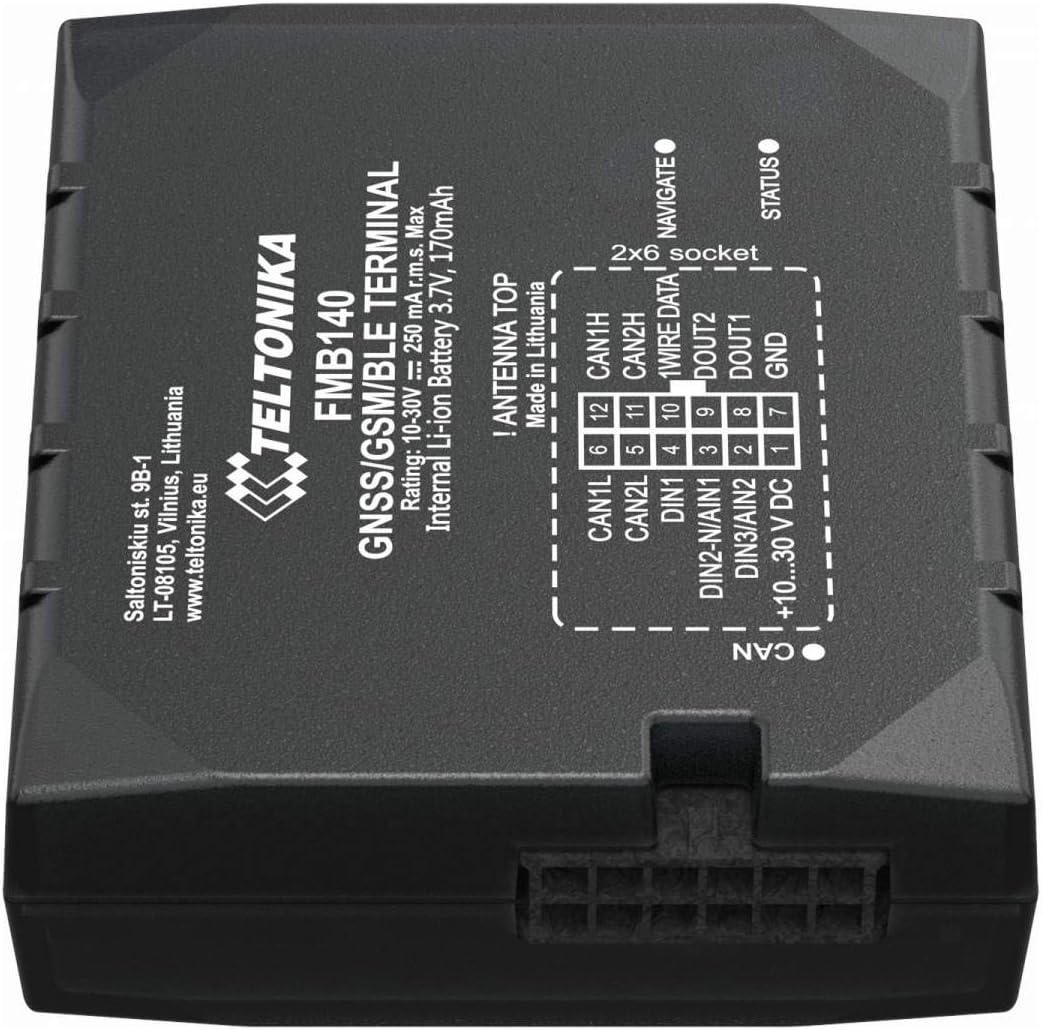
Slika 5.1: Podrobno view of the Teltonika FMB140's 2x6 socket pinout and CAN bus connector, indicating power, I/O, and data lines.
| Pin št. | Opis | funkcija |
|---|---|---|
| 1 | +10...30 V DC | Vhod za napajanje |
| 2 | DIN3/AIN2 | Digital Input 3 / Analog Input 2 |
| 3 | DIN2-N/AIN1 | Digital Input 2 (Negative) / Analog Input 1 |
| 4 | DIN1 | Digitalni vhod 1 |
| 5 | CAN2L | CAN Bus 2 Low |
| 6 | CAN1L | CAN Bus 1 Low |
| 7 | GND | Tla |
| 8 | DOUT1 | Digitalni izhod 1 |
| 9 | DOUT2 | Digitalni izhod 2 |
| 10 | PODATKI O ŽICI | 1-Wire Data Interface |
| 11 | CAN2H | CAN Bus 2 High |
| 12 | CAN1H | CAN Bus 1 High |
Napajalni priključek: Connect the +10...30V DC wire to the vehicle's positive power source and GND to the vehicle's ground. Ensure a fuse is installed on the positive power line.
Povezava CAN vodila: Connect CAN1H/CAN2H and CAN1L/CAN2L to the vehicle's CAN bus lines. Consult the vehicle's wiring diagram for correct CAN bus access points.
6. Upravljanje naprave
6.1. Initial Power-Up and Status Indicators
Once powered, the device will initiate. Observe the LED indicators for status:
- NAVIGATE LED: Indicates GNSS status. Solid green when GPS fix is acquired.
- LED STATUS: Indicates GSM/GPRS status. Flashing indicates network activity, solid indicates registered.
6.2. Konfiguracija
The FMB140 can be configured using Teltonika Configurator software via USB or remotely via FOTA (Firmware Over The Air) or SMS commands. Bluetooth connectivity also allows for configuration via a mobile application.

Figure 6.1: System block diagram of the Teltonika FMB140, illustrating its various interfaces and functionalities including configuration options.
6.3. Prenos podatkov
The device collects data from GNSS, CAN bus, and connected sensors, then transmits it to a server via GPRS. Data transmission parameters are configured through the Teltonika Configurator.
7. Vzdrževanje
The Teltonika FMB140 is designed for minimal maintenance. However, regular checks are recommended:
- Napravo vzdržujte čisto in brez prahu in umazanije.
- Prepričajte se, da so vse kabelske povezave varne in nepoškodovane.
- Periodically check for firmware updates to ensure optimal performance and access to new features.
- Naprave ne izpostavljajte vodi ali prekomerni vlagi.
8. Odpravljanje težav
| Težava | Možen vzrok | rešitev |
|---|---|---|
| Naprava se ne vklopi | Ni napajanja; Nepravilna napeljava; Pregorela varovalka. | Check power connections; Verify voltage; Replace fuse. |
| No GNSS fix (NAVIGATE LED off/flashing) | Poor satellite signal; Device indoors; Antenna obstruction. | Move device to open area; Ensure clear sky view. |
| No GSM network (STATUS LED off/flashing rapidly) | No SIM card; Invalid SIM; No network coverage; Incorrect APN settings. | Insert/check SIM; Verify network coverage; Configure APN. |
| No CAN bus data | Incorrect CAN wiring; Vehicle CAN bus inactive; Incorrect CAN settings. | Verify CAN connections; Ensure vehicle ignition is on; Check CAN configuration in software. |
If the problem persists after attempting these solutions, please contact Teltonika support.
9. Specifikacije
| Funkcija | Podrobnost |
|---|---|
| Številka modela | FMB140 |
| Znamka | Teltonica |
| Dimenzije (embalaža) | 18 x 15 x 4 cm |
| Teža (izdelek) | 220 g |
| Napajalnik | 10-30 V DC |
| Notranja baterija | 3.7 V, 170 mAh Li-ion |
| Povezljivost | GNSS, GSM, Bluetooth 4.0 LE |
| Vmesniki | CAN Bus (2x), Digital Inputs (3), Analog Inputs (2), Digital Outputs (2), 1-Wire, USB |
| Notranji pomnilnik | 128 MB |
| Delovna temperatura | -40°C do +85°C |
10. Garancija in podpora
10.1. Informacije o garanciji
Teltonika provides a standard manufacturer's warranty for the FMB140 device. Please refer to the official Teltonika website or your point of purchase for detailed warranty terms and conditions. Keep your proof of purchase for warranty claims.
10.2. Tehnična podpora
For technical assistance, troubleshooting, or further information regarding the Teltonika FMB140, please visit the official Teltonika support portal or contact their authorized distributors. Comprehensive documentation, FAQs, and firmware updates are available on the Teltonika webspletno mesto: www.teltonika-networks.com/support/
Ask a question about this manual
Ask about setup, troubleshooting, compatibility, parts, safety, or missing instructions. Manuals+ will review the question and use this page’s manual context to help answer it.