
1. Uvod
The StarTech.com SV231DPU34K is a 2-Port DisplayPort KVM Switch designed to allow control of two DisplayPort-enabled computers from a single monitor, keyboard, and mouse. This device supports high-resolution video up to 4K at 60Hz and includes an integrated USB 3.0 hub for sharing additional USB peripherals between connected systems. It also features 3.5mm analog audio switching and offers flexible control via front-panel push buttons or hotkey commands.
2. Vsebina paketa
- 1x KVM Switch (SV231DPU34K)
- 1x Universal Power Adapter (NA/JP, EU, UK, ANZ)
- 4x Rubber Foot Pads
3. Izdelek je končanview
3.1 Sprednja plošča
The front panel provides convenient access to a USB HID port, a USB 3.0 port, and selection buttons for switching between connected computers.

Slika 1: Front Panel of the SV231DPU34K KVM Switch. Features include a USB HID port, a USB 3.0 port, and two computer selection buttons (1 and 2) with a 'SELECT' button.
3.2 Zadnja plošča
The rear panel houses the power input, console DisplayPort and USB HID ports, and dedicated DisplayPort, USB, and audio ports for each connected PC.
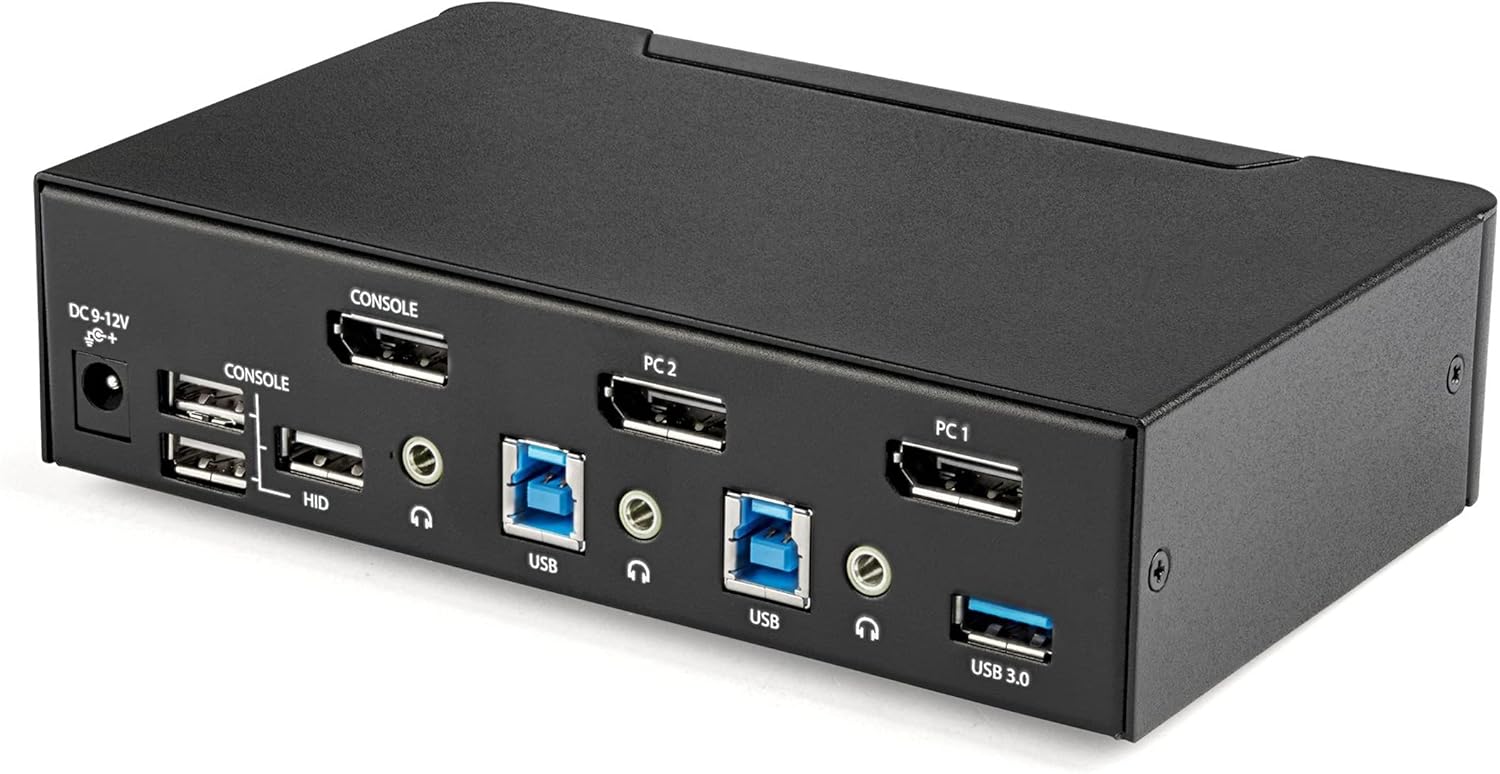
Slika 2: Rear Panel of the SV231DPU34K KVM Switch. Connections include DC 9-12V power, Console DisplayPort, Console USB HID ports, and individual DisplayPort, USB 3.0 Type-B, and 3.5mm audio jacks for PC1 and PC2.
3.3 Labeled Diagram
Ta diagram ponuja celovit view of all ports and their functions on both the front and rear panels.

Slika 3: Labeled diagram illustrating all ports on the SV231DPU34K KVM Switch, including console connections for monitor, keyboard, and mouse, and PC connections for two computers.
4. Navodila za nastavitev
Follow these steps to set up your StarTech.com SV231DPU34K KVM Switch:
- Naprave za izklop: Ensure all computers, monitors, and peripherals are powered off before beginning the installation.
- Povežite konzolne naprave:
- Connect your DisplayPort monitor to the CONSOLE DisplayPort on the rear of the KVM switch.
- Priključite tipkovnico in miško USB na CONSOLE HID USB Type-A ports on the rear of the KVM switch.
- If using external speakers or a microphone, connect them to the CONSOLE 3.5mm audio jacks na zadnji strani.
- Connect Computers (PC1 and PC2): Za vsak računalnik:
- Connect a DisplayPort cable from your computer's DisplayPort output to the corresponding PC1 DisplayPort or PC2 DisplayPort input on the KVM switch.
- Connect a USB 3.0 Type-A to Type-B cable from your computer's USB 3.0 port to the corresponding PC1 USB 3.0 Type-B or PC2 USB 3.0 Type-B input on the KVM switch.
- If using audio, connect 3.5mm audio cables from your computer's audio output/input to the corresponding PC1/PC2 3.5mm audio jacks.
- Priključite periferne naprave USB: Connect any additional USB 3.0 peripherals (e.g., USB hub, printer, flash drive) to the Vrata USB 3.0 Type-A on the front or rear of the KVM switch.
- Priključite napajanje: Connect the included universal power adapter to the Vhodna moč 9-12 V DC on the rear of the KVM switch, then plug it into a power outlet.
- Vklop: Power on the KVM switch, then power on your monitor, and finally power on your connected computers.
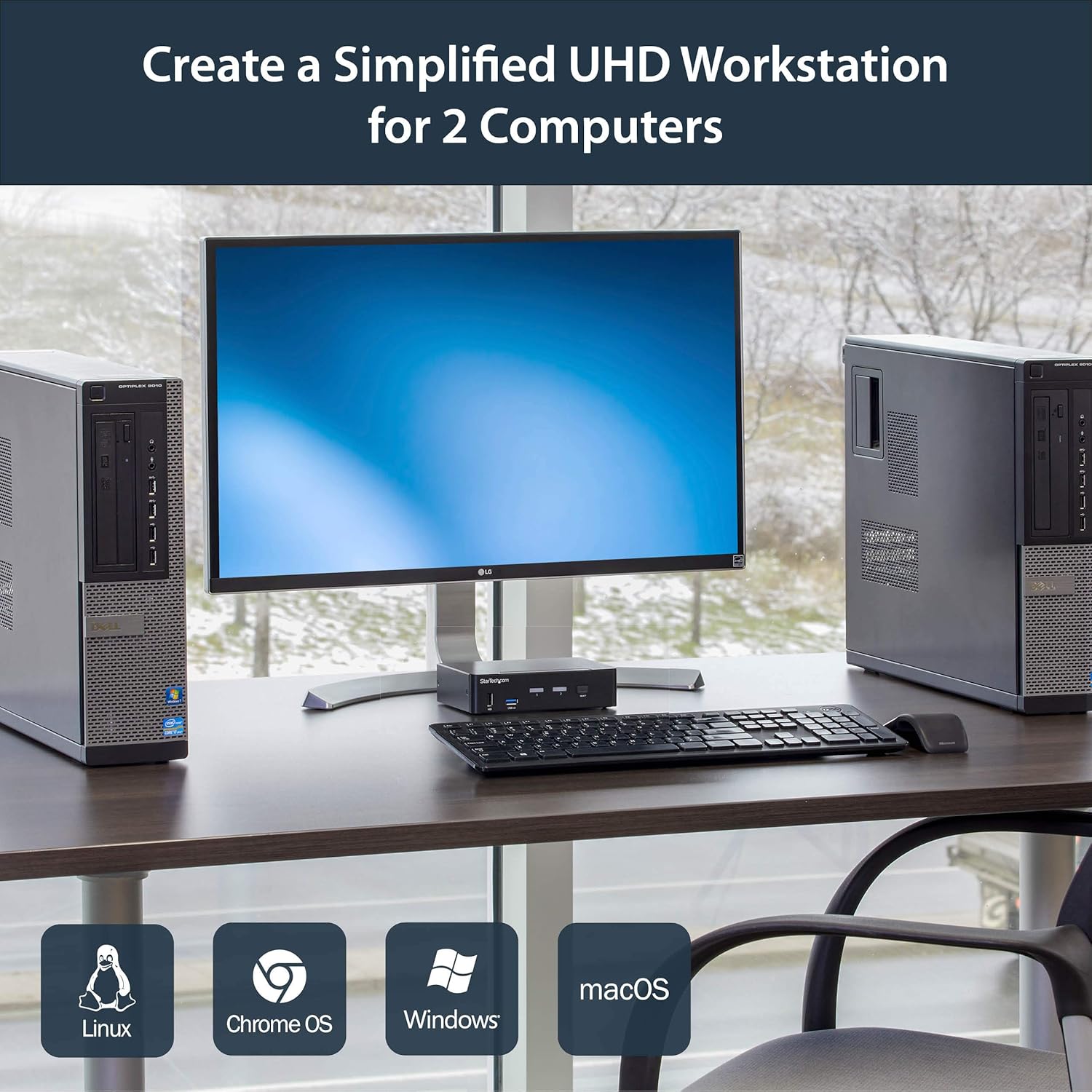
Slika 4: Connection diagram for the SV231DPU34K KVM Switch, showing how two computers share one display and peripherals.
5. Navodila za uporabo
The SV231DPU34K KVM Switch offers two methods for switching between connected computers:
5.1 Front Panel Push Buttons
Pritisnite ustrezno IZBERI button on the front panel of the KVM switch to switch to the desired computer (PC1 or PC2). The LED indicator for the selected computer will illuminate.
Slika 5: Front panel with computer selection buttons.
5.2 Hotkey Switching
The KVM switch supports hotkey commands for switching between computers. Refer to the quick start guide or the official StarTech.com product page for specific hotkey sequences.
6. Vzdrževanje
To ensure optimal performance and longevity of your KVM switch, follow these maintenance guidelines:
- Čiščenje: Keep the device clean and free from dust. Use a soft, dry, lint-free cloth for cleaning. Avoid using liquid or aerosol cleaners.
- Prezračevanje: Ensure adequate airflow around the KVM switch to prevent overheating. Do not block any ventilation openings.
- Upravljanje kablov: Organize cables to prevent strain on ports and accidental disconnections.
- Okoljski pogoji: Operate the device within its specified temperature and humidity ranges. Avoid extreme temperatures or moisture.
7. Odpravljanje težav
Če imate težave s stikalom KVM, si oglejte naslednje pogoste težave in rešitve:
| Težava | Možna rešitev |
|---|---|
| No display or flickering display after switching. |
|
| Tipkovnica ali miška se ne odziva. |
|
| USB 3.0 devices not detected or working intermittently. |
|
| Audio issues (static, no sound). |
|
| G-Sync or FreeSync not working. |
|
8. Specifikacije
| Funkcija | Podrobnost |
|---|---|
| Model | SV231DPU34K |
| Znamka | StarTech.com |
| Video vmesnik | DisplayPort 1.2 |
| Največja ločljivost | 3840 x 2160 @ 60Hz (4K UHD) |
| MST Passthrough | Podprto |
| USB zvezdišče | 2-port USB 3.0 zvezdišče |
| Vrata USB HID | 4x USB Type-A (for keyboard/mouse) |
| Avdio | 3.5mm Analog Audio Switching |
| Preklopne metode | Push Button, Hotkey |
| Material | Jeklo |
| Dimenzije (D x Š x V) | 3.9 x 6.3 x 1.6 palcev (9.9 x 16.0 x 4.1 cm) |
| Teža predmeta | 1.3 funtov (0.59 kg) |
| Vhodna moč | DC 9-12V, 18 Watts |
| barva | Črna |
| Delovna temperatura | 0 °C do 40 °C (32 °F do 104 °F) |
| Temperatura shranjevanja | -20 °C do 60 °C (-4 °F do 140 °F) |
| Vlažnost | 0-80 % RH (brez kondenzacije) |
9. Garancija in podpora
9.1 Informacije o garanciji
This StarTech.com product is backed by a 2-letna garancija. For detailed warranty terms and conditions, please refer to the official StarTech.com webmesto.
9.2 Tehnična podpora
For technical assistance, product documentation, or driver downloads, please visit the official StarTech.com support webspletno mesto: