
1. Uvod
The SABRENT 4-Bay USB 3.0 Docking Station (DS-U3B4) provides a convenient solution for accessing and managing multiple 2.5-inch or 3.5-inch SATA SSDs and HDDs. This tool-free, trayless design supports simultaneous operation of up to four drives and offers high-speed data transfer via USB 3.2 Gen 1 (5Gbps). It is compatible with Windows, macOS, and Linux systems, requiring no additional drivers for basic functionality. The docking station also features an offline cloning function for direct drive duplication without a computer connection.

Image: The SABRENT 4-Bay USB 3.0 Docking Station, a black rectangular device with four top-loading bays for hard drives and LED indicators on the front.
2. Vsebina paketa
- SABRENT 4-Bay USB 3.0 Docking Station (DS-U3B4)
- USB kabel
- Power Adapter (Input 100–240V~50/60Hz, Output 12V/6.5A)
- Uporabniški priročnik
3. Značilnosti izdelka
- Four-Bay SATA Access: Supports up to four 2.5-inch or 3.5-inch SATA SSDs or HDDs simultaneously.
- Namestitev brez orodja: Quickly insert or remove drives without tools or trays.
- Fast USB 3.2 Performance: Data transfer speeds up to 5Gbps via USB 3.2 Gen 1. Backward compatible with USB 2.0.
- Trayless Hot-Swap Design: Drives can be swapped without system reboot.
- Univerzalna združljivost: Works with Windows, macOS, and Linux systems without drivers.
- Neodvisna stikala za napajanje: Each bay has its own independent power switch and LED status indicator.
- Kloniranje brez povezave: Duplicate drives directly from source to target without a computer connection.
4. Navodila za nastavitev
- Priključite napajanje: Plug the provided power adapter into the DC IN port on the back of the docking station and then into a wall outlet.
- Priključite USB: Connect the provided USB cable from the USB 3.0 port on the back of the docking station to an available USB 3.0 (or higher) port on your computer.
- Set PC/CLONE Switch: Ensure the PC/CLONE switch on the back of the docking station is set to the "PC" position for computer connectivity.
- Vstavite pogone: With the docking station powered off, carefully insert your 2.5-inch or 3.5-inch SATA SSDs/HDDs into the available bays. Ensure they are seated firmly.
- Vklop: Flip the ON/OFF switch on the back of the docking station to the "ON" position. The power LED and individual bay LEDs should illuminate, indicating successful connection.

Image: The SABRENT 4-Bay USB 3.0 Docking Station with 2.5-inch SSDs and 3.5-inch HDDs inserted into its bays.
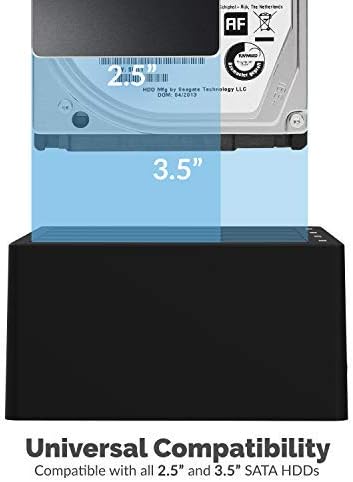
Image: A 3.5-inch hard drive being inserted into a bay of the docking station, illustrating universal compatibility.

Image: Close-up of the back panel of the docking station, highlighting the USB 3.0 port, DC IN port, and ON/OFF switch.
5. Navodila za uporabo
5.1. Data Transfer Mode (PC Mode)
- Ensure the docking station is set up as described in Section 4.
- Your operating system should automatically detect the inserted drives. They will appear as individual external drives.
- You can now access, read, write, and transfer data to and from the drives as you would with any other external storage device.
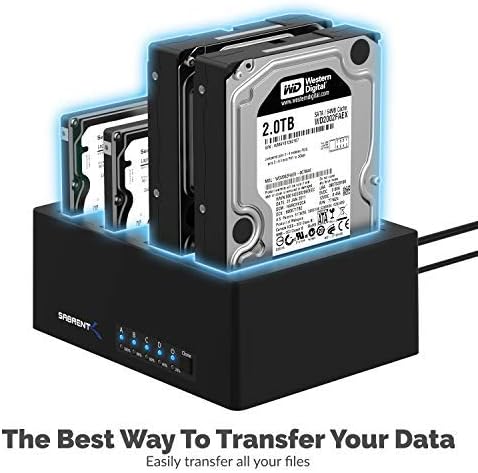
Image: The SABRENT 4-Bay USB 3.0 Docking Station with multiple hard drives, illustrating its use for data transfer.
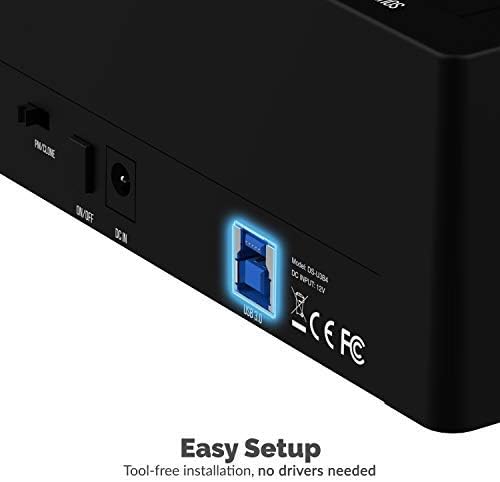
Image: A visual representation of data being transferred at 5Gbps from the docking station to a computer.
5.2 Funkcija kloniranja brez povezave
The offline cloning feature allows you to duplicate a source drive to a target drive without connecting to a computer. The target drive must have equal or greater capacity than the source drive.
- Ugasniti: Prepričajte se, da je priklopna postaja izklopljena.
- Vstavite pogone: Vstavite Izvorni pogon into Bay A (marked "SOURCE A"). Insert the Ciljni pogon into Bay B (marked "TARGET B").
- Set PC/CLONE Switch: Slide the PC/CLONE switch on the back of the docking station to the "CLONE" position.
- Začni kloniranje: Press and hold the "CLONE" button on the front of the docking station for approximately 3-5 seconds until the 20% LED indicator starts flashing. Release the button.
- Confirm Cloning: Press the "CLONE" button again briefly to confirm and start the cloning process. The LED indicators (25%, 50%, 75%, 100%) will illuminate sequentially to show the cloning progress.
- Dokončanje: The cloning process is complete when all four LED indicators (25%, 50%, 75%, 100%) remain steadily lit.
- Power Off & Remove: Power off the docking station and carefully remove the cloned drives.
Video: An official product video demonstrating the offline cloning feature of the SABRENT 4-Bay USB 3.0 Docking Station. It shows how to insert drives, activate the clone mode, and monitor the progress via LED indicators.
6. Vzdrževanje
- Polnilno postajo vzdržujte čisto in brez prahu. Za čiščenje uporabljajte mehko, suho krpo.
- Naprave ne izpostavljajte ekstremnim temperaturam ali vlagi.
- Naprave ne poskušajte razstavljati ali popravljati sami. Obrnite se na usposobljeno servisno osebje.
7. Odpravljanje težav
- Pogoni niso bili zaznani:
- Ensure all power and USB cables are securely connected.
- Verify the ON/OFF switch is in the "ON" position.
- Check that the PC/CLONE switch is set to "PC" for computer access.
- Prepričajte se, da so pogoni pravilno nameščeni v svojih ležiščih.
- Poskusite se povezati z drugimi vrati USB na vašem računalniku.
- Počasne hitrosti prenosa:
- Ensure the docking station is connected to a USB 3.0 (or higher) port on your computer.
- Verify your drives are capable of USB 3.0 speeds.
- Offline Cloning Fails:
- Confirm the target drive has equal or greater capacity than the source drive.
- Ensure the PC/CLONE switch is set to "CLONE".
- Follow the cloning steps precisely, including pressing and holding the clone button, then pressing again to confirm.
8. Specifikacije
| Funkcija | Specifikacija |
|---|---|
| Številka modela | DS-U3B4 |
| Material | Plastika |
| Združljive vrste pogonov | 2.5" / 3.5" SATA SSD/HDD |
| Največje število podprtih naprav | 4 |
| Hitrost prenosa podatkov | Do 5 Gb/s (USB 3.2 Gen 1) |
| Strojni vmesnik | USB 3.0 |
| Vhod za napajanje | 100–240V~50/60Hz |
| Izhod za napajanje | 12V/6.5A |
| Združljivi operacijski sistemi | Windows, macOS, Linux |
| Dimenzije izdelka | 6.3 x 4.72 x 2.76 palcev |
| Teža predmeta | 1 funtov |
9. Garancija in podpora
SABRENT products are designed for reliability and performance. For warranty information, technical support, or further assistance, please refer to the official SABRENT webspletno mesto ali se obrnite neposredno na njihovo službo za stranke. Za uveljavljanje garancije shranite račun.