
1. Uvod
The DROK LD25 USB Load Tester is an intelligent temperature-controlled electronic load module designed for testing USB and Type-C power sources and cables. It features high power, high current, and high voltage capabilities, along with intelligent control for precise measurements. This device is ideal for verifying charger output capacity, testing cable quality, and performing bulk aging tests.
It provides a constant current discharge task up to 4A, 25V, and 25W, offering a user-friendly interface and robust performance for diverse testing requirements.
2. Pomembne varnostne informacije
OPOZORILO: This product does not have reverse connection protection. The input polarity cannot be reversed. Reversing the input polarity will cause permanent damage to the product and it cannot be repaired. Always ensure correct polarity before connecting the device.
Zagotovite delovno napetosttage, current, and power do not exceed the rated maximums to prevent damage to the device or the power source being tested.
3. Značilnosti in komponente izdelka
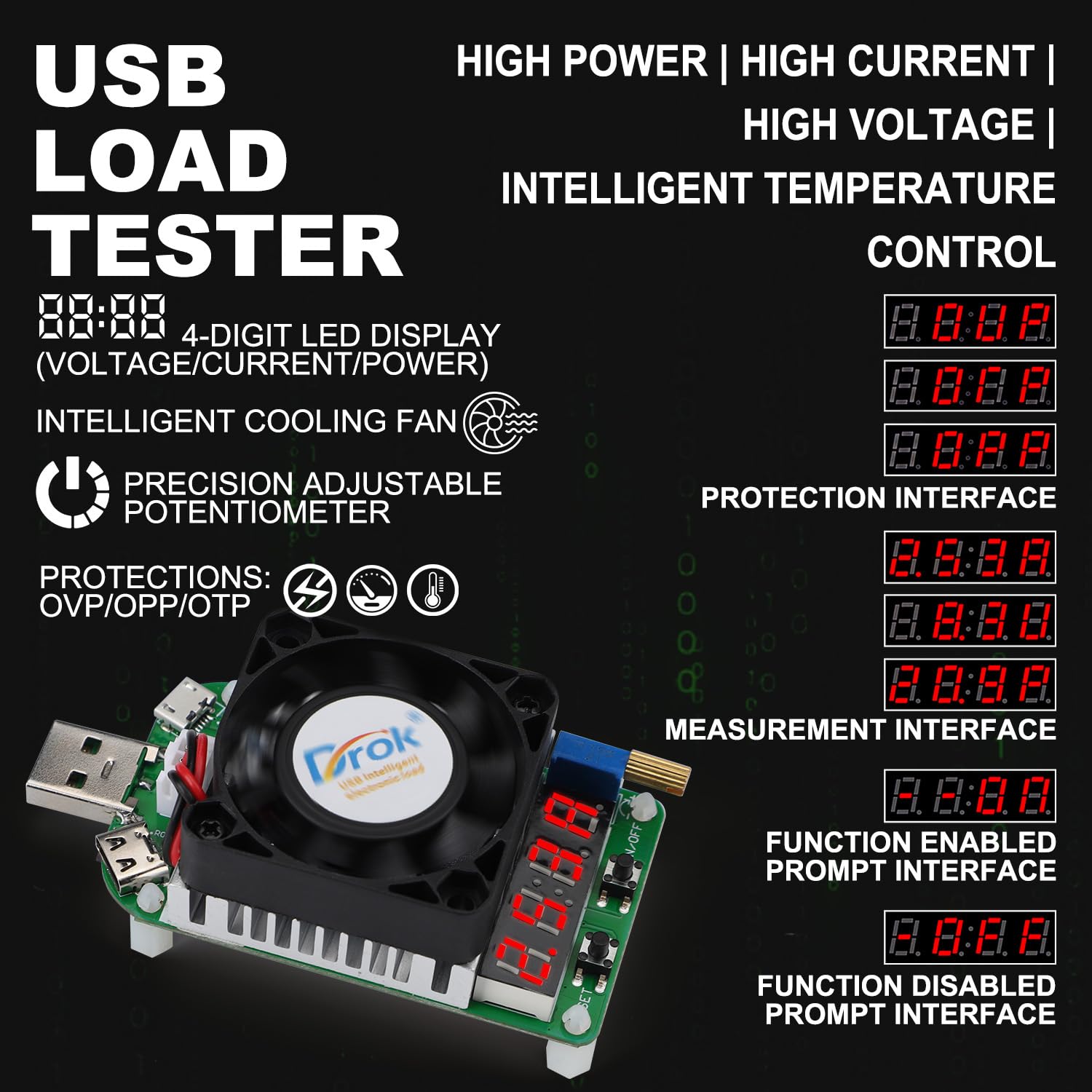

- 4-Digit LED Digital Display: Oddaje voltage, current, and power values.
- Inteligentni hladilni ventilator: Oil bearing fan with intelligent temperature control, speed up to 5800±10% RPM. Activates automatically when current exceeds 2A or temperature exceeds 40°C.
- Precision Adjustable Potentiometer: Allows fine-tuning of the output current.
- USB Male Port: For connecting to USB power sources.
- Micro USB Port (Max. Current: 2A): For testing Micro USB cables and devices.
- Type-C Port (Max. Current: 4A): For testing Type-C cables and devices.
- Tipka za VKLOP/IZKLOP: Short press to toggle the load output on or off. Long press to set the default boot state (output on or off) for future use.
- Tipka SET: Short press to cycle through the display modes: Voltage (V), Current (A), and Power (W). Long press to enter the protection setting menu.
- Full Aluminum Heat Sink: Efficient heat dissipation for stable operation.
- Lastnosti zaščite: Nad-zvtage protection (OVP), Over-power protection (OPP), Over-temperature protection (OTP).
4. Specifikacije

| Parameter | Vrednost |
|---|---|
| Nazivna delovna zmtage | DC 4-25.0V |
| Največja moč praznjenja | 25 W |
| Nazivni obratovalni tok | 0.25-4.00A (Min. 0.05A when fan is off) |
| Hitrost ventilatorja | Oil bearing intelligent temperature control fan, 5800±10% RPM |
| Constant Current Resolution | ± (1% + 3 števk) |
| Metoda odvajanja toplote | Intelligent temperature control fan + Aluminum heat sink |
| Delovna temperatura | -10℃~+40℃ |
| Nastavljiv potenciometer | Precision multiloop adjustable potentiometer |
| Način prikaza | 4-bit LED tube |
| Razširitvena vrata | Micro USB port, Type-C port |
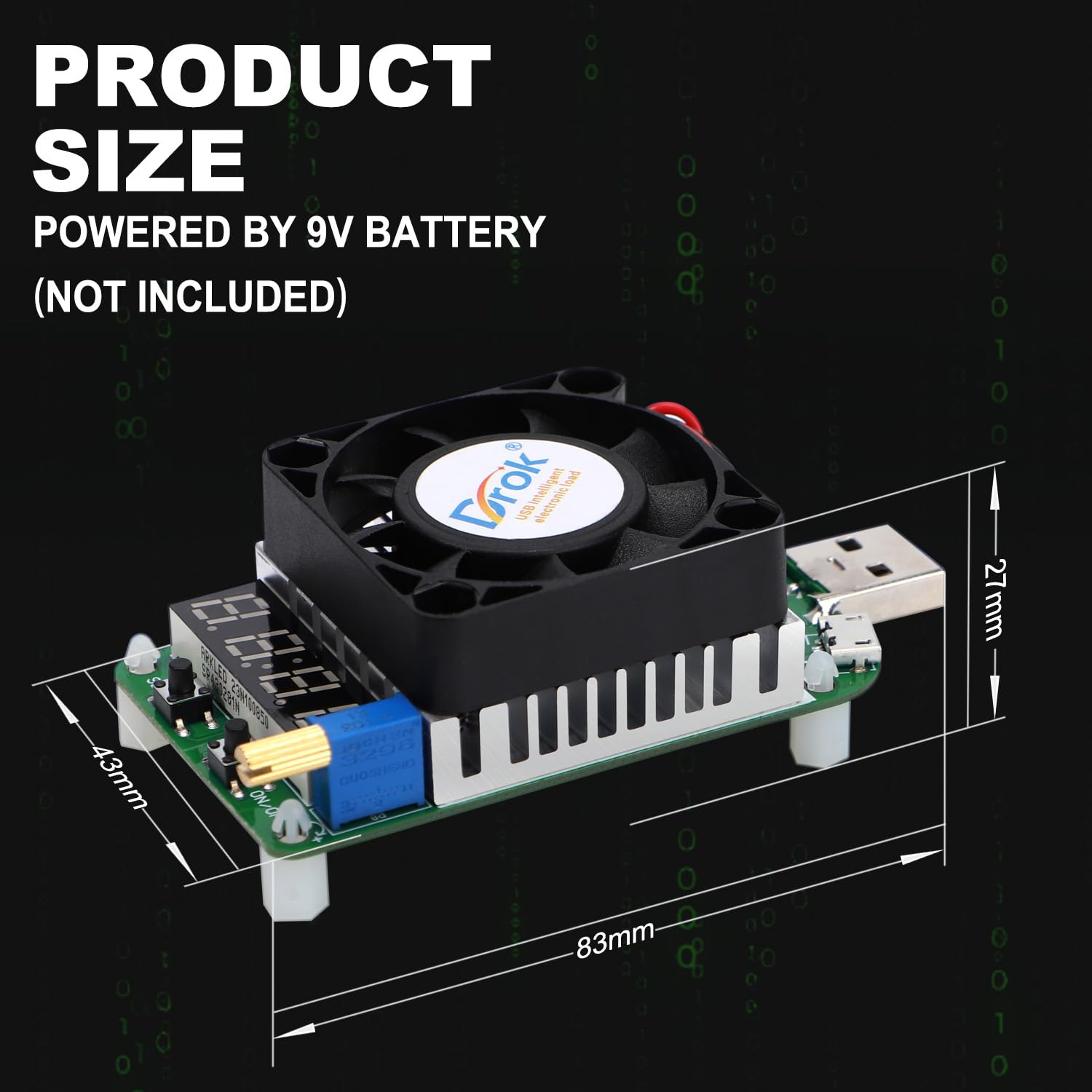
| Dimenzije izdelka | 84 x 41 x 28 mm |
| Teža izdelka | 57 g |
5. Nastavitev
- Prepare Power Source: Ensure the power source (e.g., USB charger, power bank) you intend to test is within the operating voltagObmočje enosmerne napetosti 4–25.0 V.
- Connect the Load Tester:
- For standard USB power sources: Plug the USB male port of the LD25 directly into the USB output port of your charger or power bank.
- For Micro USB or Type-C cables/devices: Connect the Micro USB or Type-C port of the LD25 to the respective cable or device.
- Preverite povezavo: Once connected, the 4-digit LED display should illuminate, indicating the device is powered on. If it does not power on, check the connection and ensure the power source is active.
- Initial Current Setting: Before applying a load, ensure the adjustable potentiometer is set to a low current or off position to avoid sudden high current draw.
6. Navodila za uporabo
6.1 Osnovna operacija
- Vklop/izklop:
- Kratek pritisk na Tipka za vklop/izklop to toggle the load output on or off.
- Dolgo pritisnite Tipka za vklop/izklop to set the default boot state (output on or off) for future use.
- Prilagoditev toka: Zavrtite Nastavljiv potenciometer to increase or decrease the discharge current. The current value will be displayed on the LED screen. Adjust gradually to the desired load.
- Načini prikaza: Kratek pritisk na Tipka SET to cycle through the display modes: Voltage (V), Current (A), and Power (W).
- Setting Protection Modes: Dolgo pritisnite Tipka SET to enter the protection setting menu. Refer to Section 7 for details on protection functions.
6.2 Delovanje inteligentnega hladilnega ventilatorja
The intelligent cooling fan will automatically activate under the following conditions to maintain optimal operating temperature:
- When the discharge current exceeds 2A.
- When the internal temperature of the device exceeds 40°C.
The fan supports continuous 25W discharge and ensures uninterrupted operation by efficiently dissipating heat.

7. Protection Functions and Troubleshooting
The LD25 USB Load Tester incorporates several protection mechanisms to ensure safe operation and prevent damage to the device and connected equipment.
- OVP (Over-Voltage Zaščita):
- Activates if the input voltage exceeds 25V (up to 30V).
- The digital display will show "OVP".
- Pozor: voltages exceeding 30V can cause permanent damage.
- OTP (zaščita pred previsoko temperaturo):
- Activates if the load temperature exceeds 80°C.
- The device will stop working, and the digital display will show "OTP".
- OPP (zaščita pred preobremenitvijo):
- Activates if the discharge power exceeds 25W.
- The device will stop working, and the digital display will show "OPP".
When a protection condition is met, the device will halt operation. To resume, address the underlying issue (e.g., reduce voltage, allow cooling, reduce power draw) and then manually or automatically reset the load as configured.
8. Aplikacije
The DROK LD25 USB Load Tester is a versatile tool for various testing scenarios:
- Charger Testing: Measure the actual output current capacity of USB chargers and power banks.
- Cable Quality Testing: Evaluate the quality and performance of Micro USB and Type-C charging cables by observing voltagpadec pod obremenitvijo.
- Bulk Aging Tests: Suitable for factory quality control and aging tests of chargers and power supplies.
- Power Delivery Verification: Confirm stable power output from various USB power sources.

9. Vzdrževanje
To ensure the longevity and accurate performance of your DROK LD25 USB Load Tester:
- Čiščenje: Za čiščenje naprave uporabite mehko, suho krpo. Ne uporabljajte tekočih čistil ali topil.
- Shranjevanje: Napravo shranjujte na hladnem in suhem mestu, stran od neposredne sončne svetlobe in ekstremnih temperatur.
- Ravnanje: Izogibajte se padcem ali izpostavljanju naprave močnim udarcem.
- Prezračevanje: Ensure the cooling fan and heat sink are free from dust and obstructions to maintain efficient heat dissipation.