
1. Končanoview
The Anker Bluetooth Ultra-Slim Keyboard is designed for efficient and quiet typing across multiple operating systems. Its compact and lightweight design makes it suitable for portable use with tablets and other Bluetooth-enabled devices.

Figure 1: Anker Bluetooth Ultra-Slim Keyboard in use, demonstrating its low-profile, soft-press keys for quiet and efficient typing.
Glavne lastnosti vključujejo:
- Ultra-slim and lightweight design for portability.
- Bluetooth connectivity, eliminating the need for cables.
- Universal compatibility with Android, iOS, Mac, and Windows devices.
- Quiet, low-profile tipke za udobno tipkanje.
- Power-saving mode for extended battery life.
2. Nastavitev
2.1. Namestitev baterije
The keyboard operates on standard AAA batteries. To install or replace batteries:
- Poiščite predal za baterije na spodnji strani tipkovnice.
- Odprite pokrov predala za baterije.
- Insert the required AAA batteries, ensuring correct polarity (+/-).
- Trdno zaprite pokrov prostora za baterije.

Figure 2: The underside of the keyboard, highlighting the power switch and the battery compartment for easy access and replacement.
2.2. Vklop/izklop
To power on the keyboard, slide the power switch located on the top edge of the keyboard to the "ON" position. To power off, slide the switch to the "OFF" position.
2.3. Bluetooth seznanjanje
To connect the keyboard to your device via Bluetooth:
- Prepričajte se, da je tipkovnica vklopljena.
- Activate Bluetooth on your device (tablet, smartphone, computer).
- Pritisnite Fn key and the Bluetooth key (usually marked with a Bluetooth symbol, often on the 'Z' key) simultaneously to enter pairing mode. The Bluetooth indicator light on the keyboard will flash.
- On your device, search for available Bluetooth devices. Select "Anker Bluetooth Keyboard" from the list.
- Follow any on-screen prompts to complete the pairing process. A successful connection will be indicated by the Bluetooth light turning solid or turning off, depending on the model.
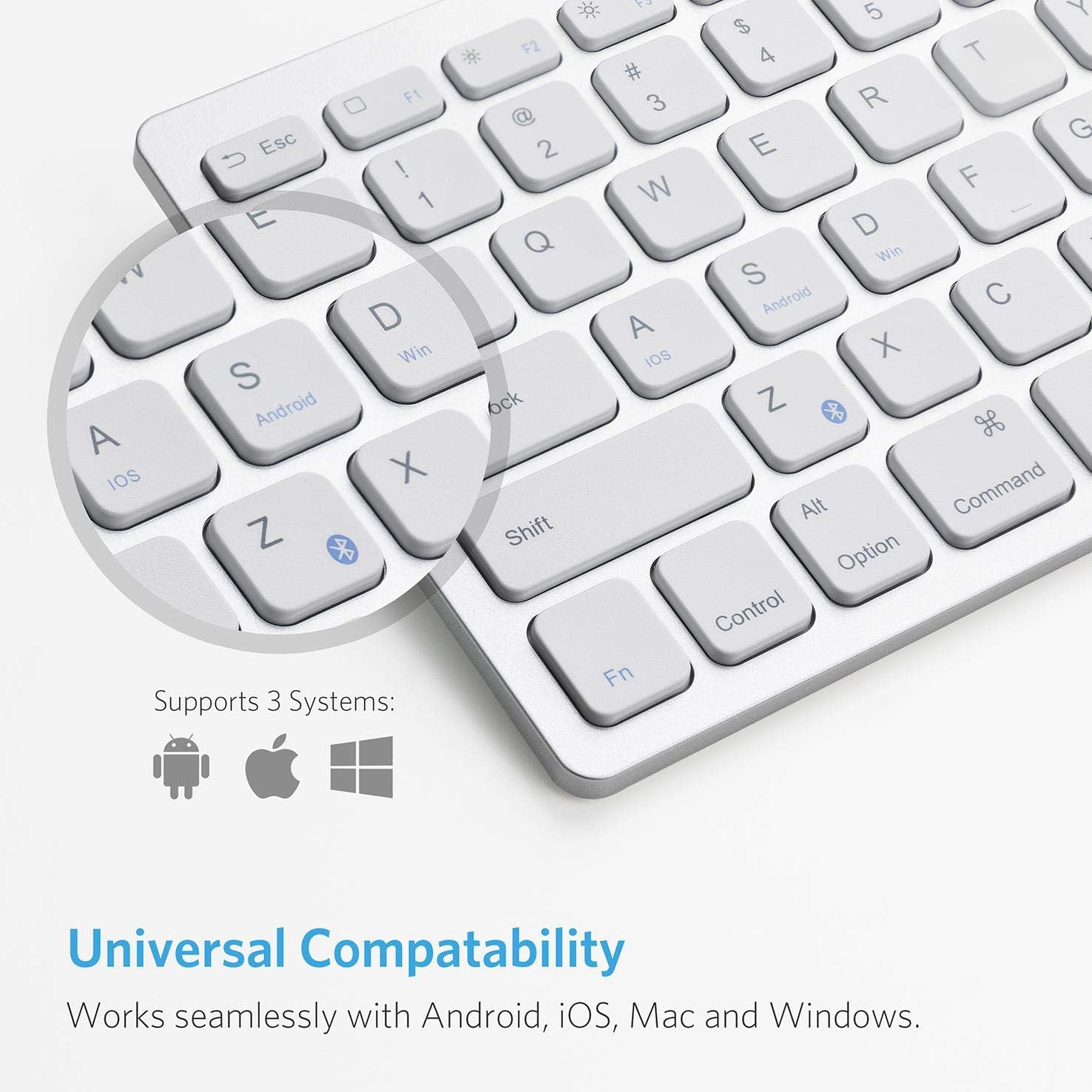
Figure 3: The keyboard features dedicated keys for selecting operating systems (iOS, Android, Windows) to optimize key functions for your device.
3. Navodila za uporabo
3.1. Združljivost sistema
The keyboard is designed for universal compatibility. To switch between operating system modes, press the Fn key along with the corresponding OS key:
- Fn + Q za iOS
- Fn + W za Android
- Fn + E za Windows
3.2. Funkcijske tipke
The top row of keys provides various function shortcuts. These keys can be used in conjunction with the Fn key for specific actions, such as media control, volume adjustment, and screen brightness.
Refer to your device's operating system for specific function key behaviors.

Figure 4: The keyboard seamlessly complements various devices, offering an enhanced typing experience for on-the-go productivity.
4. Vzdrževanje
4.1. Čiščenje
Za čiščenje tipkovnice:
- Power off the keyboard before cleaning.
- Uporabite mehko krpo, ki ne pušča vlaken, dampočistite z vodo ali blago čistilno raztopino.
- Izogibajte se prekomerni vlagi in čistil ne pršite neposredno na tipkovnico.
- Za prah in umazanijo med tipkami uporabite stisnjen zrak.
4.2. Življenjska doba baterije
The keyboard features a power-saving mode that allows for extended use. Replace batteries when the keyboard's performance diminishes or the indicator light suggests low power. For optimal battery life, power off the keyboard when not in use.
5. Odpravljanje težav
5.1. Tipkovnica se ne povezuje
- Prepričajte se, da je tipkovnica vklopljena in da ima nove baterije.
- Preverite, ali je Bluetooth v vaši napravi omogočen.
- Prepričajte se, da je tipkovnica v načinu seznanjanja (indikator Bluetooth utripa).
- Poskusite prekiniti seznanitev in ponovno seznaniti tipkovnico v nastavitvah Bluetooth v napravi.
- Ensure the keyboard is within the effective range of your device (typically up to 10 meters).
5.2. Tipke se ne odzivajo
- Preverite nivo baterije in jo po potrebi zamenjajte.
- Ensure the correct operating system mode is selected (Fn + Q/W/E).
- Znova zaženite tipkovnico in povezano napravo.
6. Specifikacije
| Znamka | Anker |
| Številka modela | B07F22RH7F |
| Povezljivost | Bluetooth |
| Material | Plastika |
| barva | Bela |
| Mere (približno) | 11.2 in (length) x 4.7 in (width) - Based on image 4, not explicitly in JSON specs. |
| Vir napajanja | AAA Batteries (not rechargeable) - Na podlagi review and image 5. |

Figure 5: The slimline design of the keyboard, measuring approximately 6mm thin, with overall dimensions of 11.2 inches in length and 4.7 inches in width.
7. Garancija in podpora
For warranty information and customer support, please refer to the documentation included with your product or visit the official Anker webspletnega mesta. Shranite dokazilo o nakupu za uveljavljanje garancije.


