
1. Uvod
This manual provides comprehensive instructions for the safe and effective use of the PCE Instruments PCE-170 A Light Meter. This device is designed for measuring illuminance (lux or foot-candles) in various environments, such as offices, factories, and outdoor settings. It features a wide measurement range, fast response time, and a compact design for ease of use.
Pred uporabo naprave natančno preberite ta priročnik in ga shranite za poznejšo uporabo.
2. Varnostne informacije
Observe the following safety precautions to prevent injury and avoid damage to the device:
- Naprave ne izpostavljajte ekstremnim temperaturam, vlagi ali neposredni sončni svetlobi.
- Izogibajte se močnim vibracijam ali udarcem.
- Ne poskušajte odpirati ali spreminjati naprave. Vsa servisna dela prepustite usposobljenemu osebju.
- Keep the light sensor clean and free from obstructions to ensure accurate readings.
- Če naprave ne boste uporabljali dlje časa, odstranite baterijo, da preprečite puščanje.
- Baterije in napravo zavrzite v skladu z lokalnimi predpisi.
3. Izdelek je končanview
The PCE-170 A Light Meter consists of a main unit with a display and control buttons, and an integrated light sensor.

Slika 1: Spredaj view of the PCE-170 A Light Meter, showing the display, control buttons, and light sensor at the top.
3.1 Komponente
- Svetlobni senzor: Located at the top of the device, protected by a white dome. This silicon photodiode measures incident light.
- LCD zaslon: A 5-digit display showing measurement values, units (lux/fc), and function indicators (e.g., AUTO RANGE, HOLD, MIN, MAX).
- Gumb za vklop (vklop/izklop): Vklopi ali izklopi napravo.
- Gumb CAL: Used for zero adjustment.
- Gumb HOLD: Zamrzne trenutno odčitavanje na zaslonu.
- fc/lx Button: Toggles between foot-candle (fc) and lux (lx) measurement units.
- Gumb RANGE: Manually selects measurement ranges or activates auto-ranging.
- Predal za baterije: Located at the rear, houses the 9V battery.

Slika 2: Od blizu view of the LCD display, showing a reading of "534 lx" and "AUTO RANGE 4 000".
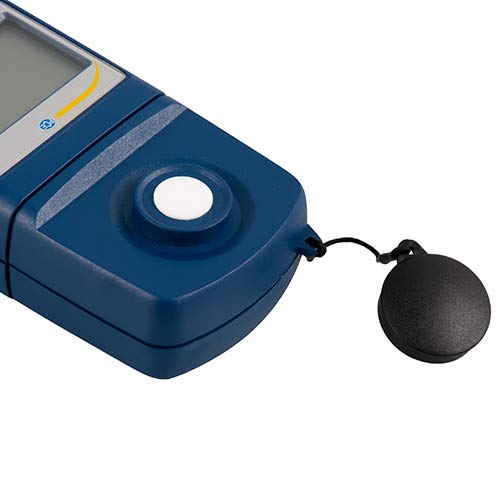
Slika 3: Podrobno view of the light sensor at the top of the device, with its protective cap removed.
4. Nastavitev
4.1 Namestitev baterije
- Poiščite pokrov predalčka za baterije na zadnji strani naprave.
- Slide the cover open or unscrew it, depending on the model.
- Vstavite eno 9V baterijo in pri tem upoštevajte pravilno polarnost (+/-).
- Varno namestite pokrov prostora za baterije.
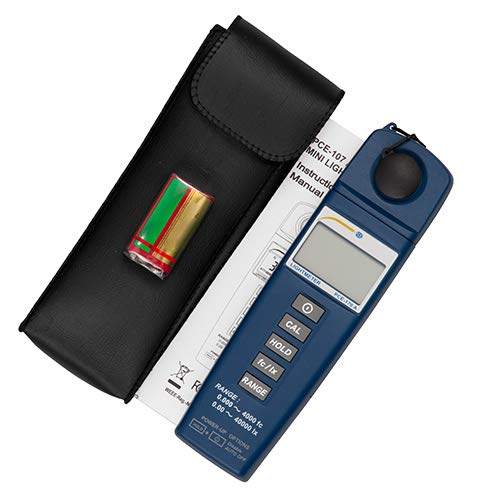
Slika 4: The PCE-170 A Light Meter shown with its carrying case and the included 9V battery, ready for installation.
4.2 Začetni vklop
Pritisnite Moč button to turn on the device. The display will illuminate and show a reading. If the battery symbol appears, replace the battery.
5. Navodila za uporabo
5.1 Merjenje
- Vklopite napravo z uporabo Moč gumb.
- Prepričajte se, da je svetlobni senzor čist in neoviran.
- Position the light sensor at the location where illuminance is to be measured. Ensure the sensor is facing the light source directly for accurate readings.
- The current illuminance value will be displayed on the LCD.

Slika 5: A user measuring light levels in an office environment with the PCE-170 A Light Meter.
5.2 Changing Measurement Units (fc/lx)
Pritisnite fc/lx button to toggle between foot-candles (fc) and lux (lx) units. The selected unit will be indicated on the display.
5.3 Funkcija ZADRŽI
Pritisnite PRIDRŽI gumb za zamrznitev trenutnega odčitka na zaslonu. Ponovno ga pritisnite, da sprostite zadržanje in nadaljujete z meritvami v živo.
5.4 Zero Adjustment (CAL)
Za izvedbo nastavitve ničle:
- Place the light sensor in a completely dark environment (e.g., cover it with the protective cap or place it in a dark box).
- Pritisnite KAL button. The display should show "0.00" or a value very close to zero.
- Če zaslon ne prikazuje ničle, postopek ponovite.
5.5 Izbira območja
The device typically operates in auto-ranging mode. To manually select a range or cycle through available ranges, press the RANGE button. The display will indicate the active range. Press and hold the RANGE button to return to auto-ranging mode.
5.6 Min/Max Function (Power-Up Option)
The PCE-170 A supports Min/Max recording. To activate this feature, refer to the power-up options indicated on the device label (e.g., press and hold a specific button during power-on). This function records the minimum and maximum illuminance values detected during a measurement session.
6. Vzdrževanje
6.1 Čiščenje
Wipe the device with a soft, dry cloth. Do not use abrasive cleaners or solvents. Keep the light sensor clean and free of dust or smudges, as this can affect measurement accuracy.
6.2 Shranjevanje
When not in use, store the PCE-170 A Light Meter in its carrying case in a cool, dry place, away from direct sunlight and extreme temperatures. Remove the battery if storing for extended periods.
7. Odpravljanje težav
| Težava | Možen vzrok | rešitev |
|---|---|---|
| Naprava se ne vklopi. | Prazna ali nepravilno nameščena baterija. | Preverite polarnost baterije ali jo zamenjajte z novo 9V baterijo. |
| Na zaslonu se prikaže "OL" (preobremenitev). | Light intensity exceeds the current measurement range. | Switch to a higher measurement range using the RANGE button, or move to a less intensely lit area. |
| Netočni odčitki. | Dirty sensor, incorrect zero adjustment, or sensor not facing light source correctly. | Clean the sensor, perform zero adjustment in darkness, and ensure the sensor is properly oriented. |
| Zaslon je prazen ali utripa. | Nizka baterija. | Zamenjajte 9V baterijo. |
8. Specifikacije
| Parameter | Vrednost |
|---|---|
| Merilna območja | 0.00 ... 40,000 lux / 0.000 ... 4000 fc |
| Resolucija | 0.01 luksov / 0.001 fc |
| Natančnost | ±3% of measurement value + 5 digits |
| Indikator preobremenitve | "OL" |
| Stopnja merjenja | Vsakih 2 sekund |
| Delovna temperatura | 0 ... 40 °C / 32 ... 104 °F |
| Svetlobni senzor | Silicon photodiode, corrected cosine angle |
| Zaslon | 5-mestni LCD |
| Vir napajanja | 9V baterija (priložena) |
| Dimenzije | 33 x 54 x 196 mm / 1.3 x 2.1 x 7.7 in |
| Teža | 180 g / <1 lb (approx. 9.17 ounces) |
8.1 Obseg dobave
The standard delivery package includes:
- 1 x PCE-170 A Lux Meter
- 1 x 9V baterija
- 1 x torbica
- 1 x Uporabniški priročnik (ta dokument)
9. Garancija in podpora
PCE Instruments provides a warranty for this product against defects in materials and workmanship. For specific warranty terms and conditions, please refer to the warranty card included with your purchase or visit the official PCE Instruments website. For technical support, service, or calibration inquiries, please contact PCE Instruments customer service.
PCE Instruments US: Obišči trgovino