
Uvod
This manual provides essential instructions for the proper setup, operation, and maintenance of your MEASURETEK 12R963 Digital Benchtop Scale. Designed for precision and durability, this scale offers a maximum capacity of 30kg (60lb) and features various application modes including weighing, parts counting, and checkweighing. Please read this manual thoroughly before using the device to ensure safe and efficient operation.
Varnostne informacije
- Always operate the scale on a stable, level surface to ensure accurate readings.
- Tehtnice ne izpostavljajte ekstremnim temperaturam, vlagi ali neposredni sončni svetlobi.
- Tehtnice ne preobremenjujte preko njene največje nosilnosti 30 kg (60 lb).
- Keep the scale away from strong electromagnetic fields, which can interfere with its performance.
- Vodni kamen očistite z mehko damp krpo. Ne uporabljajte abrazivnih čistil in enote ne potapljajte v vodo.
- Pred čiščenjem ali kakršnim koli vzdrževanjem izklopite napajanje.
Nastavitev
1. Razpakiranje in pregled
Carefully remove all components from the packaging. Inspect the scale for any signs of damage that may have occurred during transit. Retain the packaging for future storage or transport.
2. Montaža
The MEASURETEK 12R963 scale typically requires minimal assembly. Attach the display unit to the support pole, and then secure the support pole to the base platform. Ensure all connections are firm and stable.
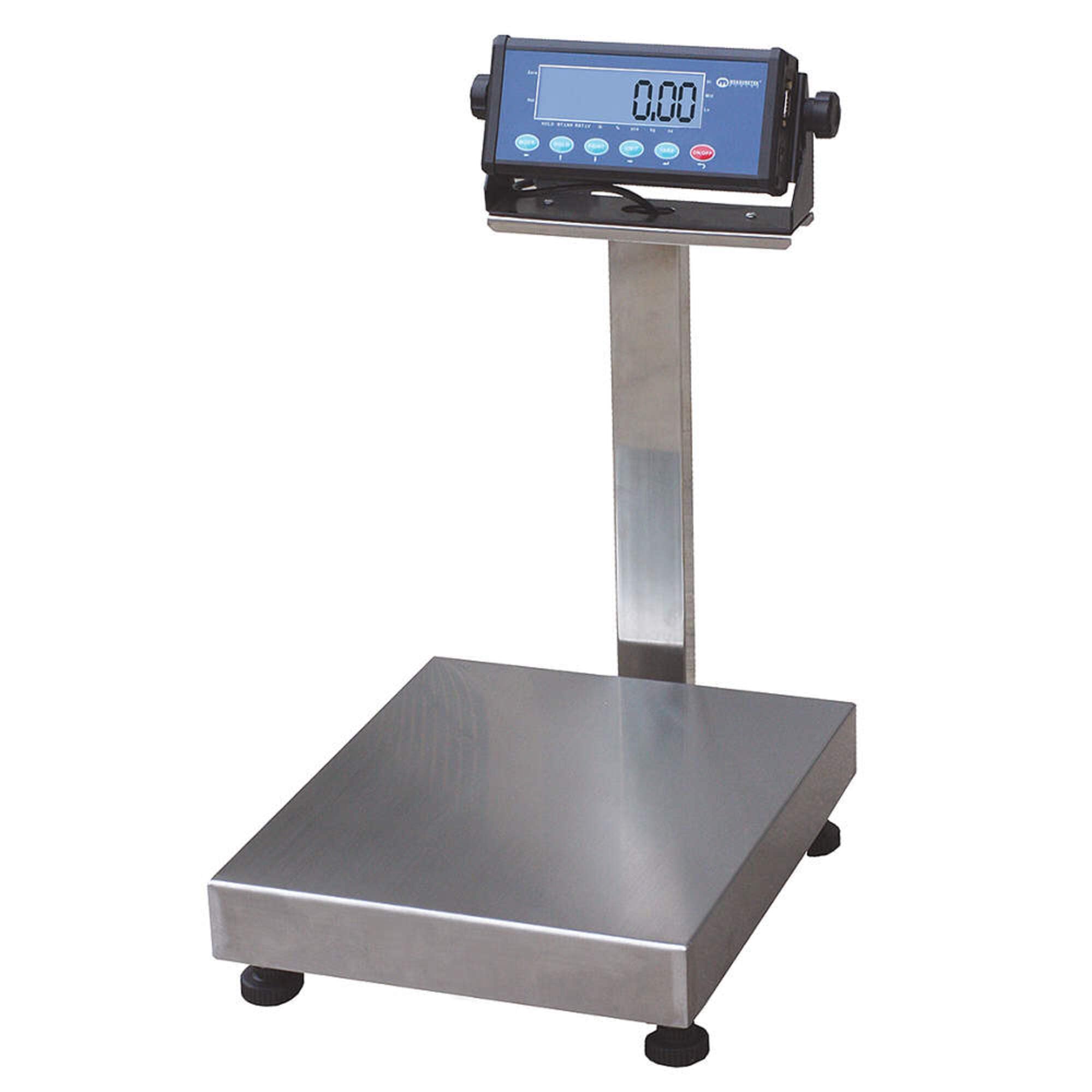
Figure 1: Fully assembled MEASURETEK 12R963 Digital Benchtop Scale. The image shows the stainless steel platform, the vertical support pole, and the digital display unit mounted at the top.
3. Napajalni priključek
Connect the power adapter to the scale's power input port and then plug it into a suitable electrical outlet. The scale may also operate on an internal rechargeable battery (if equipped).
4. Izravnava
Place the scale on a firm, level surface. Use the adjustable feet located on the underside of the platform to level the scale. Check the bubble level indicator (if present) to ensure proper leveling for accurate measurements.
5 Začetni vklop in ničelna nastavitev
Pritisnite VKLOP/IZKLOP button to power on the scale. Allow a few seconds for the display to stabilize. If the display does not show "0.00" (or similar zero reading), press the NIČ or TARA gumb za ponastavitev.
Navodila za uporabo
1 Osnovno tehtanje
- Ensure the scale is powered on and displays "0.00".
- Predmet, ki ga želite stehtati, previdno postavite na sredino ploščadi iz nerjavečega jekla.
- Počakajte, da se prikaz stabilizira, in odčitajte težo.
2. Unit Conversion (kg/lb)
Pritisnite ENOTA button to switch between kilograms (kg) and pounds (lb). The current unit will be indicated on the display.
3. Funkcija tare
To weigh items in a container:
- Prazno posodo postavite na ploščad.
- Pritisnite TARA gumb. Prikaz se bo ponastavil na "0.00".
- Predmete, ki jih želite stehtati, dodajte v posodo. Na zaslonu se bo prikazala neto teža predmetov.
- Za brisanje tare odstranite posodo in pritisnite TARA znova.
4. Parts Counting
This mode allows you to count a large number of identical items by weight.
- With the scale at zero, press the PCS (Parts Counting) button.
- The display may prompt you to select a sample size (e.g., 10, 20, 50, 100 pieces). Use the appropriate buttons to select the sample velikost.
- Place the selected number of sample items on the platform.
- Pritisnite PCS ponovno pritisnite gumb za potrditevample. The scale is now calibrated for counting.
- Add the bulk items to the platform. The display will show the total count.
5. Checkweighing
Checkweighing allows you to determine if an item's weight falls within a specified target range (under, accept, over).
- Refer to your scale's specific menu for setting upper and lower weight limits for checkweighing. This usually involves a NASTAVI or NAČIN gumb.
- Once limits are set, place items on the platform. The display will indicate if the item is under, within, or over the set limits, often with visual or audible alerts.
6. Data Connection (RS232, USB)
The scale is equipped with RS232 and USB ports for data communication with external devices such as computers or printers. Consult the specific software or driver instructions for establishing a connection and transferring data.
Vzdrževanje
1. Čiščenje
Regularly clean the scale's stainless steel platform and display with a soft, damp cloth. For stubborn dirt, a mild detergent can be used. Ensure no liquid enters the internal components. Do not use harsh chemicals, abrasive pads, or excessive water.
2. Shranjevanje
When not in use for extended periods, store the scale in a dry, dust-free environment. If possible, use the original packaging to protect it from damage.
3. Umerjanje
While the scale is factory-calibrated, periodic calibration may be necessary to maintain accuracy, especially after relocation or prolonged use. Refer to the scale's advanced settings menu or contact customer support for detailed calibration procedures, which typically require certified calibration weights.
Odpravljanje težav
| Težava | Možen vzrok | rešitev |
|---|---|---|
| Tehtnica se ne vklopi. | No power, faulty adapter, or discharged battery. | Check power connection. Ensure adapter is working. Charge or replace battery. |
| Netočni odčitki. | Scale not level, unstable surface, draft, or needs calibration. | Ensure scale is level and on a stable surface. Avoid drafts. Perform calibration. |
| Display shows "OVERLOAD" or "ERR". | Teža presega največjo zmogljivost. | Remove excess weight immediately. Do not exceed 30kg (60lb). |
| Display is unstable or flickering. | Electromagnetic interference, unstable surface, or internal issue. | Move scale away from other electronic devices. Ensure stable surface. If problem persists, contact support. |
Specifikacije
| Funkcija | Podrobnost |
|---|---|
| Model | 12R963 |
| Znamka | MEASURETEK |
| Zmogljivost | 30 kg / 60 lb |
| Diplome | 5 g / 0.01 lb |
| Material platforme | Nerjaveče jeklo |
| Material ohišja | Nerjaveče jeklo |
| Vrsta zaslona | Digitalno |
| Načini uporabe | Weighing, Parts Counting, Checkweighing |
| Priključna vrata | RS232, USB |
| Celotna dolžina | 12 palcev (približno) |
| Skupna širina | 19 palcev (približno) |
| Skupna višina | 21.5 palcev (približno) |
Garancija in podpora
For warranty information, technical support, or service inquiries regarding your MEASURETEK 12R963 Digital Benchtop Scale, please refer to the warranty card included with your product or contact MEASURETEK customer service directly. Keep your purchase receipt as proof of purchase.