
Uvod
This manual provides detailed instructions for the safe and effective use of your Sony Alpha NEX-3 interchangeable lens digital camera. The NEX-3 combines the performance of a DSLR with a compact, lightweight design, featuring a 14.2-megapixel APS-C sensor and an 18-55mm zoom lens. Please read this manual thoroughly before operating the camera and retain it for future reference.
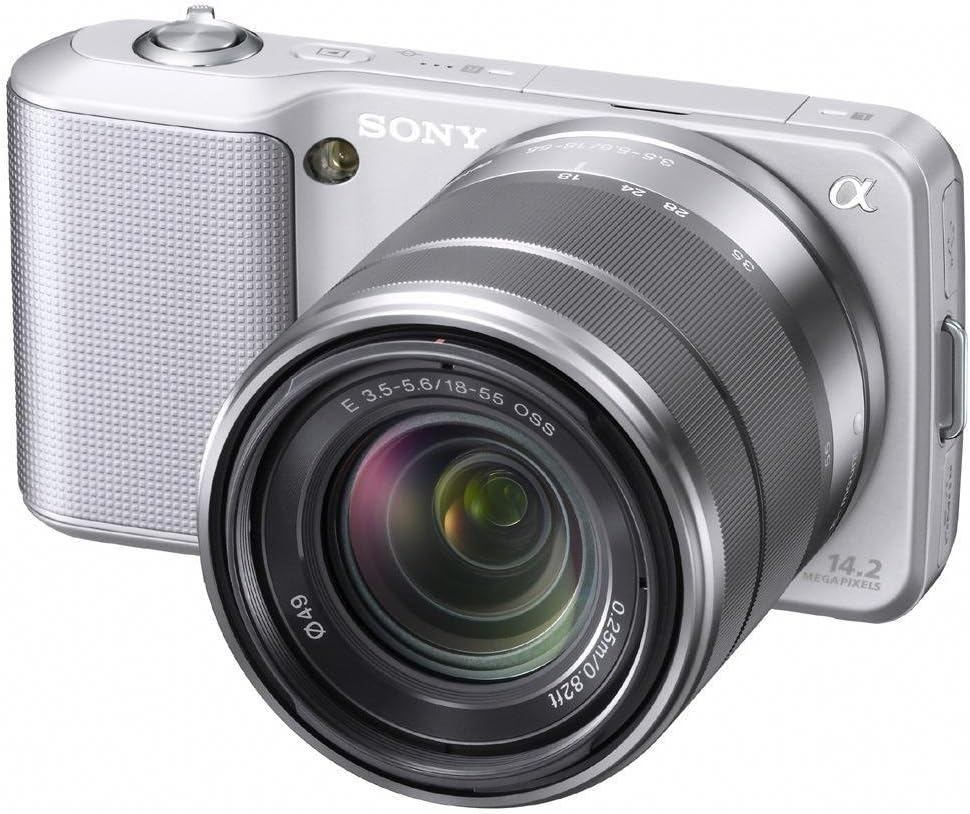
Slika 1: Sony Alpha NEX-3 Digital Camera with the included 18-55mm zoom lens. The camera body is silver with a textured grip, and the lens is also silver and black.
Nastavitev
Before using your camera, perform the following setup steps:
- Napolnite baterijo: Insert the supplied NP-FW50 Lithium-Ion battery into the charger and connect the charger to a power outlet. The charging indicator will illuminate and turn off when charging is complete.
- Vstavite baterijo: Open the battery cover on the bottom of the camera and insert the charged battery, ensuring correct orientation. Close the cover securely.
- Vstavite pomnilniško kartico: Open the memory card slot cover. Insert a compatible SD/SDHC/SDXC or Memory Stick Pro Duo/Pro-HG Duo card with the contacts facing the correct direction until it clicks into place. Close the cover.
- Pritrdite objektiv: Align the white index mark on the lens with the white index mark on the camera body. Mount the lens by rotating it clockwise until it locks into position.
- Začetne nastavitve: Turn on the camera using the power switch. Follow the on-screen prompts to set the language, date, time, and time zone.
Upravljanje kamere
The Sony Alpha NEX-3 offers various modes and features for capturing images and videos.
Osnovna fotografija
- iAuto način: For automatic scene recognition and optimal settings, rotate the control wheel to select the 'iAuto' mode. The camera will automatically adjust exposure, white balance, and other parameters.
- Fotografiranje: Frame your subject using the 3-inch tilting LCD. Press the shutter button halfway down to focus, then press it fully to capture the image.
Napredni načini fotografiranja
For more creative control, the NEX-3 provides Program Auto (P), Shutter Priority (S), Aperture Priority (A), and Manual (M) modes. Access these via the menu system using the control wheel and soft keys.
- Panoramski posnetek: This mode allows you to capture wide panoramic images by sweeping the camera horizontally or vertically. The camera automatically stitches multiple images together.
- Hand-held Twilight Mode: Captures six images at high speed and combines them to reduce noise in low-light conditions without a tripod.
- Anti Motion Blur Mode: Similar to Hand-held Twilight, this mode combines six shots to reduce blur caused by camera shake or subject movement in low light.
Snemanje videa
The NEX-3 can record high-definition video in MP4 format (720p/30p or 480p/30p).
- Začetek/ustavitev snemanja: Press the dedicated MOVIE button to begin or end video recording.
- Focus and Exposure: The camera automatically adjusts focus and exposure during video recording with E-mount lenses. Exposure compensation can be adjusted using the control wheel.
Vzdrževanje
Pravilno vzdrževanje zagotavlja dolgo življenjsko dobo in optimalno delovanje vašega fotoaparata.
- Čiščenje ohišja fotoaparata: Za brisanje ohišja fotoaparata uporabite mehko, suho krpo. Za trdovratno umazanijo rahlo obrišiteampkrpo sperite z vodo. Izogibajte se uporabi organskih topil.
- Čiščenje leče: Use a lens blower to remove dust. For smudges, use a lens cleaning solution and a soft lens cloth, wiping gently in a circular motion from the center outwards.
- Čiščenje senzorja: If dust spots appear on images, the image sensor may need cleaning. This is a delicate procedure; it is recommended to have this performed by a qualified service technician.
- Vzdrževanje baterije: Baterije shranjujte na hladnem in suhem mestu. Ne izpostavljajte jih ekstremnim temperaturam. Če fotoaparata dalj časa ne boste uporabljali, odstranite baterijo.
- Shranjevanje: Store the camera in a dry, well-ventilated area, away from direct sunlight and extreme temperatures. Use a desiccant if storing in humid environments.
Odpravljanje težav
Ta razdelek obravnava pogoste težave, na katere lahko naletite.
| Težava | Možen vzrok/rešitev |
|---|---|
| Kamera se ne vklopi. | Battery may be depleted. Ensure the battery is charged and inserted correctly. |
| Slike so zamegljene. |
|
| Images appear noisy, especially in low light. | High ISO settings can introduce noise. Use Hand-held Twilight mode or ensure adequate lighting. |
| Napaka pomnilniške kartice. | Ensure the memory card is inserted correctly and is not damaged. Try formatting the card (this will erase all data). |
| Bliskavica se ne sproži. | Check flash settings. Ensure the external flash unit (if used) is properly attached and powered. |
If problems persist, consult the Sony support webspletno mesto ali se obrnite na službo za stranke.
Specifikacije
| Funkcija | Podrobnost |
|---|---|
| Ime modela | ALPHA NEX-3 |
| Ločljivost foto senzorja | 14.2 MP |
| Velikost foto senzorja | APS-C (23.4 x 15.6 mm) |
| Vrsta senzorja | CMOS |
| Vrsta objektiva | Zoom (18-55mm) |
| Združljivi pritrdilni elementi | Sony E (NEX), Sony FE |
| Stabilizacija slike | Digitalno |
| Video ločljivost | 720p |
| Vrsta zaslona | 3-inch Tilting LCD |
| Neprekinjeno streljanje | Do 7 FPS |
| ISO Sensitivity (Expanded) | 200 - 12800 |
| Hitrost zaklopa | 30 sekunde do 1/4000 sekunde |
| Vrsta baterije | Lithium-Ion NP-FW50 |
| Povezljivost | HDMI, USB, EyeFi (Wireless Technology) |
| Mere (pribl.) | Višina artikla: 2.44 palca |
| Teža (pribl.) | 0.65 funta |
Garancija in podpora
Your Sony Alpha NEX-3 camera comes with a 1-letna omejena garancija od datuma nakupa. Ta garancija krije proizvodne napake pri normalni uporabi. Za uveljavljanje garancije shranite dokazilo o nakupu.
For technical support, service, or detailed warranty information, please visit the official Sony support webspletno mesto ali se obrnite na Sonyjevo službo za stranke.