
Úvod
Thank you for choosing the podoru 10000mAh Magnetic Power Bank. This device is designed to provide convenient and versatile charging solutions for your mobile devices, featuring magnetic wireless charging, built-in cables, and multiple output ports. Please read this manual thoroughly to ensure proper use and maintenance of your power bank.

Image: The podoru 10000mAh Magnetic Power Bank in Navy Blue, showcasing its compact design and magnetic charging surface.
Vlastnosti produktu
- Výkonná kompatibilita: Supports iPhone 12, 13, 14, 15, 16, 17 Series (including mini, Plus, Pro, Pro Max, and Air models) for magnetic wireless charging.
- Built-in Cables & Strong Magnetic Connection: Features integrated USB-C and Lightning cables for direct device connection, eliminating the need for extra cables. Strong magnetic technology ensures a secure attachment to compatible iPhones.
- 5 Devices Fast Wireless & Wired Charging: Offers up to 15W wireless charging, 20W USB-C PD output, 22.5W USB PD, and supports up to 12W Lightning input and 20W USB-C input. Capable of charging up to 5 devices simultaneously.
- 10000mAh Large Capacity & Digital Display: Provides all-day power with its high-density battery. An LED screen clearly displays the exact remaining power percentage, wireless charger symbol, and green PD fast charging symbol.
- Pocket Size & Easy to Carry: Compact and lightweight (186g, 105x71x19mm) for convenient portability in pockets or backpacks.
- Vynikajúca bezpečnosť: Equipped with 8 built-in low-temperature ice cores and a comprehensive multi-protect safety system, including temperature control, overcharge protection, and short circuit protection.
Obsah balenia
- podoru 10000mAh Magnetic Power Bank (Model KT-D011)
- USB-C to USB-A Charging Cable (for recharging the power bank)
- Používateľská príručka
Koniec produktuview
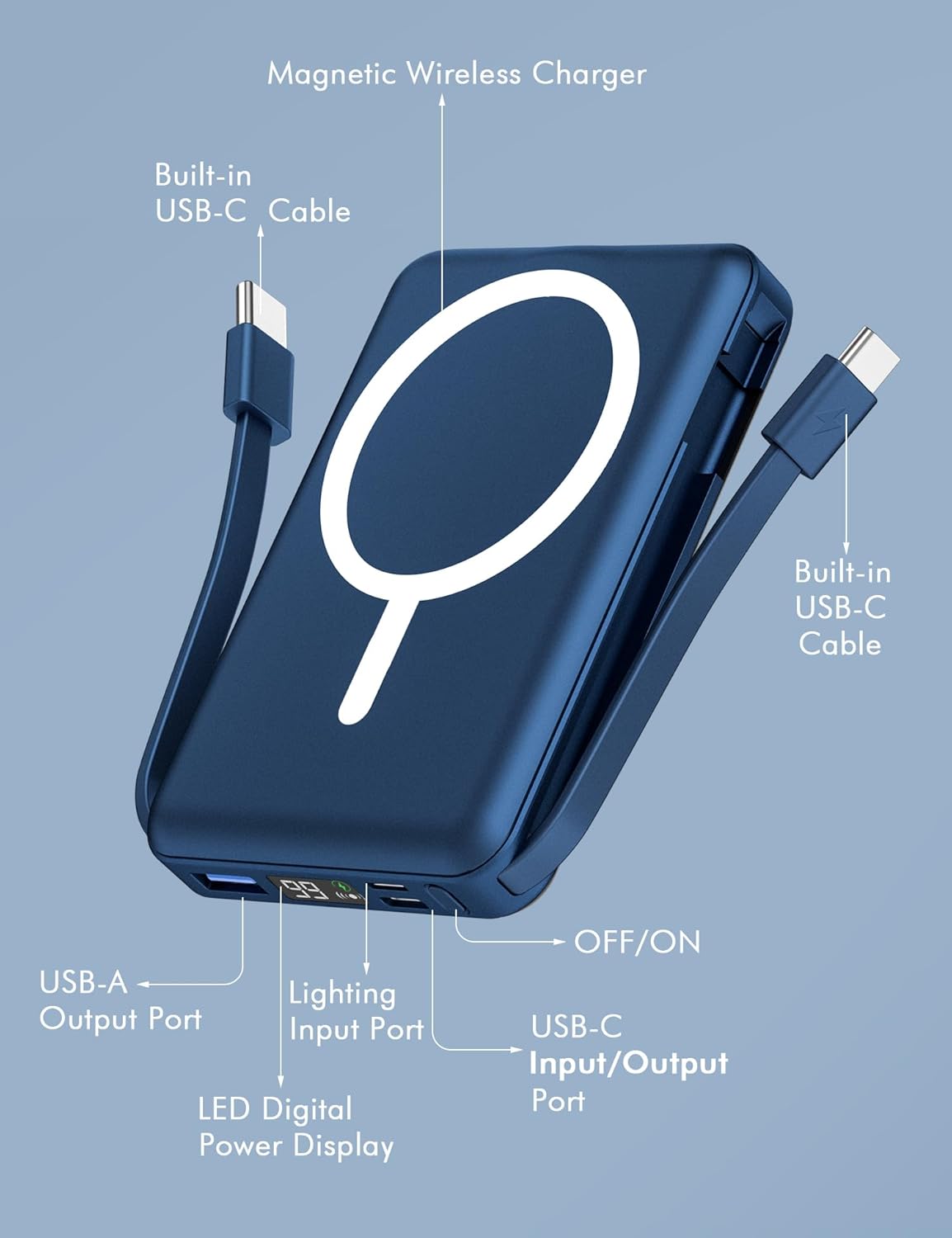
Image: A detailed diagram of the power bank, highlighting its components: Magnetic Wireless Charger, Built-in USB-C Cable, Built-in Lightning Cable, USB-A Output Port, Lightning Input Port, USB-C Input/Output Port, LED Digital Power Display, and ON/OFF button.
Nastavenie
Počiatočné nabitie powerbanky
Before first use, fully charge your podoru Magnetic Power Bank. Use the provided USB-C to USB-A cable or any compatible USB-C or Lightning cable to connect the power bank to a power adapter (not included).

Image: The power bank being recharged via its Lightning input port and its USB-C input port, showing the flexibility in recharging options.
- Connect the power bank to a power source using either the Lightning input (up to 12W) or the USB-C input (up to 20W).
- Digitálny LED displej zobrazuje priebeh nabíjania a percentá nabitia batérie.tage.
- Keď displej zobrazí 100 %, powerbanka je plne nabitá a pripravená na použitie.
Návod na obsluhu
Zapnutie/vypnutie
Press the ON/OFF button once to activate the power bank and view the current battery level on the LED display. The power bank will automatically turn off when not in use for a period to conserve energy.
Wireless Charging (MagSafe)
For compatible iPhone 12-17 Series models, simply align the power bank with the back of your iPhone. The strong magnetic connection will snap into place, and wireless charging will begin automatically.
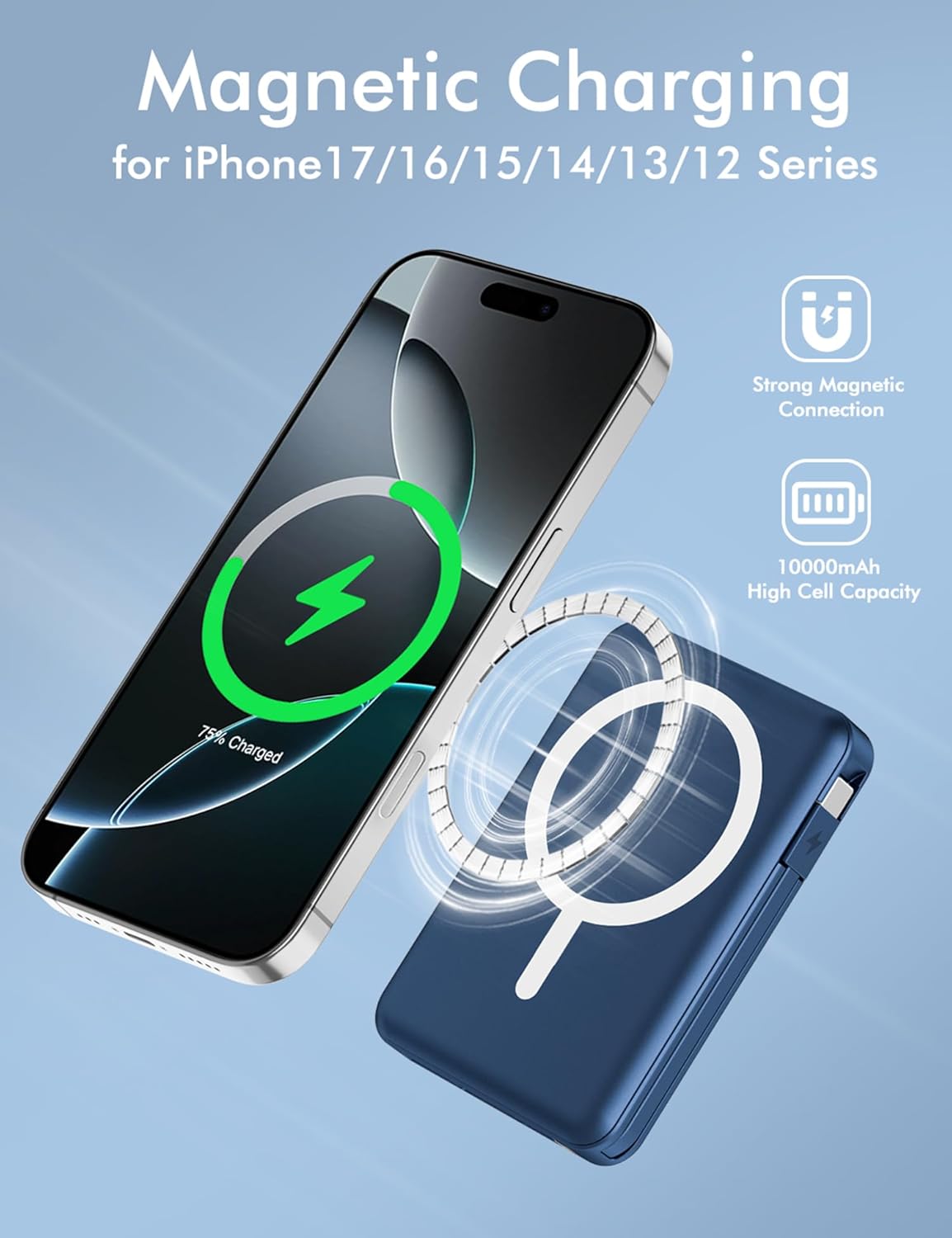
Image: An iPhone 15 Pro Max magnetically attached to the podoru power bank, displaying the charging animation on the phone screen.
Video: A demonstration of the Azmuth Magnetic Power Bank (similar to podoru) showing its magnetic attachment and wireless charging functionality with an iPhone. The video highlights the ease of use and secure connection.
- Ensure your iPhone is a compatible model (iPhone 12 series or newer).
- The power bank's LED display will show a wireless charging symbol when active.
- For optimal magnetic connection and charging efficiency, use an iPhone without a case or with a MagSafe-compatible case.

Image: The magnetic power bank attached to an iPhone, demonstrating compatibility with magnetic cases for secure and efficient charging.
Káblové nabíjanie
Use the built-in cables or the USB-A/USB-C output ports to charge various devices.
- Vstavané káble: Pull out the integrated USB-C or Lightning cable and connect it directly to your device.
- Výstup USB-A: Connect your device's USB-A charging cable to the power bank's USB-A port.
- USB-C výstup: Connect your device's USB-C charging cable to the power bank's USB-C port.

Image: The power bank demonstrating wide compatibility by charging various devices such as iPhones, Samsung, Pixel, Huawei phones, and tablets using its multiple output options.
Simultánne nabíjanie
The power bank supports charging up to 5 devices concurrently (1 wireless, 4 wired). This allows for shared charging without waiting.

Image: The power bank actively charging five different devices at once, including an iPhone wirelessly, and other phones and tablets via its built-in and external USB ports.
Using the Foldable Kickstand
The power bank features a built-in foldable kickstand for convenient hands-free viewpočas nabíjania.
Video: A demonstration of the 10000mAh Magnetic Portable Charger with Built-in Stand, showing how the kickstand can be deployed to prop up a phone for hands-free use while charging.
- Opatrne vytiahnite stojan zo zadnej strany powerbanky.
- Place your magnetically attached iPhone onto the power bank, and position it on a flat surface for stable viewing.
Údržba
- Uchovávajte powerbanku mimo dosahu vody, vlhkosti a extrémnych teplôt.
- Zariadenie čistite mäkkou, suchou handričkou. Nepoužívajte agresívne chemikálie ani abrazívne materiály.
- Zabráňte pádu alebo vystaveniu powerbanky silným nárazom.
- Pri dlhšom nepoužívaní skladujte na chladnom a suchom mieste.
Riešenie problémov
- Zariadenie sa nenabíja: Ensure the power bank is sufficiently charged. Check all cable connections. For wireless charging, ensure proper alignment and MagSafe compatibility.
- Pomalé nabíjanie: Verify that your device and cable support fast charging. Ensure the power bank has enough charge.
- Magnetic connection is weak: Ensure your iPhone is a compatible model. If using a case, ensure it is MagSafe-compatible. Remove any foreign objects between the power bank and the phone.
- LED displej nefunguje: Press the power button to activate the display. If it remains off, the power bank may be fully discharged or require service.
Špecifikácie
| Funkcia | Detail |
|---|---|
| Značka | podoru |
| Číslo modelu | KT-D011 |
| Kapacita batérie | 10000 milamp Hodiny |
| Rozmery produktu | 4.13 x 2.79 x 0.74 palca |
| Hmotnosť položky | 8.4 uncí |
| Bezdrôtový nabíjací výstup | Až 15W |
| USB-C PD výstup | Až 20W |
| USB PD výstup | Až 22.5W |
| Vstup blesku | Až 12W |
| Vstup USB-C | Až 20W |
| Špeciálne funkcie | Built-in Cables, Digital Display, Fast Charging, Pocket Size, Wireless Charging, Foldable Kickstand |
| Farba | Námornícka modrá |
Bezpečnostné informácie
- Zariadenie nerozoberajte, neotvárajte, nestláčajte, neohýbajte, nedeformujte, neprepichujte ani netrhajte.
- Do not modify or remanufacture, attempt to insert foreign objects into the battery, or immerse or expose it to water or other liquids.
- Do not expose the power bank to fire, explosion, or other hazards.
- Vyhnite sa extrémnym teplotným zmenám.
- Uchovávajte mimo dosahu detí.
- Powerbanku zlikvidujte v súlade s miestnymi predpismi.
Záruka a podpora
For warranty information or technical support, please refer to the product packaging or contact podoru customer service directly. Keep your purchase receipt as proof of purchase.