
1. Úvod
This manual provides essential instructions for the safe and efficient operation of your Rigol DHO1074 Digital Oscilloscope. The DHO1074 is a 4-channel, 70 MHz digital oscilloscope featuring a 12-bit resolution and a 2 GSa/s real-time sample rate, designed for precise signal analysis in various applications. Please read this manual thoroughly before using the device to ensure proper functionality and to prevent damage.
2. Bezpečnostné informácie
Dodržiavajte nasledujúce bezpečnostné opatrenia, aby ste predišli zraneniu a poškodeniu nástroja:
- Use only the power cord specified for this instrument.
- Uistite sa, že prístroj je správne uzemnený, aby ste predišli úrazu elektrickým prúdom.
- Do not operate the instrument in wet or damp podmienky.
- Vyhnite sa prevádzke vo výbušnom prostredí.
- Do not remove the instrument cover. Refer servicing to qualified personnel.
- Use appropriate probes and accessories.
- Pred čistením odpojte napájanie.
3. Obsah balenia
Overte si, či sú vo vašom balení všetky nižšie uvedené položky:
- Rigol DHO1074 Digital Oscilloscope (1 unit)
- Napájací kábel (1 kus)
- Passive Probes (4 units, one for each channel)
- USB kábel (1 kus)
- Stručný návod (1 jednotka)
- Resource CD (1 unit)
4. Nastavenie
4.1 Pripojenie napájania
- Uistite sa, že je hlavný vypínač osciloskopu v polohe VYPNUTÉ.
- Pripojte dodaný napájací kábel k vstupu striedavého prúdu na zadnom paneli osciloskopu.
- Zapojte druhý koniec napájacieho kábla do uzemnenej sieťovej zásuvky.
4.2 Pripojenie sond
- Connect the BNC connector of a passive probe to one of the input channels (CH1, CH2, CH3, or CH4) on the front panel.
- Attach the probe ground clip to a common ground point in your circuit.
- Pripojte hrot sondy k testovanému bodu vo vašom obvode.
- For accurate measurements, compensate the probe before use. Refer to the "Probe Compensation" section in the full user manual for detailed instructions.
4.3 Prvé zapnutie
- Press the power switch on the front panel to turn on the oscilloscope.
- The instrument will perform a self-test and display the startup screen.
- Once the main interface appears, the oscilloscope is ready for use.
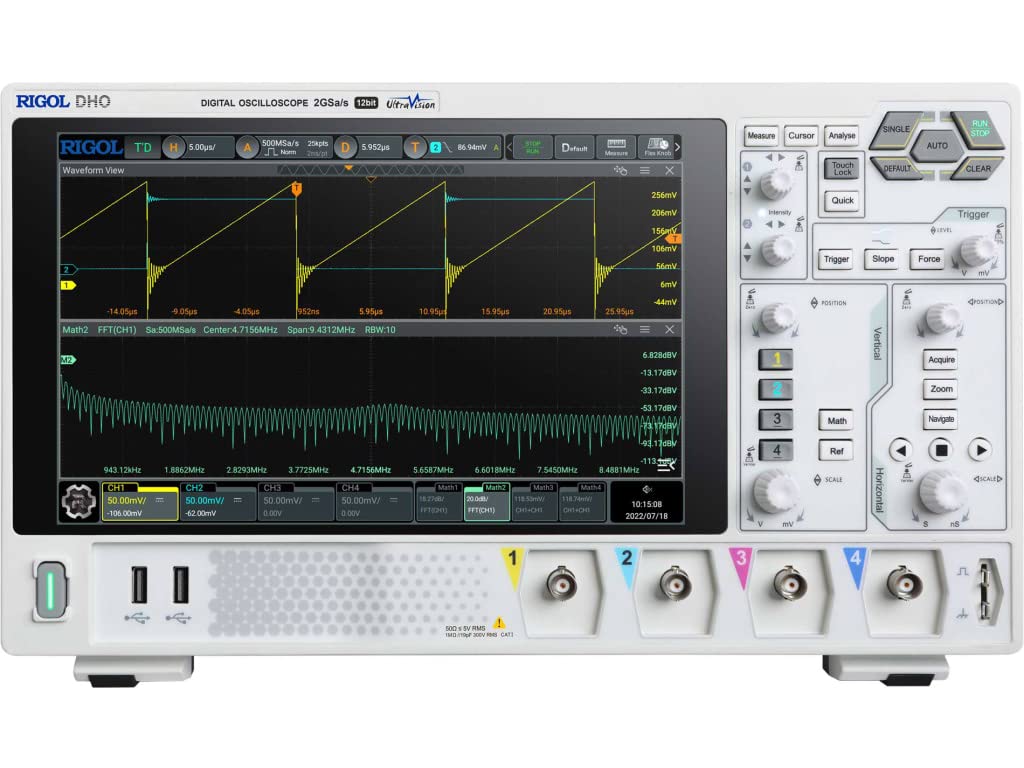
Obrázok 4.1: Predná strana view of the Rigol DHO1074 Digital Oscilloscope, showing the display, control panel, and input channels.
5. Obsluha osciloskopu
The Rigol DHO1074 offers a user-friendly interface for capturing and analyzing waveforms. Key features include 4 analog channels, 70 MHz bandwidth, and a 12-bit vertical resolution for enhanced signal fidelity.
5.1 Základné snímanie priebehu
- Zapnutie: Ensure the oscilloscope is powered on as described in Section 4.3.
- Pripojte signál: Connect your signal source to an input channel using a compensated probe.
- Automatické nastavenie: Stlačte tlačidlo AUTOMATICKY button on the front panel. The oscilloscope will automatically adjust vertical, horizontal, and trigger settings to display a stable waveform.
- Manuálne úpravy:
- Použite vertikálne knobs (VOLTS/DIV) to adjust the vertical scale (voltage per division) for each channel.
- Použite HORIZONTÁLNY knob (SEC/DIV) to adjust the horizontal scale (time per division).
- Použite SPÚŠŤAČ controls to set the trigger level and mode for stable waveform capture.
5.2 Pokročilé funkcie
- Vysoké rozlíšenie: Benefit from the 12-bit vertical resolution, providing 16 times more quantization levels than standard 8-bit oscilloscopes, which improves measurement accuracy and reduces quantization noise.
- Deep Memory: The DHO1074 features a 50 Mpts maximum memory depth (expandable to 100 Mpts with option DHO1000-RLU-01), allowing for longer waveform captures at high sample sadzby.
- Serial Decoding: Standard serial decoding capabilities include SPI, I2C, RS232/UART, CAN, and LIN, simplifying the analysis of common serial bus communications.
- Funkcie merania: Access various automatic measurement functions (e.g., Vpp, Vrms, Frequency, Period) via the MEASURE menu.
- Matematické funkcie: Utilize built-in math functions (e.g., Add, Subtract, Multiply, Divide, FFT) to perform waveform analysis.
6. Údržba
6.1 Čistenie prístroja
- Pred čistením vždy odpojte napájací kábel.
- Použite mäkkú handričku dampened with a mild detergent solution to clean the exterior surfaces.
- Do not use abrasive cleaners or solvents that could damage the plastic parts.
- Zabráňte striekaniu tekutín priamo na prístroj.
6.2 Skladovanie
- Osciloskop skladujte v čistom a suchom prostredí, mimo dosahu priameho slnečného žiarenia a extrémnych teplôt.
- Protect the screen from scratches.
6.3 Kalibrácia
For optimal performance and measurement accuracy, periodic calibration by qualified service personnel is recommended. Refer to Rigol's official support channels for calibration services.
7. Riešenie problémov
| Problém | Možná príčina | Riešenie |
|---|---|---|
| No power when turned on. | Power cord not connected; power outlet faulty; instrument fuse blown. | Skontrolujte pripojenie napájacieho kábla; otestujte zásuvku; kontaktujte servis kvôli výmene poistky. |
| Nezobrazuje sa žiadny priebeh. | Probe not connected; signal source off; vertical/horizontal scale incorrect; trigger not set correctly. | Verify probe connection; check signal source; adjust VOLTS/DIV and SEC/DIV; adjust trigger level or use AUTO button. |
| Nestabilný priebeh. | Trigger settings incorrect; noisy signal. | Adjust trigger mode, source, and level; ensure proper grounding of the probe. |
| Incorrect measurements. | Probe compensation incorrect; wrong measurement settings. | Compensate probes; verify measurement parameters. |
If the problem persists after attempting these solutions, please contact Rigol customer support.
8. Špecifikácie
| Parameter | Hodnota |
|---|---|
| Model | DHO1074 |
| Šírka pásma | 70 MHz |
| Analógové kanály | 4 |
| Vertikálne rozlíšenie | 12-bitový |
| Max Sample Rate | 2 GSa/s (real-time) |
| Hĺbka pamäte | 50 Mpts (100 Mpts with DHO1000-RLU-01 option) |
| Sériové dekódovanie | SPI, I2C, RS232/UART, CAN, LIN |
| Rozmery produktu | 18 x 11 x 12 palca |
| Hmotnosť položky | 12 libry |
| Výrobca | RIGOL TECHNOLOGIES USA INC |
9. Záruka a podpora
Rigol products are designed for reliability and performance. This instrument is covered by a standard manufacturer's warranty. For specific warranty terms and conditions, please refer to the warranty card included with your product or visit the official Rigol webstránky.
For technical support, service, or inquiries regarding your Rigol DHO1074 Digital Oscilloscope, please contact Rigol Technologies USA Inc. customer service through their official webstránku alebo kontaktné informácie uvedené v dokumentácii k produktu.
Online zdroje a dodatočná dokumentácia môžu byť k dispozícii na Rigol webstránky.