
SAMSUNG SM-P610
Používateľská príručka pre SAMSUNG Galaxy Tab S6 Lite (SM-P610)
Model: SM-P610 | Brand: SAMSUNG
Úvod
Welcome to the user manual for your new SAMSUNG Galaxy Tab S6 Lite (SM-P610). This tablet is designed for versatility and entertainment, featuring a 10.4-inch display, S Pen support, and a lightweight design. This manual provides essential information for setting up, operating, maintaining, and troubleshooting your device.
The Galaxy Tab S6 Lite is ideal for various uses, from educational tasks and note-taking with the included S Pen to enjoying multimedia content with its vivid display and AKG-tuned dual speakers with Dolby Atmos sound. Its slim metal design makes it highly portable, and the long-lasting battery ensures extended usage.
Čo je v krabici
Upon unboxing your SAMSUNG Galaxy Tab S6 Lite, please verify that all the following items are included:
- SAMSUNG Galaxy Tab S6 Lite (SM-P610) Tablet (Oxford Gray)
- S Pen
- Napájací adaptér
- Data Cable (Type C)
- Vyhadzovací kolík
- Sprievodca rýchlym spustením
- Hard Case for P610 tablet
- Ochrana obrazovky
- 32 GB karta microSD

Image: The complete bundle including the tablet, S Pen, protective case, and 32GB microSD card, as packaged.

Obrázok: Detailný záber view of the SAMSUNG Galaxy Tab S6 Lite tablet, alongside the S Pen, a screen protector, and a 32GB microSD card.
Počiatočné nastavenie
1. Nabíjanie tabletu
Before first use, it is recommended to fully charge your tablet. Connect the provided USB-C data cable to the tablet's USB-C port and the power adapter. Plug the power adapter into a wall outlet. The charging indicator will appear on the screen.
2. Zapnutie a počiatočná konfigurácia
Press and hold the Power button (located on the side of the tablet) until the SAMSUNG logo appears. Follow the on-screen prompts to select your language, connect to a Wi-Fi network, sign in with your Google account, and set up security features.
3. Inštalácia karty MicroSD
To expand your tablet's storage, insert the included 32GB microSD card. Locate the SIM/microSD card tray on the side of the tablet. Use the provided ejection pin to open the tray. Place the microSD card into the tray with the gold contacts facing down, then gently push the tray back into the slot until it clicks into place.
4. Attaching the S Pen
The S Pen attaches magnetically to the side of the tablet for convenient storage and quick access. Simply align the S Pen with the designated magnetic area on the tablet's side until it snaps into place.
5. Applying the Screen Protector and Case
For enhanced protection, carefully apply the screen protector to the tablet's display, ensuring no dust or air bubbles are trapped underneath. Then, fit the tablet into the provided hard case. The case is designed to protect the back, edges, and corners from scratches and bumps, offering 360-degree full protection.
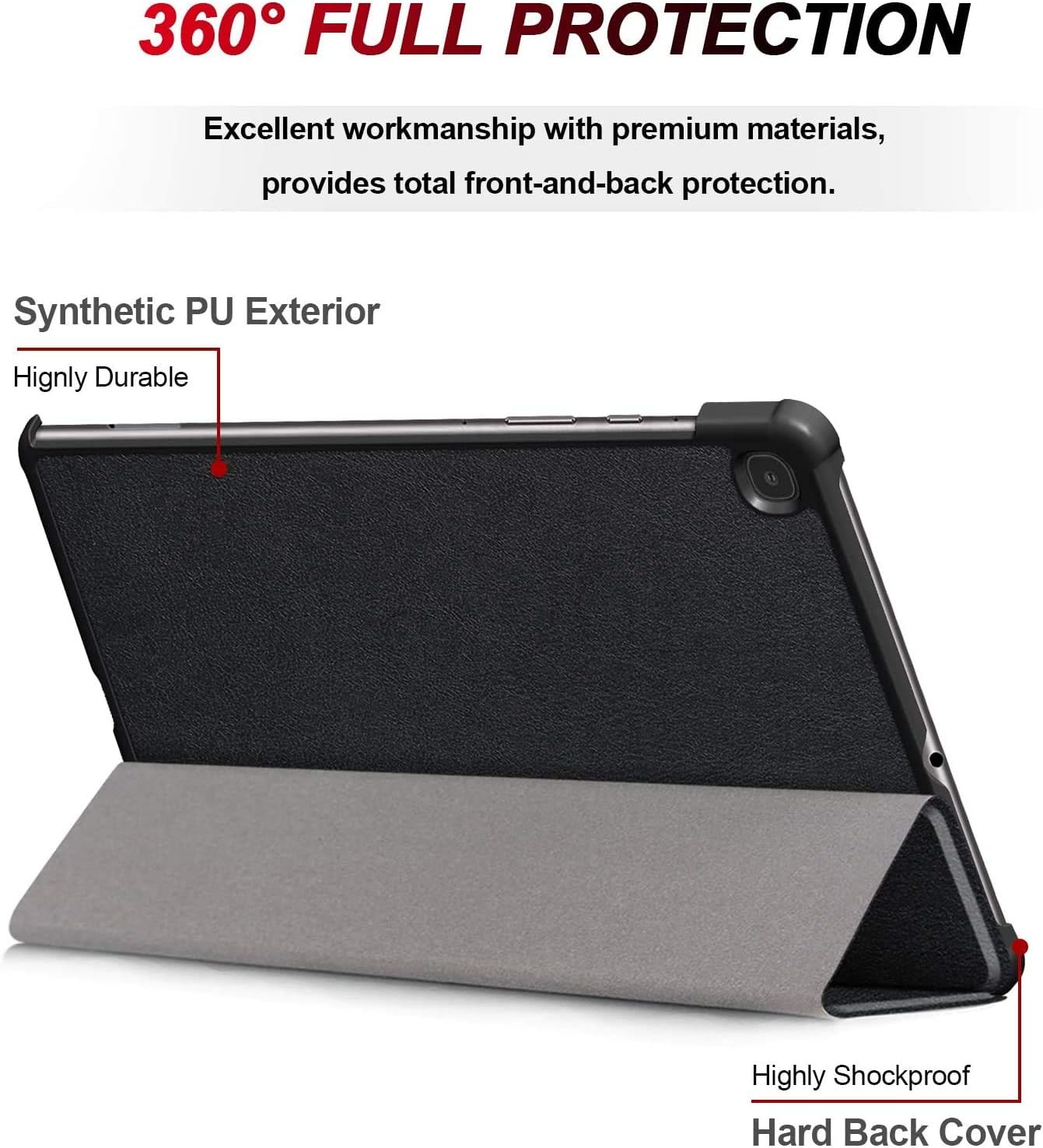
Image: The tablet enclosed in its protective case, illustrating its resistance to drops, dust, and scratches.
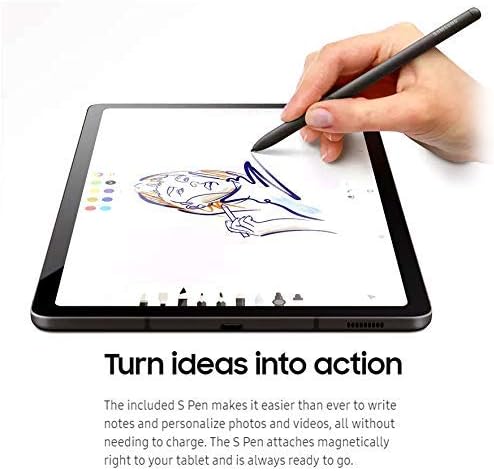
Image: A close-up of the tablet case, highlighting the precision cutouts that allow full access to all ports and buttons without removing the case.
Ovládanie tabletu
1. Základná navigácia
The Galaxy Tab S6 Lite operates on Android 10, offering intuitive touch-based navigation. Swipe up, down, left, or right to navigate through menus, home screens, and applications. Tap to select items, and pinch to zoom in or out on content like photos and web stránky.
2. Používanie pera S Pen
The S Pen enhances your tablet experience, allowing for precise input without needing to be charged. Use it for:
- Písanie poznámok: Quickly jot down ideas or create detailed notes in Samsung Notes or other compatible apps.
- Kreslenie a skicovanie: Express your creativity with various drawing applications.
- Anotácia: Mark up documents, PDFs, and images with ease.
- Inteligentný výber: Zachyťte konkrétne oblasti obrazovky a extrahujte text alebo obrázky.

Image: A hand demonstrating the use of the S Pen to draw on the screen of the Galaxy Tab S6 Lite.
3. Funkcie fotoaparátu
The tablet features an 8MP rear camera with autofocus for capturing photos and videos, and a 5MP front-facing camera ideal for video calls and selfies.
- Zadná kamera: Suitable for general photography and scanning documents.
- Predná kamera: Optimized for video conferencing and self-portraits.

Image: The tablet display showing an active video call with several participants, demonstrating the front-facing camera's utility.
4. Zvuk a zábava
Experience immersive audio with dual speakers tuned by AKG and enhanced with Dolby Atmos surround sound. This setup provides a rich audio experience for movies, music, and games.
5. Konektivita
The tablet supports Wi-Fi for internet access and Bluetooth for connecting to wireless accessories like headphones or keyboards. It is not compatible with cellular service.
6. Rozpoznávanie tváre
For convenient and secure unlocking, the tablet features face recognition. The front camera recognizes your face to unlock the device quickly.

Image: A visual representation of the tablet's face recognition feature, showing how it maps facial features for secure access.
Starostlivosť a údržba
1. Čistenie tabletu
Na čistenie obrazovky použite mäkkú handričku, ktorá nepúšťa vlákna. V prípade odolných škvŕn ju jemneampen the cloth with water or a screen-specific cleaning solution. Avoid using harsh chemicals or abrasive materials. For the body of the tablet, a dry, soft cloth is sufficient.
2. Starostlivosť o batérie
To maximize battery life, avoid exposing the tablet to extreme temperatures. It is generally recommended to keep the battery charge between 20% and 80% for optimal long-term health, though occasional full charges/discharges are acceptable.
3. Aktualizácie softvéru
Regularly check for and install software updates to ensure your tablet has the latest features, security patches, and performance improvements. You can usually find this option in the tablet's Settings menu under "Software update."
4. Ochrana vášho zariadenia
Always use the provided hard case and screen protector to guard against physical damage. Avoid placing heavy objects on the tablet or exposing it to liquids.
Riešenie problémov
This section addresses common issues you might encounter with your SAMSUNG Galaxy Tab S6 Lite. For more detailed troubleshooting or issues not listed here, please refer to the official SAMSUNG support webstránky.
Tablet sa nezapína
- Ensure the battery is charged. Connect the tablet to the power adapter and let it charge for at least 30 minutes before attempting to power on again.
- Press and hold the Power button for at least 10 seconds to perform a forced restart.
Problémy s pripojením k Wi-Fi
- Reštartujte Wi-Fi router a tablet.
- Zabudnite na sieť v nastaveniach Wi-Fi v tablete a znova sa pripojte.
- Uistite sa, že ste v dosahu signálu Wi-Fi.
S Pen Not Responding
- Ensure the S Pen is properly attached to the magnetic area on the tablet's side, as this can sometimes reset its connection.
- Reštartujte tablet.
- Check S Pen settings in the tablet's system settings.
Pomalý výkon
- Zatvorte nepoužívané aplikácie spustené na pozadí.
- Vymažte údaje vyrovnávacej pamäte z aplikácií a systému.
- Zabezpečte dostatok voľného úložného priestoru.
- Ak je k dispozícii, vykonajte aktualizáciu softvéru.
Technické špecifikácie
| Funkcia | Špecifikácia |
|---|---|
| Číslo modelu | SM-P610 |
| Veľkosť displeja | 10.4 palca |
| Maximálne rozlíšenie obrazovky | 2000 x 1200 (WUXGA+) |
| Procesor | 2.3GHz Samsung Exynos (Exynos 9611) Octa Core |
| RAM | 4 GB |
| Interné úložisko | 64 GB |
| Rozšíriteľná pamäť | Up to 1TB via microSD (32GB card included) |
| Operačný systém | Android 10 |
| Predná kamera | 5 MP |
| Zadná kamera | 8 MP |
| Bezdrôtové pripojenie | Wi-Fi (802.11abg, 802.11bgn), Bluetooth |
| Zvuk | Dual speakers with AKG sound, Dolby Atmos |
| Výdrž batérie (priemerná) | Up to 13-14 hours (usage dependent) |
| Nabíjací port | USB-C |
| Rozmery (DxŠxV) | 9.63 x 6.07 x 0.28 palca |
| Hmotnosť položky | 2.33 libry |
Záruka a podpora
Please note that this product bundle explicitly states "No Warranty Included!" in its feature description. For any technical assistance, product information, or further support, please visit the official SAMSUNG support webstránku alebo kontaktujte priamo ich zákaznícky servis.
Najaktuálnejšie zdroje podpory nájdete na adrese: Oficiálna podpora spoločnosti Samsung