Úvod
This manual provides essential information for the safe and proper installation and use of your Logilink BP0117 TV Wall Mount. Please read these instructions thoroughly before beginning installation and retain them for future reference. This fixed wall mount is designed to securely hold 43-80 inch flat and curved monitors with a maximum load capacity of 40 kg (88 lbs).
Bezpečnostné informácie
- Uistite sa, že konštrukcia steny bezpečne unesie kombinovanú hmotnosť držiaka a televízora.
- Neprekračujte maximálnu nosnosť 40 kg (88 libier).
- Use appropriate tools and follow all drilling and mounting instructions carefully.
- Always use a stud finder to locate wall studs for secure mounting, especially for drywall installations.
- Ak si nie ste istí niektorou časťou inštalácie, poraďte sa s kvalifikovaným odborníkom.
- Počas inštalácie držte deti a domáce zvieratá mimo dosahu.
Obsah balenia
Verify that all components are present before beginning installation. Refer to the included parts list in your product packaging for a complete inventory.
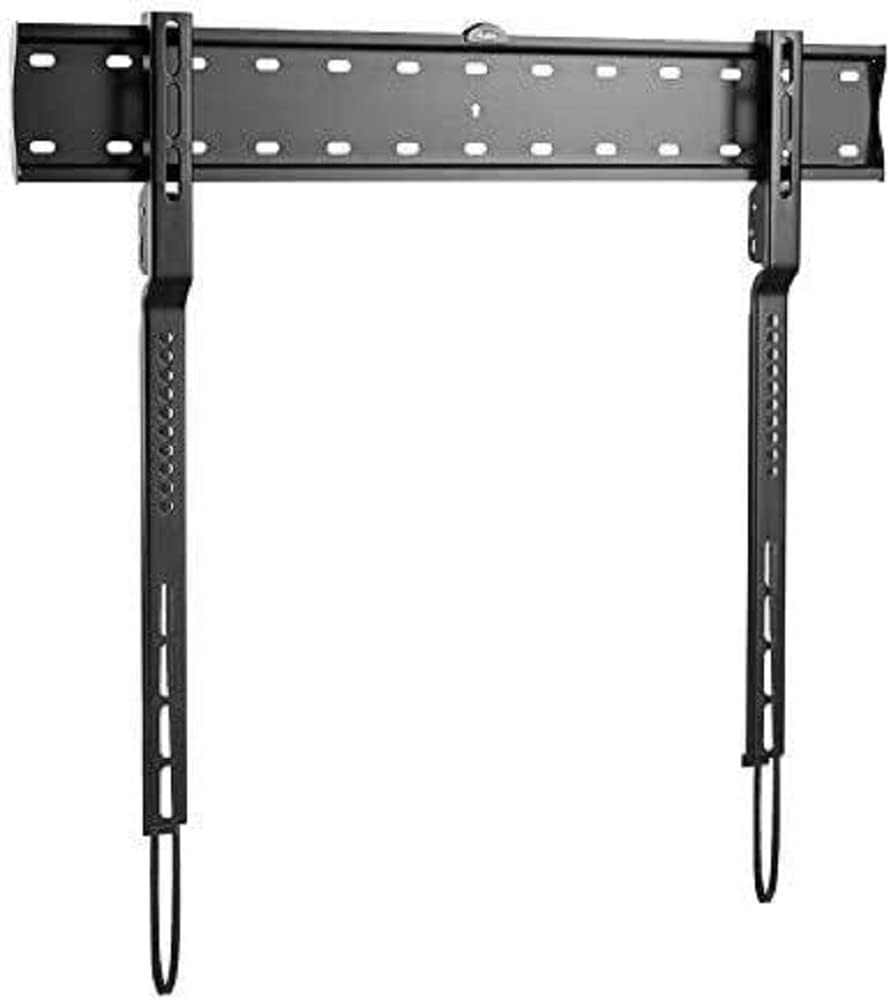
Obrázok: The Logilink BP0117 TV Wall Mount, showing the main wall plate and the two vertical TV brackets. The wall plate has multiple mounting holes, and the TV brackets feature VESA mounting points and pull-down straps for easy release.
Nastavenie a inštalácia
Pre bezpečnú inštaláciu postupujte podľa týchto krokov:
- Pripravte stenu:
- Určte požadovanú výšku pre váš televízor.
- Locate wall studs using a stud finder. Mark the center of the studs.
- Position the wall plate against the wall at the marked height and use the built-in spirit level to ensure it is perfectly horizontal. Mark the drilling points.
- Drill pilot holes at the marked points. Ensure the drill bit size is appropriate for your wall anchors/screws.
- Pripevnite nástennú dosku:
- Secure the wall plate to the wall using the provided screws and anchors. Tighten all screws firmly but do not overtighten.
- The silicone pads on the mount help prevent scratches or damage to the wall.
- Pripevnenie držiakov televízora k televízoru:
- Opatrne položte televízor obrazovkou nadol na mäkký a čistý povrch.
- Identifikujte montážne otvory VESA na zadnej strane televízora.
- Attach the two vertical TV brackets to the back of your TV using the appropriate screws and spacers (if needed) that match your TV's VESA pattern. The BP0117 supports VESA patterns: 200x200, 300x200, 300x300, 400x200, 400x300, 600x300.
- Ensure the brackets are securely fastened and evenly spaced.
- Upevnenie televízora na nástenný držiak:
- With assistance, carefully lift the TV and align the hooks on the TV brackets with the top edge of the wall plate.
- Gently lower the TV until the brackets engage with the wall plate.
- The spring with the strap mechanism will lock your TV into place. Pull the straps down to ensure the TV is securely latched.
- Dvakrát skontrolujte, či je televízor vodorovný a bezpečne pripevnený k nástennému držiaku.
Ovládanie držiaka
The Logilink BP0117 is a fixed wall mount, meaning it does not offer tilt, swivel, or extension capabilities. Once installed, your TV will remain in a fixed position, 18 mm from the wall.
To remove the TV from the mount, simply pull down on the release straps located at the bottom of the TV brackets. This will disengage the locking mechanism, allowing you to lift the TV off the wall plate.
Údržba
- Pravidelne kontrolujte všetky skrutky a matice, aby ste sa uistili, že sú pevne utiahnuté a bezpečne utiahnuté.
- Držiak čistite mäkkou, suchou handričkou. Nepoužívajte abrazívne čistiace prostriedky ani rozpúšťadlá.
- Inspect the mount for any signs of wear or damage. If any damage is found, do not use the mount and contact customer support.
Riešenie problémov
| Problém | Možná príčina | Riešenie |
|---|---|---|
| Televízor nie je po inštalácii vo vodorovnej polohe. | Nástenná doska nie je počas inštalácie vyrovnaná. | Remove TV, loosen wall plate screws, adjust with spirit level, re-tighten. |
| Televízor sa na držiaku zdá byť nestabilný. | Screws not tightened sufficiently; incorrect VESA screws used; wall not strong enough. | Ensure all screws are tight. Verify correct VESA screws are used. Confirm wall structure can support weight. Ensure release straps are engaged. |
| Cannot attach TV brackets to TV. | Incorrect VESA pattern or screw size. | Check your TV's VESA pattern against the mount's compatibility. Use the correct screws and spacers for your TV model. |
Špecifikácie
| Funkcia | Detail |
|---|---|
| Číslo modelu | BP0117 |
| Značka | Logilink |
| Typ montáže | Držiak na stenu |
| Typ pohybu | Opravené |
| Kompatibilné veľkosti televízorov | 43-80 inches (Flat and Curved) |
| Max. Nosnosť | 40 kg / 88 libier |
| Kompatibilita VESA | 200x200, 300x200, 300x300, 400x200, 400x300, 600x300 |
| Vzdialenosť od steny | 18 mm |
| Materiál | Silicone pads (for wall protection) |
| Rozmery produktu | 4.53 x 2.69 x 1.59 inches (mount only) |
| Hmotnosť položky | 4.62 libry |
Záruka a podpora
Specific warranty information for the Logilink BP0117 TV Wall Mount is not provided within this manual. Please refer to the product packaging or the official Logilink webpodrobné záručné podmienky nájdete na stránke.
For technical support, missing parts, or any inquiries regarding your product, please contact Logilink customer service through their official channels. Contact information can typically be found on the manufacturer's webmiesto alebo balenie produktu.