
Úvod
Thank you for choosing the WEKOME D6 Desktop Mini Bluetooth Speaker. This compact and portable speaker delivers clear sound quality and offers versatile connectivity options. This manual provides detailed instructions on how to set up, operate, and maintain your speaker to ensure optimal performance.
Koniec produktuview

Obrázok 1: Predné view of the WEKOME D6 Mini Bluetooth Speaker, highlighting its compact cylindrical design and control panel.
The WEKOME D6 is a palm-sized desktop speaker designed for portability and ease of use. It features Bluetooth connectivity for wireless audio streaming and a TF card slot for direct music playback. Its robust design ensures clear audio output for various compatible devices.
Kľúčové vlastnosti:
- Bluetooth pripojenie: Seamless wireless pairing with smartphones, tablets, and laptops.
- Kompaktný dizajn: Palm-sized for easy portability.
- Čistá kvalita zvuku: Delivers crisp and clear audio.
- Dlhá výdrž batérie: 500 mAh battery provides approximately 4-5 hours of playback.
- Rozšírený rozsah: Bluetooth transmission distance of up to 10 meters (33 feet).
- Podpora TF kariet: Maximum support for 32GB TF (MicroSD) cards for direct music playback.
- Výstupný výkon: Speaker maximum output power of 10 Watts.
Obsah balenia
Skontrolujte, prosím, balenie, či neobsahuje nasledujúce položky:
- WEKOME D6 Desktop Mini Bluetooth Speaker
- USB nabíjací kábel
- Používateľská príručka (tento dokument)
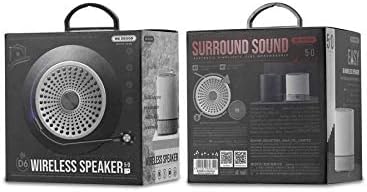
Obrázok 2: Retail packaging of the WEKOME D6 Mini Bluetooth Speaker, illustrating the product's branding and key information on the box.
Nastavenie
1. Nabíjanie reproduktora:
- Pripojte menší koniec nabíjacieho kábla USB k nabíjaciemu portu na reproduktore.
- Druhý koniec USB kábla pripojte k napájaciemu adaptéru USB (nie je súčasťou balenia) alebo k USB portu počítača.
- The charging indicator light will illuminate during charging and turn off once fully charged. A full charge typically takes 2-3 hours.
2. Zapnutie/vypnutie:
- Zapnutie: Stlačte a podržte Tlačidlo napájania na niekoľko sekúnd, kým nezaznie zvuková výzva alebo sa nerozsvieti kontrolka.
- Vypnutie: Stlačte a podržte Tlačidlo napájania znova na niekoľko sekúnd.
3. Párovanie Bluetooth:
- Ensure the speaker is powered on and in Bluetooth pairing mode (it will usually enter this mode automatically upon first power-on or if no device is connected). The indicator light will typically flash rapidly.
- Na svojom zariadení (smartfón, tablet, notebook) povoľte Bluetooth a vyhľadajte dostupné zariadenia.
- Select "WEKOME D6" from the list of found devices.
- Po spárovaní reproduktor poskytne zvukové potvrdenie a kontrolka prestane blikať a zostane svietiť nepretržite.
- Reproduktor sa po zapnutí automaticky znova pripojí k poslednému spárovanému zariadeniu, ak je na zariadení povolené rozhranie Bluetooth a zariadenie je v dosahu.
4. TF Card Insertion:
- Locate the TF card slot on the speaker.
- Gently insert a TF (MicroSD) card (up to 32GB) with pre-loaded music filedo slotu, kým nezacvakne na miesto.
- The speaker will automatically switch to TF card playback mode if a card is detected.
Obsluha reproduktora
Ovládacie tlačidlá:
Refer to Figure 1 for the location of the control buttons.
- Tlačidlo napájania: Stlačením a podržaním zapnete/vypnete.
- Tlačidlo na zvýšenie hlasitosti / Ďalšia skladba (+):
- Krátke stlačenie: Zvýšenie hlasitosti.
- Long press: Skip to the next track.
- Tlačidlo Prehrať/Pozastaviť (||): Krátkym stlačením spustíte alebo pozastavíte hudbu.
- Tlačidlo na zníženie hlasitosti / predchádzajúcu skladbu (-):
- Krátke stlačenie: Zníženie hlasitosti.
- Long press: Go to the previous track.
- Mode Button (Dot between + and Play/Pause): Short press to switch between Bluetooth mode and TF card mode (if a TF card is inserted).
Údržba
- Čistenie: Use a soft, dry cloth to clean the speaker's surface. Do not use abrasive cleaners, alcohol, or other chemical solvents, as these may damage the finish.
- Ukladací priestor: Reproduktor skladujte na chladnom a suchom mieste mimo dosahu priameho slnečného žiarenia a extrémnych teplôt.
- Starostlivosť o batérie: Pre predĺženie výdrže batérie sa vyhýbajte častému úplnému vybíjaniu reproduktora. Reproduktor pravidelne nabíjajte, aj keď ho dlhší čas nepoužívate.
- Odolnosť voči vode: This speaker is not water-resistant. Avoid exposure to liquids.
Riešenie problémov
| Problém | Možná príčina | Riešenie |
|---|---|---|
| Reproduktor sa nezapne. | Slabá batéria. | Plne nabite reproduktor. |
| Žiadny zvuk. | Volume too low; Speaker not paired; Incorrect mode. | Increase volume; Ensure speaker is paired; Switch to correct mode (Bluetooth/TF card). |
| Nedá sa spárovať so zariadením Bluetooth. | Reproduktor nie je v režime párovania; Bluetooth zariadenia je vypnutý; Príliš ďaleko od reproduktora. | Ensure speaker is in pairing mode; Turn on device Bluetooth; Move device closer to speaker (within 10M). |
| Music stops playing from TF card. | TF card not inserted correctly; Corrupted files; Unsupported format. | Reinsert TF card; Check TF card for errors; Ensure music filesú v podporovanom formáte (napr. MP3). |
Špecifikácie
| Značka | WEKOME |
| Názov modelu | D6 |
| Technológia pripojenia | Bluetooth |
| Typ reproduktora | Desktop Mini Speaker |
| Maximálny výstupný výkon reproduktora | 10 wattov |
| Kapacita batérie | 500 mAh (approx. 4-5 hours playback) |
| Prenosová vzdialenosť | 10 33 metrov (XNUMX XNUMX stôp) |
| Podpora TF kariet | Až 32 GB |
| Kompatibilné zariadenia | Notebook, smartfón, tablet |
| Typ montáže | Stolová doska |
| Rozmery balenia | 12.4 x 11.4 x 7.6 cm |
| Hmotnosť | 210 g |
Záruka a podpora
For warranty information and technical support, please refer to the warranty card included with your product or contact WEKOME customer service through their official website or authorized retailers. Keep your purchase receipt as proof of purchase for warranty claims.