
Sricam SP012
Sricam SP012 720P Pan/Tilt Indoor Wireless IP Camera User Manual
Model: SP012
Úvod
This manual provides detailed instructions for the installation, operation, and maintenance of your Sricam SP012 720P Pan/Tilt Indoor Wireless IP Camera. This device is designed for home security monitoring, offering features such as 720P HD video, pan/tilt control, night vision, two-way audio, and motion detection. Please read this manual thoroughly before using the product to ensure proper setup and functionality.
Koniec produktuview
The Sricam SP012 is a versatile indoor IP camera equipped with various components for comprehensive surveillance.
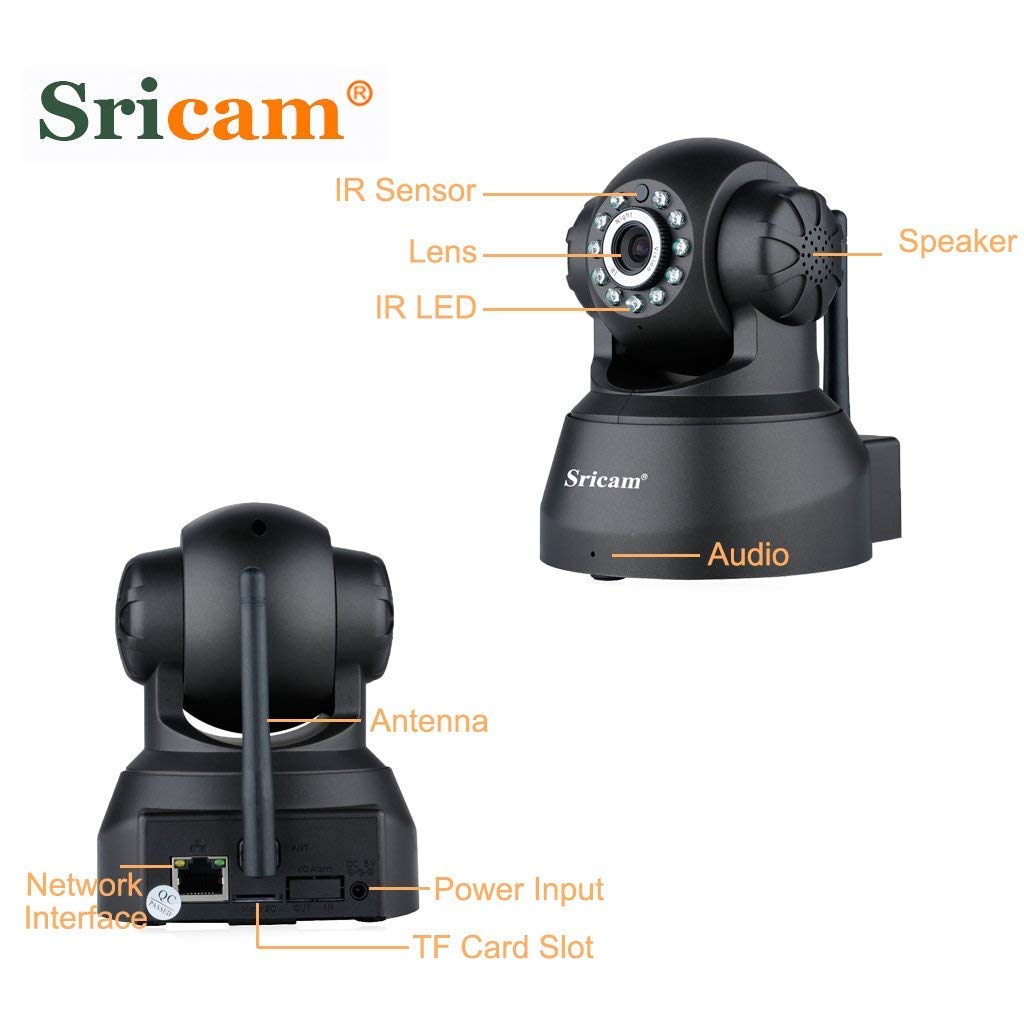
Obrázok: Predné a zadné view of the Sricam SP012 camera with labels pointing to its components including IR Sensor, Lens, IR LED, Speaker, Audio port, Antenna, Network Interface, Power Input, and TF Card Slot.
Kľúčové vlastnosti:
- 720P HD video: Provides clear 1280 x 720 high-definition video.
- Funkcia otáčania/nakláňania: Remotely control horizontal angle 355° and vertical angle 90° via smartphone.
- Nočné videnie: Equipped with IR LEDs for clear surveillance up to 20 meters in low light or darkness.
- Obojsmerný zvuk: Vstavaný mikrofón a reproduktor umožňujú komunikáciu v reálnom čase.
- Detekcia pohybu: Configurable function to trigger instant alerts and recording upon detecting movement.
- Miestne úložisko: Supports MicroSD card up to 128GB for video and picture storage.
- Bezdrôtové pripojenie: Connects to 2.4GHz Wi-Fi networks.
- ONVIF Protocol: Compatible with third-party ONVIF platform software and NVRs (above Onvif version 2.4.2).
Obsah balenia
Prosím, overte si, či sú vo vašom balíku všetky nižšie uvedené položky:
- 1 x Sricam SP012 720P Wireless Wifi WLAN IP Camera
- 1 x napájací adaptér (zástrčka pre USA)
- 1 x Wifi anténa
- 1 x držiak
- 1 x Návod na použitie
- 1 x montážne skrutky
Pokyny na nastavenie
1. Počiatočné nastavenie hardvéru
- Pripojenie antény: Screw the Wi-Fi antenna securely into the designated port on the back of the camera.
- Vložte kartu MicroSD (voliteľné): If you plan to use local storage, gently insert a MicroSD card (up to 128GB) into the TF Card Slot. Ensure the camera is powered off before inserting or removing the card.
- Zapnutie: Connect the power adapter to the camera's power input port and then plug it into an electrical outlet. The camera will initiate its startup sequence.
- Možnosti sieťového pripojenia:
- Bezdrôtové pripojenie (Wi-Fi): The camera supports 2.4GHz Wi-Fi networks only. Ensure your router is configured for 2.4GHz.
- Káblové (Ethernet): For initial setup or a more stable connection, you can connect an Ethernet cable from your router to the camera's network interface port.

Obrázok: Diagram illustrating two connection methods: Wired connection from camera to router to computer, and Wireless connection from camera to router to phone/tablet/notebook.
2. Inštalácia aplikácie a párovanie zariadení
- Stiahnite si aplikáciu: Hľadať the "Sricam" app on the Apple App Store (for iOS devices) or Google Play Store (for Android devices) and install it.
- Registrácia/Prihlásenie: Open the Sricam app and follow the on-screen instructions to register a new account or log in if you already have one.
- Pridať zariadenie:
- Tap the "+" icon or "Add Device" option in the app.
- Vyberte možnosť pridania novej kamery.
- Follow the in-app wizard to connect the camera to your Wi-Fi network. This typically involves scanning a QR code on the camera or entering your Wi-Fi credentials.
- Ensure your smartphone is connected to the same 2.4GHz Wi-Fi network as the camera during the setup process.
- Kompletné nastavenie: Once the camera is successfully added, you should see it listed in your app and be able to view živého krmiva.
Návod na obsluhu
1. Živé View Monitorovanie
Open the Sricam app and select your camera from the device list to access the live video feed. You can view the feed from anywhere in the world with an internet connection.
Obrázok: A smartphone screen showing a live video feed from the Sricam SP012 camera, demonstrating remote monitoring capabilities.
2. Ovládanie otáčania a nakláňania
V rámci živého vysielania view interface of the app, use the on-screen controls to remotely adjust the camera's viewuhol záberu. Kamera podporuje horizontálne otáčanie 355° a vertikálne nakláňanie 90°.

Obrázok: The Sricam SP012 camera illustrating its 355° pan and 90° tilt capabilities, with an inset showing a smartphone displaying the camera's view.
3. Obojsmerný zvuk
Ak chcete použiť funkciu obojsmerného zvuku, klepnite na ikonu mikrofónu v aplikácii naživo view. You can speak into your phone, and your voice will be transmitted through the camera's speaker. Similarly, the camera's built-in microphone will pick up sounds from the monitored area.
Obrázok: A child communicating with a parent via the camera's two-way audio function, with a smartphone displaying the microphone icon.
4. Nočné videnie
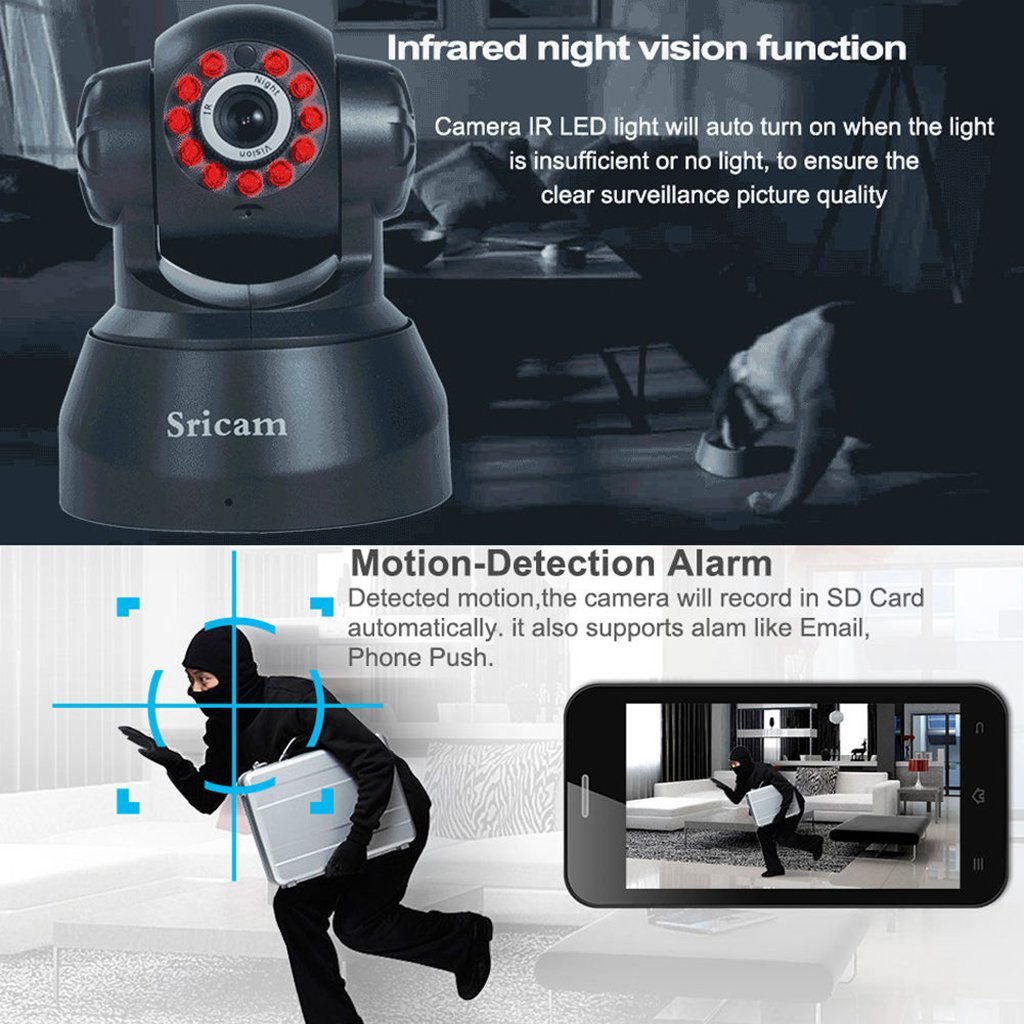
The camera automatically activates its infrared (IR) LEDs when ambient light is insufficient, providing clear black-and-white video in dark conditions. This ensures continuous surveillance day and night.

Obrázok: The Sricam SP012 camera with its IR LEDs illuminated, indicating active night vision functionality.
5. Detekcia a nahrávanie pohybu
Configure motion detection settings within the app. When motion is detected, the camera can automatically record video to the inserted MicroSD card and send instant alerts (e.g., email, push notifications) to your smartphone.
6. Vzdialený prístup
The Sricam app allows you to access your camera's live feed and recorded footage from any location with an internet connection, using your smartphone, tablet, or PC.

Obrázok: Various devices including smartphones, tablets, and desktop computers displaying live feeds from multiple Sricam cameras, illustrating remote access capabilities.
Údržba
- Čistenie: Na čistenie objektívu a tela fotoaparátu používajte mäkkú, suchú handričku. Nepoužívajte agresívne chemikálie ani abrazívne materiály.
- Aktualizácie firmvéru: Periodically check the Sricam app for available firmware updates to ensure optimal performance and security.
- umiestnenie: Ensure the camera is placed in a stable, dry indoor environment, away from direct sunlight, extreme temperatures, and strong electromagnetic fields.
- Zabezpečenie siete: Regularly update your Wi-Fi password and ensure your network is secure to prevent unauthorized access.
Riešenie problémov
| Problém | Možné riešenie |
|---|---|
| Fotoaparát sa nepodarilo pripojiť k sieti Wi-Fi. |
|
| Žiadny živý video prenos. |
|
| Obojsmerný zvuk nefunguje. |
|
| Neboli prijaté upozornenia na detekciu pohybu. |
|
Špecifikácie
| Funkcia | Detail |
|---|---|
| Číslo modelu | SP012 |
| Rozlíšenie | 720P (1280 x 720) |
| Uhol otočenia/naklonenia | Horizontálne 355°, Vertikálne 90° |
| Objektív | 3.6 mm širokouhlý objektív |
| Vzdialenosť nočného videnia | Dosah až 20 metrov (IR LED) |
| Zvuk | Built-in Microphone and Speaker (Two-Way Audio) |
| Skladovanie | MicroSD Card Slot (Max. 128GB) |
| Konektivita | Wireless (2.4GHz Wi-Fi), Wired (Ethernet) |
| Protokol pripojenia | ONVIF, Wi-Fi |
| Vnútorné / vonkajšie použitie | Vnútorný |
| Zdroj napájania | Sieťový adaptér |
| Rozmery produktu | 19.56 x 11.18 x 16.76 cm |
| Hmotnosť položky | 567 g |
Záruka a podpora
For information regarding warranty coverage and customer support, please refer to the warranty policy provided with your purchase or visit the official Sricam webstránky. Uschovajte si doklad o kúpe ako doklad o kúpe pre prípad reklamácie.
For technical assistance or further inquiries, please contact Sricam customer support.
Ask a question about this manual
Ask about setup, troubleshooting, compatibility, parts, safety, or missing instructions. Manuals+ will review the question and use this page’s manual context to help answer it.