
1. හැඳින්වීම
The VEDINDUST HDMI Audio Embedder (Model CHD801) is designed to integrate external audio into an HDMI video signal. This device allows you to replace the original HDMI audio with digital optical (TOSLINK/SPDIF) or analog (3.5mm line) audio sources. It supports high-resolution video up to 4K@60Hz with 18Gbps bandwidth, HDR, CEC, and HDCP2.2/1.4 pass-through. This manual provides detailed instructions for setup, operation, and troubleshooting to ensure optimal performance.
2. විශේෂාංග
- Digital/Analog Audio to HDMI Embedding: Replaces the original HDMI audio with external digital optical (TOSLINK/SPDIF) or analog (3.5mm line) audio.
- අධි විභේදන සහාය: Supports video resolutions up to 4K@60Hz 4:4:4 with 18Gbps bandwidth. Also compatible with 1080p and 720p.
- Advanced Video Features: Supports HDMI2.0, 10-bit High Dynamic Range (HDR), HDCP 2.2/1.4, and CEC pass-through.
- ශ්රව්ය ආකෘති අනුකූලතාව: HDMI port passes through all digital/analog audio formats including PCM, LPCM. Optical audio input supports various digital formats. 3.5mm audio input supports 2-channel stereo PCM audio.
- DVI to HDMI Conversion: Supports combining DVI signals with audio signals into HDMI signals using DVI to HDMI cables.
- ප්ලග් සහ ප්ලේ: No software installation required for operation.
3. පැකේජ අන්තර්ගතය
පහත ලැයිස්තුගත කර ඇති සියලුම අයිතම ඔබේ පැකේජයට ඇතුළත් කර ඇති බව කරුණාකර සත්යාපනය කරන්න:
- VEDINDUST HDMI Audio Embedder Unit (Model CHD801)
- මයික්රෝ USB බල කේබලය
- පරිශීලක අත්පොත
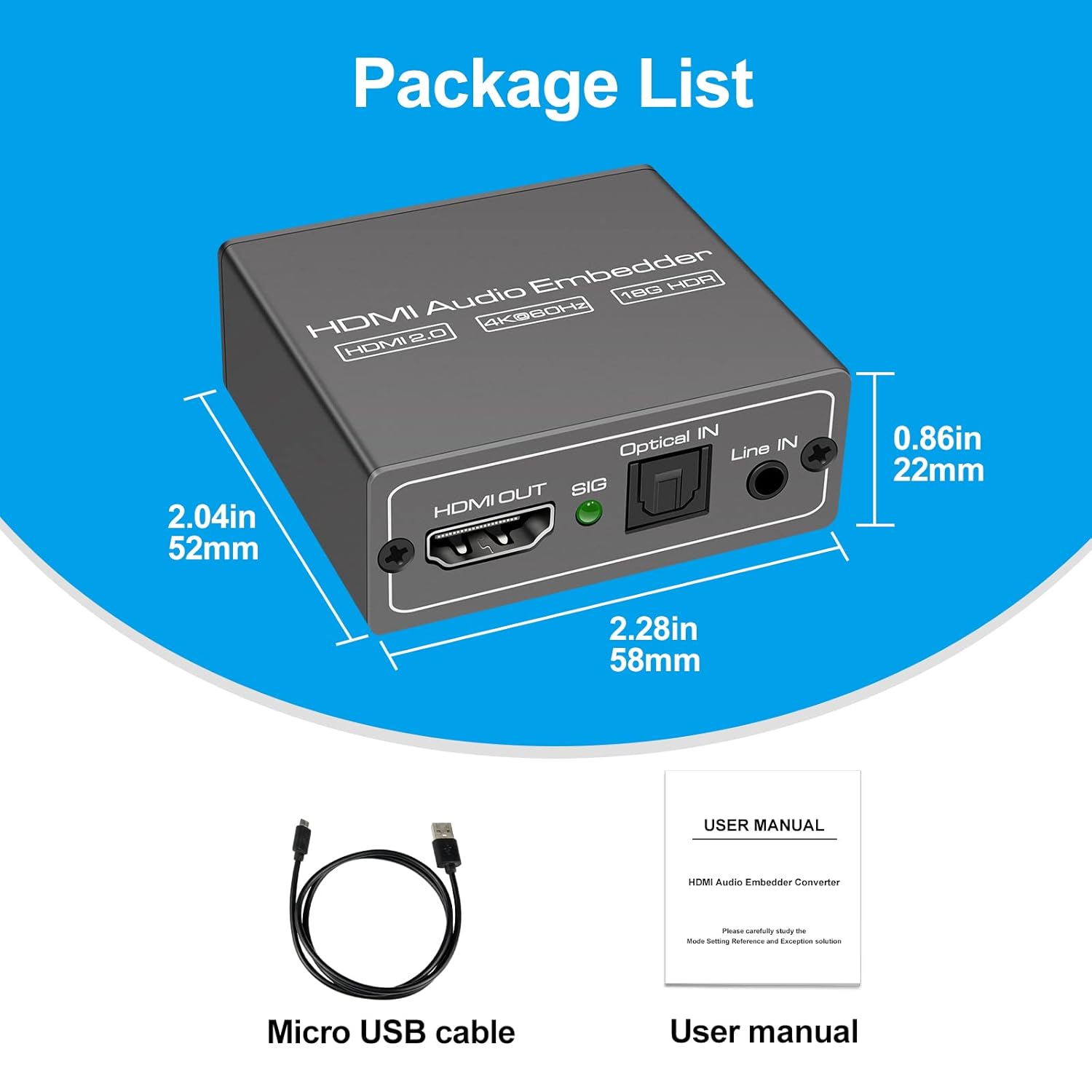
This image displays the items included in the product package: the VEDINDUST HDMI Audio Embedder unit, a Micro USB power cable, and the user manual.
4. නිෂ්පාදන අවසන්view සහ වරායන්
Familiarize yourself with the device's ports and controls:

This close-up shows the mode switch on the device, allowing selection between 'Optical' audio input, 'Line' (3.5mm) audio input, or 'Pass' through mode for original HDMI audio.

This image details the audio output and input ports: HDMI OUT, Optical IN (TOSLINK), and 3.5mm Line IN, along with the signal indicator light.
- HDMI තුළ: Connect your HDMI video source (e.g., laptop, TV box, game console).
- HDMI පිටත: Connect to your display device (e.g., TV, projector).
- දෘශ්ය IN: Connect your digital optical audio source (TOSLINK/SPDIF).
- Line IN: Connect your analog 3.5mm audio source.
- USB 5V (PW): Connect the Micro USB power cable to a 5V power adapter (not included) or a USB port on your display device.
- මාදිලියේ ස්විචය: Selects the desired audio input mode (Pass, Optical, or Line).
- SIG Indicator: Lights up when a signal is detected.
5. පිහිටුවීම
Follow these steps to set up your HDMI Audio Embedder:
- Connect your HDMI video source (e.g., laptop, TV box, PS4, Blu-Ray DVD player) to the HDMI-IN port on the embedder using an HDMI cable.
- Connect your display device (e.g., HD TV, projector) to the HDMI පිටතට port on the embedder using an HDMI cable.
- Connect your external audio source to either the ඔප්ටිකල් IN port (for digital audio) or the IN පේළිය (3.5mm) port (for analog audio), depending on your desired audio input.
- Connect the provided Micro USB power cable to the USB 5V (PW) port on the embedder and then to a 5V power source.
- Select the appropriate audio input mode using the මාදිලියේ ස්විචය on the device (refer to Section 6: Operating Modes).
- Ensure all connections are secure and power on all connected devices.

This diagram shows how to connect various devices to the HDMI Audio Embedder. HDMI sources (laptop, TV box, PS4, Blu-Ray DVD) connect to the HDMI IN. External audio sources (3.5mm or optical) connect to their respective inputs. The HDMI OUT connects to a display device like a projector or HD TV.
6. මෙහෙයුම් මාතයන්
The HDMI Audio Embedder features a mode switch to select how audio is handled:
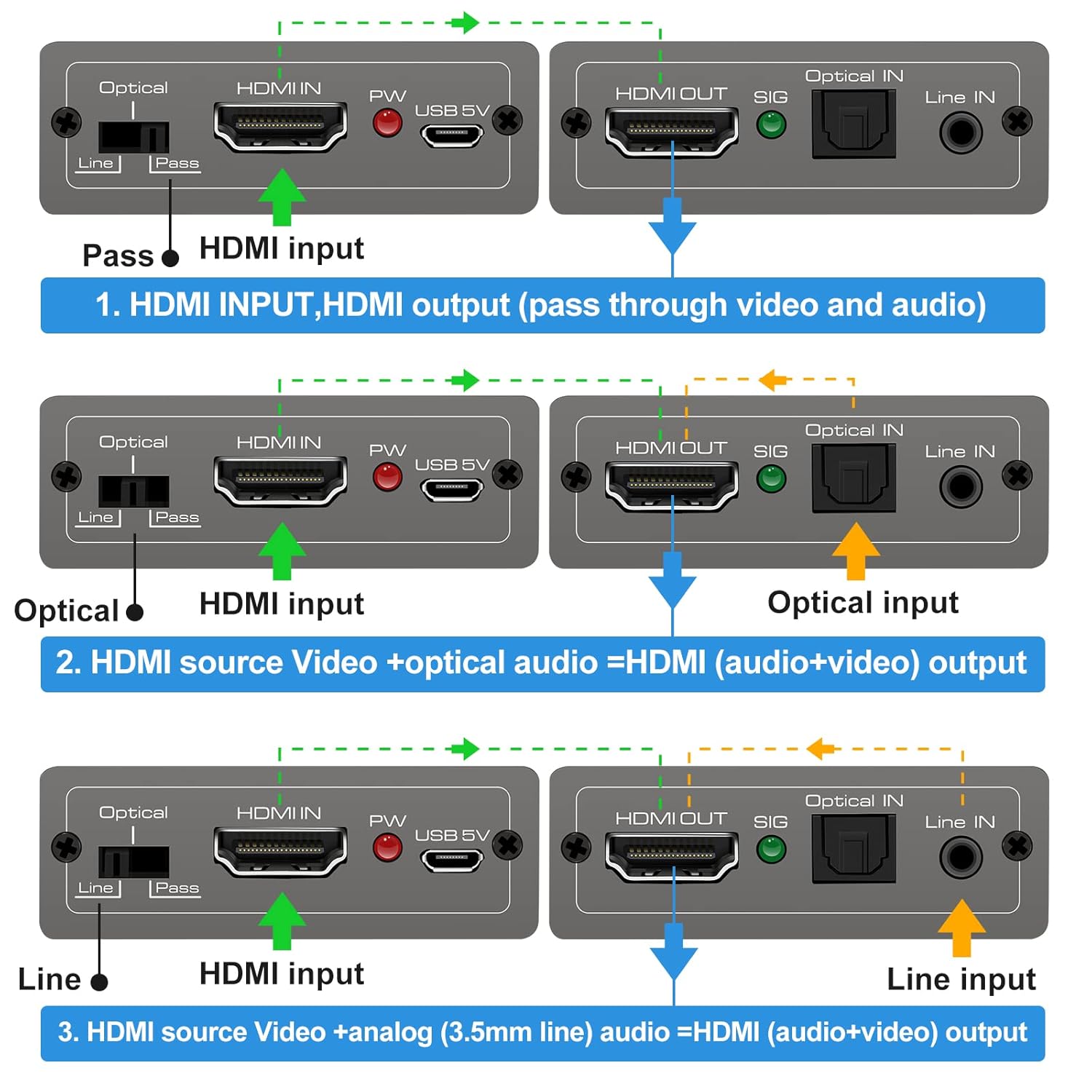
This diagram illustrates the three operational modes: 1. Pass Mode: HDMI input video and audio pass directly to HDMI output. 2. Optical Mode: HDMI input video combines with optical audio input for HDMI output. 3. Line Mode: HDMI input video combines with 3.5mm line audio input for HDMI output.
- සමත් ප්රකාරය: In this mode, the original HDMI audio from your source device is passed through directly to the HDMI output, along with the video signal. No external audio is embedded.
- දෘශ්ය මාදිලිය: When selected, the HDMI video signal from your source is combined with the audio signal received from the ඔප්ටිකල් IN port. The embedded audio is then sent to the HDMI output.
- රේඛා මාදිලිය: When selected, the HDMI video signal from your source is combined with the audio signal received from the IN පේළිය (3.5mm) port. The embedded audio is then sent to the HDMI output.
To change modes, simply slide the switch to the desired position. The device will automatically adjust the audio routing.
7. පිරිවිතර
Technical specifications for the VEDINDUST HDMI Audio Embedder:
- ආකෘතිය: CHD801
- HDMI අනුවාදය: HDMI 2.0
- HDCP අනුවාදය: HDCP 2.2 / 1.4
- වීඩියෝ විභේදනය: Up to 4K@60Hz (YUV 4:4:4)
- කලාප පළල: 18Gbps
- HDR සහාය: 10-bit HDR
- CEC සහාය: සමත්-හරහා
- Audio Input (Digital): Optical (TOSLINK/SPDIF)
- Audio Input (Analog): 3.5mm Line In (2-channel stereo PCM)
- ශ්රව්ය ප්රතිදානය: HDMI (embedded audio)
- බල සැපයුම: DC 5V (via Micro USB)
- මානයන්: 10.16 x 5.18 x 2.18 cm (4.0 x 2.04 x 0.86 අඟල්)
- බර: ග්රෑම් 110 (අවුන්ස 3.88)
- නිෂ්පාදකයා: VEDINDUST
- UPC: 798610311141

This image highlights the device's capability to support high-resolution video, up to 4K at 60Hz, ensuring clear and detailed visuals.
8. දෝශ නිරාකරණය
If you encounter issues with your HDMI Audio Embedder, please refer to the following common troubleshooting steps:
- වීඩියෝ ප්රතිදානය නැත:
- සියලුම HDMI කේබල් ආරක්ෂිතව සම්බන්ධ කර ඇති බවට වග බලා ගන්න.
- Verify the power adapter is connected and the device is receiving power.
- Try connecting the HDMI source directly to the display to confirm the source and display are working correctly.
- Check if the display's input source is correctly selected.
- No Audio Output / Incorrect Audio:
- Ensure the correct audio input mode (Pass, Optical, or Line) is selected on the embedder's switch.
- Verify that the external audio source is properly connected and producing sound.
- Check the volume levels on both your audio source and display device.
- If using Optical or 3.5mm input, ensure the cables are fully inserted and not damaged.
- Some audio formats may not be supported by all devices. Try adjusting the audio output format on your source device.
- අතරමැදි සංඥාව:
- විශේෂයෙන් 4K විභේදන සඳහා උසස් තත්ත්වයේ HDMI කේබල් භාවිතා කරන්න.
- Ensure the power supply is stable and sufficient (5V).
- Avoid excessive cable lengths.
මෙම පියවරයන් උත්සාහ කිරීමෙන් පසුවද ගැටලුව දිගටම පවතින්නේ නම්, කරුණාකර පාරිභෝගික සහාය අමතන්න.
9. නඩත්තු කිරීම
To ensure the longevity and optimal performance of your HDMI Audio Embedder, follow these maintenance guidelines:
- පිරිසිදු කිරීම: උපාංගය පිරිසිදු කිරීම සඳහා මෘදු වියළි රෙද්දක් භාවිතා කරන්න. දියර පිරිසිදු කරන්නන් හෝ එයරොසෝල් භාවිතා නොකරන්න.
- පරිසරය: උපාංගය සිසිල්, වියළි ස්ථානයක, සෘජු හිරු එළිය, තාප ප්රභවයන් සහ තෙතමනයෙන් ඈත්ව තබා ගන්න.
- හැසිරවීම: උපාංගය ප්රබල බලපෑම්වලට වැටීමෙන් හෝ යටත් කිරීමෙන් වළකින්න.
- වාතාශ්රය: Ensure proper airflow around the device to prevent overheating.
- බලය: Disconnect the power supply when the device is not in use for extended periods.
10. වගකීම් සහ සහාය
VEDINDUST products are designed for reliability and performance. For information regarding warranty coverage, technical support, or service, please refer to the warranty card included with your product or visit the official VEDINDUST website. Please have your model number (CHD801) and purchase information ready when contacting support.