
1. නිෂ්පාදන අවසන්view
The VOCOlinc TGuard Smart Door Lock is a keyless entry deadbolt designed exclusively for Apple HomeKit. It features an electronic LED keypad, Bluetooth connectivity, and security functions including auto-locking and remote control capabilities when paired with an Apple Home Hub.
This smart lock provides enhanced security and convenience, allowing multiple methods of access and user management. It integrates seamlessly into your Apple Home ecosystem for secure and private operation.
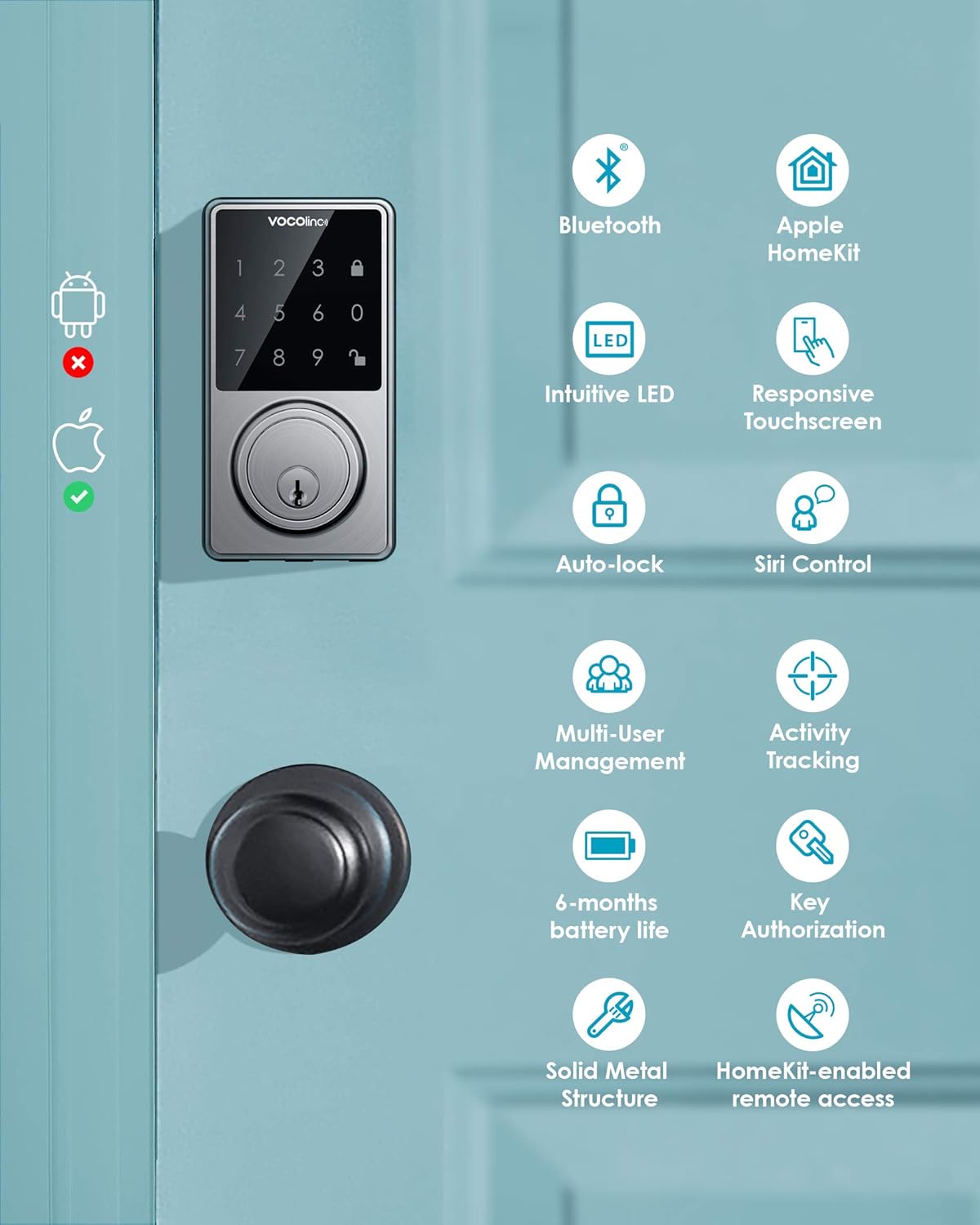
රූපය 1.1: ඉවරයිview of VOCOlinc TGuard Smart Lock features, including Bluetooth, Apple HomeKit compatibility, intuitive LED, responsive touchscreen, auto-lock, Siri control, multi-user management, activity tracking, 6-month battery life, key authorization, solid metal structure, and HomeKit-enabled remote access.
2. පැකේජ අන්තර්ගතය
ස්ථාපනය ආරම්භ කිරීමට පෙර සියලුම සංරචක පැකේජයේ ඇති බව තහවුරු කර ගන්න:
- සම්පූර්ණ Lockset සහ Hardware
- ඇතුල්වීමේ යතුරු (2)
- ස්ථාපන මාර්ගෝපදේශය (මෙම ලේඛනය)
- ඉක්මන් ආරම්භක මාර්ගෝපදේශය

රූපය 2.1: පුපුරා ගියේය view of the VOCOlinc TGuard Smart Lock components, including the exterior keypad assembly, interior assembly, deadbolt mechanism, strike plate, mounting plate, screws, and two physical keys. The retail box is also shown.
3. පිරිවිතර
| විශේෂාංගය | විස්තර |
|---|---|
| පද්ධති අවශ්යතාව | Mobile device running iOS 10.3 or later |
| බ්ලූටූත් සහාය | V4.2 |
| ගැළපුම | Apple HomeKit ONLY |
| බලශක්ති ප්රභවය | 4 x AA Alkaline batteries (not included) |
| බැටරි ආයු කාලය | 4 to 6 months (with high-quality batteries) |
| පරිශීලක ධාරිතාව | පරිශීලකයින් 30 දක්වා |
| මුරකේත දිග | ඉලක්කම් 4-8 |
| දොර ඝණකම | 1 3/8 inch (35mm) to 1 3/4 inch (45mm) |
| Backsets | 2 3/8 inch (60mm) and 2 3/4 inch (70mm) |
| Face Borehole | 2 1/8 inch (54mm) minimum |
| Lock Dimensions (L x W x H) | 72 x 162 x 115 මි.මී |
| අගුළු බර | 825 ග්රෑම් |
| ද්රව්ය | නිකල් |
| අවසන් කරන්න | සැටින් |

Image 3.1: Detailed dimensions of the VOCOlinc TGuard Smart Lock exterior and interior units, showing measurements of 5.07 inches (height) by 2.71 inches (width) for the keypad, and 6.75 inches (height) by 2.89 inches (width) for the interior unit. Also illustrates compatible door thickness (1 3/8 to 1 3/4 inches) and backsets (2 3/8 and 2 3/4 inches) with a minimum 2 1/8 inch face borehole.
4. ස්ථාපන මාර්ගෝපදේශය
Proper installation is crucial for the optimal performance and security of your VOCOlinc TGuard Smart Door Lock. Refer to the included Quick Start Guide for step-by-step visual instructions.
4.1 පූර්ව ස්ථාපන චෙක්පත්
- Ensure your door meets the specified thickness and backset requirements (refer to Section 3: Specifications).
- A 2 1/8 inch (54mm) face borehole is required. Drilling may be necessary if your door does not have this.
- The deadbolt must be in the retracted (unlocked) position during installation.
- Ensure the deadbolt mechanism is oriented vertically.

Image 4.1: Important installation tips for the VOCOlinc TGuard Smart Lock. Illustrations show correct door preparation, including ensuring the deadbolt is retracted (unlocked), drilling requirements for a 2 1/8 inch minimum borehole, and proper vertical positioning of the deadbolt mechanism. Also reiterates door thickness (1 3/8 to 1 3/4 inches) and backset (2 3/8 and 2 3/4 inches) compatibility.
4.2 සාමාන්ය ස්ථාපන පියවර (සාරාංශය)
- Prepare the door and frame according to the provided templates and ensure all holes are correctly sized.
- දොර කෙළවරට ඩෙඩ්බෝල්ට් අගුල සවි කරන්න.
- Install the exterior keypad assembly, ensuring the cable passes through the door.
- අභ්යන්තර සවිකිරීමේ තහඩුව සවි කරන්න.
- බාහිර එකලස් කිරීමේ සිට අභ්යන්තර එකලස් කිරීම දක්වා කේබලය සම්බන්ධ කරන්න.
- Mount the interior assembly to the mounting plate.
- Insert 4 AA alkaline batteries into the interior assembly.
- Perform the door handing process as instructed in the Quick Start Guide.
5. සැකසුම සහ යුගලනය
The VOCOlinc TGuard Smart Door Lock is designed to work exclusively with Apple HomeKit. You will need an iOS device (iPhone, iPad, or iPod touch) running iOS 10.3 or later and Bluetooth V4.2 enabled.
5.1 Initial Pairing with Apple Home App
- Ensure your iOS device's Bluetooth is turned on.
- ඔබගේ iOS උපාංගයේ Apple Home යෙදුම විවෘත කරන්න.
- ඉහළ දකුණු කෙළවරේ ඇති '+' නිරූපකය තට්ටු කර 'උපාංග එකතු කරන්න' තෝරන්න.
- Scan the HomeKit setup code located on the lock or in the Quick Start Guide.
- Follow the on-screen prompts to name your lock and assign it to a room.
- The lock will now be paired with your Apple HomeKit system.
5.2 VOCOlinc App Integration
For advanced features and management, download the VOCOlinc app from the Apple App Store. Once installed, the app will automatically detect your HomeKit-paired TGuard lock, allowing you to access additional settings and controls.
6. මෙහෙයුම් උපදෙස්
The TGuard Smart Door Lock offers multiple convenient ways to lock and unlock your door.
6.1 Locking and Unlocking Methods
- Touch Keypad: Enter a valid 4-8 digit passcode on the touchscreen keypad to unlock. To lock, press the lock icon on the keypad.
- Apple Home / VOCOlinc App: Use the respective apps on your iOS device to remotely lock or unlock the door via Bluetooth or through your Home Hub.
- Siri Voice Control: With an Apple Home Hub (Apple TV Gen. 4 or HomePod) set up, you can use Siri to control your lock. For example, say "Hey Siri, lock my front door."
- භෞතික යතුර: In case of emergencies or dead batteries, use one of the two provided physical keys to manually lock or unlock the deadbolt.

Image 6.1: A person using Siri voice control to lock their front door with the VOCOlinc TGuard Smart Lock. The image shows an iPhone displaying a 'Privacy' screen and a speech bubble with the command "Hey Siri, lock my front door."
6.2 ස්වයංක්රීය අගුළු විශේෂාංගය
The auto-lock feature automatically locks your door after a user-defined period, providing peace of mind. You can set the auto-lock time between 5 to 180 seconds within the VOCOlinc app.

Image 6.2: Illustration of the auto-lock feature for the VOCOlinc TGuard Smart Lock, showing the deadbolt automatically extending to lock the door. The text indicates that auto-lock time can be set between 5 to 180 seconds in the VOCOlinc app.
6.3 දුරස්ථ ප්රවේශය
For remote access and control of your TGuard lock when you are away from home, an Apple Home Hub (Apple TV [Gen. 4 or later] or HomePod) is required. The Home Hub acts as a bridge, allowing you to control your lock via the Apple Home app over the internet.
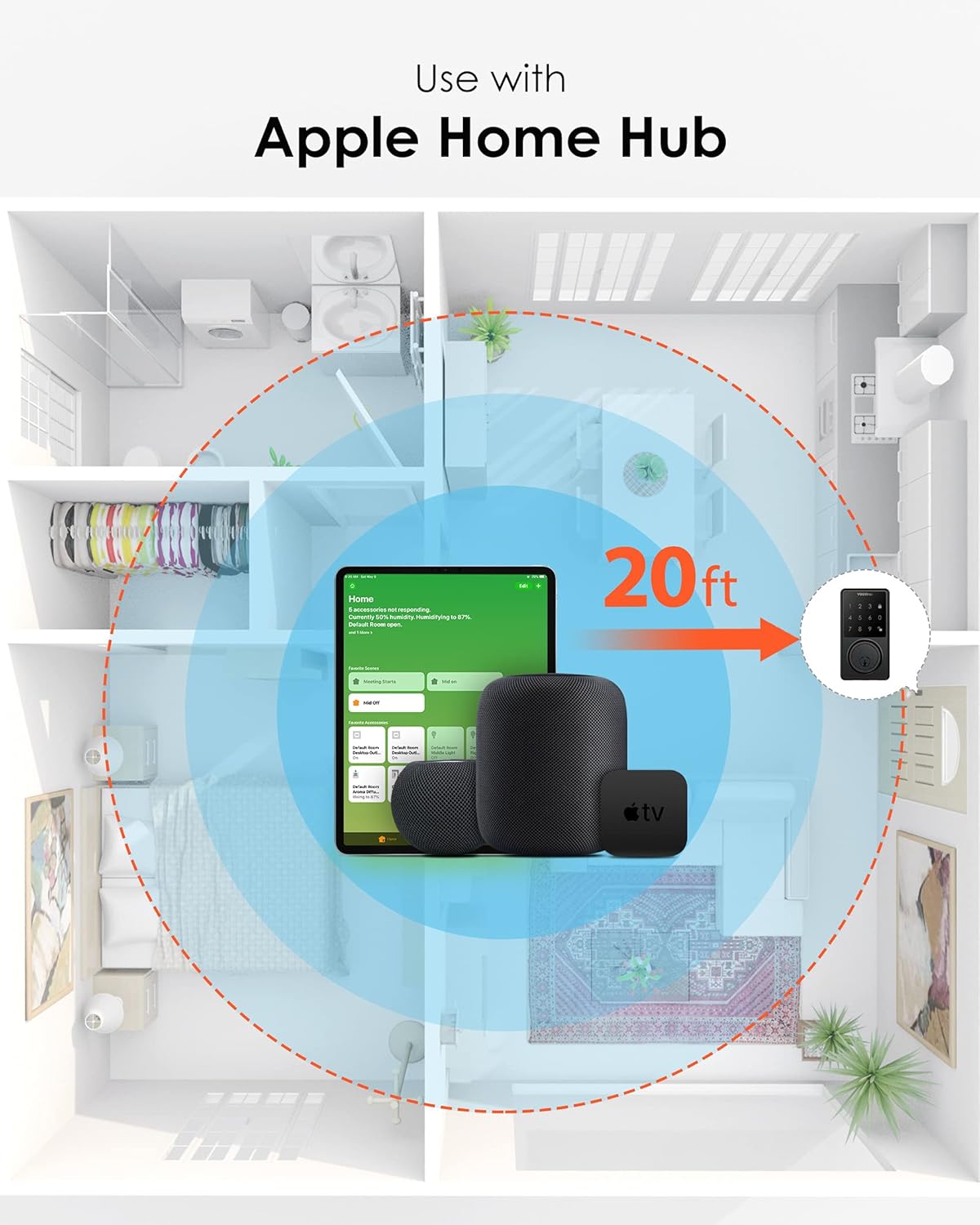
Image 6.3: Diagram illustrating the use of the VOCOlinc TGuard Smart Lock with an Apple Home Hub (Apple TV or HomePod) for remote access. The image shows a smart lock communicating with an Apple Home Hub within a 20ft range, enabling control from a mobile device.
7. පරිශීලක කළමනාකරණය
The VOCOlinc TGuard Smart Door Lock allows you to manage access for various individuals, enhancing security and convenience.
7.1 Creating and Managing Passcodes
You can manage up to 30 users (e.g., family members, friends, tenants, service providers) by assigning unique 4-8 digit passcodes. These passcodes can be customized for specific frequencies and periods of validity.
- පරිශීලකයා එකතු කරන්න: Use the VOCOlinc app to create new users and assign them unique passcodes.
- Set Validity: Define when a passcode is active (e.g., specific days, times, or temporary access).
- Administrator Only Access: This setting disables all user-defined passcodes, allowing access only via the administrator's credentials or physical key.

Image 7.1: Illustration of creating and managing user codes for the VOCOlinc TGuard Smart Lock. The image shows the lock's keypad alongside a smartphone screen displaying the 'Add User' interface within the VOCOlinc app, allowing entry of a name, assignment of a passcode, and creation of user groups.
7.2 ක්රියාකාරකම් ලුහුබැඳීම
The lock automatically records door activities, allowing you to track who accessed your door and when. This feature is accessible through the VOCOlinc app.
8. නඩත්තු කිරීම
Regular maintenance ensures the longevity and reliable operation of your VOCOlinc TGuard Smart Door Lock.
8.1 බැටරි ප්රතිස්ථාපනය
The lock is powered by 4 AA alkaline batteries, providing an industry-leading battery life of 4 to 6 months. When the battery level is low, you will receive notifications via the app. To replace batteries:
- අභ්යන්තර එකලස් කිරීමේ බැටරි කවරය ඉවත් කරන්න.
- පැරණි බැටරි ඉවත් කරන්න.
- Insert four new, high-quality AA alkaline batteries, ensuring correct polarity.
- බැටරි ආවරණය ප්රතිස්ථාපනය කරන්න.
සටහන: Always use high-quality alkaline batteries (e.g., Energizer, Duracell) for optimal performance and battery life.
8.2 බල ඉතිරි කිරීමේ මාදිලිය
When you are away from home for an extended period, activate 'Away mode' in the VOCOlinc app to disable the touch panel and further conserve battery power.
8.3 පිරිසිදු කිරීම
Clean the exterior keypad and interior assembly with a soft, dry cloth. Avoid using abrasive cleaners or solvents, which can damage the finish and electronic components.
9. දෝශ නිරාකරණය
If you encounter issues with your VOCOlinc TGuard Smart Door Lock, refer to the following common troubleshooting tips:
- අගුල ප්රතිචාර නොදක්වයි: Check battery levels. Replace batteries if low. Ensure the lock is properly installed and the deadbolt moves freely.
- යතුරු පෑඩය ප්රතිචාර නොදක්වයි: The touch control offers three levels of sensitivity. Adjust this setting in the VOCOlinc app if needed. Ensure the keypad is clean and dry.
- Siri Control Not Working: Verify that your Apple Home Hub (Apple TV or HomePod) is online and within range of the lock. Ensure your iOS device is connected to the internet.
- දුරස්ථ ප්රවේශ ගැටළු: Confirm your Apple Home Hub is properly set up and connected to the internet. Ensure your iOS device has an active internet connection.
- Lock Jams or Does Not Operate Smoothly: Check for any obstructions in the door frame or deadbolt path. Ensure the door is properly aligned and the deadbolt mechanism is installed vertically.
- හදිසි ප්රවේශය: Always use the physical backup keys provided in case of electronic failure or dead batteries.
10. වගකීම් සහ සහාය
For warranty information and technical support, please refer to the official VOCOlinc website or contact VOCOlinc customer service directly. Keep your purchase receipt as proof of purchase for warranty claims.
VOCOlinc Customer Service: කරුණාකර පිවිසෙන්න www.vocolinc.com/support සම්බන්ධතා තොරතුරු සහ වැඩිදුර සහාය සඳහා.