
1. کانview
The Philips TAZ2200 is a versatile portable sound machine designed for enjoying various audio formats. It features a top-loading CD player, a front-loading cassette player, FM radio, Bluetooth 6.0 connectivity, USB playback, and a 3.5mm audio input. Equipped with dynamic bass boost and 6W stereo speakers, it delivers rich sound. The unit can be powered by AC mains or batteries and includes a carrying handle for portability.
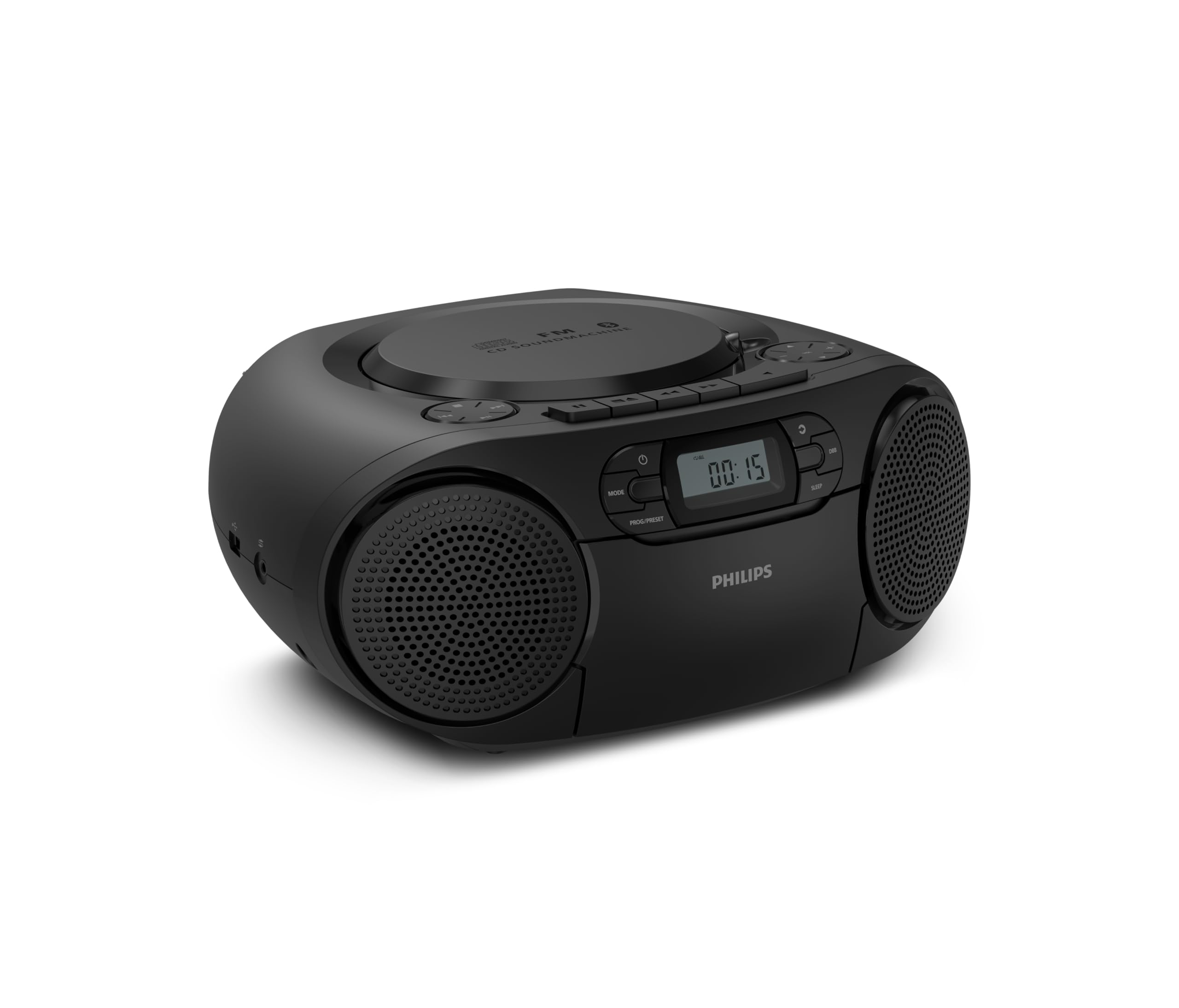
سامهون view of the Philips TAZ2200 CD Soundmachine, showing the main display and control buttons.
2. حفاظت جي ڄاڻ
Please read these safety instructions carefully before using your device and keep them for future reference. Incorrect use may result in hazards.
- طاقت جو ذريعو: صرف مخصوص پاور اڊاپٽر يا بيٽريون استعمال ڪريو. پڪ ڪريو ته وولٽtagاي يونٽ جي گهرجن کي پورو ڪري ٿو.
- پاڻي ۽ نمي: يونٽ کي مينهن، نمي، ٽِپڻ، يا ڇِپڻ جي سامهون نه رکو. يونٽ تي مائع سان ڀريل شيون، جهڙوڪ گلدان، نه رکو.
- وينٽيليشن: Ensure adequate ventilation. Do not block any ventilation openings. Maintain a minimum distance around the unit for sufficient ventilation.
- گرمي: يونٽ کي گرمي جي ذريعن جهڙوڪ ريڊيئيٽر، گرمي رجسٽر، اسٽو، يا ٻيو سامان (بشمول ampلائفائرز) جيڪي گرمي پيدا ڪن ٿا.
- بيٽريون: Follow correct polarity when inserting batteries. Do not mix old and new batteries, or different types of batteries. Remove batteries if the unit is not used for a long period.
- صفائي: صفائي ڪرڻ کان اڳ يونٽ کي پاور آئوٽليٽ مان ڪڍو. نرم، سڪل ڪپڙو استعمال ڪريو. مائع ڪلينر يا ايروسول ڪلينر استعمال نه ڪريو.
- خدمت ڪرڻ: ھن پراڊڪٽ کي پنھنجي خدمت ڪرڻ جي ڪوشش نه ڪريو. س servني خدمتن جو حوالو ڏيو قابل سروس اهلڪارن کي.
3. دٻي ۾ ڇا آهي
پيڪنگ ڪرڻ وقت، مھرباني ڪري پڪ ڪريو ته ھيٺ ڏنل سڀ شيون موجود آھن:
- Philips TAZ2200 CD Soundmachine
- پاور ڪيبل
- تڪڙو شروع ھدايت
- وارنٽي ڪتابي
- حفاظتي چادر
4. ڪنٽرول ۽ ڪنيڪشن
فرنٽ پينل ڪنٽرول
The front panel features the main display, power button, mode selection, program/preset buttons, and dynamic bass boost (DBB) control. Playback controls for CD and USB are also located here.

تفصيلي اڳيون view showing the display, power, mode, program/preset, and DBB buttons.
Side and Rear Connections
The side of the unit provides a USB port for digital audio playback and a 3.5mm audio input jack for connecting external devices.

پاسي view illustrating the USB port and Audio Input jack.
The top of the unit houses the CD compartment and additional playback controls, while the rear features the AC power input and the FM antenna.

مٿو view showing the CD compartment and associated controls.

ريڙهه view displaying the AC power input and the telescopic FM antenna.
5. سيٽ اپ
5.1 پاور سپلائي
اي سي پاور
- پڪ ڪريو ته يونٽ بند ٿيل آهي.
- Connect the supplied power cable to the AC IN socket on the rear of the sound machine.
- Plug the other end of the power cable into a wall power outlet.
بيٽري پاور
For portable use, the unit can operate on 6 x C-type batteries (not included).
- کوليو بيٽري جي خاني جي چادر يونٽ جي تري تي واقع آهي.
- Insert 6 C-type batteries, ensuring correct polarity (+/-) as indicated inside the compartment.
- بيٽري جي ڪمري واري ڍڪ کي محفوظ طور تي بند ڪريو.
5.2 اينٽينا ايڊجسٽمينٽ
For optimal FM radio reception, fully extend the telescopic antenna located at the rear of the unit. Adjust its position and angle to achieve the clearest signal.
6. آپريٽنگ هدايتون
6.1 جنرل آپريشن
- پاور آن / آف: کي دٻايو پاور يونٽ کي آن يا آف ڪرڻ لاءِ بٽڻ.
- حجم ڪنٽرول: استعمال ڪريو کول + or جلد - حجم جي سطح کي ترتيب ڏيڻ لاءِ بٽڻ.
- ڊائنامڪ باس بوسٽ (ڊي بي بي): کي دٻايو ڊي بي بي button to activate or deactivate the dynamic bass boost feature for enhanced bass sound.
- موڊ جي چونڊ: کي دٻايو موڊ button repeatedly to switch between CD, Cassette, FM Radio, Bluetooth, USB, and Audio Input modes.
6.2 سي ڊي پلے بیک
- يونٽ جي مٿان سي ڊي ڪمپارٽمينٽ ڪَوَر کوليو.
- Place a CD (CD, CD-R, or CD-RW) with the label side facing up onto the spindle.
- سي ڊي جي ڪمري واري ڍڪ کي بند ڪريو.
- کي دٻايو موڊ سي ڊي موڊ چونڊڻ لاءِ بٽڻ.
- کي دٻايو راند/روڪ پلے بیک شروع ڪرڻ لاءِ بٽڻ.
- استعمال ڪريو SKIP بٽڻَ|< or >> |) ٽريڪ ڇڏڻ لاءِ.
- دٻايو ۽ رکو |< or >> | to search within a track.
- کي دٻايو اسٽاپ پلے بیک کي روڪڻ لاءِ بٽڻ
6.3 ڪيسٽ پلے بیک
- Open the cassette compartment door on the front of the unit.
- هڪ ڪيسٽ ٽيپ داخل ڪريو جنهن جو کليل ڪنارو مٿي طرف هجي.
- ڪيسٽ ڪمپارٽمينٽ جو دروازو بند ڪريو.
- کي دٻايو موڊ button to select Cassette mode.
- کي دٻايو راند ڪريو پلے بیک شروع ڪرڻ لاءِ بٽڻ.
- استعمال ڪريو فاسٽ فارورڊ or REWIND ٽيپ کي جلدي اڳتي وڌائڻ يا پوئتي ڪرڻ لاءِ بٽڻ.
- کي دٻايو اسٽاپ پلے بیک کي روڪڻ لاءِ بٽڻ
6.4 ايف ايم ريڊيو
- کي دٻايو موڊ ايف ايم ريڊيو موڊ چونڊڻ لاءِ بٽڻ.
- خودڪار اسڪين: کي دٻايو ۽ رکو PROG/PRESET دستياب ايف ايم اسٽيشنن کي خودڪار طريقي سان اسڪين ڪرڻ ۽ ذخيرو ڪرڻ لاءِ بٽڻ.
- دستي ترتيب کي دٻايو ٽيوننگ بٽڻَ|< or >> |) to manually tune to a desired frequency.
- اڳواٽ محفوظ ڪرڻ: After tuning to a station, press PROG/PRESET once, then use |< or >> | اڳواٽ نمبر چونڊڻ لاءِ، ۽ دٻايو PROG/PRESET ٻيهر تصديق ڪرڻ لاء.
- وري يادگار سيٽون: FM موڊ ۾ ، پريس ڪريو PROG/PRESET repeatedly to cycle through saved preset stations.
6.5 بلوٽوٿ پلے بیک
- کي دٻايو موڊ بلوٽوٿ موڊ چونڊڻ لاءِ بٽڻ دٻايو. ڊسپلي 'BT' ۽ فليش ڏيکاريندو، جيڪو ظاهر ڪندو ته اهو پيئرنگ موڊ ۾ آهي.
- پنهنجي بلوٽوٿ-فعال ڊوائيس (اسمارٽ فون، ٽيبليٽ) تي، بلوٽوٿ کي فعال ڪريو ۽ موجود ڊوائيسز جي ڳولا ڪريو.
- Select "Philips TAZ2200" from the list of devices.
- Once paired, the unit will emit a confirmation sound, and 'BT' will stop flashing.
- Start playing audio on your connected device. The sound will be streamed to the sound machine.
6.6 USB پلے بیک
- يونٽ جي پاسي واري USB پورٽ ۾ USB فليش ڊرائيو داخل ڪريو.
- کي دٻايو موڊ USB موڊ چونڊڻ لاءِ بٽڻ.
- يونٽ خودڪار طريقي سان مطابقت رکندڙ آڊيو کي ڳوليندو ۽ هلائڻ شروع ڪندو. files (MP3, WAV, WMA).
- پلے بیک ڪنٽرول استعمال ڪريو (راند/روڪ, SKIP, اسٽاپ) as you would for CD playback.
6.7 Audio Input (AUX)
- Connect one end of a 3.5mm audio cable (not included) to the AUDIO IN jack on the side of the sound machine.
- Connect the other end of the audio cable to the headphone jack or audio output of your external device (e.g., MP3 player, turntable).
- کي دٻايو موڊ button to select Audio Input mode.
- Start playing audio on your external device. The sound will be played through the sound machine.
7. سار سنڀال
- يونٽ جي صفائي: يونٽ جي ٻاهرين حصي کي نرم، ٿوري ڊي سان صاف ڪريوamp ڪپڙو. استعمال نه ڪريو abrasive cleaners يا solvents.
- سي ڊي پليئر جي سنڀال: Keep the CD compartment clean. If the lens is dirty, use a specialized CD lens cleaner. Avoid touching the lens.
- ڪيسٽ پليئر جي سنڀال: وقت بوقت ٽيپ جي سرن کي صاف ڪريو ۽ رولرز کي ڪپهه جي سواب سان هلڪو صاف ڪريو.ampisopropyl شراب سان ختم.
- بيٽري مٽائڻ: If using batteries, replace all 6 C-type batteries when the unit's performance diminishes or if the unit will not be used for an extended period.
- اسٽوريج: جڏهن استعمال ۾ نه هجي، ته يونٽ کي سڌي سج جي روشني ۽ انتهائي گرمي پد کان پري صاف، سڪل جاءِ تي ذخيرو ڪريو.
8. مسئلا حل ڪرڻ
If you encounter any issues with your Philips TAZ2200, please refer to the table below for common problems and solutions.
| مسئلو | ممڪن سبب | حل |
|---|---|---|
| طاقت نه آهي | پاور ڪيبل ڳنڍيل نه آهي؛ بيٽريون ختم ٿي ويون آهن يا غلط طور تي داخل ڪيون ويون آهن. | اي سي پاور ڪنيڪشن چيڪ ڪريو؛ بيٽريون تبديل ڪريو يا صحيح پولارٽي کي يقيني بڻايو. |
| آواز ڪونهي | آواز تمام گهٽ آهي؛ غلط موڊ چونڊيو ويو آهي؛ هيڊفون ڳنڍيل آهن. | Increase volume; Select the correct source mode (CD, FM, BT, etc.); Disconnect headphones. |
| سي ڊي نه پئي هلي. | سي ڊي غلط طريقي سان داخل ڪئي وئي آهي؛ سي ڊي گندي يا خراب آهي؛ سي ڊي فارميٽ سپورٽ نه آهي. | Insert CD with label side up; Clean or replace CD; Ensure CD is CD-R/RW compatible. |
| Cassette not playing | Cassette inserted incorrectly; Tape is damaged. | Insert cassette correctly; Try a different cassette. |
| ناقص ايف ايم استقبال | اينٽينا صحيح طرح سان نه وڌايو ويو آهي يا پوزيشن ۾ نه آهي؛ ڪمزور سگنل. | ٽيليسڪوپڪ اينٽينا کي مڪمل طور تي وڌايو ۽ ترتيب ڏيو؛ يونٽ کي ٻئي هنڌ منتقل ڪرڻ جي ڪوشش ڪريو. |
| بلوٽوٿ ڳنڍي نه ٿو | Unit not in pairing mode; Bluetooth device too far; Device already paired with another unit. | Ensure unit is in Bluetooth mode and flashing; Move device closer; Disconnect from other devices. |
| USB پلے بیک مسئلا | USB ڊرائيو صحيح طرح سان داخل نه ڪئي وئي آهي؛ غير مطابقت رکندڙ file فارميٽ؛ USB ڊرائيو خراب ٿي وئي آهي. | USB ڊرائيو ٻيهر داخل ڪريو؛ پڪ ڪريو files are MP3, WAV, or WMA; Try a different USB drive. |
9. وضاحتون
| خاصيت | تفصيل |
|---|---|
| برانڊ | فلپس |
| ماڊل نمبر | TAZ2200/10 |
| رابطي ٽيڪنالاجي | Bluetooth 6.0, USB, Audio Input (3.5mm) |
| اسپيڪر جو قسم | Stereo (2 speakers) |
| ٻاھر نڪرڻ جي طاقت | 6 واٽ (و max) |
| سپورٽ ميڊيا | CD, CD-R, CD-RW, Cassette, USB (MP3, WAV, WMA) |
| ريڊيو Tuner | Digital FM with 20 presets |
| طاقت جو ذريعو | AC (wired), 6 x C-type batteries (not included) |
| طول و عرض (LxWxH) | 24.5 x 28.5 x 12.5 سينٽي |
| وزن | 1.35 ڪلوگرام |
| رنگ | چاندي |
10. وارنٽي ۽ سپورٽ
10.1 پروڊڪٽ وارنٽي
This Philips TAZ2200 CD Soundmachine comes with a 2 سال وارنٽي خريداري جي تاريخ کان. مھرباني ڪري وارنٽي جي دعوائن لاءِ خريداري جو ثبوت رکو. وارنٽي عام استعمال جي حالتن ۾ پيداوار جي خرابين ۽ خرابين کي ڍڪيندي آهي.
10.2 ڪسٽمر سپورٽ
For technical assistance, troubleshooting beyond this manual, or warranty service, please refer to the contact information provided in the warranty booklet included with your product. You can also visit the official Philips support website for your region for further assistance and FAQs.