
1. تعارف
خريد ڪرڻ لاءِ مهربانيasing the Sharp PS-916 Bluetooth Party Speaker System. This system includes two identical portable Bluetooth speakers designed to deliver powerful audio with versatile connectivity options. Please read this manual carefully before using the product to ensure proper operation and to maximize your listening experience.
پيڪيج مواد:
- 2 x Sharp PS-916 Party Speakers
- 1 x چارجنگ ڪيبل
- 1 x ريموٽ ڪنٽرول
- 1 x استعمال ڪندڙ دستياب

Image: The Sharp PS-916 system includes two speakers for a complete stereo experience.
2. سيٽ اپ
2.1 اسپيڪرز کي چارج ڪرڻ
The PS-916 speakers are equipped with rechargeable batteries, providing up to 12 hours of playback. Before initial use, fully charge both speakers.
- Connect the charging cable to the DC IN port on the rear of each speaker.
- Plug the other end of the charging cable into a suitable power adapter (not included) or USB power source.
- چارجنگ انڊيڪيٽر لائيٽ روشن ٿيندي. چارجنگ مڪمل ٿيڻ کان پوءِ اهو رنگ تبديل ڪندو يا بند ٿي ويندو.
2.2 پاور آن/آف
To power on or off each speaker, press and hold the ON/STAND BY INPUT بٽڻ ڪنٽرول پينل تي واقع آهي.
2.3 بلوٽوٿ پيئرنگ (سنگل اسپيڪر)
- Ensure the speaker is powered on and in Bluetooth mode. The Bluetooth indicator will flash, indicating it is ready for pairing.
- توهان جي موبائل ڊوائيس تي، بلوٽوت کي فعال ڪريو ۽ دستياب ڊوائيسز لاء ڳولا ڪريو.
- Select "Sharp PS-916" from the list of devices.
- هڪ ڀيرو ڳنڍجڻ کان پوءِ، بلوٽوٿ انڊيڪيٽر چمڪائڻ بند ڪندو ۽ مضبوط رهندو.
2.4 ٽرو وائرليس اسٽيريو (TWS) پيئرنگ (ٻه اسپيڪر)
TWS allows you to connect two PS-916 speakers wirelessly for a stereo sound experience.
- Power on both PS-916 speakers.
- Ensure neither speaker is currently connected to a Bluetooth device.
- اسپيڪرن مان هڪ تي (هي پرائمري اسپيڪر هوندو)، دٻايو TWS button. The speaker will enter TWS pairing mode.
- The primary speaker will automatically search for the secondary speaker. Once connected, you will hear an audible confirmation, and the TWS indicator lights on both speakers will illuminate.
- هاڻي، پنهنجي موبائل ڊوائس کي بلوٽوٿ ذريعي پرائمري اسپيڪر سان ڳنڍيو جيئن سيڪشن 2.3 ۾ بيان ڪيو ويو آهي. آڊيو ٻنهي اسپيڪرن ذريعي اسٽيريو ۾ هلندو.
3. آپريٽنگ
3.1 ڪنٽرول پينل ختمview

Image: Main control panel for the Sharp PS-916 speaker.
- ON/STAND BY INPUT: Power on/off, switch input modes (Bluetooth, USB, TF, AUX, FM).
- PLAY/PAUSE (►/∕∕): آڊيو پلے بیک کي هلايو يا روڪيو.
- PREVIOUS (◀◀): پوئين ٽريڪ ڏانھن وڃو.
- NEXT (▶▶): ايندڙ ٽريڪ ڏانھن وڃو.
- وولم نوب: Rotate to adjust the master volume.
- TWS: Initiate or disconnect True Wireless Stereo pairing.
- برابر ڪندڙ: Cycle through preset equalizer modes.
- بيس: Activate or deactivate bass boost.
- روشني: Change or turn off the LED light effects.
- MIC CONTROL: Adjust microphone volume or echo (if applicable).
3.2 ان پٽ پورٽس
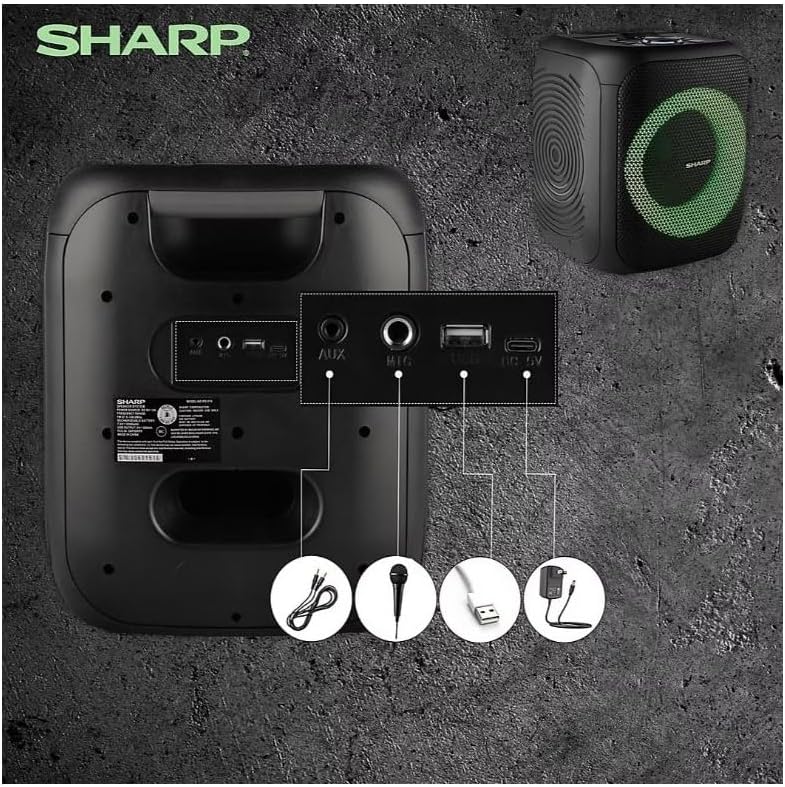
Image: Rear panel with various input and charging ports.
- هاڪس ان: 3.5 ايم ايم آڊيو ڪيبل استعمال ڪندي ٻاهرين آڊيو ڊوائيسز کي ڳنڍيو.
- MIC IN: Connect a microphone (sold separately) for karaoke or announcements.
- USB: آڊيو پلے بیک لاءِ USB فليش ڊرائيو داخل ڪريو.
- TF ڪارڊ: Insert a TF (microSD) card for audio playback.
- ڊي سي اندر Connect the charging cable to power and charge the speaker.
3.3 Playing Audio from USB/TF Card
- لاڳاپيل پورٽ ۾ USB فليش ڊرائيو يا TF ڪارڊ داخل ڪريو.
- کي دٻايو ON/STAND BY INPUT button repeatedly until the display shows the USB or TF mode.
- پلے بیک پاڻمرادو شروع ٿيندو. استعمال ڪريو راند/روڪ, پويون، ۽ اڳتي پلے بیک کي ڪنٽرول ڪرڻ لاءِ بٽڻ.
3.4 Using AUX Input
- Connect one end of a 3.5mm audio cable to the AUX IN port on the speaker.
- ٻئي ڇيڙي کي پنهنجي ٻاهرين ڊوائيس جي هيڊ فون جيڪ يا آڊيو آئوٽ پٽ سان ڳنڍيو.
- کي دٻايو ON/STAND BY INPUT button repeatedly until the display shows AUX mode.
- پنهنجي ٻاهرين ڊوائيس تان پلے بیک ۽ حجم کي ڪنٽرول ڪريو.
3.5 ايف ايم ريڊيو آپريشن

Image: The PS-916 features an integrated FM Tuner.
- کي دٻايو ON/STAND BY INPUT button repeatedly until the display shows FM mode.
- کي دٻايو ۽ رکو راند/روڪ دستياب ايف ايم اسٽيشنن کي خودڪار طريقي سان اسڪين ڪرڻ ۽ محفوظ ڪرڻ لاءِ بٽڻ.
- استعمال ڪريو پويون ۽ اڳتي محفوظ ٿيل اسٽيشنن ذريعي وڃي وڃڻ لاءِ بٽڻَ.
3.6 LED Light Effects
کي دٻايو روشني button to cycle through different LED light modes or to turn the lights off.
4. سار سنڀال
4.1 صفائي
- Always power off the speaker and disconnect it from the power source before cleaning.
- ٻاهرين سطحن کي صاف ڪرڻ لاءِ نرم، سڪل ڪپڙو استعمال ڪريو.
- مائع صاف ڪندڙ، ايروسول، يا محلول استعمال نه ڪريو، ڇاڪاڻ ته اهي ختم يا اندروني حصن کي نقصان پهچائي سگهن ٿا.
4.2 اسٽوريج
- اسپيڪرن کي سڌي سج جي روشني ۽ انتهائي گرمي پد کان پري ٿڌي، سڪل جاءِ تي رکو.
- جيڪڏهن گهڻي عرصي تائين ذخيرو ڪري رهيا آهيو، ته بيٽري جي صحت کي برقرار رکڻ لاءِ هر ڪجهه مهينن ۾ بيٽري کي تقريباً 50 سيڪڙو تائين چارج ڪريو.
5. مسئلا حل ڪرڻ
If you encounter issues with your Sharp PS-916 speakers, please refer to the following common problems and solutions:
| مسئلو | ممڪن حل |
|---|---|
| اسپيڪر پاور آن نٿو ٿئي. | پڪ ڪريو ته بيٽري چارج ٿيل آهي. چارجنگ ڪيبل جوڙيو ۽ ٻيهر ڪوشش ڪريو. |
| اسپيڪر کان ڪوبه آواز نه. | اسپيڪر ۽ توهان جي ڳنڍيل ڊوائيس ٻنهي تي واليوم ليول چيڪ ڪريو. پڪ ڪريو ته صحيح ان پٽ موڊ چونڊيو ويو آهي. |
| بلوٽوٿ ڊيوائس جوڙي نه ٿي سگهي. | Ensure the speaker is in Bluetooth pairing mode (indicator flashing). Move your device closer to the speaker. Disconnect from other Bluetooth devices. |
| TWS جوڙڻ ناڪام ٿيو. | Ensure both speakers are powered on and not connected to any other Bluetooth devices. Try initiating TWS pairing again. |
| بگڙيل آواز. | Reduce the volume on both the speaker and your connected device. Ensure the audio source is not distorted. |
6. وضاحتون
| خاصيت | تفصيل |
|---|---|
| برانڊ | تيز |
| ماڊل نالو | پي ايس-916 |
| اسپيڪر جي ترتيب | 8" Woofer, 1" Tweeter (per speaker) |
| چوٽي اوٽ پاور | 400 واٽ (في اسپيڪر) |
| آر ايم ايس آئوٽ پاور | 40 واٽ (في اسپيڪر) |
| رابطي ٽيڪنالاجي | بلوٽوٿ |
| اضافي داخلا | USB, TF Card, 3.5mm AUX, Microphone Input |
| بيٽري جي زندگي | 12 ڪلاڪ تائين |
| خاص خاصيتون | True Wireless Stereo (TWS) Pairing, Bass Boost, LED Light Effects, FM Tuner |
| رنگ | ڪارو |
| شيءِ جو وزن | 6.5 Pounds (per speaker) |
| يو پي سي | 728434122111 |
| جي ٽي اين | 728434122111 |
7. وارنٽي ۽ سپورٽ
7.1 وارنٽي ڄاڻ
This Sharp PS-916 product comes with a 90-day limited warranty. This warranty covers manufacturing defects under normal use. It does not cover damage caused by misuse, accidents, unauthorized modifications, or normal wear and tear.
7.2 ڪسٽمر سپورٽ
For technical assistance, warranty claims, or further inquiries, please refer to the contact information provided with your purchase documentation or visit the official Sharp support webسائيٽ.