
1. تعارف
This manual provides essential information for setting up, operating, and maintaining your HP OmniDesk Slim Desktop PC, Model S03-0006. This desktop PC is designed for daily tasks, offering an Intel Core i3-14100 processor, ample memory, and various connectivity options for productivity and entertainment.
2. پيڪيج مواد
پڪ ڪريو ته سڀئي شيون پيڪيج ۾ موجود آهن:
- HP S03-000 OmniDesk Slim Desktop PC
- بجلي جي فراهمي
- USB Black Wired Keyboard (if included with specific bundle)
- USB Wired Mouse (if included with specific bundle)
Note: Additional accessories may be sold separately.
3. پراڊڪٽ ختمview
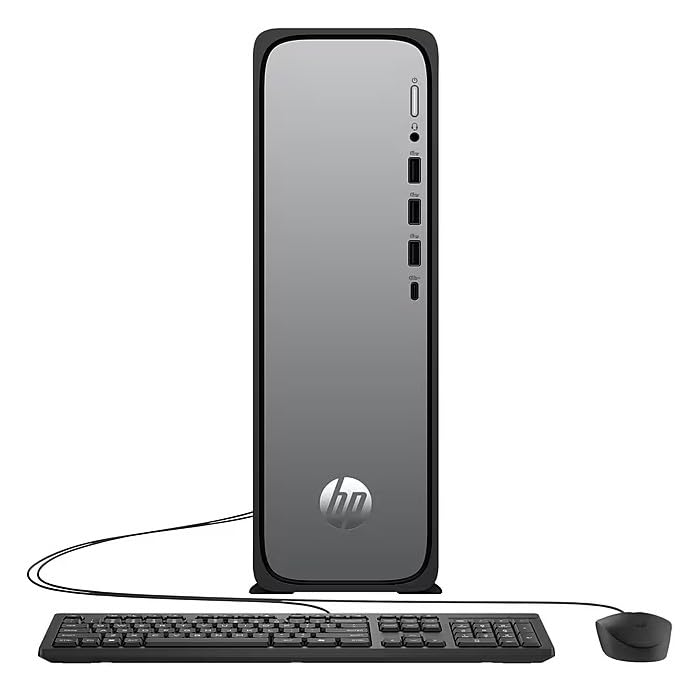
The HP OmniDesk Slim Desktop PC features a compact design with essential components for efficient computing.

شڪل 3.1: HP OmniDesk Slim Desktop PC showcasinجي اِٽس سلم پروfile, Intel Core i3-14100 processor, 8GB DDR5 RAM, 256GB SSD, Intel UHD Graphics 710, Wi-Fi 6, Bluetooth 5.4, Windows 11, and dual display support.
3.1. بندرگاهن ۽ ڪنيڪٽر
Familiarize yourself with the various ports on your desktop PC for connecting peripherals and displays.
شڪل 3.2: Front and rear port layout of the HP OmniDesk Slim Desktop PC. Front ports include a headphone/microphone combo jack, USB Type-A 5Gbps ports, and a USB Type-C 10Gbps port. Additional ports (typically rear) include 4 USB 2.0 Type-A, 1 RJ-45 (Ethernet), 1 HDMI Out, and 1 DisplayPort 1.4.
- سامهون بندرگاهن:
- هيڊ فون / مائڪروفون ڪمبو
- USB Type-A 5Gbps signaling rate (3 ports)
- USB Type-C 10Gbps signaling rate (1 port)
- پوئين بندرگاهن:
- USB 2.0 Type-A (4 ports)
- RJ-45 (Ethernet)
- HDMI 1.4b (1 port)
- DisplayPort 1.4a (1 port)
4. سيٽ اپ گائيڊ
Follow these steps to set up your HP OmniDesk Slim Desktop PC:
- مانيٽر ڳنڍيو: Connect your monitor to the PC using an HDMI or DisplayPort cable. Ensure the cable is securely plugged into both the PC and the monitor.
- پردي سان ڳنڍڻ: Plug in your USB keyboard and mouse into the available USB ports on the PC.
- پاور Connectنيو: Connect the power supply cable to the PC's power input, then plug the other end into a wall outlet or surge protector.
- پاور آن: Press the power button on the front of the PC. The system will boot up, and you will see the Windows 11 setup screen.
- شروعاتي ونڊوز سيٽ اپ: Follow the on-screen instructions to complete the Windows 11 setup, including language, region, network connection, and user account creation.
5. آپريٽنگ هدايتون
5.1. بنيادي آپريشن
- پاور آن / آف: Press the power button to turn on the PC. To shut down, click the Start button, then Power > Shut down.
- ٻيهر شروع ڪريو: شروع بٽڻ تي ڪلڪ ڪريو، پوءِ پاور > ٻيهر شروع ڪريو.
- سمهڻ جو طريقو: شروع بٽڻ تي ڪلڪ ڪريو، پوءِ پاور > سليپ.
5.2. نيٽ ورڪ سان ڳنڍڻ
Your PC supports both wired (Ethernet) and wireless (Wi-Fi) network connections.
- وائرڊ ڪنيڪشن: Connect an Ethernet cable from your router or modem to the RJ-45 port on the back of the PC.
- Wireless Connection (Wi-Fi 6):
- ٽاسڪ بار ۾ وائي فائي آئڪن تي ڪلڪ ڪريو.
- فهرست مان پنھنجو مطلوب وائي فائي نيٽ ورڪ چونڊيو.
- جيڪڏهن اشارو ڪيو وڃي ته نيٽ ورڪ سيڪيورٽي ڪي (پاسورڊ) داخل ڪريو، پوءِ ڪلڪ ڪريو ڳنڍڻ.
5.3. Dual Display Support
To extend your desktop to a second monitor:
- Connect the second monitor to an available video output port (HDMI or DisplayPort) on your PC.
- Right-click on the desktop and select ڊسپلي سيٽنگون.
- Under "Multiple displays," select how you want the displays to behave (e.g., Extend these displays, Duplicate these displays).
6. سار سنڀال
- سافٽ ويئر اپڊيٽ: سسٽم جي استحڪام ۽ سيڪيورٽي کي يقيني بڻائڻ لاءِ باقاعدي طور تي ونڊوز اپڊيٽس جي جانچ ڪريو ۽ انسٽال ڪريو. ڏانهن وڃو سيٽنگون > ونڊوز اپڊيٽ.
- ڊرائيور اپڊيٽ: Keep your device drivers updated. HP Support Assistant (MyHP) can help manage these updates.
- صفائي: Use a soft, dry cloth to clean the exterior of the PC. Avoid liquid cleaners directly on components. Ensure ventilation openings are clear of dust.
- بيڪ اپ ڊيٽا: باقاعده بيڪ اپ اهم fileڊيٽا جي نقصان کي روڪڻ لاءِ ٻاهرين ڊرائيو يا ڪلائوڊ اسٽوريج ڏانهن رابطو ڪريو.
7. مسئلا حل ڪرڻ
| مسئلو | ممڪن حل |
|---|---|
| پي سي آن نٿو ٿئي. |
|
| مانيٽر تي ڪو به ڊسپلي ناهي. |
|
| انٽرنيٽ ڪنيڪشن ناهي. |
|
| Peripherals (keyboard/mouse) not working. |
|
8. وضاحتون
| ماڊل نالو | HP OmniDesk Desktop HP S03-000 PC |
| ماڊل نمبر | OmniDesk Slim S03-0006 |
| پروسيسر | Intel Core i3-14100 (3.5 GHz, 6 MB Cache) |
| گرافڪس | انٽيل يو ايڇ ڊي گرافڪس 710 (انٽيگريٽڊ) |
| رام | 8 GB DDR5 (4800 MT/s), Max 64 GB |
| ذخيرو | 256 جي بي ايس ايس ڊي (سالڊ اسٽيٽ ڊرائيو) |
| آپريٽنگ سسٽم | ونڊوز 11 گهر |
| رابطي | Realtek Wi-Fi 6 (2x2), Bluetooth 5.4, Gigabit Ethernet (RJ-45) |
| بندرگاهن |
|
| طول و عرض (H x W x D) | 11.61 x 3.94 x 11.97 انچ |
| وزن | 8.38 پائونڊ |
| سرٽيفڪيشن | ENERGY STAR certified, EPEAT Gold with Climate+ |
9. وارنٽي ۽ سپورٽ
9.1. وارنٽي ڄاڻ
This HP OmniDesk Slim Desktop PC comes with a 90 ڏينهن جي محدود وارنٽي. مھرباني ڪري مخصوص شرطن ۽ ضابطن لاءِ پنھنجي پراڊڪٽ سان شامل وارنٽي دستاويزن جو حوالو ڏيو.
9.2. ٽيڪنيڪل سپورٽ
ٽيڪنيڪل مدد، ڊرائيور ڊائون لوڊ، يا وڌيڪ معلومات لاءِ، مهرباني ڪري سرڪاري HP سپورٽ جو دورو ڪريو. website. You can also utilize the pre-installed MyHP application for device customization, optimization, and access to helpful messages and settings.
Always provide your product model number (S03-0006) and serial number when contacting support.