
تعارف
Welcome to the HP OmniDesk M03 AI Desktop PC. This manual provides essential information for setting up, operating, maintaining, and troubleshooting your new computer. The HP OmniDesk M03 is designed for performance and efficiency, featuring an Intel Core Ultra 7 265 processor with dedicated AI cores, 16GB DDR5 RAM, and a 2TB NVMe SSD, running on Windows 11 Home.
دٻي ۾ ڇا آهي
پڪ ڪريو ته سڀئي جزا پيڪنگ ۾ موجود آهن:
- HP OmniDesk Desktop PC
- وائرليس ڪي بورڊ
- مائوس
- جلدي سيٽ اپ گائيٽ
- پاور ڪيبل

Image: The HP OmniDesk M03 desktop PC, wireless keyboard, mouse, and power cable, illustrating the contents of the product box.
سيٽ اپ ڪريو
1. پردي کي ڳنڍڻ
Before powering on your PC, connect your monitor, keyboard, and mouse.
- مانيٽر: Connect your monitor to the PC using an HDMI or DisplayPort cable. The ports are located on the rear of the PC.
- ڪي بورڊ ۽ ماؤس: The included keyboard and mouse are wireless. Insert batteries (if not pre-installed) and connect their USB receiver to an available USB port on the PC.
- طاقت: Connect the power cable to the PC's power input on the rear and then to a wall outlet.
- نيٽ ورڪ (اختياري): For a wired internet connection, connect an Ethernet cable from your router to the RJ45 port on the rear of the PC.

Image: Rear panel of the HP OmniDesk M03, highlighting the DisplayPort, HDMI, USB, and Ethernet ports for connecting external devices.

تصوير: پاسي view of the HP OmniDesk M03 AI Desktop PC, showing its compact tower design.
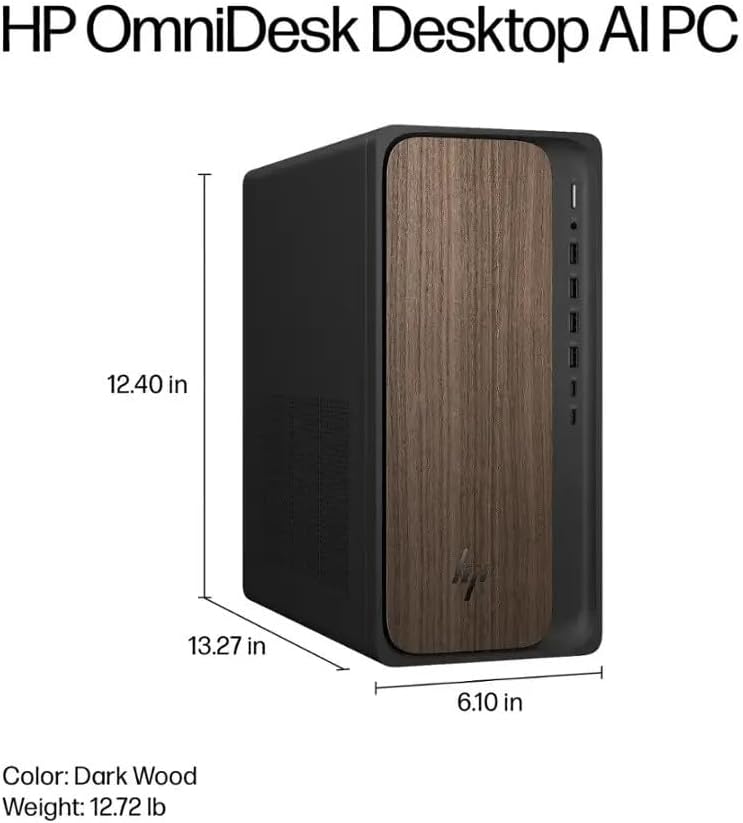
Image: Diagram illustrating the location and type of front and rear ports on the HP OmniDesk M03, including USB-A, USB-C, HDMI, DisplayPort, and audio jacks.
2. پاور آن ۽ شروعاتي سيٽ اپ
هڪ دفعو سڀئي پردي ڳنڍيل آهن:
- پي سي جي سامهون واري پاور بٽڻ کي دٻايو.
- Follow the on-screen instructions to complete the Windows 11 Home initial setup, including language selection, network connection (if not wired), account creation, and privacy settings.

تصوير: سامهون view of the HP OmniDesk M03, showing the power button at the top right and various USB ports below it.
توهان جي پي سي کي هلائڻ
ونڊوز 11 گهر
Your HP OmniDesk M03 comes pre-installed with Windows 11 Home. Familiarize yourself with the operating system's interface, Start menu, and settings. Microsoft provides extensive online resources for Windows 11 usage.
AI خاصيتون
The Intel Core Ultra 7 265 processor includes dedicated AI cores and Intel AI Boost, enhancing performance for AI-driven applications and features within Windows 11, such as AI Copilot. These features can assist with tasks, content creation, and system optimization.
رابطي
- وائي فائي 6 (802.11ax): Connect to wireless networks for internet access. Manage Wi-Fi settings through the Windows 11 network settings.
- بلوٽوٽ 5.4: Pair wireless devices such as headphones, speakers, or additional input devices. Access Bluetooth settings via the Windows 11 settings menu.
- Ethernet: For a stable, high-speed wired connection, ensure an Ethernet cable is connected to the RJ45 port.
سار سنڀال
Cleaning Your PC
- ٻاهران: نرم، لِنٽ کان خالي ڪپڙو استعمال ڪريو ٿورڙو ڊيampپاڻي يا هلڪي صفائي واري محلول سان صاف ڪريو ته جيئن ٻاهرئين حصي کي صاف ڪري سگهجي. سخت ڪيميڪلز کان پاسو ڪريو.
- وينٽس: وقتي طور تي وينٽيليشن گرلز مان مٽي صاف ڪريو دٻيل هوا استعمال ڪندي ته جيئن مناسب هوا جي وهڪري کي يقيني بڻائي سگهجي ۽ وڌيڪ گرم ٿيڻ کان بچي سگهجي.
- بندرگاهن: بندرگاهن کي مٽي ۽ ملبي کان پاڪ رکو.
سافٽ ويئر اپڊيٽس
Regularly update Windows 11 and device drivers to ensure optimal performance, security, and compatibility. Access Windows Update through the Settings menu.
ڊيٽا بيڪ اپ
ڊيٽا جي نقصان کي روڪڻ لاءِ پنهنجي اهم ڊيٽا جو باقاعدي بيڪ اپ ڪنهن ٻاهرين ڊرائيو يا ڪلائوڊ اسٽوريج ۾ رکڻ جي صلاح ڏني وئي آهي.
مشڪلاتون
هي حصو عام مسئلن کي حل ڪري ٿو جيڪي توهان کي منهن ڏئي سگهن ٿا.
- طاقت ناهي:
- پڪ ڪريو ته پاور ڪيبل پي سي ۽ وال آئوٽليٽ ٻنهي سان محفوظ طور تي ڳنڍيل آهي.
- ٻئي ڊوائيس ۾ پلگ ان ڪندي تصديق ڪريو ته وال آئوٽليٽ ڪم ڪري رهيو آهي.
- ڪابه ڊسپلي:
- Check that the monitor is powered on and correctly connected to the PC via HDMI or DisplayPort.
- پڪ ڪريو ته توهان جي مانيٽر تي صحيح ان پٽ سورس چونڊيو ويو آهي.
- انٽرنيٽ ڪنيڪشن ناهي:
- وائي فائي لاءِ، چيڪ ڪريو ته وائي فائي اڊاپٽر فعال آهي ۽ ڇا توهان صحيح پاسورڊ سان صحيح نيٽ ورڪ سان ڳنڍيل آهيو.
- For wired connection, ensure the Ethernet cable is properly connected and your router is working.
- ڪي بورڊ/ماؤس جواب نه ڏئي رهيو آهي:
- وائرليس ڊوائيسز لاءِ بيٽري جي سطح چيڪ ڪريو.
- Ensure the USB receiver is plugged into a functional USB port.
- Try restarting the PC.
وڌيڪ پيچيده مسئلن لاءِ، HP سپورٽ جو حوالو ڏيو webسائيٽ يا ڪسٽمر سروس سان رابطو ڪريو.
وضاحتون
Detailed technical specifications for the HP OmniDesk M03 AI Desktop PC:
| جزو | تفصيل |
| پروسيسر | Intel Core Ultra 7 265 (20-Core, up to 5.3 GHz, Intel AI Boost) |
| آپريٽنگ سسٽم | ونڊوز 11 گهر (64-bit) |
| ياداشت (رام) | 16GB DDR5 5600 MHz |
| ذخيرو | 2 ٽي بي PCIe NVMe M.2 SSD |
| گرافڪس | Integrated Intel گرافڪس |
| وڊيو آئوٽ | 1x HDMI 2.1، 1x ڊسپلي پورٽ 1.4a |
| USB پورٽ (اڳيون) | 2x USB-A 5Gbps, 2x USB-A 10Gbps, 1x USB-C 5Gbps, 1x USB-C 10Gbps |
| USB پورٽ (پوئتي) | 4x USB 2.0 ٽائپ-اي |
| آڊيو پورٽ | 1x Headphone/Microphone Combo, 1x Line Input, 1x Line Output |
| نيٽ ورڪ | Wi-Fi 6 (802.11ax), Bluetooth 5.4, Gigabit Ethernet (RJ45) |
| طول و عرض (H x W x D) | 13.3" x 6.1" x 12.4" (33.8 سينٽي ميٽر x 15.5 سينٽي ميٽر x 31.5 سينٽي ميٽر) |
| وزن | 11.77 پائونڊ (5.34 ڪلوگرام) |

Image: Diagram showing the height (13.27 inches), width (6.10 inches), and depth (12.40 inches) of the HP OmniDesk M03 desktop PC.
وارنٽي ۽ سپورٽ
وارنٽي ڄاڻ
Your HP OmniDesk M03 AI Desktop PC comes with a 90 ڏينهن جي محدود وارنٽي. This warranty covers defects in materials and workmanship under normal use. For detailed terms and conditions, please refer to the warranty documentation included with your product or visit the official HP support webسائيٽ.
ڪسٽمر سپورٽ
For technical assistance, troubleshooting, or warranty claims, please contact HP Customer Support:
- آن لائن سپورٽ: سرڪاري دورو ڪريو HP سپورٽ Webسائيٽ ڊرائيورن، دستورالعملن، ۽ مسئلن جي حل جي رهنمائي لاءِ.
- فون سپورٽ: Refer to the Quick Setup Guide or HP's webعلائقائي رابطي جي نمبرن لاءِ سائيٽ.
سپورٽ سان رابطو ڪرڻ وقت، مھرباني ڪري پنھنجو پراڊڪٽ ماڊل (M03) ۽ سيريل نمبر تيار رکو.