
1. تعارف
Thank you for choosing the DazzlingStage 60W 9LED RGBW Stage Wall Wash Bar Light. This manual provides essential information for the safe and effective operation of your lighting fixture. Please read it thoroughly before installation and use, and retain it for future reference.
هن ايسtage light bar features 9 high-power RGBW LEDs, offering a wide spectrum of colors and dynamic lighting effects suitable for various events and venues.

تصوير 1.1: مٿيview of the DazzlingStage 60W 9LED RGBW Stage Wall Wash Bar Lights in various colors.
2. حفاظتي هدايتون
- برقي حفاظت: بجلي جي فراهمي کي يقيني بڻائيtage matches the specifications of the fixture. Always disconnect power before cleaning, servicing, or moving the unit.
- تنصيب: Install the fixture in a well-ventilated area, away from heat sources. Ensure secure mounting to prevent accidental falls.
- آپريشن: Do not look directly into the light source when the fixture is operating, as it can cause eye damage. Avoid operating the unit in wet or damp حالتون.
- سار سنڀال: سڀني خدمتن کي قابل اهلڪارن جي حوالي ڪريو. يونٽ کي پاڻ مرمت ڪرڻ جي ڪوشش نه ڪريو.
- ٻار: ڊوائيس ٻارن جي پهچ کان پري رکو.
3. پيڪيج مواد
پيڪنگ ڪرڻ وقت، مھرباني ڪري تصديق ڪريو ته ھيٺ ڏنل سڀ شيون شامل آھن ۽ سٺي حالت ۾ آھن:
- DazzlingStage 60W 9LED RGBW Stage Wall Wash Bar Light (x1 per pack)
- Power Cord (x1 per pack)
- Remote Control (x1 per pack)
- Mounting Bracket (x1 per pack)
- Knobs (x2 per pack)
- Black Gaskets (x2 per pack)
- Instruction Manual (x1 per pack)

تصوير 3.1: پراڊڪٽ پيڪيج ۾ شامل مواد.
4. پيداوار جا حصا
Familiarize yourself with the main components of the light bar:
- ايل اي ڊي صف: 9 RGBW LEDs for color mixing.
- ڪنٽرول پينل: Features a 4-digit LED display and control buttons (MENU, UP, DOWN, ENTER) for mode selection and parameter adjustment.
- DMX IN/OUT Ports: For connecting to a DMX controller or linking multiple units.
- Power IN/OUT: For power connection and daisy-chaining power to other units.
- چڙهڻ واري بریکٹ: Adjustable bracket for floor standing or truss mounting.
- گرمي پد: Integrated cooling system to maintain optimal operating temperature.

Image 4.1: Key components and dimensions of the light bar.
5. سيٽ اپ ۽ تنصيب
The DazzlingStage Wall Wash Bar Light offers flexible installation options:
5.1 بریکٹ تي چڙهڻ
Attach the included mounting bracket to the light bar using the provided knobs and gaskets. Ensure the bracket is securely fastened.
5.2 جڳهه جا آپشن
- فرش جو اسٽيڊنگ: The bracket allows the light bar to stand upright on a flat surface. Adjust the angle as needed.
- ٽرس لڳائڻ: مناسب cl استعمال ڪريوamps (not included) to attach the bracket to a lighting truss. Ensure the truss and clamps can support the weight of the fixture.
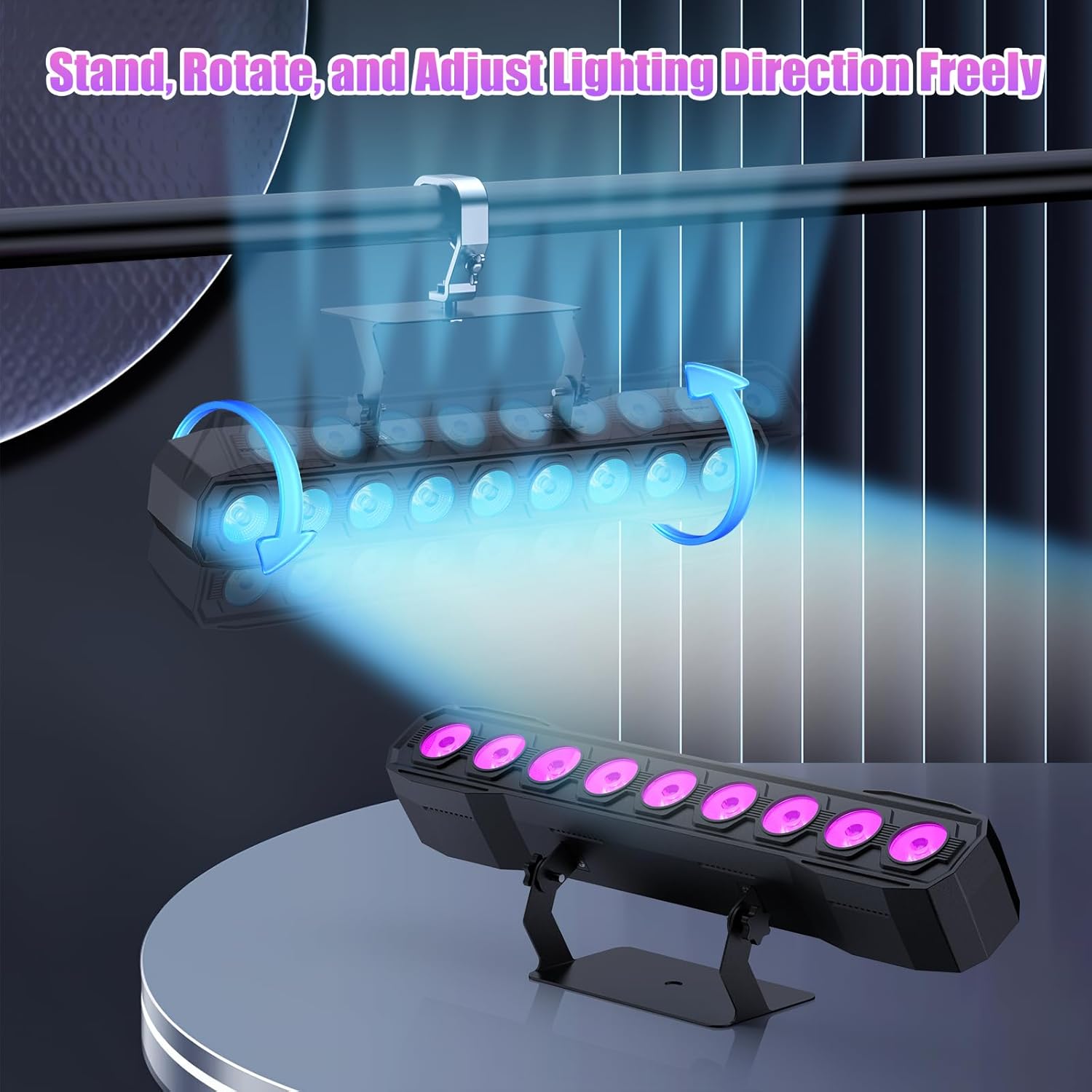
Image 5.1: Illustration of mounting and angle adjustment options.
5.3 پاور ڪنيڪشن
Connect the power cord to the Power IN port on the back of the fixture and then to a suitable power outlet. Multiple units can be daisy-chained using the Power OUT port to simplify wiring for larger setups.
6. آپريٽنگ موڊس
The DazzlingStage Wall Wash Bar Light supports several control modes:
- DMX512 ڪنٽرول: For professional control via a DMX console.
- خودڪار موڊ: Pre-programmed lighting sequences.
- Sound-Activated Control: Lights react to ambient sound.
- ريموٽ ڪنٽرول: Convenient wireless control using the included remote.
- ماسٽر-غلام موڊ: Link multiple units where one acts as a master and others as slaves, synchronizing effects.
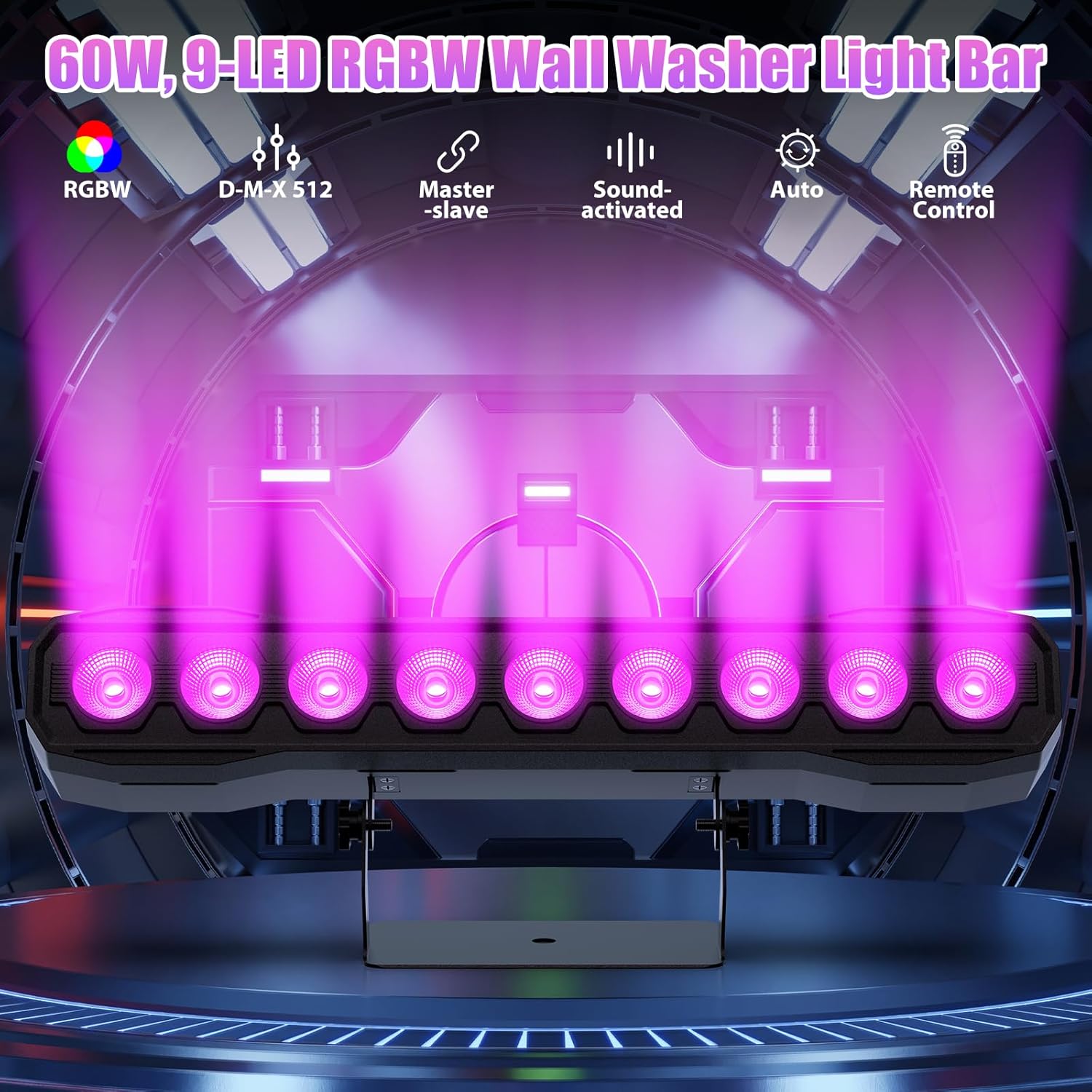
تصوير 6.1: مٿيview of available control modes.
6.1 Display Panel Operation
Use the buttons on the back of the fixture to navigate the menu and select modes:
- مينيو مکيه مينيو اختيارن ذريعي سائيڪل.
- لاهيون چاڙهيون: Adjusts values or navigates sub-menus.
- داخل ٿيڻ: چونڊ جي تصديق ڪري ٿي.
6.2 روشني جا اثر
The fixture supports various dynamic effects:
- رنگ ملائڻ: Over 16.7 million color combinations with 0-100% linear dimming.
- اسٽروب: چمڪندڙ اثر.
- ٽپو: Instant color changes.
- ورڊ رنگن جي وچ ۾ هموار منتقلي.
- نبض: Gradual changing effects.
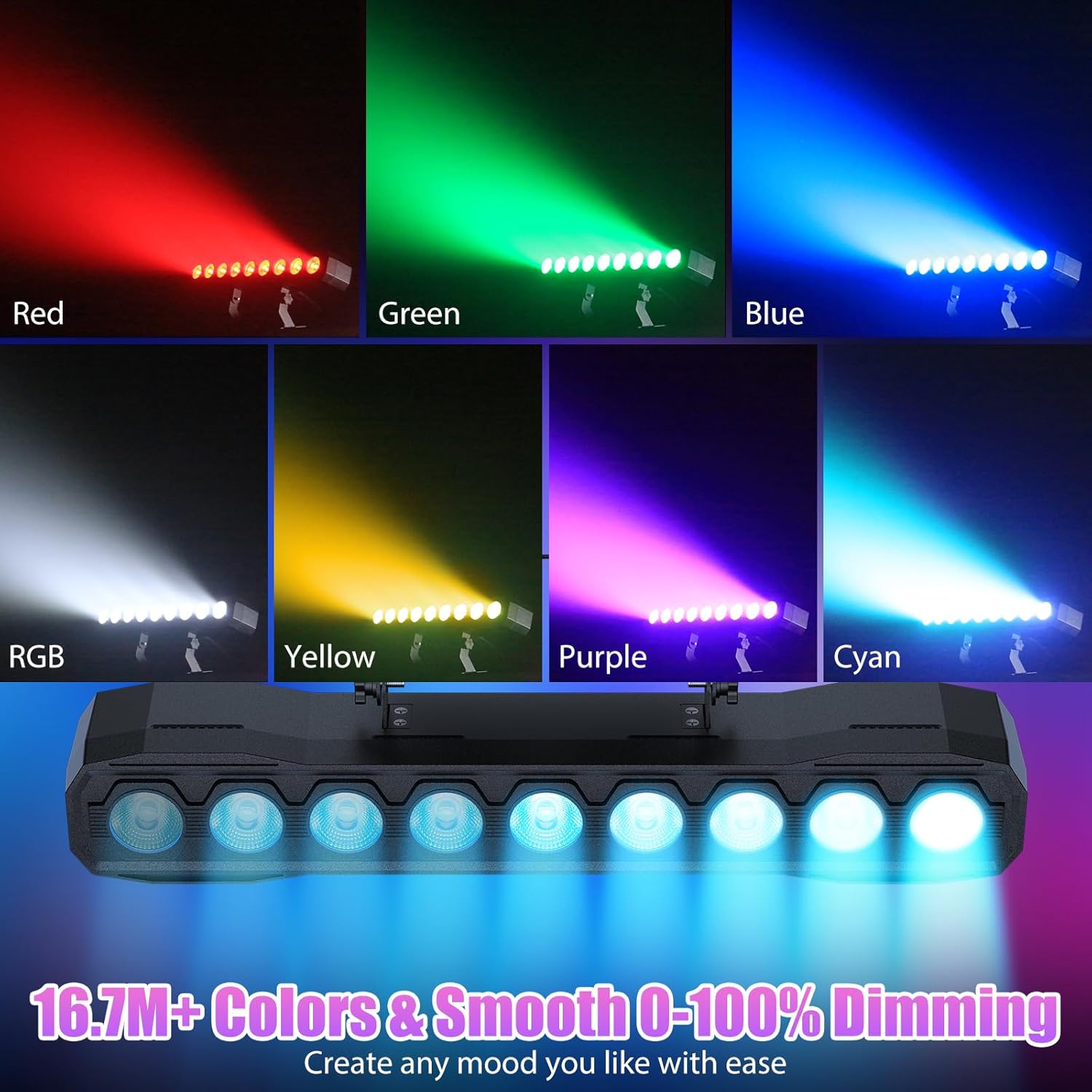
تصوير 6.2: اڳوڻيamples of color mixing and dimming capabilities.

Image 6.3: Visual representation of Strobe, Jump, Fade, and Pulse effects.
7. ريموٽ ڪنٽرول افعال
شامل ريموٽ ڪنٽرول مختلف ڪمن تائين آسان رسائي فراهم ڪري ٿو:
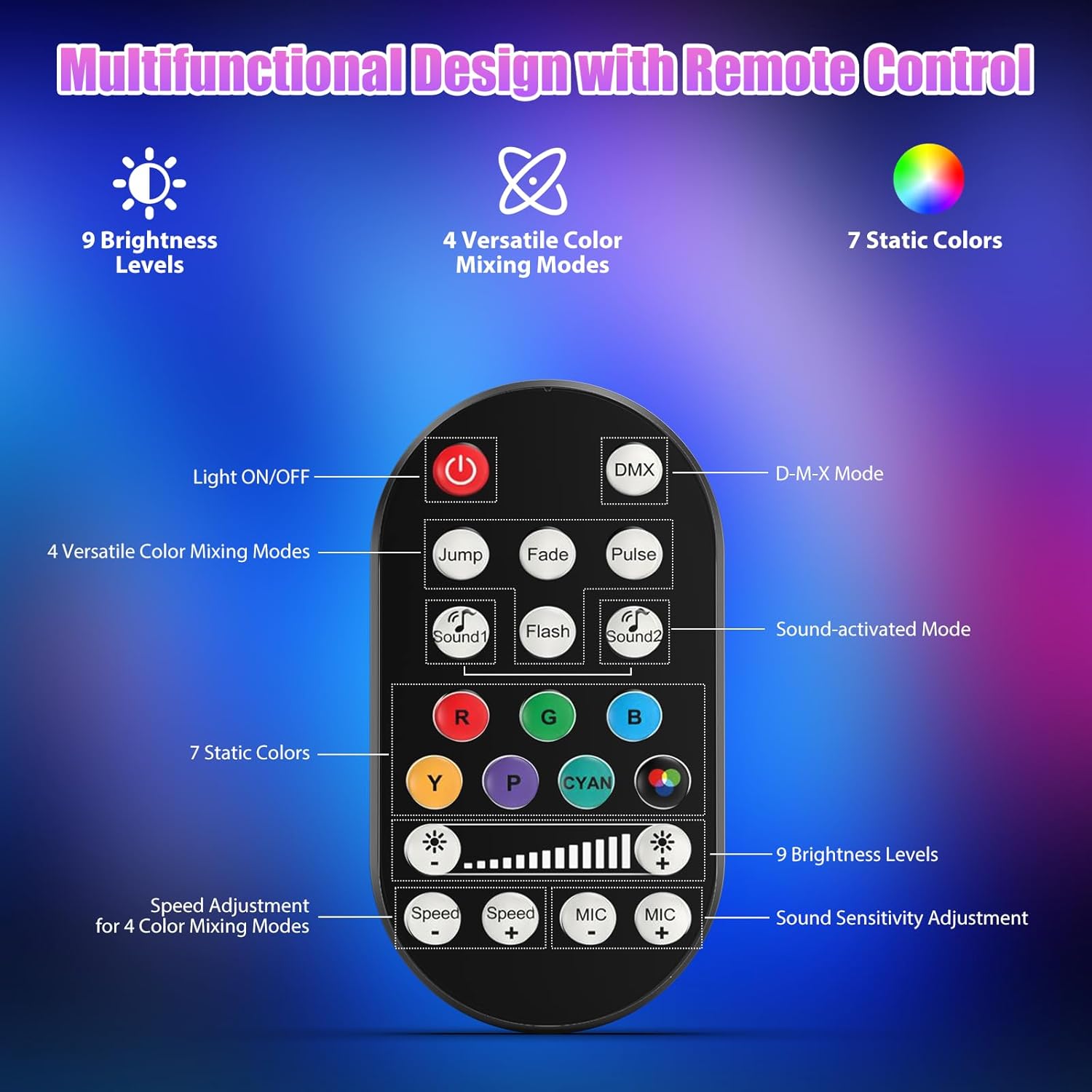
Image 7.1: Remote control layout and functions.
- روشني آن / بند: پاور يونٽ کي آن يا آف ڪري ٿو.
- DMX: Activates DMX control mode.
- Jump, Fade, Pulse, Flash: Selects different color mixing modes.
- Sound1, Sound2: Activates sound-activated modes with different sensitivities.
- R, G, B, Y, P, Cyan, White: Selects static colors.
- روشني جي سطح: Adjusts the overall intensity of the light (9 levels).
- رفتار +/-: Adjusts the speed of dynamic effects.
- MIC +/-: Adjusts the sound sensitivity for sound-activated modes (15 levels).
8. DMX512 ڪنٽرول
For advanced control, connect the fixture to a DMX512 controller. The light bar typically uses 4 or 8 DMX channels. Refer to the display panel for DMX address setting and channel assignments.
8.1 DMX Address Setting
Use the MENU, UP, DOWN, and ENTER buttons on the fixture's display panel to set the DMX starting address. The display will show 'AXXX' where XXX is the address (e.g., A001).
8.2 DMX Channel Functions (Example - 8 Channel Mode)
| چينل | فنڪشن | قدر جي حد | وصف |
|---|---|---|---|
| CH1 | ماسٽر ڊيمر | 0-255 | مجموعي روشني (0٪ کان 100٪) |
| CH2 | لال شدت | 0-255 | Red LED brightness (0% to 100%) |
| CH3 | سبزي جي شدت | 0-255 | Green LED brightness (0% to 100%) |
| CH4 | نيري شدت | 0-255 | Blue LED brightness (0% to 100%) |
| CH5 | اڇو شدت | 0-255 | White LED brightness (0% to 100%) |
| CH6 | Strobe/Effect | 0-255 | 0-10: No function; 11-255: Strobe speed (slow to fast) |
| CH7 | خودڪار پروگرام | 0-255 | Selects and controls speed of built-in auto programs |
| CH8 | آواز فعال | 0-255 | Activates sound mode and adjusts sensitivity |
ٽيبل 8.1: مثالample DMX Channel Functions (may vary slightly by firmware version).
9. سار سنڀال
باقاعده سار سنڀال بهترين ڪارڪردگي کي يقيني بڻائي ٿي ۽ توهان جي فڪسچر جي عمر وڌائي ٿي.
- صفائي: Periodically clean the lens and housing with a soft, lint-free cloth. Do not use abrasive cleaners or solvents. Ensure the fixture is powered off and cool before cleaning.
- چڪاس: Regularly check power cables, DMX cables, and mounting hardware for any signs of wear or damage. Replace damaged components immediately.
- اسٽوريج: When not in use for extended periods, store the fixture in a dry, dust-free environment.
10. مسئلا حل ڪرڻ
جيڪڏهن توهان کي مسئلا درپيش اچن ٿا، ته هيٺ ڏنل عام مسئلن ۽ حلن جو حوالو ڏيو:
| مسئلو | ممڪن سبب | حل |
|---|---|---|
| طاقت نه آهي | Power cable disconnected; No power from outlet; Blown fuse | Check power cable connection; Test outlet with another device; Replace fuse if necessary |
| ڪابه روشني پيداوار نه آهي | Dimmer channel at 0%; Incorrect mode selected; DMX signal issue | Increase dimmer level; Select desired operating mode; Check DMX cable and address settings |
| Incorrect colors/effects | Incorrect DMX channel values; Remote control interference | Verify DMX channel settings; Ensure remote is pointed directly at the sensor; Check for other IR interference |
| آواز-فعال موڊ ڪم نه ڪري رهيو آهي | Microphone sensitivity too low; No sound input | Increase MIC sensitivity via remote or display; Ensure sufficient sound is present near the fixture |
| فڪسچر جو اوور هيٽنگ | Poor ventilation; Blocked heat sink | Ensure adequate airflow around the unit; Clean any dust or debris from the heat sink fins |
11. وضاحتون
| خاصيت | تفصيل |
|---|---|
| برانڊ | DazzlingStage |
| ماڊل نمبر | ZQ06190 |
| نور جو ذريعو | 9 x 60W RGBW LEDs |
| رنگ ملائڻ | RGBW 4-in-1, 16.7 million colors |
| دم ڪرڻ | 0-100٪ لڪير اليڪٽرانڪ ڊمنگ |
| بيم زاويه | 35° وائڊ اينگل |
| ڪنٽرول موڊس | DMX512, Auto, Sound-Activated, Remote Control, Master-Slave |
| DMX چينلز | 4 or 8 Channels (selectable) |
| ڏيکاريو | 4 عددي LED ڊسپلي |
| مواد | Acrylonitrile Butadiene Styrene (ABS) |
| پيداوار جي ماپ | 18.1 x 5.5 x 5.1 انچ (46 x 14 x 13 سينٽي) |
| شيءِ جو وزن | لڳ ڀڳ. 1.98 پائونڊ (0.9 ڪلوگرام) |
| پاور ان پٽ | AC 100-240V، 50/60Hz |
| ٺاهيندڙ | Shenzhen Zhuoqiong Technology Co., Ltd. |
12. وارنٽي ۽ سپورٽ
DazzlingStage products are designed for reliability and performance. For warranty information, please refer to the terms and conditions provided at the time of purchase or contact your retailer.
If you require technical assistance or have questions not covered in this manual, please contact DazzlingStage customer support through the retailer's platform or the official brand website. Please have your model number (ZQ06190) and purchase details ready when contacting support.