
Viozon I6
Viozon Portable Selfie Stick User Manual
ماڊل: I6
Brand: Viozon
1. تعارف
خريد ڪرڻ لاءِ مهربانيasing the Viozon Portable Selfie Stick. This all-in-one compact device is designed to enhance your mobile photography and videography experience, offering convenience and versatility for vlogging, travel, and filming. Please read this manual carefully before use to ensure proper operation and longevity of your device.
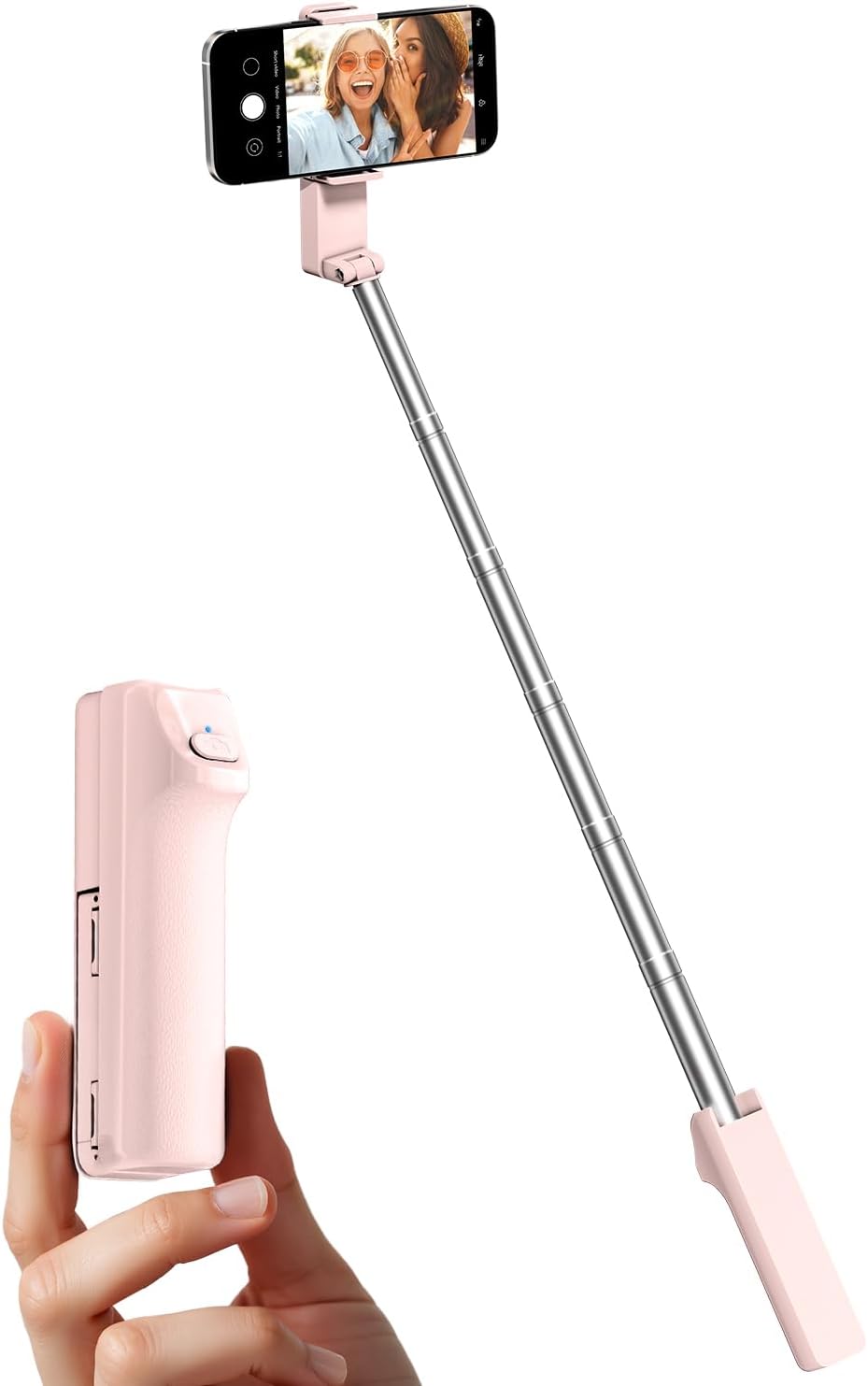
Figure 1: Viozon Portable Selfie Stick (Pink)
This image displays the Viozon Portable Selfie Stick in its extended form with a smartphone mounted, alongside a separate view of the compact remote control held in a hand. The product is pink.
2. اهم خاصيتون
- وسيع مطابقت: Designed to work with smartphones between 4 and 7 inches, including various iPhone and Android models. The adjustable pull clip accommodates devices from 2.4 to 3.9 inches and allows for both horizontal and vertical phone rotation.
- Adjustable Length & Super Lightweight: Extends up to 26.38 inches (67 cm) for versatile shooting angles. When folded, it measures just 1.2 x 1.9 x 4.7 inches (3 x 4.8 x 11.9 cm), making it highly portable. Weighing approximately 0.24 lbs (110g), it is ideal for travel.
- Wireless Connection & One-Click Shooting: Features a wireless remote for easy photo capture. Simply pair with your phone's Bluetooth for convenient one-click operation.
- Ergonomic ڊيزائن: The grip is designed for comfortable and secure handling, reducing arm fatigue during extended use.
- اعلي معيار جو مواد: Constructed from durable Stainless Steel and premium lightweight ABS, ensuring wear-resistance, shockproof performance, and corrosion resistance for outdoor use.

Figure 2: Extendable Arm and Compact Size
This image illustrates the selfie stick's extendable arm, highlighting its maximum length of 26.38 inches when fully extended and its compact folded dimensions of 1.2 x 1.9 x 4.7 inches.

Figure 3: Wide Smartphone Compatibility
This image demonstrates the selfie stick's wide compatibility, showing it can hold various smartphone models ranging from 4 to 7 inches, with an adjustable clip from 2.4 to 3.9 inches.
3. سيٽ اپ گائيڊ
3.1 شروعاتي تياري
- پيڪ ڪريو: Carefully remove the selfie stick from its packaging.
- حفاظتي فلم کي هٽايو: Locate and remove the protective film on the camera button side of the remote control. This ensures proper contact and functionality.
3.2 بلوٽوٽ جوڙي
- ريموٽ چالو ڪريو: Press and hold the button on the selfie stick's remote control for approximately 2 seconds until the blue indicator light begins to flash. This indicates it is in pairing mode.
- فون تي بلوٽوٿ کي فعال ڪريو: پنهنجي اسمارٽ فون تي، بلوٽوٿ سيٽنگز ڏانهن وڃو.
- جوڙ جو سامان: In the list of available devices, locate and select "Selfie-I6". Once selected, your phone should indicate a successful connection.
- استعمال لاء تيار: The blue light on the remote will stop flashing and remain solid (or turn off, depending on the model) once successfully paired. You are now ready to use your selfie stick.

شڪل 4: بلوٽوٿ جوڙڻ جو عمل
This image shows a smartphone's Bluetooth settings screen with "Selfie-I6" listed as a connected device, illustrating the pairing process for the remote control.
4. آپريٽنگ هدايتون
4.1 توهان جي اسمارٽ فون کي ڳنڍڻ
- Open Phone Clip: Gently pull open the adjustable phone clip at the top of the selfie stick.
- فون داخل ڪريو: Carefully place your smartphone into the clip, ensuring it is securely held. The clip is designed to accommodate phones between 4 and 7 inches.
- رخ ترتيب ڏيو: The clip allows for 360° smooth rotation. Rotate your phone horizontally or vertically as needed for your desired shot.
4.2 Extending and Retracting the Stick
- وڌايو: Hold the handle firmly and gently pull the telescopic stainless steel tube upwards to extend the stick to your desired length, up to 26.38 inches.
- واپس وٺڻ: Push the telescopic tube back down into the handle until it is fully collapsed for compact storage.
4.3 Taking Photos/Videos
- ڪئميرا ايپ کوليو: Ensure your smartphone's camera application is open.
- پوزيشن: Extend the selfie stick and position your phone to frame your shot.
- قبضو: Press the button on the wireless remote control to take a photo or start/stop video recording.

Figure 5: Rotatable Dual-Shaft and Ergonomic Handle
This image highlights the selfie stick's rotatable dual-shaft, allowing for 360-degree smooth rotation, and its ergonomic handle designed for comfortable use.
Video 1: Portable Selfie Stick Overview
This video demonstrates the compact size, ease of use, and key features of the Viozon Portable Selfie Stick, including its compatibility, rotatable head, and extendable arm for capturing photos and videos.
5. سار سنڀال
- صفائي: Wipe the selfie stick with a soft, dry cloth. Avoid using harsh chemicals or abrasive cleaners.
- اسٽوريج: Store the selfie stick in a cool, dry place away from direct sunlight and extreme temperatures. Ensure it is fully retracted before storage.
- بيٽري جي سنڀال: If the remote control uses a replaceable battery, ensure it is replaced correctly when needed. For built-in batteries, avoid fully discharging the device for extended periods.
- پاڻي کان بچاء: The device is not waterproof. Avoid exposure to water or high humidity.
6. مسئلا حل ڪرڻ
| مسئلو | ممڪن سبب | حل |
|---|---|---|
| Remote control does not turn on/pair. | Battery low or dead; protective film not removed; not in pairing mode. | Ensure protective film is removed. Charge or replace battery if applicable. Press and hold the button for 2 seconds until blue light flashes to enter pairing mode. |
| Cannot connect to smartphone. | Bluetooth not enabled; device not discoverable; interference. | Ensure Bluetooth is enabled on your phone. Restart both the selfie stick remote and your phone. Try pairing again. Keep devices close during pairing. |
| Remote button does not trigger photo. | Not paired; camera app not open; phone settings. | Confirm successful Bluetooth pairing. Ensure your phone's camera app is open. Some Android phones may require setting the volume button to act as a shutter button in camera settings. |
| Phone is wobbly or unstable when extended. | Phone too heavy for maximum extension; improper phone placement. | Ensure phone is centered and securely clamped. Avoid extending to maximum length if your phone is particularly heavy. Hold the stick firmly. |
7. مصنوعات جي وضاحت
- ماڊل: I6
- برانڊ: وائيزون
- رنگ: گلابي
- مواد: اسٽينلیس اسٽيل، ABS
- فولڊ ٿيل سائيز (L x W x H): 1.2 x 1.9 x 4.7 انچ (تقريبن 3 x 4.8 x 11.9 سينٽي ميٽر)
- وڌايل ڊگھائي: Up to 26.38 inches (approx. 67 cm)
- شيء جو وزن: 4.2 آونس (تقريبن 110 گرام)
- موازن فون سائيز: 4-7 inches (adjustable clip 2.4-3.9 inches)
- رابطي: وائرليس (بلوٽوت)

شڪل 6: ڪمپيڪٽ ۽ هلڪو وزن وارو ڊيزائن
This image shows the Viozon selfie stick in its compact, folded state, being held in a hand and placed into a small bag, illustrating its portability and light weight of 0.24 lbs (110g).
8. وارنٽي ۽ سپورٽ
Viozon offers a 1 سال وارنٽي for quality-related issues. If you encounter any manufacturing defects or performance problems within one year of purchase, you are eligible for a replacement or refund.
For any questions, concerns, or technical assistance, please contact our friendly support team. We are committed to replying to your inquiry within 24 hours.
Please refer to your purchase documentation or the Viozon official webمخصوص رابطي جي تفصيل لاءِ سائيٽ.