1. اھم حفاظتي ھدايتون
Please read these instructions carefully before using your bonsaii shredder. Keep this manual for future reference.
- ٻارن ۽ پالتو جانورن جي پهچ کان ٻاهر رکو: The shredder has sharp blades and moving parts that can cause injury.
- طاقت جو ذريعو: Connect the shredder to a properly grounded power outlet with the correct voltage جيئن پراڊڪٽ ليبل تي اشارو ڪيو ويو آهي.
- اوور لوڊ ڪرڻ کان پاسو ڪريو: Do not exceed the specified sheet capacity for both auto-feed and manual feed. Overloading can cause jams and damage the motor.
- Keep Hands, Hair, and Loose Clothing Away: Always keep hands, hair, ties, and loose clothing away from the paper entry slot to prevent injury.
- Do Not Shred: Avoid shredding adhesive labels, continuous forms, newspapers, or any materials other than paper, credit cards, or CDs/DVDs (if applicable to model). This model supports paper and credit cards.
- Unplug جڏهن استعمال ۾ نه هجي: ڪچري جي دٻي کي منتقل ڪرڻ، صاف ڪرڻ، يا خالي ڪرڻ کان اڳ هميشه شريڊر کي ان پلگ ڪريو.
- صرف اندروني استعمال: This shredder is designed for indoor use only.
- جدا نه ڪريو: Do not attempt to repair or disassemble the shredder yourself. Contact qualified service personnel for assistance.
2. پراڊڪٽ ختمview
The bonsaii C290-A is an advanced auto-feed micro-cut shredder designed for efficient and secure document disposal in office environments. It features a large capacity auto-feed tray and robust shredding capabilities.

شڪل 2.1: سامهون view of the bonsaii C290-A Auto-Feed Micro-Cut Shredder, showing the auto-feed tray and waste bin window.
اهم خاصيتون:
- 150-Sheet Auto-Feed: Automatically shreds up to 150 sheets of A4 paper (64g/㎡) for hands-free operation.
- 60-Minute Continuous Run Time: Designed for extended use, capable of continuous shredding for up to 60 minutes.
- Micro-Cut Shredding: Shreds paper into tiny 4x12mm particles, providing high-security (DIN P-4) for sensitive information.
- 12-Sheet Manual Feed: Allows for manual shredding of up to 12 sheets at a time, suitable for smaller tasks or thicker documents.
- 23L Large Capacity Waste Bin: Reduces the frequency of emptying, featuring a pull-out design and transparent window for easy monitoring.
- اينٽي جام سسٽم: Equipped with Auto-Cleaning and Auto-Reverse functions to prevent paper jams and ensure smooth operation.
- Movable Casters: 360° silent wheels with a one-touch lock mechanism for easy movement and stable placement.
3. سيٽ اپ
- شريڊر کوليو: Carefully remove the shredder from its packaging. Ensure all packing materials are removed from the shredder and the waste bin.
- Position the Shredder: Place the shredder on a flat, stable surface. The integrated casters allow for easy movement. To secure the shredder in place, engage the lock mechanism on the casters.

Figure 3.1: The 23L large capacity waste bin can be easily pulled out for emptying. The shredder also features movable casters for convenient placement.
- پاور Connectنيو: Plug the power cord into a standard electrical outlet. Ensure the power switch on the shredder is in the "OFF" position before plugging it in.
- Insert Waste Bin: پڪ ڪريو ته ڪچري جي دٻي کي شريڊر باڊي ۾ صحيح طرح سان داخل ڪيو ويو آهي. جيڪڏهن دٻي کي صحيح طرح سان نه رکيو ويو آهي ته شريڊر ڪم نه ڪندو.
4. آپريشن
The bonsaii C290-A shredder offers both automatic and manual feeding options for versatile document shredding.
4.1. ڪنٽرول پينل

Figure 4.1: The intuitive control panel with power button and indicators for shredder status.
- پاور بٽڻ: Press to turn the shredder ON/OFF.
- Forward/Reverse Buttons: Used for manual control, especially to clear minor jams.
- حيثيت جا اشارو: Lights indicate power, overheating, paper jam, and bin full status.
4.2. Automatic Feed Operation (Auto-Feed)
- Ensure the shredder is plugged in and the power is ON.
- آٽو فيڊ ٽري ڪَوَر کوليو.
- Stack up to 150 sheets of A4 paper (64g/㎡) neatly into the auto-feed tray. Ensure there are no staples, paper clips, or other foreign objects.
- Close the auto-feed tray cover. The shredder will automatically begin shredding the stack.
- The shredder can operate continuously for up to 60 minutes. Allow a cool-down period if the shredder overheats.

Figure 4.2: The auto-feed feature allows for hands-free shredding of large document stacks, enabling continuous operation for up to 60 minutes.
4.3. دستي فيڊ آپريشن
- For manual shredding, insert up to 12 sheets of paper into the manual feed slot.
- The shredder will automatically detect the paper and begin shredding.
- Credit cards can also be shredded through the manual feed slot. Insert one card at a time.
- The manual feed function supports continuous use for up to 10 minutes.

Figure 4.3: The shredder supports both automatic feeding of up to 150 sheets and manual feeding of up to 12 sheets, including credit cards.
5. سار سنڀال
باقاعده سار سنڀال توهان جي شريڊر جي ڊگهي عمر ۽ بهترين ڪارڪردگي کي يقيني بڻائي ٿي.
5.1. ڪچري جي دٻي کي خالي ڪرڻ
- When the waste bin is full, the shredder will stop operating, and the "Bin Full" indicator light will illuminate.
- شريڊر کي پاور آئوٽليٽ مان ڪڍو.
- شريڊر جي اڳيان کان ڪچري جي دٻي کي ٻاهر ڪڍو.
- Dispose of the shredded paper.
- ڪچري جي دٻي کي مضبوطيءَ سان ٻيهر داخل ڪريو جيستائين اهو جاءِ تي نه اچي.
- Plug the shredder back in.
Figure 5.1: The transparent window allows for easy monitoring of the shredded paper level, indicating when the 23L bin needs to be emptied.
5.2. خودڪار صفائي جو ڪم
The shredder is equipped with an auto-cleaning function to clear paper residue from the blades. This function activates automatically:
- For 1-3 seconds in reverse when the power is turned ON.
- For 1-3 seconds in reverse, extended by 2-3 seconds, at the end of each shredding cycle.

Figure 5.2: The auto-cleaning function helps maintain blade performance by clearing paper debris. The auto-reverse function prevents jams by reversing the blades if overloaded.
5.3. Oiling the Shredder Blades (Recommended)
To maintain optimal performance and extend the life of your shredder, it is recommended to oil the shredder blades regularly, especially after emptying the waste bin multiple times or after heavy use. Use a shredder-specific lubricant sheet or oil.
- Apply shredder oil in a zigzag pattern across a sheet of paper, or use a pre-lubricated shredder sheet.
- Feed the oiled sheet into the manual feed slot.
- Run the shredder in reverse for 10-20 seconds after shredding the sheet to distribute the oil.
6. مسئلا حل ڪرڻ
عام مسئلن ۽ انهن جي حل لاءِ هن حصي جو حوالو ڏيو.
| مسئلو | ممڪن سبب | حل |
|---|---|---|
| شريڊر آن نٿو ٿئي. |
|
|
| ڪاغذ جو جام. |
|
|
| شريڊر آپريشن دوران بند ٿي ويندو آهي. |
|
|
| Shredded paper is not micro-cut. | Incorrect shredder model or expectation. | This model is designed for micro-cut shredding (4x12mm). If the output is larger, contact customer support.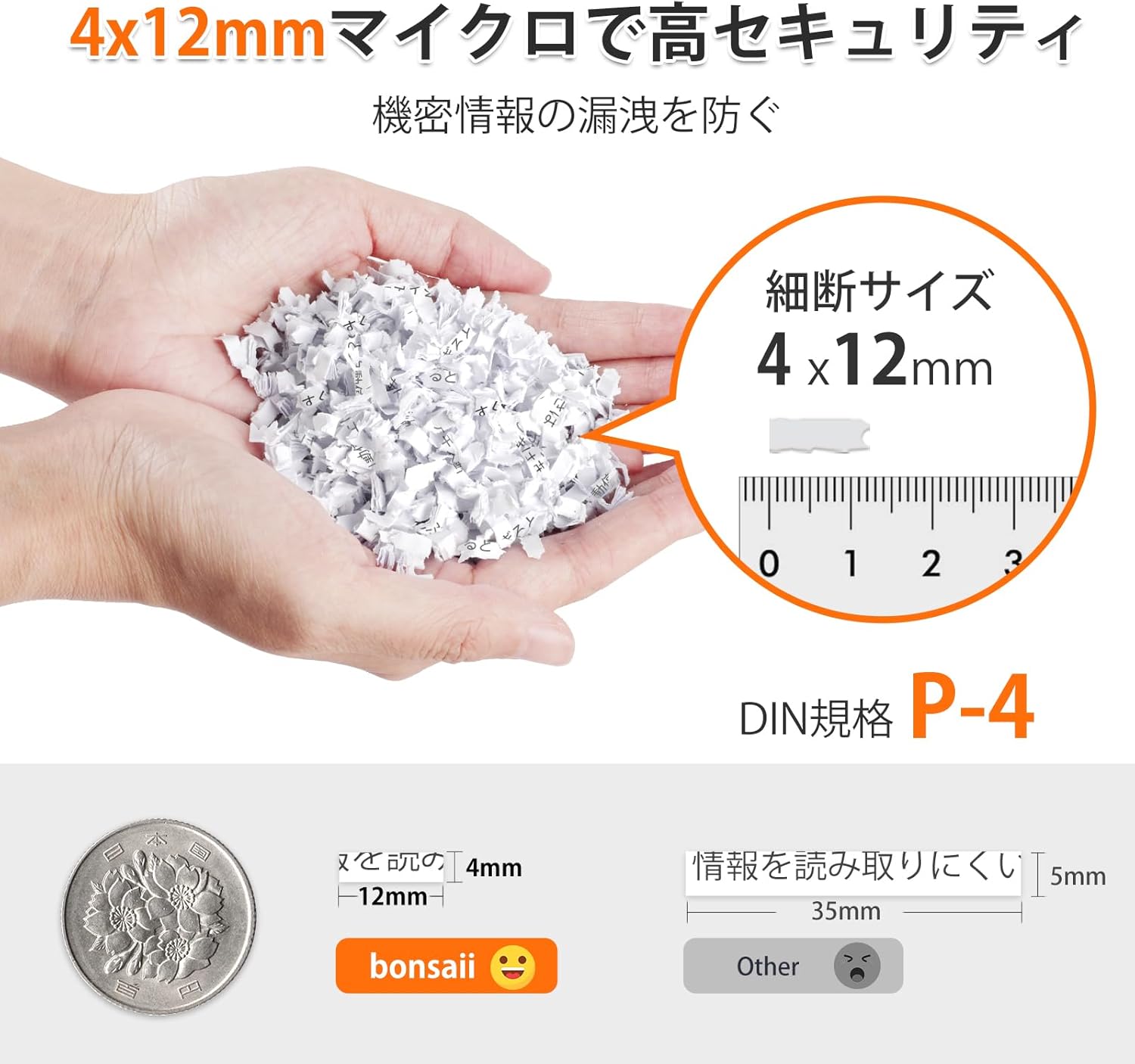 Figure 6.1: The bonsaii C290-A produces micro-cut particles of 4x12mm, ensuring high security for your documents. |
7. وضاحتون
| خاصيت | تفصيل |
|---|---|
| ماڊل نمبر | JP-C290-A |
| ٽڪر جو قسم | مائيڪرو ڪٽ |
| ٽڪر جي ماپ | 4 x 12 ملي ميٽر |
| خودڪار فيڊ جي گنجائش | Up to 150 sheets (A4, 64g/㎡) |
| دستي فيڊ جي گنجائش | 12 شيٽ تائين |
| Continuous Run Time (Auto-Feed) | 60 منٽ |
| Continuous Run Time (Manual Feed) | 10 منٽ |
| ٿڌي ٿيڻ جو وقت | Not specified, typically 30-60 minutes after max run time |
| فضلي بن جي گنجائش | 23 ليٽر |
| Shreds Credit Cards | Yes (via manual feed slot) |
| طول و عرض (L x W x H) | 26.3 x 36.7 x 50.6 سينٽي |
| وزن | 9.2 ڪلو |
| طاقت جو ذريعو | تار ٿيل برقي |
8. وارنٽي ۽ سپورٽ
bonsaii products are manufactured to the highest quality standards. For information regarding warranty coverage, please refer to the warranty card included with your product or visit the official bonsaii webسائيٽ.
If you encounter any issues or have questions about your bonsaii C290-A shredder, please contact bonsaii customer support for assistance. Contact details can typically be found on the bonsaii official webسائيٽ تي يا پراڊڪٽ پيڪنگنگ تي.
For further assistance, you may visit the bonsaii store on Amazon: bonsaii Amazon Store