تعارف
This manual provides detailed instructions for the safe and efficient operation of your Denver MRD-51BT MK2 9-in-1 Bluetooth Radio Disc Player. Please read this manual thoroughly before using the device and retain it for future reference. This versatile music center combines modern technology with a vintage aesthetic, allowing you to enjoy various audio formats.
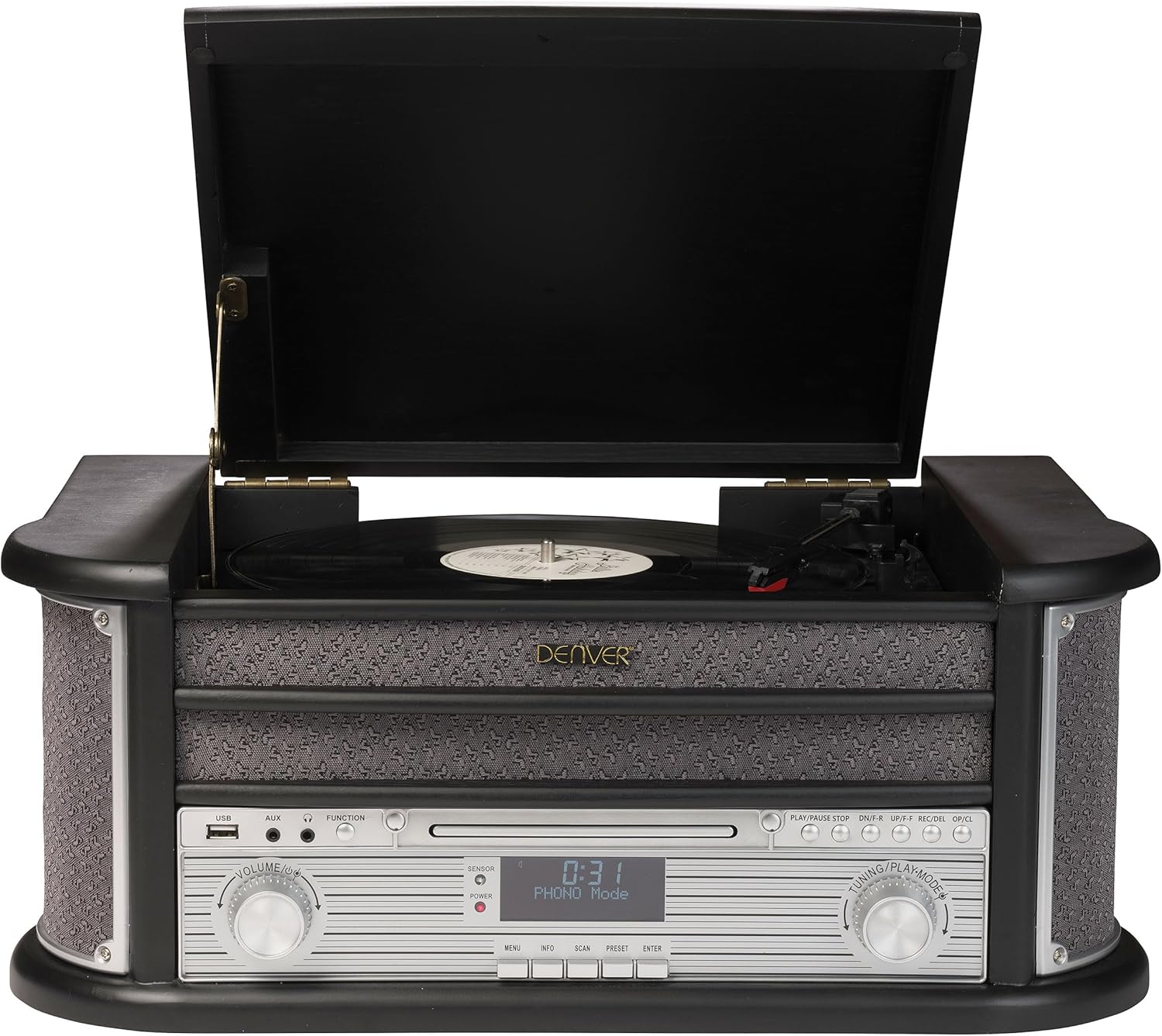
شڪل 1: سامهون view of the Denver MRD-51BT MK2 music center.
پيداوار جون خاصيتون
The Denver MRD-51BT MK2 is a comprehensive audio system designed to play various media types. Key features include:
- 9-in-1 Audio System: Integrates a turntable, cassette player, CD player, DAB/DAB+ radio, FM radio, USB MP3 playback, Bluetooth connectivity, AUX input, and Line output.
- 3-Speed Turntable: Supports 33, 45, and 78 RPM vinyl records.
- Digital Radio: DAB/DAB+ tuner for access to digital radio stations.
- Analog Radio: FM tuner for traditional radio broadcasts.
- بلوٽوت ڪنيڪشن: Wirelessly stream audio from compatible smartphones, tablets, or other Bluetooth-enabled devices.
- USB MP3 Playback & Recording: MP3 کيڏيو files from a USB drive and record audio from vinyl, cassette, or CD directly to MP3 format on a USB drive.
- معاون ان پٽ (AUX IN): 3.5 ايم ايم جيڪ ذريعي ٻاهرين آڊيو ڊوائيسز کي ڳنڍيو.
- Line Output (LINE OUT): Connect the unit to an external ampلائفائر يا طاقتور اسپيڪر.
- هيڊ فون جڪ ذاتي ٻڌڻ لاءِ.
- مربوط ڳالهائيندڙ: Built-in stereo speakers for immediate audio playback.
- ريموٽ ڪنٽرول: آسان آپريشن لاءِ مڪمل فنڪشنل ريموٽ.
سيٽ اپ ڪريو
1. Unpacking
Carefully remove the unit from its packaging. Retain the packaging materials for future transport or storage. Ensure all components are present:
- Denver MRD-51BT MK2 Music Center
- ريموٽ ڪنٽرول
- استعمال ڪندڙ جو دستياب (ھي دستاويز)
- پاور اڊاپٽر

شڪل 2: پراڊڪٽ پيڪنگنگ.
2. رکڻ
يونٽ کي هڪ مستحڪم، هموار مٿاڇري تي رکو جيڪو سڌي سج جي روشني، گرمي جي ذريعن، ۽ گهڻي مٽي يا نمي کان پري هجي. يونٽ جي چوڌاري مناسب هوا جي وهڪري کي يقيني بڻايو وڃي.
3. ڳنڍڻ واري طاقت
Connect the supplied power adapter to the DC IN jack on the rear of the unit, then plug the adapter into a standard wall outlet.
4. اينٽينا ڪنيڪشن
For optimal FM and DAB/DAB+ radio reception, extend the FM wire antenna located at the rear of the unit. Position it for the best signal reception.
5. ٻاهرين ڊوائيس ڪنيڪشن
- هاڪس ان: To connect an external audio device (e.g., an MP3 player or smartphone without Bluetooth), use a 3.5mm audio cable (not supplied) to connect the device's headphone or line-out jack to the AUX IN jack on the front panel.
- لائين :اھر: To connect the music center to an external amplifier or powered speakers, use RCA audio cables (not supplied) to connect the L/R LINE OUT jacks on the rear panel to the corresponding audio input jacks on your external audio system.
- هيڊفون: For private listening, plug 3.5mm stereo headphones into the HEADPHONE jack on the front panel.

شڪل 3: پوئين پينل ڪنيڪشن.
آپريٽنگ هدايتون
1. عام ڪنٽرول

Figure 4: Front control panel details.
- پاور بٽڻ: يونٽ کي آن يا آف ڪرڻ لاءِ پريس ڪريو.
- وولم نوب: آڊيو آئوٽ ليول کي ترتيب ڏيڻ لاءِ گھمايو.
- فنڪشن بٽڻ: Press repeatedly to cycle through different modes (PHONO, CD, USB, DAB, FM, BT, AUX).
- TUNING/PLAYMODE Knob: Used for tuning radio stations or navigating tracks/folders in CD/USB mode.
- LCD ڊسپلي: موجوده موڊ، ٽريڪ جي معلومات، ريڊيو فريڪوئنسي، وغيره ڏيکاري ٿو.
2. Turntable Operation (PHONO Mode)
This unit supports 33, 45, and 78 RPM records.
- Lift the turntable lid.
- Place a vinyl record on the turntable platter. If playing a 45 RPM single, place the included adapter over the spindle.
- Select the appropriate speed (33/45/78) using the speed selector switch located on the turntable deck.
- Gently release the tone arm lock.
- Lift the tone arm using the cueing lever and position it over the desired track on the record.
- Lower the cueing lever to gently place the stylus onto the record. Playback will begin.
- At the end of the record, the turntable may stop automatically (if auto-stop is enabled). Manually return the tone arm to its rest and secure it with the lock.

Figure 5: Turntable in operation.
3. CD Player Operation (CD Mode)
- کي دٻايو فنڪشن سي ڊي موڊ چونڊڻ لاءِ بٽڻ.
- کي دٻايو کوليو/ بند ڪريو سي ڊي ٽري کولڻ لاءِ بٽڻ دٻايو.
- هڪ سي ڊي کي ٽري ۾ ليبل واري پاسي کي مٿي ڪري رکو.
- کي دٻايو کوليو/ بند ڪريو button again to close the tray. The unit will read the CD.
- دٻايو راند/روڪ to start playback. Use the SKIP ٽريڪ نيويگيٽ ڪرڻ لاء بٽڻ.
4. Cassette Player Operation (TAPE Mode)
The cassette deck is located on the side of the unit.
- Insert a cassette tape into the cassette slot.
- کي دٻايو فنڪشن button to select TAPE mode.
- Use the cassette deck controls (PLAY, STOP/EJECT, F.FWD, REW) to operate the tape.
5. Radio Operation (DAB/DAB+ and FM Modes)
- کي دٻايو فنڪشن button to select DAB or FM mode.
- For DAB: The unit will automatically scan for available DAB stations on first use. To manually scan, refer to the full manual for specific instructions. Use the ٽيوننگ ڇڪ يا اڳواٽ buttons to navigate stations.
- For FM: استعمال ڪريو ٽيوننگ knob to manually tune to a station or press and hold the اسڪين button for automatic scanning.
- اڳواٽ محفوظ ڪرڻ: اسٽيشن کي محفوظ ڪرڻ لاءِ، گهربل اسٽيشن تي ٽيون ڪريو، پوءِ دٻايو ۽ رکو اڳواٽ button until the display prompts you to save. Use the ٽيوننگ knob to select a preset number, then press داخل ڪريو تصديق ڪرڻ.
6. Bluetooth Operation (BT Mode)
- کي دٻايو فنڪشن button to select BT mode. The display will show "BT" and the unit will enter pairing mode.
- پنهنجي بلوٽوٿ-فعال ڊوائيس (اسمارٽ فون، ٽيبليٽ) تي، بلوٽوٿ کي فعال ڪريو ۽ موجود ڊوائيسز جي ڳولا ڪريو.
- Select "MRD-51BT" from the list of devices. Once paired, the unit will emit a confirmation sound.
- هاڻي توهان پنهنجي ڊوائيس کان ميوزڪ سينٽر ڏانهن آڊيو اسٽريم ڪري سگهو ٿا.
7. USB MP3 Playback (USB Mode)
- MP3 تي مشتمل USB فليش ڊرائيو داخل ڪريو fileسامهون واري پينل تي USB پورٽ ۾ s.
- کي دٻايو فنڪشن button to select USB mode. The unit will automatically begin playing MP3 files.
- استعمال ڪريو SKIP buttons to navigate tracks and the راند/روڪ پلے بیک کي ڪنٽرول ڪرڻ لاءِ بٽڻ.
8. USB رڪارڊنگ
You can record audio from vinyl, cassette, or CD directly to a USB drive in MP3 format.
- USB پورٽ ۾ USB فليش ڊرائيو داخل ڪريو.
- Select the desired source mode (PHONO, CD, or TAPE).
- Start playback of the source audio (e.g., play a record, CD, or cassette).
- کي دٻايو آر اي سي button on the control panel or remote control. The unit will begin recording the audio to the USB drive.
- کي دٻايو اسٽاپ رڪارڊنگ ختم ڪرڻ لاءِ بٽڻ. رڪارڊ ٿيل file USB ڊرائيو تي محفوظ ڪيو ويندو.
سار سنڀال
1. صفائي
- هميشه صاف ڪرڻ کان پهريان يونٽ کي پاور آئوٽ مان انپلگ ڪريو.
- ٻاهرين مٿاڇري کي صاف ڪرڻ لاءِ نرم، سڪل ڪپڙو استعمال ڪريو. رگڙيندڙ صاف ڪندڙ، موم، يا محلول استعمال نه ڪريو.
- For the turntable platter and stylus, use specialized cleaning tools and solutions designed for vinyl record players.
- Keep the CD tray and cassette deck free of dust and debris.
2. اسٽائلس جي متبادل
The turntable stylus (needle) is a consumable part and will wear out over time. A worn stylus can damage your records and degrade sound quality. Replace the stylus after approximately 300-500 hours of playback, or if you notice a significant drop in sound quality or distortion.
- Gently remove the old stylus by pulling it downwards and forwards from the cartridge.
- Carefully insert the new stylus by pushing it upwards and backwards into the cartridge until it clicks into place.
- Avoid touching the tip of the new stylus.
مشڪلاتون
If you experience issues with your Denver MRD-51BT MK2, please consult the following table before seeking professional service.
| مسئلو | ممڪن سبب | حل |
|---|---|---|
| طاقت نه آهي | بجلي جي تار ڳنڍيل نه آهي؛ بجلي جو آئوٽليٽ فعال نه آهي. | پڪ ڪريو ته پاور ڪنڊ محفوظ طور تي پلگ ان ٿيل آهي؛ هڪ مختلف آئوٽليٽ آزمايو |
| آواز ڪونهي | Volume too low; Incorrect function mode selected; Headphones connected | Increase volume; Press FUNCTION to select correct mode; Disconnect headphones |
| ناقص ريڊيو استقبال | Antenna not extended or positioned correctly; Weak signal | Extend and reposition the FM antenna; Try auto-scan for DAB/FM |
| Turntable not spinning or sound distorted | Speed setting incorrect; Stylus worn or damaged; Tone arm locked | Select correct speed (33/45/78 RPM); Replace stylus; Release tone arm lock |
| بلوٽوت جوڙڻ جي ناڪامي | Unit not in pairing mode; Device too far; Bluetooth disabled on external device | Ensure unit is in BT mode; Move device closer; Enable Bluetooth on your device |
| USB رڪارڊنگ ڪم نه ڪري رهي آهي | USB drive full or incompatible format; Source not playing | Use a formatted USB drive with sufficient space; Ensure source (vinyl, CD, tape) is playing |
وضاحتون
پراڊڪٽ وضاحتون بغير نوٽيس جي تبديلي جي تابع آهن.
- برانڊ: ڊنور
- ماڊل نمبر: MRD-51BT-Black
- رنگ: Black Wood MK2
- طول و عرض (L x W x H): 51.5 x 35 x 22 سينٽي ميٽر (تقريبن 20.3 x 13.8 x 8.7 انچ)
- وزن: 8 ڪلوگرام (تقريبن 17.6 پائونڊ)
- طاقت جو ذريعو: ڪيبل اليڪٽرڪ
- رابطي ٽيڪنالاجي: USB, Bluetooth, AUX In, Line Out, Headphone Socket
- مطابقت رکندڙ ڊوائيسز: Headphones, Speakers, Tablet
- ڳالهائيندڙن جو تعداد: 2 (بدليل)
- گھمڻ واري رفتار: 33، 45، 78 RPM
- ريڊيو ٽيونر: DAB +، FM
وارنٽي ۽ سپورٽ
This product comes with a 12-month warranty from the date of purchase. For warranty claims or technical support, please contact the dedicated support center. Details for contacting support are typically provided with your purchase documentation or on the manufacturer's official webسائيٽ.
مھرباني ڪري وارنٽي جي تصديق لاءِ خريداري جو ثبوت رکو.