
1. سيٽ اپ
This section provides instructions for the initial setup of your LG 45GR75DC-B Ultragear Curved Gaming Monitor.
1.1 انباڪسنگ ۽ اسيمبلي
Carefully remove all components from the packaging. Ensure all parts are present before proceeding with assembly. The monitor includes a 3-way adjustable stand for ergonomic positioning.

سامهون view of the LG 45GR75DC-B Ultragear Curved Gaming Monitor on its stand.
1.2 توهان جي ڊوائيسز کي ڳنڍڻ
The monitor supports various connectivity options. Connect your computer or gaming console using the appropriate cables.
- HDMI: Use an HDMI 2.1 cable for high-resolution and high-refresh-rate connections.
- ڊسپلي پورٽ: Use a DisplayPort 1.4 cable for optimal performance, especially for DQHD resolution at 200Hz.
- USB قسم-سي: Connect compatible devices for video, data transfer, and up to 90W power delivery.
- USB بندرگاهن: Utilize the additional USB ports for peripherals such as keyboards, mice, or external storage.
- 4-pole Headphone Jack: Connect your headphones for audio output and microphone input.

Connectivity options for DQHD at 200Hz via DisplayPort, HDMI, and USB Type-C.

USB Type-C port supporting video, data transfer, and 90W power delivery.
2. آپريٽنگ هدايتون
Learn how to utilize the various features and settings of your LG Ultragear monitor for an optimized viewراند ۽ راند جو تجربو.
2.1 ڏيکاريو خاصيتون
The 45-inch curved QHD (5120 x 1440) display with a 32:9 aspect ratio offers an expansive visual field. It supports VESA DisplayHDR 600 and covers up to 95% of the DCI-P3 color gamut for rich, accurate colors and dynamic contrast.

The curved panoramic display provides an immersive viewتجربو.

High-fidelity color and dynamic contrast with VESA DisplayHDR 600 and DCI-P3 95%.
2.2 ڪارڪردگي جون خاصيتون
Experience smooth and responsive gameplay with a 200Hz refresh rate and a 1ms (GtG) response time. The monitor also features AMD FreeSync Premium Pro for tear-free and stutter-free gaming.

Visual comparison demonstrating the smoothness of 200Hz refresh rate and 1ms response time.

AMD FreeSync Premium Pro ensures a fluid, tear-free gaming experience.
2.3 Multitasking and Gaming Enhancements
The monitor offers features to enhance both productivity and gaming.
- تصوير ۾ تصوير (PiP) / تصوير طرفان تصوير (PbP): Use OnScreen Control to display content from two separate input sources simultaneously.
- بهتر ڪيل گيمنگ GUI: Access various modes like Gamer, FPS, or RTS to optimize display settings. Features include Dynamic Action Sync, Black Stabilizer, FPS Counter, and Crosshair.
- DTS HP:X: Provides accurate spatialization and localization for 3D audio over headphones via the 4-pole headphone jack.

Picture-in-Picture (PiP) allows viewing multiple sources at once.

The Enhanced Gaming GUI provides quick access to game-specific settings.
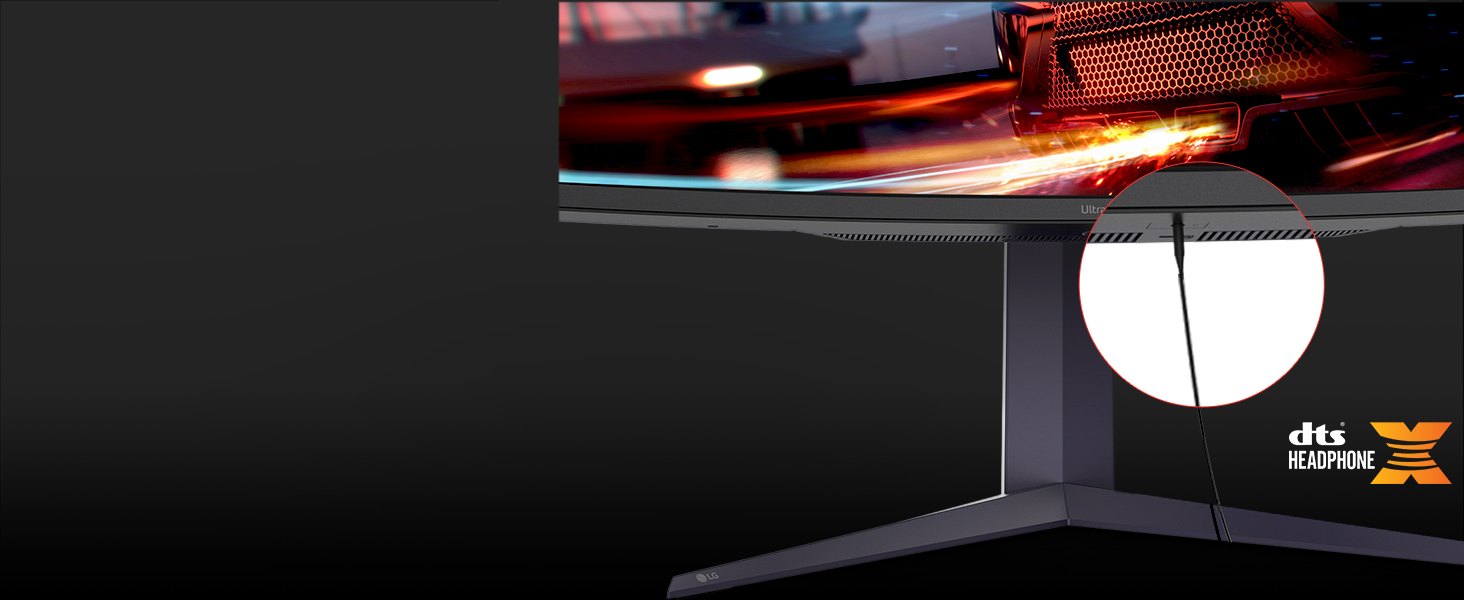
DTS HP:X provides immersive 3D audio through the 4-pole headphone jack.
3. سار سنڀال
مناسب سار سنڀال توهان جي مانيٽر جي ڊگهي عمر ۽ بهترين ڪارڪردگي کي يقيني بڻائي ٿي.
3.1 مانيٽر جي صفائي
اسڪرين کي صاف ڪرڻ لاءِ، نرم، لِنٽ فري ڪپڙي سان ان کي نرميءَ سان صاف ڪريو. ضدي نشانن لاءِ، هلڪو ڊيampen the cloth with water or a specialized screen cleaner. Avoid using harsh chemicals or abrasive materials. For the monitor body, use a soft, dry cloth.
3.2 اسٽينڊ کي ترتيب ڏيڻ
The monitor's stand allows for various adjustments to achieve an ergonomic viewپوزيشن.
- اونچائي جي ترتيب: مانيٽر کي پنهنجي پسند جي اکين جي سطح تائين مٿي يا هيٺ ڪريو.
- جھلڻ جي ترتيب: Adjust the vertical angle of the screen to minimize glare and improve viewآرام ۾.
- گھمڻ واري ترتيب: Rotate the monitor horizontally to share your screen or change your viewزاويه.

اونچائي جي ترتيب

جھلڻ جي ترتيب

گھمڻ واري ترتيب
4. مسئلا حل ڪرڻ
جيڪڏهن توهان کي پنهنجي مانيٽر سان مسئلا درپيش اچن ٿا، ته هيٺ ڏنل عام مسئلا حل ڪرڻ واري قدمن جو حوالو ڏيو.
4.1 No Display or Signal
- ڪيبل چيڪ ڪريو: Ensure all video cables (HDMI, DisplayPort, USB-C) are securely connected to both the monitor and your source device.
- طاقت: Verify the monitor's power cable is properly connected and the power outlet is functional. Press the power button on the monitor.
- ان پٽ جو ذريعو: Use the monitor's OSD (On-Screen Display) menu to manually select the correct input source.
- ذريعو ڊوائيس: Confirm your computer or gaming console is powered on and outputting a signal. Try connecting another display to the source device to rule out a problem with the source.
4.2 Resolution or Refresh Rate Issues
- گرافڪس ڊرائيور: پڪ ڪريو ته توهان جا گرافڪس ڪارڊ ڊرائيور اپ ٽو ڊيٽ آهن.
- ڊسپلي سيٽنگون: Adjust the resolution and refresh rate in your operating system's display settings. For optimal performance, use 5120x1440 resolution and 200Hz refresh rate.
- ڪيبل مطابقت: Verify that your cables (especially HDMI and DisplayPort) support the desired resolution and refresh rate. Older cables may have limitations.
4.3 آڊيو مسئلا
- حجم: مانيٽر ۽ پنهنجي سورس ڊيوائس ٻنهي تي واليوم سيٽنگز چيڪ ڪريو.
- آڊيو آئوٽ: Ensure the monitor is selected as the default audio output device in your operating system.
- هيڊ فون ڪنيڪشن: If using headphones, ensure they are fully plugged into the 4-pole headphone jack.
5. وضاحتون
Detailed technical specifications for the LG 45GR75DC-B Ultragear Curved Gaming Monitor.
| خاصيت | تفصيل |
|---|---|
| برانڊ | LG |
| ماڊل نمبر | 45GR75DC-B |
| اسڪرين جي ماپ | 45 انچ |
| قرارداد | 5K QHD (5120 x 1440) |
| اسپيڪٽ ريشو | 32:9 |
| گھمڻ | مڙيل |
| ريفريش جي شرح | 200 هز |
| جوابي وقت | 1 Milliseconds (GtG) |
| ڊسپلي جو قسم | VA |
| روشني | 400 Candela per Square Meter |
| مقابلي جي نسبت | 3000:1 |
| رنگ گامٽ | ڊي سي آءِ-پي 3 95٪ |
| HDR سپورٽ | ويسا ڊسپلي ايڇ ڊي آر 600 |
| موافقت واري هم وقت سازي | AMD فري سنڪ پريميئم پرو |
| رابطي | 2x HDMI, 1x DisplayPort, 1x USB Type-C (90W PD), 3x USB Ports, 1x 4-pole Headphone Jack |
| بجلي جو استعمال | 35 واٽ (عام) |
| شيون طول و عرض (D x W x H) | 12.9"ڊي x 42.7"ڊي x 22"ايڇ |
| شيءِ جو وزن | 19.4 پائونڊ |
6. وارنٽي ۽ سپورٽ
This section outlines the warranty information and how to obtain support for your LG monitor.
6.1 وارنٽي ڄاڻ
The LG 45GR75DC-B Ultragear Curved Gaming Monitor comes with a 1 سال ٺاهيندڙ وارنٽي covering both parts and labor. Please retain your proof of purchase for warranty claims.
6.2 ڪسٽمر سپورٽ
For technical assistance, service, or further inquiries, please contact LG Customer Support. You can find contact information on the official LG webسائيٽ يا توهان جي پراڊڪٽ سان شامل دستاويزن ۾.
When contacting support, please have your monitor's model number (45GR75DC-B) and serial number ready.