
1. تعارف
This manual provides detailed instructions for the CODi A04616 Wireless Headset. Designed for clear audio communication in various environments, this headset features advanced AI-Environmental Noise Cancellation (ENC) technology to suppress ambient noise and enhance voice clarity. Please read this manual thoroughly before using the headset to ensure proper operation and to maximize its performance and lifespan.
پيڪيج مواد:
- CODi A04616 Wireless Headset
- Headset Charging Dock
- USB-A ڊونگل
- USB چارجنگ ڪيبل
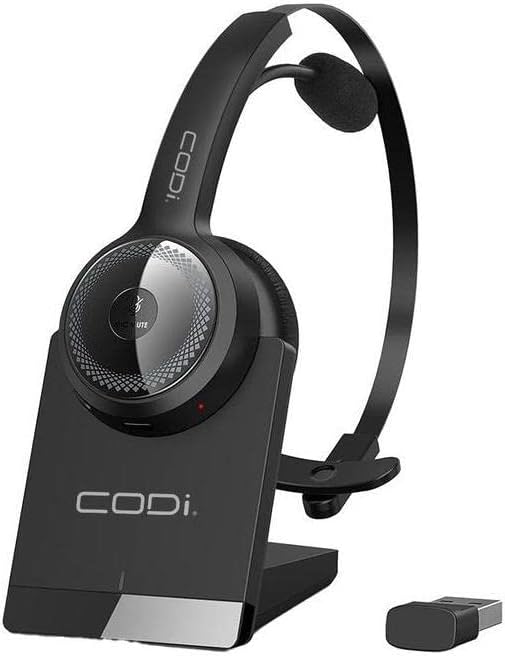
شڪل 1.1: CODi A04616 Wireless Headset with its charging dock and USB-A dongle. The headset is black with a silver accent on the ear cup, resting in its black charging base. The small black USB dongle is visible next to the base.
2. پيداوار جا حصا
Familiarize yourself with the various parts of your CODi A04616 Wireless Headset:
- Adjustable Headband: آرامده ۽ محفوظ فٽ لاءِ.
- Cushioned Ear Pad: ڊگهي استعمال دوران آرام فراهم ڪري ٿو.
- مائڪروفون: Features AI-ENC technology for clear voice pickup. Rotates 135° for use on either ear.
- حجم ڪنٽرول: Buttons located on the ear cup for adjusting audio levels.
- ملٽي فنڪشن بٽڻ: پاور، پيئرنگ، ۽ ڪال مئنيجمينٽ لاءِ.
- چارج پورٽ: Located on the headset for direct charging or via the dock.
- USB-A Dongle: For wireless connection to PCs and laptops.
- چارجنگ ڊاک: Provides a convenient charging and storage solution.

شڪل 2.1: The CODi A04616 Wireless Headset, highlighting its adjustable headband and the flexible, rotating microphone arm. The headset is black with a single ear cup and an over-the-head design.
3. سيٽ اپ
3.1. هيڊ سيٽ کي چارج ڪرڻ
- Connect the USB charging cable to the charging dock and then to a power source (e.g., computer USB port or USB wall adapter).
- Place the CODi A04616 Wireless Headset onto the charging dock, ensuring the charging contacts align.
- The headset's indicator light will show charging status. A full charge provides approximately 35 hours of working time.
- Alternatively, connect the USB charging cable directly to the headset's charging port.
3.2. بلوٽوت ذريعي ڳنڍڻ
- پڪ ڪريو ته هيڊ سيٽ چارج ٿيل آهي ۽ بند آهي.
- Press and hold the multi-function button on the headset until the indicator light flashes blue and red, indicating pairing mode.
- پنهنجي ڊوائيس (اسمارٽ فون، ليپ ٽاپ، وغيره) تي، بلوٽوٿ کي فعال ڪريو ۽ موجود ڊوائيسز جي ڳولا ڪريو.
- Select "CODi A04616" from the list of found devices.
- Once connected, the indicator light on the headset will turn solid blue or flash blue periodically. The Bluetooth operating range is up to 300 feet (91 meters).
3.3. Connecting via USB-A Dongle
- Plug the USB-A dongle into an available USB-A port on your computer or laptop.
- Power on the CODi A04616 Wireless Headset.
- The headset and dongle should automatically pair. The indicator light on the headset will turn solid blue when connected.
- Ensure the CODi A04616 is selected as the audio input and output device in your computer's sound settings. The USB-A dongle operating range is up to 32 feet.
4. آپريٽنگ هدايتون
4.1. پاور آن/آف
- پاور آن: Press and hold the multi-function button for approximately 3 seconds until the indicator light flashes blue.
- بجلي بند: Press and hold the multi-function button for approximately 5 seconds until the indicator light flashes red and then turns off.
4.2. ڪال مينيجمينٽ
- جواب/آخر ڪال: هڪ multiيرو ملٽي فنڪشن بٽڻ کي دايو.
- ڪال رد ڪريو: 2 سيڪنڊن لاءِ ملٽي فنڪشن بٽڻ کي دايو ۽ رکو.
- مائڪروفون کي خاموش/ چالو ڪريو: Press the dedicated mute button (if available, or refer to specific button layout for your model).
4.3. حجم ڪنٽرول
- حجم و :ايو: واليوم اپ بٽڻ دٻايو.
- حجم گھٽايو: واليوم ڊائون بٽڻ دٻايو.
4.4. مائڪروفون ايڊجسٽمينٽ
The microphone arm can rotate 135 degrees, allowing you to wear the headset on either your left or right ear. Position the microphone approximately 1-2 inches from your mouth for optimal voice clarity and AI-ENC performance.
5. سار سنڀال
Proper care and maintenance will extend the life of your CODi A04616 Wireless Headset.
- صفائي: Use a soft, dry, lint-free cloth to clean the headset and charging dock. Do not use abrasive cleaners, solvents, or aerosol sprays.
- اسٽوريج: When not in use, store the headset in its charging dock or a cool, dry place away from direct sunlight and extreme temperatures.
- بيٽري جي سنڀال: To preserve battery life, avoid fully discharging the headset frequently. Charge the headset regularly, even if not in constant use.
- پاڻي جي مزاحمت: هي هيڊ سيٽ پاڻي جي مزاحمتي ناهي. مائعات جي سامهون اچڻ کان پاسو ڪريو.
6. مسئلا حل ڪرڻ
If you encounter issues with your headset, refer to the following common problems and solutions:
| مسئلو | حل |
|---|---|
| هيڊ سيٽ آن نٿو ٿئي. | Ensure the headset is fully charged. Connect it to the charging dock or directly via USB cable. |
| بلوٽوٿ ذريعي ڳنڍي نه ٿو سگهجي. |
|
| ڪابه آواز يا خراب آڊيو معيار ناهي. |
|
| مائڪروفون ڪم نه ڪري رهيو آهي. |
|
7. وضاحتون
| ماڊل نالو | Wireless Headset (A04616) |
| رابطي ٽيڪنالاجي | وائرليس (بلوٽوت) |
| بلوٽوٽ آپريٽنگ رينج | 300 فوٽ (91 ميٽر) تائين |
| USB-A Dongle Operating Range | 32 فوٽن تائين |
| بيٽري جي زندگي | Approximately 35 hours (working time) |
| مائڪروفون | 135° Rotating, AI-Environmental Noise Cancellation (ENC) |
| ڪن جي جڳهه | ڪن مٿان |
| فارم فيڪٽر | On Ear / Over-the-head |
| مطابقت رکندڙ ڊوائيسز | PCs, Laptops, Smartphones, Desktops, Gaming Consoles, Tablets, Telephones, Smart Speaker, Television, Car Audio Systems |
| پيداوار جي ماپ | 8 x 7.5 x 3.1 انچ |
| شيءِ جو وزن | 13.4 اونس |
| شامل اجزاء | Wireless Headset, Headset Charging Dock |
| يو پي سي | 633886015853 |
8. سپورٽ ۽ وارنٽي
For technical assistance or warranty inquiries, please contact CODi customer support. Refer to the product packaging or the official CODi webتازي رابطي جي معلومات ۽ وارنٽي تفصيلن لاءِ سائيٽ.
آن لائن سپورٽ: www.codi.com/support