تعارف
The KUU FLEXONE is a versatile 2-in-1 laptop designed for both productivity and entertainment. Featuring an Intel J5040 processor, 8GB DDR4 RAM, and a 512GB SSD, it offers reliable performance. Its 14-inch IPS touch-screen and 360-degree hinge allow for seamless transitions between laptop, tablet, and other modes, adapting to various usage scenarios. The all-metal body ensures durability, while features like a fingerprint reader enhance security and convenience.
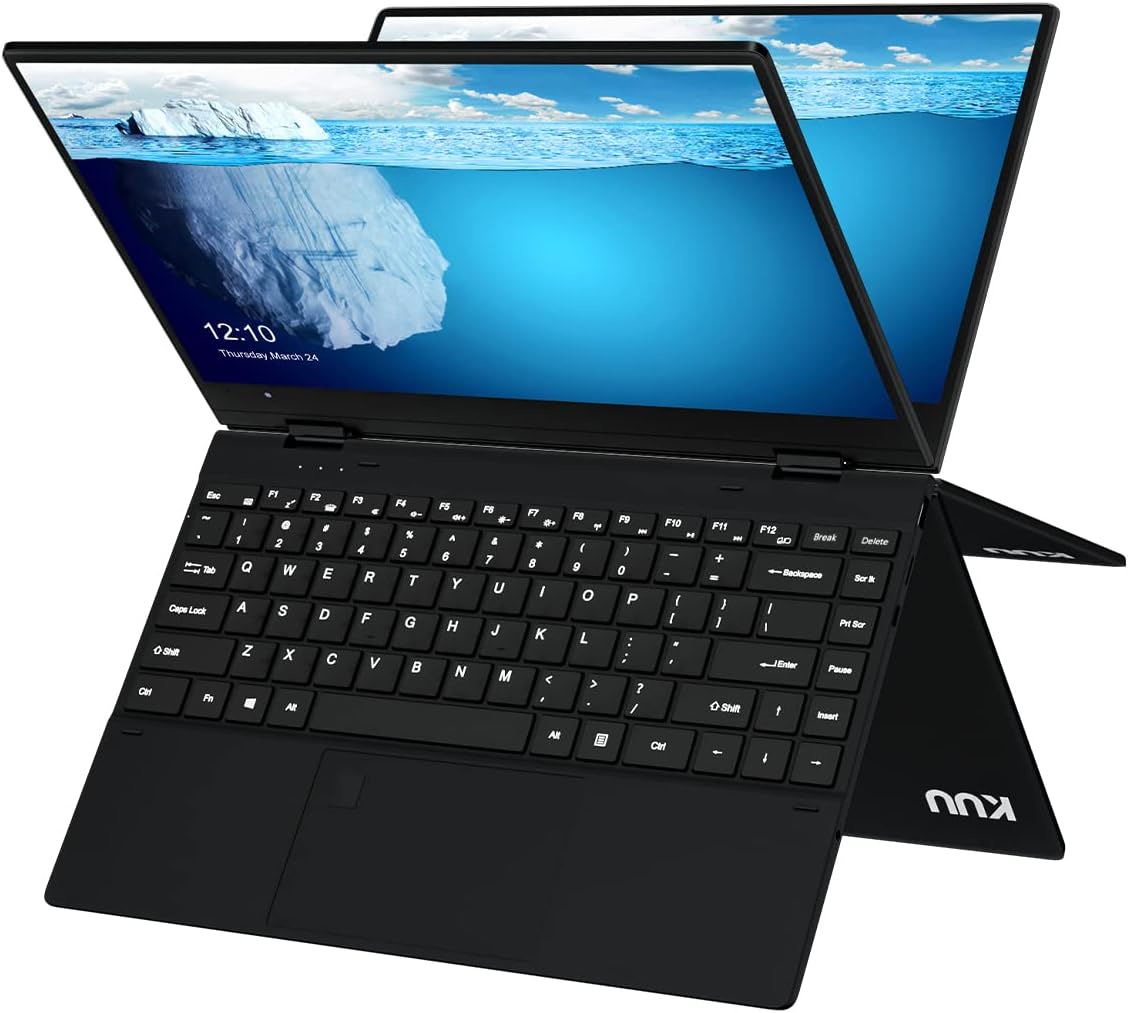
Image: The KUU FLEXONE 2-in-1 laptop in its standard laptop configuration, displaying the full keyboard and the vibrant screen.
اهم خاصيتون
- 2-ان-1 ڊيزائن: Seamlessly switch between laptop, tablet, stand, and tent modes with a 360-degree rotatable hinge.
- 14-inch IPS Touch-Screen: Enjoy vibrant visuals and intuitive interaction with the responsive touch display.
- Intel J5040 Processor: Provides efficient performance for daily computing tasks.
- 8GB DDR4 RAM & 512GB SSD: آڇون ample memory for multitasking and fast storage for your files ۽ ايپليڪيشنون.
- فنگر پرنٽ ريڊر: Enhance security and quickly log in with integrated biometric authentication.
- All-Metal Body: Durable and premium construction.
- ونڊوز 11 پرو: Pre-installed operating system for a modern and secure user experience.

Image: An infographic highlighting key specifications including Pentium J5040 CPU, 8GB RAM, 512GB SATA SSD, full metal body, 1.4kg weight, 360-degree axial free rotation, 14-inch IPS screen, 38Whr battery, and fingerprint unlock.
سيٽ اپ ڪريو
1. شروعاتي پاور آن
- ليپ ٽاپ ۽ سڀئي لوازمات دٻي مان ڪڍو.
- Connect the power adapter to the laptop's DC-IN port and plug it into a power outlet.
- ليپ ٽاپ کي آن ڪرڻ لاءِ ان جي پاسي تي موجود پاور بٽڻ کي دٻايو.
- شروعاتي ونڊوز 11 پرو سيٽ اپ مڪمل ڪرڻ لاءِ اسڪرين تي ڏنل هدايتن تي عمل ڪريو، جنهن ۾ ٻولي، علائقو، نيٽ ورڪ ڪنيڪشن، ۽ يوزر اڪائونٽ ٺاهڻ شامل آهن.
2. بيٽري کي چارج ڪرڻ
For optimal battery life, fully charge the laptop before its first use. The charging indicator light will typically show the charging status.
آپريٽنگ هدايتون
1. Understanding the 2-in-1 Modes
The KUU FLEXONE features a 360-degree hinge, allowing it to transform into various modes:
- ليپ ٽاپ موڊ: ٽائيپنگ ۽ روايتي ڪمپيوٽنگ لاءِ معياري ليپ ٽاپ ترتيب.
- خيمه جو طريقو: Fold the screen back to form a "tent" shape, ideal for watching videos or presentations in confined spaces.
- اسٽينڊ موڊ: Flip the keyboard under the screen, allowing the screen to stand upright, perfect for touch-based interactions or media consumption.
- ٽيبليٽ موڊ: Fold the screen completely back against the keyboard for a full tablet experience, enabling touch and stylus input.

Image: The KUU FLEXONE demonstrating its 360-degree hinge, showing how it can be used in office mode (laptop), sharing mode (tent), leisure patterns (stand), and tablet mode.

Image: A user interacting with the KUU FLEXONE's touchscreen while the device is in a stand-like configuration, showcasing its touch capabilities for creative work.
2. ڪي بورڊ ۽ ٽچ پيڊ
The laptop features a comfortable keyboard with 1.3mm key travel and a 2nd gear backlight for improved typing in various lighting conditions. The large touchpad supports multi-touch gestures for efficient navigation.
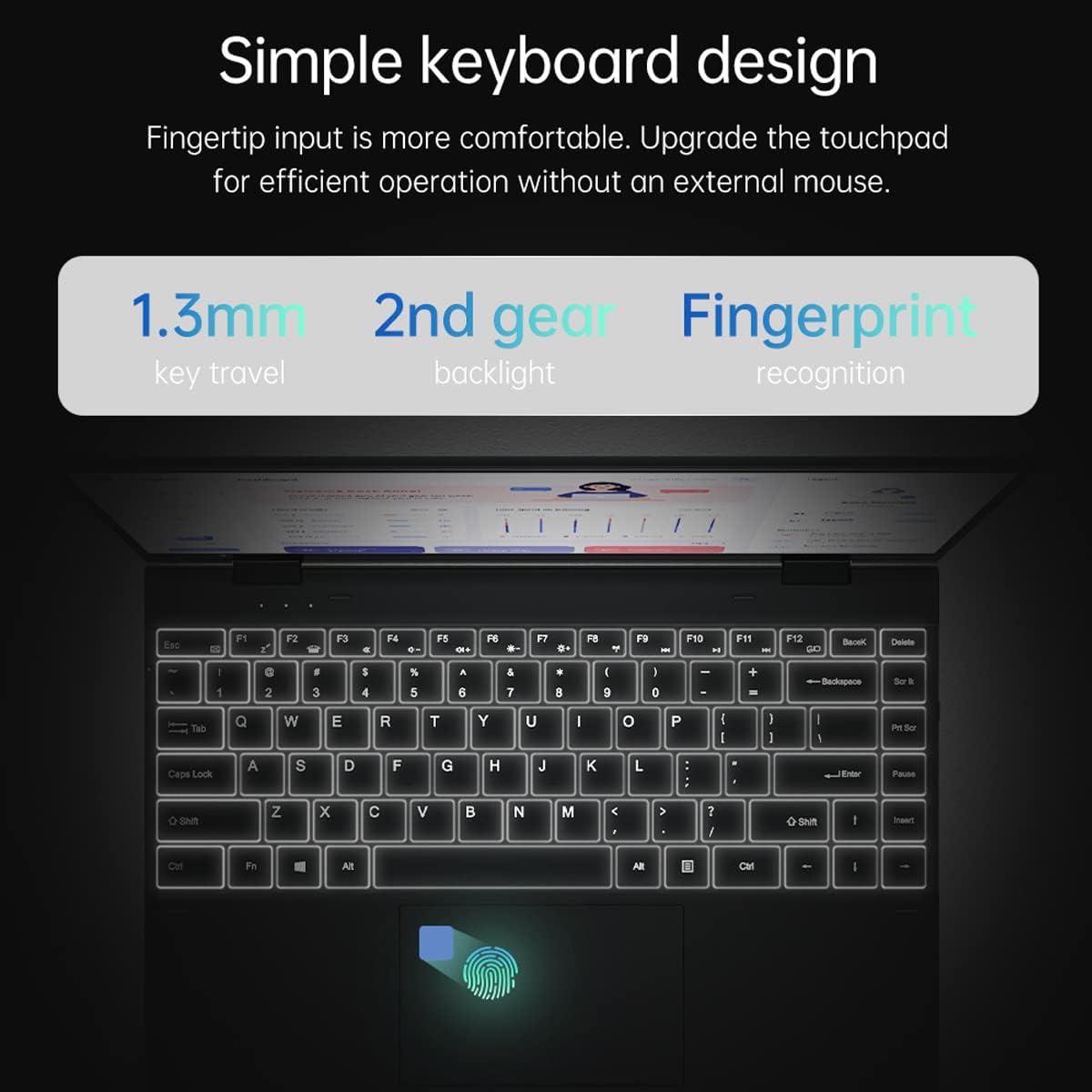
تصوير: هڪ تفصيلي view of the KUU FLEXONE's keyboard, highlighting the 1.3mm key travel, 2nd gear backlight, and the integrated fingerprint recognition sensor on the touchpad.
3. فنگر پرنٽ ريڊر
The integrated fingerprint reader allows for secure and quick login to your Windows 11 Pro system. To set up, navigate to سيٽنگون > اڪائونٽس > سائن ان آپشن and follow the instructions to register your fingerprint.
4. Connectivity and Ports
The KUU FLEXONE offers a variety of ports for connecting peripherals and accessories:
- DC-IN: پاور اڊاپٽر ڪنيڪشن لاءِ.
- قسم-سي انٽرفيس: Versatile port for data transfer and potentially charging (check specific model capabilities).
- آڊيو پورٽ: هيڊفونز يا ٻاهرين اسپيڪرن لاءِ.
- TF ڪارڊ انٽرفيس: For expanding storage with a TF (microSD) card.
- USB 3.0 انٽرفيس: USB ڊوائيسز سان تيز رفتار ڊيٽا جي منتقلي لاءِ.
Wireless connectivity includes Wi-Fi and Bluetooth 5.1 for seamless internet access and peripheral connections.

Image: A diagram illustrating the rich interface expansion of the KUU FLEXONE, detailing the locations of the Power interface (DC-IN), Type-C Interface, Audio Port, Power Button, TF card interface, and USB 3.0 interface.
سار سنڀال
- صفائي: اسڪرين ۽ ٻاهرين حصي کي صاف ڪرڻ لاءِ نرم، لِنٽ فري ڪپڙو استعمال ڪريو. ضدي نشانن لاءِ، ٿورو ڊيampڪپڙي کي پاڻي يا اسڪرين ڪلينر سان ڌوئڻ ڏيو. سخت ڪيميڪلز کان پاسو ڪريو.
- بيٽري جي سنڀال: To prolong battery life, avoid extreme temperatures. If storing for a long period, charge the battery to about 50% before storage.
- سافٽ ويئر اپڊيٽ: بهترين ڪارڪردگي ۽ سيڪيورٽي کي يقيني بڻائڻ لاءِ پنهنجي ونڊوز آپريٽنگ سسٽم ۽ ڊرائيورن کي باقاعدي طور تي اپڊيٽ ڪريو.
- وينٽيليشن: Ensure the laptop's vents are not obstructed to prevent overheating. Use on a flat, hard surface when possible.
مشڪلاتون
| مسئلو | ممڪن حل |
|---|---|
| ليپ ٽاپ آن نٿو ٿئي. | Ensure the power adapter is securely connected and the outlet is working. Try holding the power button for 10-15 seconds to perform a hard reset. |
| اسڪرين خالي آهي يا ٽمٽار ڪري رهي آهي. | Check display cable connections if using an external monitor. Restart the laptop. Update graphics drivers. |
| وائي فائي يا بلوٽوٿ ڪم نه ڪري رهيو آهي. | Check if Wi-Fi/Bluetooth is enabled in Windows settings. Restart the laptop. Update network drivers. |
| ٽچ اسڪرين غير جوابي. | Restart the laptop. Ensure the screen is clean. Check for touchscreen driver updates in Device Manager. |
| سست ڪارڪردگي. | Close unnecessary applications. Check for malware. Ensure sufficient free space on the SSD. Update Windows. |
وضاحتون
| خاصيت | تفصيل |
|---|---|
| اسڪرين واري ڊسپلي سائيز | 14 انچ |
| برانڊ | ڪي يو يو |
| شيون ماڊل نمبر | Flexone |
| آپريٽنگ سسٽم | ونڊوز 11 پرو |
| پيداوار جي ماپ | 12.71 x 8.97 x 0.54 انچ |
| شيون طول و عرض LxWxH | 12.71 x 8.97 x 0.54 انچ |
| ڪمپيوٽر جي ميموري جو قسم | DDR4 SDRAM |
| فليش ميموري سائيز | 8 جي بي |
| خاص خصوصيت | فنگر پرنٽ ريڊر |
| رابطي ٽيڪنالاجي | بلوٽوٿ، يو ايس بي، وائي فائي |
| ليتيم بيٽري انرجي مواد | 300 واٽ ڪلاڪ |
| رام جو قسم | DDR4 SDRAM |
| ڪيش سائيز | 8 جي بي |
| ڪنٽرول جو طريقو | ڇڪڻ |
| ٺاهيندڙ | ڪي يو يو |
سرڪاري پراڊڪٽ وڊيو
وڊيو: هڪ سرڪاري پراڊڪٽ وڊيو شوڪasing the KUU FLEXONE 2-in-1 Laptop's features, including its metal fuselage, narrow border display, 360-degree rotation, precision touch screen, and horizontal/vertical display capabilities.
وارنٽي ۽ سپورٽ
For warranty information, technical support, or service inquiries, please refer to the warranty card included with your product or visit the official KUU website. You may also contact KUU customer service directly for assistance.
اضافي وسيلن ۽ پيداوار جي معلومات لاءِ، دورو ڪريو KUU Store on Amazon.