
1. تعارف
This manual provides essential information for the safe and efficient use of your OPPO F21 Pro (5G) smartphone. Please read this manual thoroughly before using your device to ensure optimal performance and longevity.
The OPPO F21 Pro (5G) is a high-performance smartphone featuring a 2.2 GHz Octa-core processor, 8GB of RAM, and 128GB of internal storage, expandable via microSDXC. It operates on Android 12 and is powered by a non-removable 4500 mAh Li-Po battery. Key features include a 6.43-inch AMOLED display, a 64 MP AI Triple Camera system, and 5G connectivity.
2. ڊوائيس سيٽ اپ
2.1 پيڪيج مواد
- OPPO F21 Pro (5G) Smartphone
- USB ڪيبل
- تڪڙي شروعات جي ھدايت (علائقي جي لحاظ کان مختلف ٿي سگھي ٿي)
- حفاظتي معلومات (علائقي جي لحاظ کان مختلف ٿي سگهي ٿي)
2.2 سم ڪارڊ ۽ مائڪرو ايس ڊي ڪارڊ داخل ڪرڻ
Your OPPO F21 Pro (5G) supports Dual-SIM functionality and a microSDXC card for expanded storage. The device uses Nano-SIM cards.
- پنهنجي فون جي پاسي تي سم ڪارڊ ٽري ڳوليو.
- سم ايجيڪٽر ٽول (جيڪڏهن مهيا ڪيل هجي) کي ٽري جي ڀرسان ننڍڙي سوراخ ۾ داخل ڪريو ۽ نرميءَ سان دٻايو جيستائين ٽري ٻاهر نه اچي.
- پنهنجا نانو-سم ڪارڊ ۽/يا مائڪرو ايس ڊي ايڪس سي ڪارڊ ٽري تي مقرر ڪيل سلاٽ ۾ رکو. پڪ ڪريو ته سون جا رابطا هيٺئين طرف هجن.
- احتياط سان ٽري کي فون ۾ واپس دٻايو جيستائين اهو پاسي سان فلش نه ٿئي.
آمريڪا جي خريد ڪندڙن لاءِ اهم نيٽ ورڪ مطابقت نوٽ:
هي اسمارٽ فون CDMA نيٽ ورڪن سان مطابقت نٿو رکي، جنهن ۾ VERIZON، SPRINT، ۽ US CELLULAR شامل آهن. خريد ڪرڻ کان اڳ مھرباني ڪري پنھنجي نيٽ ورڪ فراهم ڪندڙ سان 3G يا 4G/LTE مطابقت جي تصديق ڪريو.
2.3 پاور آن/آف
- پاور آن ڪرڻ: پاور بٽڻ (ساڄي پاسي واقع) کي دٻايو ۽ رکو جيستائين OPPO لوگو ظاهر نه ٿئي.
- پاور آف ڪرڻ: پاور بٽڻ کي دٻايو ۽ رکو، پوءِ اسڪرين تي موجود اختيارن مان 'پاور آف' چونڊيو.
- ٻيهر شروع ڪرڻ لاء: پاور بٽڻ کي دٻايو ۽ رکو، پوءِ اختيارن مان 'ٻيهر شروع ڪريو' چونڊيو.
2.4 شروعاتي سيٽ اپ
Upon first power-on, follow the on-screen instructions to complete the initial setup process. This includes selecting your language, connecting to Wi-Fi, setting up your Google account, and configuring security features like Face Recognition.
3. توهان جي ڊوائيس کي هلائڻ
3.1 بنيادي نيويگيشن
Your OPPO F21 Pro (5G) runs on Android 12, offering an intuitive user interface. Use gestures or navigation buttons (configurable in settings) to move between apps, return to the home screen, and access recent applications.
3.2 ڏيکاريو خاصيتون

The front of the OPPO F21 Pro (5G) features a vibrant AMOLED display with a punch-hole cutout for the front camera.

هڪ تفصيلي view of the punch-hole front camera, integrated seamlessly into the display.
The device features a 6.43-inch AMOLED display with a resolution of 1080 x 2400 pixels, protected by Schott Xensation glass. This display provides vivid colors and deep blacks for an enhanced viewتجربو.
3.3 ڪئميرا جو استعمال
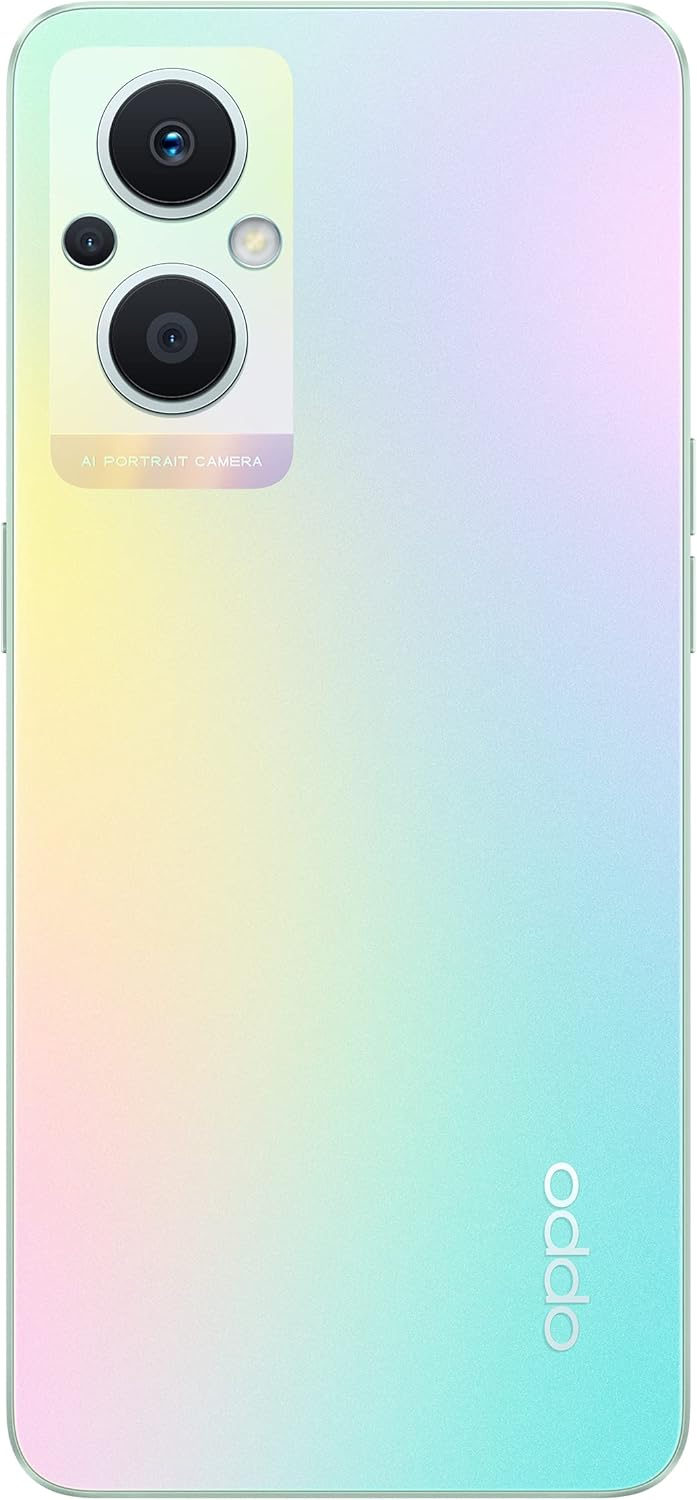
The back of the OPPO F21 Pro (5G) showcases its triple camera system and sleek design.

هڪ تفصيلي view of the AI Portrait Camera module on the rear, highlighting the lenses and flash.
The OPPO F21 Pro (5G) is equipped with a versatile camera system:
- پوئتي ڪئميرا: 64 MP (wide, f/1.7, PDAF), 2 MP (macro, f/2.4), 2 MP (depth, f/2.4).
- سامهون ڪئميرا: 16 MP (wide, f/2.4).
Access the Camera app from your home screen or app drawer. Select various shooting modes such as Photo, Video, Portrait, Macro, and more. Tap the screen to focus and press the shutter button to capture images or start/stop video recording.
3.4 ڪنيڪشن
- 5G نيٽ ورڪ: Supports N1/ N8/ N28/ N41/ N77/ N78 SA/NSA bands.
- وائي فائي: انٽرنيٽ تائين رسائي لاءِ وائرليس نيٽ ورڪن سان ڳنڍيو.
- بلوٽوٿ: وائرليس لوازمات جهڙوڪ هيڊفون ۽ اسپيڪر سان جوڙيو.
- USB قسم-سي: چارج ڪرڻ ۽ ڊيٽا جي منتقلي لاء.
3.5 سيڪيورٽي خاصيتون
The device includes Face Recognition for convenient and secure unlocking. You can set this up in the Security settings menu.
4. سار سنڀال
4.1 بيٽري جي سنڀال
Your OPPO F21 Pro (5G) is equipped with a 4500 mAh Lithium-Polymer battery. To maximize battery life:
- انتهائي گرمي پد کان بچاء.
- مهيا ڪيل اصل چارجر ۽ USB ڪيبل استعمال ڪريو.
- بيٽري کي بار بار مڪمل طور تي چارج ڪرڻ کان پاسو ڪريو.
- ڊوائيس جي سيٽنگ مينيو ۾ بيٽري سيٽنگز کي بهتر بڻايو.
4.2 توهان جي ڊوائيس کي صاف ڪرڻ
The device is rated as Water Resistant. To clean your phone:
- صاف ڪرڻ کان اڳ ڊوائيس بند ڪريو.
- ھڪڙو نرم ، لينٽ کان پاڪ ڪپڙو استعمال ڪريو.
- سخت ڪيميڪلز، رگڙيندڙ صاف ڪندڙ، يا دٻيل هوا استعمال ڪرڻ کان پاسو ڪريو.
- پاڻي ۾ ڊوائيس کي آبدوز نه ڪريو.
4.3 سافٽ ويئر اپڊيٽ
Regularly check for and install software updates to ensure your device has the latest features, security patches, and performance improvements. You can check for updates in the device's Settings menu under 'About phone' or 'Software update'.
5. مسئلا حل ڪرڻ
If you encounter issues with your OPPO F21 Pro (5G), try the following basic troubleshooting steps:
- ڊوائيس غير جوابدار: زبردستي ٻيهر شروع ڪرڻ لاءِ پاور بٽڻ کي تقريباً 10-15 سيڪنڊن لاءِ دٻايو ۽ رکو.
- نيٽ ورڪ مسئلا: Ensure your SIM card is correctly inserted. Check your network settings and ensure mobile data or Wi-Fi is enabled. Restart your device.
- ايپ ڪريشنگ: Close and reopen the app. Clear the app's cache and data in Settings > Apps. If the issue persists, uninstall and reinstall the app.
- بيٽري جلدي ختم ٿيڻ: Review battery usage in Settings to identify power-hungry apps. Reduce screen brightness, disable unnecessary features (GPS, Bluetooth, Wi-Fi) when not in use.
- مڪمل اسٽوريج: غير ضروري ختم ڪريو files, photos, and videos. Move media to a microSD card if installed. Clear app caches.
وڌيڪ پيچيده مسئلن لاءِ، سرڪاري OPPO سپورٽ جو حوالو ڏيو. webسائيٽ يا ڪسٽمر سروس سان رابطو ڪريو.
6. وضاحتون

هڪ اوورview of the OPPO F21 Pro (5G) showcasing its main features including the 64MP AI Triple Camera, AMOLED screen, and Qualcomm Snapdragon 5G SoC.

The OPPO F21 Pro (5G) in Rainbow Spectrum, displaying both its front and rear aesthetics.
| خاصيت | تفصيل |
|---|---|
| برانڊ | اوپو |
| ماڊل نالو | OPPO F21 Pro (5G) |
| آپريٽنگ سسٽم | Android 12.0 |
| پروسيسر | ڪوالڪوم SM6375 سنيپراگن 695 5G (6 nm)، آڪٽا-ڪور (2x2.2 GHz ڪريو 660 گولڊ ۽ 6x1.7 GHz ڪريو 660 سلور) |
| رام | 8 جي بي |
| اندروني اسٽوريج | 128 جي بي |
| وسعت وارو اسٽوريج | microSDXC |
| اسڪرين جي ماپ | 6.43 انچ (16.33 سينٽي ميٽر) |
| ڊسپلي جو قسم | AMOLED |
| قرارداد | 1080 x 2400 پکسلز |
| پوئين ڪئميرا | 64 ايم پي (وڏي)، 2 ايم پي (ميڪرو)، 2 ايم پي (گہرائي) |
| سامهون ڪئميرا | 16 ايم پي (وڏي) |
| بيٽري جي گنجائش | 4500 mAh (Lithium-Polymer, non-removable) |
| سيلولر ٽيڪنالاجي | 5G (Dual SIM) |
| وائرليس ٽيڪنالاجي | وائي فائي، بلوٽوت |
| ڪنيڪٽر جو قسم | USB قسم سي |
| بايوميٽرڪ سيڪيورٽي | منهن جي سڃاڻپ |
| پاڻي جي مزاحمت جي سطح | پاڻي مزاحمتي |
| طول و عرض | 6.3 x 2.87 x 0.31 انچ |
| شيءِ جو وزن | 173 گرام |
7. وارنٽي ڄاڻ
Your OPPO F21 Pro (5G) smartphone comes with a 1 سالن جي ٺاهيندڙ جي وارنٽي. هي وارنٽي عام استعمال هيٺ مواد ۽ ڪاريگري ۾ خرابين کي ڍڪيندي آهي. وارنٽي دعوائن لاءِ مهرباني ڪري خريداري جو ثبوت رکو.
The warranty does not cover damage caused by misuse, accidents, unauthorized modifications, or normal wear and tear. For full terms and conditions, please refer to the warranty card included in your product packaging or visit the official OPPO webسائيٽ.
8. سپورٽ
وڌيڪ مدد، ٽيڪنيڪل سپورٽ، يا سروس سينٽر ڳولڻ لاءِ، مهرباني ڪري سرڪاري OPPO سپورٽ تي وڃو. webسائيٽ:
You may also find helpful FAQs and community forums on the support webسائيٽ.