
1. تعارف
This manual provides essential instructions for the safe and efficient operation of your ROARBATT 4000W 24V Pure Sine Wave Power Inverter. This device converts 24V DC battery power into 110V/120V AC household electricity, suitable for powering various appliances. Please read this manual thoroughly before installation and use to ensure proper function and to prevent damage to the unit or connected devices.

Figure 1.1: ROARBATT 4000W Pure Sine Wave Power Inverter with included remote control and battery cables.
2. حفاظتي هدايتون
Adherence to these safety guidelines is crucial for preventing personal injury and damage to the inverter or connected equipment.
- وينٽيليشن: پڪ ڪريو ته انورٽر سٺي هوادار علائقي ۾ نصب ٿيل آهي. وينٽيليشن جي سوراخن کي بلاڪ نه ڪريو.
- خشڪ ماحول: Avoid exposure to water, rain, snow, or spray. The inverter is designed for indoor or protected use.
- مناسب گرائونڊنگ: Always connect the inverter to a proper earth ground. Refer to the installation section for details.
- انٽ واليمtage: انورٽر کي صرف 24V DC پاور سورس سان ڳنڍيو. ٻين وولٽ سان ڳنڍڻtagنقصان پهچائي سگھي ٿو.
- ٻاھر لوڊ: Do not exceed the inverter's rated continuous power output of 4000W. The peak power is 8000W.
- ٻرندڙ مواد: انورٽر کي ٻرندڙ مواد، گيسن، يا بخارات جي ويجهو نه هلايو.
- ٻار: انورٽر کي ٻارن جي پهچ کان پري رکو.
- خدمت ڪرڻ: انورٽر جي پاڻ سروس ڪرڻ جي ڪوشش نه ڪريو. سڀني سروسنگ کي قابل اهلڪارن جي حوالي ڪريو.
- بيٽري ڪنيڪشن: Always connect the positive (+) terminal of the battery to the positive (+) terminal of the inverter and the negative (-) terminal of the battery to the negative (-) terminal of the inverter. Reverse polarity will cause damage.
3. پراڊڪٽ ختمview
The ROARBATT 4000W Pure Sine Wave Power Inverter is designed for reliability and versatility. It features multiple output options and an intelligent display for monitoring.
3.1 مکيه اجزاء
- Inverter Unit: The main power conversion unit.
- ريموٽ ڪنٽرول: Allows for convenient power ON/OFF control from a distance.
- بيٽري ڪيبل: Heavy-duty cables for connecting to a 24V DC battery bank.
- ڌرتي تار: For proper grounding of the unit.
- فیوز: Spare 40A fuses for protection.
- رنچ: For securing battery cable connections.
3.2 Front and Rear Panel Features

Figure 3.1: Key features of the inverter, including DC input terminals, cooling fans, AC outlets, USB ports, and remote control port.
The inverter features:
- ڊي سي ان پٽ ٽرمينل: Positive (red) and Negative (black) terminals for 24V DC battery connection.
- ٿڌڻ جا مداح: Intelligent temperature-controlled fans activate automatically to maintain optimal operating temperature.
- ايل ايل ڊسپلي: Provides real-time operational status.
- پاور اشارو: ايل اي ڊي لائيٽ جيڪا بجلي جي حيثيت کي ظاهر ڪري ٿي.
- پاور آن / بند سوئچ: Main switch for the inverter.
- USB بندرگاهن: Two 5V DC, 3.4A USB ports for charging mobile devices.
- ريموٽ ڪنٽرول پورٽ: RJ10 port for connecting the wired remote control.
- AC آئوٽليٽ: Four 110V/120V AC outlets for connecting standard appliances.
- AC Terminal Blocks: For heavy-duty AC output connections (4000W-8000W peak).
- Earth Wire Terminal: For grounding the inverter chassis.
3.3 اندروني ڊيزائن

Figure 3.2: Internal components highlighting the high-precision circuit board and robust cooling system for stable output and extended product life.
4. سيٽ اپ ۽ تنصيب
Follow these steps for safe and correct installation of your inverter.
4.1 انسٽاليشن جي جڳھ چونڊڻ
- Mount the inverter on a flat, stable surface.
- Ensure adequate ventilation around the unit. Maintain at least 6 inches (15 cm) of clear space on all sides.
- سڌي سج جي روشني، گرمي جي ذريعن ۽ نمي کان پاسو ڪريو.
- Keep away from any flammable materials or gases.
4.2 Connecting Battery Cables
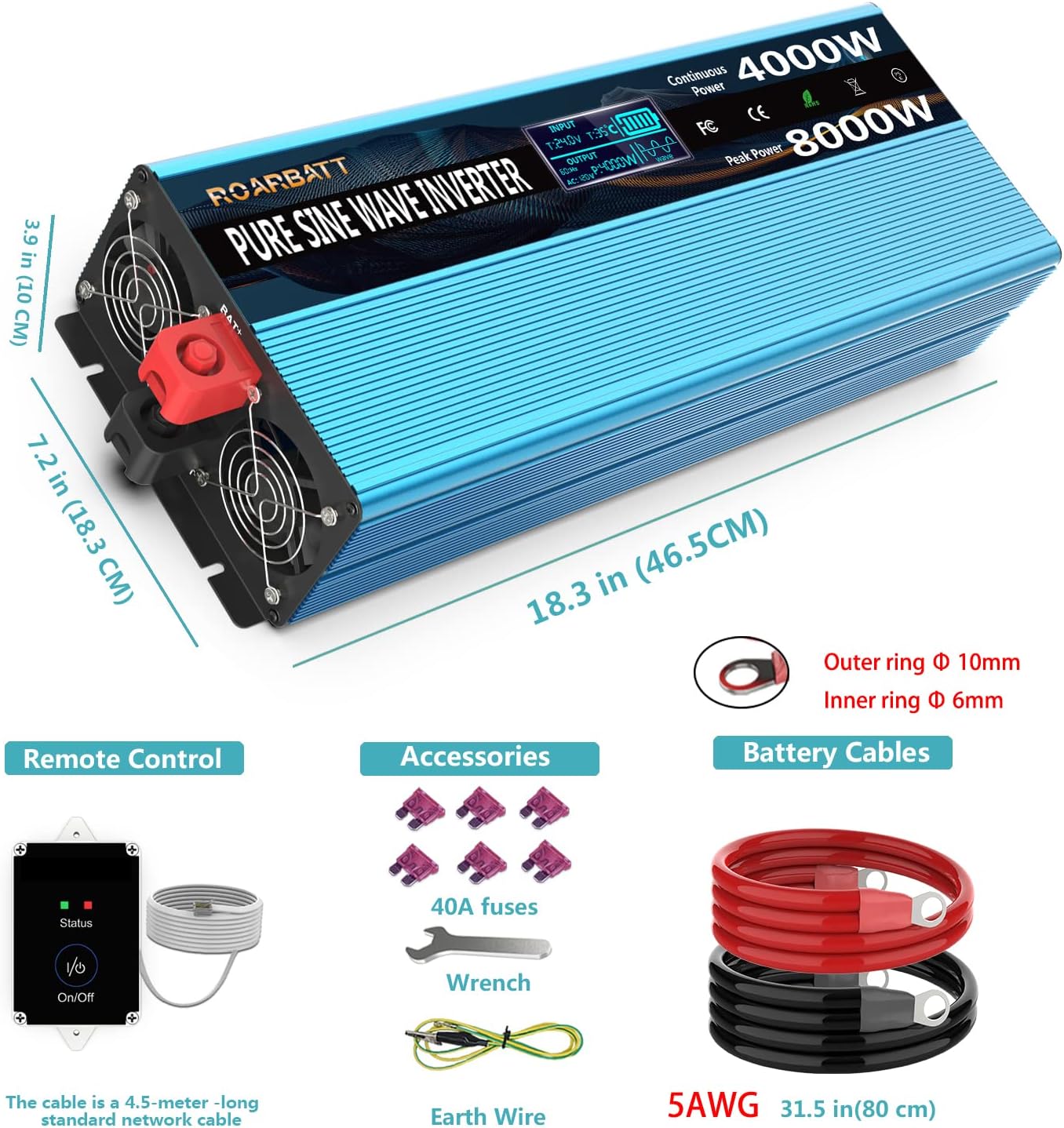
Figure 4.1: Included accessories: remote control, battery cables, 40A fuses, wrench, and earth wire. Also shows inverter dimensions.
- پڪ ڪريو ته انورٽر جو پاور سوئچ آف پوزيشن ۾ آهي.
- ڳنڍيو ڳاڙهو بيٽري ڪيبل تائين هاڪاري (+) terminal of the inverter. Use the provided wrench to tighten securely.
- ڳنڍيو ڪارو بيٽري ڪيبل تائين ناڪاري (-) terminal of the inverter. Tighten securely.
- جي ٻئي آخر سان ڳنڍيو ڳاڙهو بيٽري ڪيبل تائين هاڪاري (+) توهان جي 24V DC بيٽري بينڪ جو ٽرمينل.
- جي ٻئي آخر سان ڳنڍيو ڪارو بيٽري ڪيبل تائين ناڪاري (-) توهان جي 24V DC بيٽري بينڪ جو ٽرمينل.
- پڪ ڪريو ته سڀئي ڪنيڪشن تنگ ۽ محفوظ آهن ته جيئن آرڪنگ کي روڪي سگهجي.
4.3 انورٽر کي گرائونڊ ڪرڻ
Connect the provided earth wire from the inverter's ground terminal to a reliable earth ground point (e.g., vehicle chassis, ground rod, or proper electrical ground system).
4.4 ريموٽ ڪنٽرول کي ڳنڍڻ
Plug the RJ10 connector of the remote control cable into the 'Remote Control' port on the inverter. The remote control allows you to power the inverter ON/OFF from a convenient location.
5. آپريٽنگ هدايتون
Learn how to power on your inverter and utilize its features.
5.1 پاور آن/آف
- After all connections are secure, switch the main power switch on the inverter to the 'ON' position. Alternatively, if the remote control is connected, you can use its ON/OFF button.
- The LED display will illuminate, and the cooling fan may briefly activate.
- To power off, switch the main power switch to 'OFF' or use the remote control.
5.2 Using AC Outlets and USB Ports
- Plug your 110V/120V AC appliances into the four AC outlets. Ensure the total power consumption does not exceed 4000W.
- For high-power loads, consider using the AC terminal blocks for a more robust connection.
- Connect your USB-powered devices to the two 5V DC, 3.4A USB ports for charging.
5.3 Understanding the Intelligent LCD Display

Figure 5.1: The intelligent LCD display provides real-time status information.
The LCD display provides critical information about the inverter's operation and battery status:
- انٽ واليمtage Data (BT): موجوده ڊي سي ان پٽ واليم ڏيکاري ٿوtage جي بيٽري مان.
- Working Temperature (T): انورٽر جي اندروني آپريٽنگ گرمي پد ڏيکاري ٿو.
- بيٽري پاور: Indicates the estimated remaining battery capacity.
- اوٽ وولٽtage (AC): AC آئوٽ پُٽ وول ڏيکاري ٿوtagاي (110V/120V).
- Appliance's Using Power (P): Shows the current power consumption of connected AC appliances.
- تحفظ جو طريقو: Indicates if the inverter is in a protection state (e.g., overload, low voltag۽.
- Pure Sine Wave Indicator: Confirms the output waveform is pure sine wave.
6. سار سنڀال
باقاعده سار سنڀال توهان جي انورٽر جي ڊگهي عمر ۽ بهترين ڪارڪردگي کي يقيني بڻائي ٿي.
- صفائي: وقت بوقت انورٽر جي ٻاهرين حصي کي سڪل، نرم ڪپڙي سان صاف ڪريو. پڪ ڪريو ته وينٽيليشن جا سوراخ مٽي ۽ ملبي کان پاڪ آهن.
- ڪنيڪشن: سڀني ڊي سي ۽ اي سي ڪنيڪشنن کي باقاعدي طور تي چيڪ ڪريو ته جيئن پڪ ٿئي ته اهي تنگ ۽ زنگ کان پاڪ آهن.
- اسٽوريج: جيڪڏهن انورٽر کي گهڻي عرصي تائين ذخيرو ڪري رهيا آهيو، ته ان کي بيٽري کان ڌار ڪريو ۽ ان کي ٿڌي، سڪل جاءِ تي ذخيرو ڪريو.
- بيٽري صحت: Maintain your battery bank according to the battery manufacturer's instructions. A healthy battery is crucial for inverter performance.
7. مسئلا حل ڪرڻ
This section addresses common issues and their solutions. The inverter features advanced protection mechanisms that may cause it to shut down or alarm under certain conditions.
| مسئلو | ممڪن سبب | حل |
|---|---|---|
| انورٽر آن نٿو ٿئي | بيٽري ڪنيڪشن ڍلو؛ گهٽ بيٽري وولٽtage; Blown fuse; Inverter switch OFF. | Check and tighten battery cables; Charge battery; Replace fuses (use only 40A); Ensure inverter switch is ON. |
| No AC output, but inverter is ON | Overload protection; Short circuit protection; Over-temperature protection. | Reduce load below 4000W; Disconnect faulty appliance; Allow inverter to cool down. Check LCD for protection mode indication. |
| گھٽ وولٽtage Alarm/Shutdown | بيٽري جلدtage dropped below 20V (alarm) or 19V (shutdown). | Charge or replace battery. Reduce load to extend battery life. |
| و Overيڪ جلدtage بند ڪرڻ | ان پٽ Voltage exceeded 32V DC. | Check charging system (e.g., solar charge controller) to ensure proper voltagاي ضابطو. |
| اوور لوڊ تحفظ | Connected appliance(s) draw more than 4000W continuously or 8000W peak. | Disconnect some appliances to reduce the load. Restart the inverter. |
| گرمي جي حفاظت جي مٿان | Internal temperature exceeded 65°C. | Ensure adequate ventilation. Reduce load. Allow inverter to cool down. |
8. وضاحتون
Detailed technical specifications for the ROARBATT 4000W 24V Pure Sine Wave Power Inverter.
| خاصيت | تفصيل |
|---|---|
| مسلسل طاقت | 4000 واٽ |
| چوٽي جي طاقت | 8000 واٽ |
| ڊي سي ان پٽ Voltage | 24V ڊي سي |
| AC آئوٽ وولٽtage | 110V/120V AC ±5% |
| ٻاھر ڪڍڻ واري موج | Pure Sine Wave (THD≤3%) |
| No-Load Current Draw | ≤ 0.6A |
| وڌ ۾ وڌ ڪارڪردگي | 90% |
| يو ايس بي آئوٽ | 2 x 5V DC, Max. 3.4A |
| AC دڪان | 4 |
| انپٽ انڊر-وولtage الارم | 20 ± 0.5V ڊي سي |
| انپٽ انڊر-وولtage بند ڪرڻ | 19 ± 1V ڊي سي |
| ان پٽ اوور- Voltage بند ڪرڻ | 32 ± 1V ڊي سي |
| گرمي جي حفاظت جي مٿان | 65 ± 5. سي |
| ڪم ڪندڙ درجه حرارت | 0-40 ° سي |
| اسٽوريج جي درجه حرارت | -10-45 ° سي |
| ٿڌو ڪرڻ وارو پنو | Temperature controlled (activates near 113℉ / 45°C) & Power controlled (activates up to 1/2 rated power) |
| Remote Controller Cable Length | 15 ft (RJ10 Plug) |
| بيٽري ڪيبل | 2 pairs (red/black), 2.62 ft length |
| شيءِ جو وزن | 16.27 پائونڊ |
| پيڪيج جي ماپ | 23.9 x 10.4 x 7.5 انچ |
9. وارنٽي ۽ سپورٽ
Your ROARBATT 4000W 24V Pure Sine Wave Power Inverter comes with a 24-مهيني وارنٽي خريداري جي تاريخ کان.
This warranty covers defects in materials and workmanship under normal use. It does not cover damage caused by improper installation, misuse, abuse, neglect, accident, or unauthorized repair.
For warranty claims or technical support, please contact ROARBATT customer service. Please have your purchase information and product model number ready when contacting support.