
1. تعارف
This manual provides essential information for the safe and efficient use of your HP Envy x360 13.3-inch 2-in-1 laptop. Please read this manual thoroughly before operating your device to ensure optimal performance and longevity. This device combines the functionality of a traditional laptop with the versatility of a tablet, featuring a responsive touchscreen and a 360-degree hinge.
2. مصنوعات جون خاصيتون
- 13.3-inch Full HD IPS Touch-Screen Display: Experience vibrant visuals and intuitive interaction with the responsive touch display.
- 11th Generation Intel Core i5-1135G7 Processor: Delivers efficient performance for multitasking, productivity, and entertainment.
- 8GB DDR4 ريم: Provides substantial memory for smooth operation of multiple applications.
- 256GB PCIe NVMe SSD: Offers fast boot-up times and quick data access with solid-state storage.
- بيڪ لِٽ ڪي بورڊ: Enables comfortable typing in various lighting conditions.
- فنگر پرنٽ ريڊر: Enhances security and provides quick, convenient login.
- ونڊوز 10 هوم آپريٽنگ سسٽم: Pre-installed for a familiar and productive user experience.
- 360-degree Hinge: ڊوائيس کي ليپ ٽاپ، ٽينٽ، اسٽينڊ، ۽ ٽيبليٽ موڊز جي وچ ۾ تبديل ڪرڻ جي اجازت ڏئي ٿو.
- Intel Iris Xe Graphics: Integrated graphics for clear visuals and light creative tasks.
- Bang & Olufsen Audio with Three Speakers: Delivers rich and immersive sound.
- HP Wide Vision HD Camera with Camera Shutter: For video calls and privacy.
3. جسماني اوورview
Familiarize yourself with the various components and ports of your HP Envy x360 laptop.

شڪل 3.1: زاويه view of the HP Envy x360 laptop in traditional laptop mode, displaying the keyboard and screen.
بندرگاهن ۽ رابطا:
- USB 3.0 ٽائپ-اي پورٽس (x2): ٻاهرين ڊوائيسز جهڙوڪ USB ڊرائيو، چوٿون، يا ڪي بورڊ ڳنڍڻ لاءِ.
- HDMI پورٽ (x1): ٻاهرين ڊسپلي يا پروجيڪٽرن سان ڳنڍڻ لاءِ.
- Micro SD Card Reader (x1): For reading and writing data to Micro SD cards.
- هيڊ فون/مائڪروفون ڪمبو جڪ (x1): هيڊفون يا ٻاهرين مائڪروفون کي ڳنڍڻ لاءِ.
- USB-C پورٽ (x1): For data transfer, charging, and display output (Thunderbolt compatible).
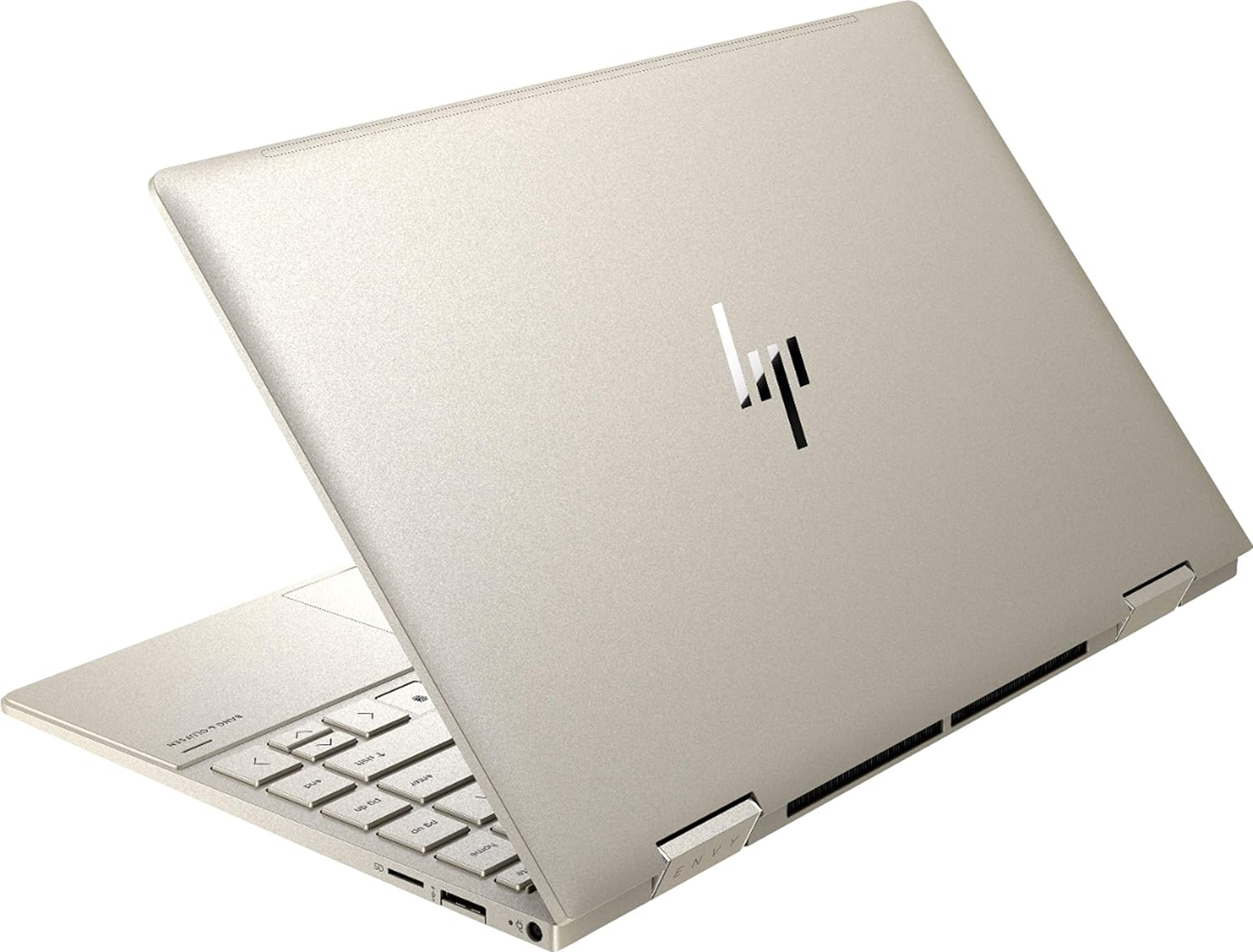
شڪل 3.2: پوئتي view of the HP Envy x360 laptop, highlighting the sleek design and port placement on the sides.
4. سيٽ اپ
4.1 شروعاتي پاور آن
- Unpack your HP Envy x360 laptop and included accessories.
- پاور اڊاپٽر کي ليپ ٽاپ جي چارجنگ پورٽ سان ڳنڍيو ۽ پوءِ پاور آئوٽليٽ سان.
- Press the power button, typically located on the side or keyboard deck, to turn on the laptop.
- ونڊوز 10 هوم سيٽ اپ مڪمل ڪرڻ لاءِ اسڪرين تي ڏنل هدايتن تي عمل ڪريو، جنهن ۾ ٻولي جي چونڊ، نيٽ ورڪ ڪنيڪشن، ۽ يوزر اڪائونٽ ٺاهڻ شامل آهن.
4.2 پردي کي ڳنڍڻ
Connect your mouse, external display, or other USB devices to the available ports as described in Section 3. For wireless devices, enable Bluetooth in Windows settings and pair your devices.
5. آپريٽنگ هدايتون
5.1 Using the 2-in-1 Modes
Your HP Envy x360 features a versatile 360-degree hinge, allowing for multiple usage modes:
- ليپ ٽاپ موڊ: Traditional laptop orientation for typing and productivity.
- خيمه جو طريقو: اسڪرين کي پوئتي موڙيو ته جيئن هڪ الٽي 'V' شڪل ٺاهي سگهجي، جيڪا محدود جڳهن ۾ وڊيوز يا پيشڪشون ڏسڻ لاءِ مثالي آهي.
- اسٽينڊ موڊ: Fold the screen back further, resting the keyboard face down, to use the display for media consumption or touch-based applications.
- ٽيبليٽ موڊ: Fold the screen completely back against the base, transforming the device into a tablet for touch interaction.

Figure 5.1: The HP Envy x360 laptop configured in tent mode, suitable for media viewing.

Figure 5.2: The HP Envy x360 laptop fully folded into tablet mode, ready for touch input.
5.2 Touchscreen and Keyboard Usage
- ٽچ اسڪرين: Use gestures similar to a smartphone or tablet for navigation, zooming, and interaction with applications.
- بيڪ لِٽ ڪي بورڊ: Press the function key (Fn) and the appropriate F-key (usually F5 or F4, check keyboard icons) to toggle the keyboard backlight on/off or adjust brightness.
- فنگر پرنٽ ريڊر: Enroll your fingerprint through Windows Hello settings for secure and fast login.
6. سار سنڀال
Regular maintenance helps prolong the life of your laptop.
- صفائي: Use a soft, lint-free cloth to clean the screen and chassis. For stubborn smudges, dampڪپڙي کي پاڻي يا اسڪرين محفوظ ڪلينر سان ڌوئڻ ڏيو. سخت ڪيميڪلز کان پاسو ڪريو.
- سافٽ ويئر اپڊيٽ: Regularly update Windows and HP drivers to ensure optimal performance and security.
- بيٽري جي سنڀال: بيٽري کي بار بار مڪمل طور تي چارج ڪرڻ کان پاسو ڪريو. ڊگهي عرصي تائين اسٽوريج لاءِ، بيٽري کي تقريباً 50-70٪ تائين چارج ڪريو.
- وينٽيليشن: Ensure the laptop's vents are not obstructed to prevent overheating. Use on a hard, flat surface when possible.
7. مسئلا حل ڪرڻ
هي حصو عام مسئلن کي حل ڪري ٿو جيڪي توهان کي منهن ڏئي سگهن ٿا.
7.1 بجلي جا مسئلا
- ليپ ٽاپ آن نٿو ٿئي: Ensure the power adapter is securely connected and the outlet is functional. Try a different outlet or power adapter if available.
- بيٽري نه ڀريندي: Verify the power adapter connection. Check for any damage to the cable or port.
7.2 ڊسپلي مسئلا
- اسڪرين خالي آهي: Connect an external monitor to check if the issue is with the laptop's display. Try restarting the laptop.
- ٽچ اسڪرين غير جوابده: Restart the laptop. Ensure all drivers are up to date via Windows Update or HP Support Assistant.
7.3 ڪارڪردگي جا مسئلا
- سست ڪارڪردگي: غير ضروري ايپليڪيشنون بند ڪريو. وسيلن جي ضرورت واري عملن لاءِ ٽاسڪ مئنيجر چيڪ ڪريو. SSD تي ڪافي خالي جاءِ کي يقيني بڻايو.
- گهڻو گرم ٿيڻ: Clean vents. Ensure proper airflow. Reduce workload if consistently hot.
8. وضاحتون
| خاصيت | تفصيل |
|---|---|
| برانڊ | HP |
| ماڊل نالو | HP Envy x360 |
| اسڪرين جي ماپ | 13.3 انچ |
| ڊسپلي قرارداد | 1920 x 1080 (مڪمل HD) |
| ڊسپلي جو قسم | LED IPS Touch Screen |
| پروسيسر | 11th Generation Intel Core i5-1135G7 (2.4 GHz, up to 4.2 GHz with Turbo Boost) |
| رام ياداشت | 8 GB DDR4 |
| ذخيرو | 256 GB SSD |
| آپريٽنگ سسٽم | ونڊوز 10 گهر |
| گرافڪس | انٽيل آئرس ايڪس اي گرافڪس (انٽيگريٽيڊ) |
| خاص خاصيتون | بيڪ لِٽ ڪي بورڊ، فنگر پرنٽ ريڊر |
| آڊيو | Bang & Olufsen Audio with Three speakers |
| رابطي | Wireless-AX, Bluetooth, USB, HDMI |
| بندرگاهن | 2x USB 3.0 Type-A, 1x HDMI, 1x Micro SD Card Reader, 1x Headphone/Microphone Combo, 1x USB-C |
| طول و عرض (L x W x H) | 12.07" x 7.66" x 0.65" |
| وزن | 2.92 پائونڊ |
| رنگ | هلڪو سون |
9. دٻي ۾ ڇا آهي
The following items are included with your HP Envy x360 laptop:
- HP Envy x360 13.3-inch 2-in-1 Laptop
- پاور اڊاپٽر
- ماؤس پيڊ

Figure 9.1: The HP Envy x360 laptop shown alongside the included mouse pad.
10. وارنٽي ۽ سپورٽ
Your HP Envy x360 laptop comes with a standard manufacturer's warranty. For detailed warranty information, please refer to the warranty card included in your product packaging or visit the official HP support website. For technical assistance, driver downloads, or service requests, please contact HP Customer Support.
HP سپورٽ Webسائيٽ: support.hp.com