
1. تعارف
This manual provides detailed instructions for the installation, operation, and maintenance of your Axis Communications M3064-V Mini Dome Camera. This camera is designed for indoor surveillance, offering HDTV 720p video quality, dust resistance, and IK08 impact protection. Please read this manual thoroughly before using the product to ensure proper functionality and safety.
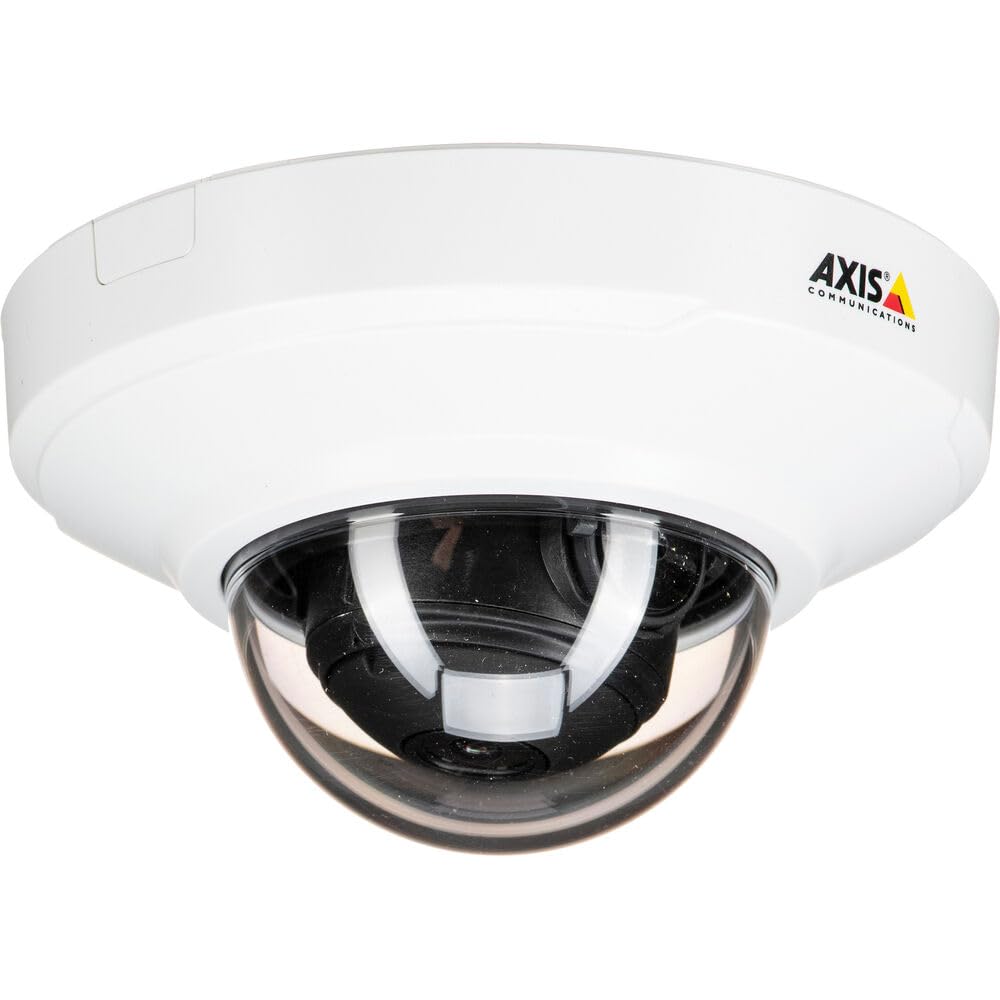
شڪل 1: سامهون view of the Axis M3064-V Mini Dome Camera. This image shows the compact dome design suitable for discreet indoor surveillance.
2. حفاظت جي ڄاڻ
- بجلي جي فراهمي: Use only the specified power supply (AC/DC, 220 Volts, 1.6 Watts) to prevent damage or fire.
- تنصيب: Installation should be performed by qualified personnel and comply with all local electrical codes. Ensure the mounting surface can support the camera's weight.
- ماحول: This camera is designed for indoor use. While dust-resistant and IK08 rated, avoid exposing it to extreme temperatures, direct water spray, or corrosive substances.
- صفائي: صفائي ڪرڻ کان اڳ بجلي بند ڪريو. نرم، سڪل ڪپڙو استعمال ڪريو. مائع يا ايروسول ڪلينر استعمال نه ڪريو.
- خدمت ڪرڻ: ھن پراڊڪٽ کي پنھنجي خدمت ڪرڻ جي ڪوشش نه ڪريو. س servني خدمتن جو حوالو ڏيو قابل سروس اهلڪارن کي.
3. پيڪيج مواد
Verify that all items are present in the package. If any items are missing or damaged, contact your supplier.
- Axis M3064-V Mini Dome Camera (1 unit)
- انسٽاليشن ھدايت
- وڌندڙ خط
- ماؤنٽنگ اسڪرو ۽ وال پلگ
- ريزسٽرڪس ايل-ڪي
4. سيٽ اپ ۽ تنصيب
4.1 ڪئميرا لائڻ
The Axis M3064-V camera can be mounted on a ceiling or wall. Ensure the mounting surface is stable and can support the camera's weight.
- سطح تيار ڪريو: Choose a suitable location. Use the mounting bracket as a template to mark drill holes.
- سوراخ سوراخ: Drill pilot holes for the mounting screws. Insert wall plugs if necessary.
- بریکٹ ڳنڍيو: مهيا ڪيل اسڪرو استعمال ڪندي ماؤنٽنگ بریکٹ کي مٿاڇري تي محفوظ ڪريو.
- ڪيبل ڳنڍڻ: Route the network cable (wired connectivity) through the bracket and connect it to the camera's Ethernet port.
- ڪئميرا لڳايو: Secure the camera body to the mounting bracket. Ensure it clicks into place or is fastened according to the specific bracket design.

Figure 2: Illustrative diagram of the camera mounting process on a ceiling. This shows the steps from marking holes to securing the camera.
4.2 پاور آن ۽ نيٽ ورڪ ڪنيڪشن
- وائرڊ ڪنيڪشن: Connect an Ethernet cable from your network switch or router to the camera's Ethernet port. The camera supports Power over Ethernet (PoE), simplifying power delivery.
- وائي فائي ڪنيڪشن: The camera supports Wi-Fi connectivity. After initial wired setup, you can configure wireless settings via the camera's web انٽرفيس.
- بجلي جي فراهمي: If not using PoE, connect a compatible AC/DC power adapter (220V, 1.6W) to the camera's power input.
- شروعاتي رسائي: Once powered, the camera will obtain an IP address from your network (DHCP). Use an Axis IP Utility tool or your network router's client list to find the camera's IP address.
5. آپريٽنگ هدايتون
5.1 ڪئميرا انٽرفيس تائين رسائي
کوليو a web browser (e.g., Chrome, Firefox) and enter the camera's IP address in the address bar. You will be prompted to create a new password for the root user upon first access. Follow the on-screen instructions.
5.2 زنده View and Video Settings
- جيئڻ View: The main interface provides a live video feed. You can adjust the viewing angle remotely if the camera supports pan/tilt/zoom (PTZ) functions, though this model features a fixed dome with 3x optical zoom.
- قرارداد: The camera supports HDTV 720p video capture resolution. You can configure streaming profiles for different quality and frame rate needs.
- رات جو خواب: The camera includes Night Color functionality, providing enhanced visibility in low-light conditions. This feature can be configured in the image settings.
- بصري زوم: Utilize the 3x optical zoom feature through the web interface to focus on specific areas within the 83-degree viewزاويه.
5.3 رڪارڊنگ ۽ اسٽوريج
ڪئميرا مختلف رڪارڊنگ آپشنز کي سپورٽ ڪري ٿو:
- ايج اسٽوريج: The camera has 128 GB of flash memory installed for local recording. Insert a compatible microSD card (not included) for additional storage.
- نيٽ ورڪ وڊيو رڪارڊر (NVR): Integrate the camera with an NVR or video management system (VMS) for centralized recording and management.
- Event-Based Recording: Configure motion detection or other event triggers to start recording, saving storage space.
6. سار سنڀال
6.1 ڪئميرا صاف ڪرڻ
Regular cleaning helps maintain optimal image quality.
- بجلي بند: Always disconnect the camera from its power source before cleaning.
- لينس: Gently wipe the lens cover with a soft, lint-free cloth. For stubborn dirt, slightly dampen the cloth with water or a mild lens cleaning solution. Avoid abrasive materials.
- هائوسنگ: Wipe the camera housing with a soft, dry cloth. Do not use strong detergents or solvents.
6.2 فرم ویئر تازه ڪاريون
وقتي طور تي ايڪسس ڪميونيڪيشن چيڪ ڪريو website for firmware updates. Keeping your camera's firmware up-to-date ensures optimal performance, security, and access to new features. Follow the instructions provided with the firmware update package.
7. مسئلا حل ڪرڻ
| مسئلو | ممڪن سبب | حل |
|---|---|---|
| ڪئميرا پاور نه آهي | No power supply; Faulty PoE switch/injector; Damaged cable. | Check power connection. Verify PoE functionality. Test with a different Ethernet cable or power adapter. |
| ڪابه وڊيو فيڊ | Network connectivity issue; Incorrect IP address; Firewall blocking access; Camera not configured. | Verify network connection. Confirm camera's IP address. Check firewall settings. Ensure camera is properly configured via its web انٽرفيس. |
| خراب تصوير جو معيار | Dirty lens; Incorrect focus; Low light conditions; Network bandwidth issues. | Clean the lens. Adjust focus settings in the web interface. Ensure adequate lighting or verify Night Color settings. Check network bandwidth. |
| رسائي نه ٿو ڪري سگھجي web انٽرفيس | Incorrect IP address; Network issue; Browser compatibility. | Confirm IP address. Ping the camera's IP. Try a different web برائوزر. برائوزر ڪيش صاف ڪريو. |
8. وضاحتون
| خاصيت | تفصيل |
|---|---|
| ماڊل نالو | M3064-V |
| ماڊل نمبر | 01716-001 |
| برانڊ | Axis Communications |
| فارم فيڪٽر | گنبد |
| رابطي ٽيڪنالاجي | وائرڊ، وائي فائي |
| وڊيو ڪيپچر ريزوليوشن | 720p (HDTV) |
| اڃا به مؤثر حل | 64 MP (Note: This might refer to sensor resolution, actual video output is 720p) |
| فوٽو سينسر قرارداد | 5 ايم پي |
| Viewزاويه | 83 درجا |
| بصري زوم | 3x |
| رات جو نظارو | رات جو رنگ |
| پنروڪ درجه بندي | IP42 (Dust-resistant) |
| اثر تحفظ | IK08 |
| طاقت جو ذريعو | AC/DC, PoE |
| جلدtage | 220 وولٽ |
| واتtage | 1.6 واٽ |
| فليش ميموري انسٽال ٿيل سائيز | 128 جي بي |
| شيون طول و عرض (LxWxH) | 3.98 x 3.98 x 2.2 انچ |
| شيءِ جو وزن | 150 گرام |
| رنگ | ڪارو / اڇو |
9. وارنٽي ۽ سپورٽ
9.1 پروڊڪٽ وارنٽي
Axis Communications products typically come with a limited manufacturer's warranty. Please refer to the warranty card included with your product or visit the official Axis Communications website for detailed warranty terms and conditions specific to the M3064-V model. Keep your proof of purchase for warranty claims.
9.2 ٽيڪنيڪل سپورٽ
For technical assistance, troubleshooting beyond this manual, or service inquiries, please contact Axis Communications customer support. You can find contact information, FAQs, and additional resources on the official Axis Communications support website. When contacting support, please have your product model number (M3064-V or 01716-001) and serial number ready.
آن لائين وسيلا: www.axis.com/support