
تعارف
This manual provides instructions for the proper use and care of your GreatPowerDirect USB DC Charger and Data SYNC Cable. This cable is designed to provide both power charging and data synchronization capabilities for specific iRiver Media Player models.
پيداوار جي مطابقت
- iRiver Media Player D20
- iRiver Media Player D25
- iRiver Media Player D27
- iRiver Media Player D28
Please ensure your device is listed above for proper functionality.
سيٽ اپ ڪريو
Follow these steps to connect your USB DC Charger + Data SYNC Cable to your iRiver Media Player.
- Locate the USB Type-A connector on the cable. This is the standard rectangular USB connector.
- Insert the USB Type-A connector into an available USB port on a computer or a compatible USB wall charger.
- Locate the proprietary connector on the other end of the cable. This connector is specifically designed for iRiver Media Players.
- Carefully align and insert the proprietary connector into the corresponding port on your iRiver Media Player (D20, D25, D27, D28). Ensure it is fully seated to establish a secure connection.
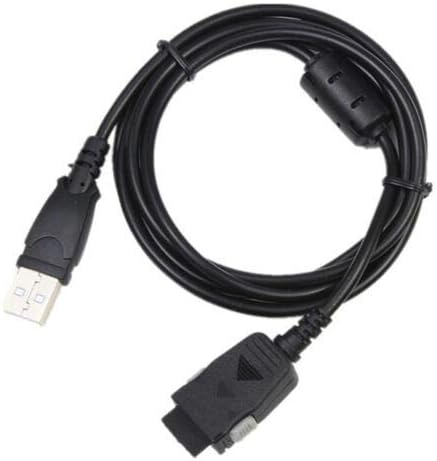
Image: The GreatPowerDirect USB DC Charger + Data SYNC Cable, featuring its USB-A end for power/data source and the specialized connector for iRiver Media Players.
آپريٽنگ هدايتون
توهان جي ڊوائس چارج
- Connect the cable as described in the "Setup" section to a USB wall charger or a powered USB port on a computer.
- Your iRiver Media Player should indicate that it is charging. Refer to your media player's manual for specific charging indicators.
- Charging time may vary depending on the power source and the battery level of your device.
ڊيٽا هم وقت سازي
- Connect the cable to a USB port on your computer.
- Connect the other end to your iRiver Media Player.
- Your computer should recognize the media player as a removable storage device or prompt for driver installation if necessary.
- Once recognized, you can transfer files (music, videos, photos) between your computer and the iRiver Media Player.
- Always safely eject the device from your computer's operating system before disconnecting the cable to prevent data corruption.

Image: The GreatPowerDirect USB DC Charger + Data SYNC Cable, coiled to show its full length and the ferrite bead for signal integrity.
سار سنڀال
Proper care extends the life of your cable and ensures reliable performance.
- اسٽوريج: ڪيبل کي سڌي سج جي روشني ۽ سخت گرمي پد کان پري ٿڌي، سڪل جاءِ تي رکو. ڪيبل کي مضبوطيءَ سان ڪوئل ڪرڻ يا تيزيءَ سان موڙڻ کان پاسو ڪريو، جيڪو اندروني تارن کي نقصان پهچائي سگھي ٿو.
- صفائي: Use a soft, dry cloth to wipe the cable and connectors. Do not use liquid cleaners or solvents.
- سنڀالڻ: Always grasp the connector head when plugging or unplugging the cable, not the cable itself, to prevent strain and damage to the wiring.
- چڪاس: ڪنيڪٽرن جي خراب ٿيڻ، ٽٽڻ، يا نقصان جي ڪنهن به نشاني لاءِ وقتي طور تي ڪيبل جو معائنو ڪريو. جيڪڏهن نقصان ڏٺو وڃي ته استعمال بند ڪريو.
مشڪلاتون
جيڪڏهن توهان کي پنهنجي ڪيبل سان مسئلا درپيش اچن ٿا، ته هيٺ ڏنل مسئلا حل ڪرڻ جا قدم آزمايو:
- ڊوائيس چارج نه ڪرڻ:
- Ensure the cable is securely connected to both the power source and the iRiver Media Player.
- Try a different USB port on your computer or a different USB wall charger.
- Verify that the iRiver Media Player itself is functioning correctly and its charging port is clean and free of debris.
- Device Not Recognized by Computer (Data Sync):
- Ensure the cable is firmly connected to both the computer and the media player.
- توهان جي ڪمپيوٽر تي هڪ مختلف USB پورٽ جي ڪوشش ڪريو.
- Restart your computer and the iRiver Media Player.
- Check your computer's device manager for any unrecognized devices or driver issues. You may need to install specific drivers for your iRiver Media Player, usually available from the iRiver support webسائيٽ.
- وقتي ڪنيڪشن:
- ڪنهن به نظر ايندڙ نقصان لاءِ ڪيبل ۽ ڪنيڪٽرن جو معائنو ڪريو.
- Ensure the connectors are clean and free of dust or lint.
- استعمال دوران ڪيبل تي دٻاءُ وجهڻ کان پاسو ڪريو.
وضاحتون
Key technical specifications for the GreatPowerDirect USB DC Charger + Data SYNC Cable:
| خاصيت | تفصيل |
|---|---|
| برانڊ | GreatPowerDirect |
| ماڊل | GPD090220-34180 |
| ڪنيڪٽر جو قسم | USB Type A (Male) to Proprietary iRiver (Male) |
| ڪيبل جو قسم | USB (Charge & Data Sync) |
| مطابقت رکندڙ ڊوائيسز | iRiver Media Player D20, D25, D27, D28 |
| رنگ | ڪارو |
| پنن جو تعداد | 4 |
| رابطي ٽيڪنالاجي | USB |
| وضاحت ميٽر | FCC, CE, OEM |
| اندروني / ٻاهران استعمال | اندريون، ٻاهريون |
| شيءِ جو وزن | 8 آونس (تقريبن 227 گرام) |
وارنٽي ۽ سپورٽ
This product is manufactured to high-quality standards. For any issues or support inquiries, please refer to the retailer or manufacturer's official support channels. Specific warranty details may be provided at the point of purchase or on the manufacturer's webسائيٽ.