
تيز
Sharp Atomic Clock Instruction Manual
ماڊل: 8541848315
تعارف
The Sharp Atomic Clock provides precise timekeeping and temperature monitoring for your home or office. Featuring a large, easy-to-read display, this clock automatically synchronizes with the atomic time signal (WWVB) broadcast from Fort Collins, Colorado, ensuring accuracy without manual adjustments. It also includes a wireless outdoor sensor to display both indoor and outdoor temperatures.
پيداوار جون خاصيتون
- Atomic Time Accuracy: Automatically synchronizes with the WWVB atomic time signal for precise timekeeping.
- Jumbo 3" Easy-to-Read Numbers: Large digital display for clear visibility of time, date, and temperature.
- Indoor/Outdoor Temperature Display: Monitors both indoor ambient temperature and outdoor temperature via a wireless sensor.
- وائرليس dاهرين سينسر: Transmits outdoor temperature data to the main unit.
- بيٽري طاقت: Operates on batteries for flexible placement (batteries not included).
- خودڪار ڏينهن جي روشني جي بچت جو وقت (DST) ترتيب: Automatically adjusts for daylight saving time changes.
- چونڊيل وقت جا علائقا: Allows selection of various US time zones.
- 12/24 ڪلاڪ فارميٽ: Option to display time in either 12-hour or 24-hour format.
- Celsius/Fahrenheit Display: سيلسيس ۽ فارنهائيٽ گرمي پد يونٽن جي وچ ۾ سوئچ ڪريو.
پيڪيج مواد
مھرباني ڪري پڪ ڪريو ته سيٽ اپ سان اڳتي وڌڻ کان اڳ سڀ شيون موجود آھن.
- Sharp Atomic Clock Main Unit
- وائرليس آئوٽ ڊور سينسر
- ھدايت وارو دستور
Note: Batteries are not included. The main unit requires 2 AA batteries, and the outdoor sensor requires 2 AA batteries.
سيٽ اپ ڪريو
1. بيٽري لڳائڻ
- Open the battery compartment on the back of the main clock unit.
- Insert 2 AA batteries, observing the correct polarity (+ and -).
- بيٽري جي ڪمري واري ڍڪ کي بند ڪريو.
- Open the battery compartment on the wireless outdoor sensor.
- Insert 2 AA batteries into the outdoor sensor, observing the correct polarity.
- Close the outdoor sensor's battery compartment cover.
2. Initial Synchronization and Settings
After battery installation, the clock will attempt to receive the WWVB atomic time signal and connect to the outdoor sensor. This process may take several minutes or up to 24 hours depending on your location and environmental interference.
- ٽائيم زون: Press the "TIME ZONE" button (often labeled "UP TIME ZONE") on the back of the clock to cycle through available time zones (PST, MST, CST, EST). Select your desired time zone.
- 12/24 ڪلاڪ فارميٽ: Press the "12/24" button to switch between 12-hour and 24-hour display.
- سينٽي گريڊ/فارن هاٽ: Press the "°C/°F" button to toggle between Celsius and Fahrenheit temperature display.
- Outdoor Sensor Pairing: If the outdoor temperature does not appear, press the "CHANNEL" button on the main unit to search for the sensor signal. Ensure the outdoor sensor is within range and not obstructed.
For optimal signal reception, place the clock away from large metal objects, electronic devices, and areas with heavy concrete or brick walls. The outdoor sensor should be placed in a shaded, dry location, protected from direct sunlight and precipitation, for accurate readings.
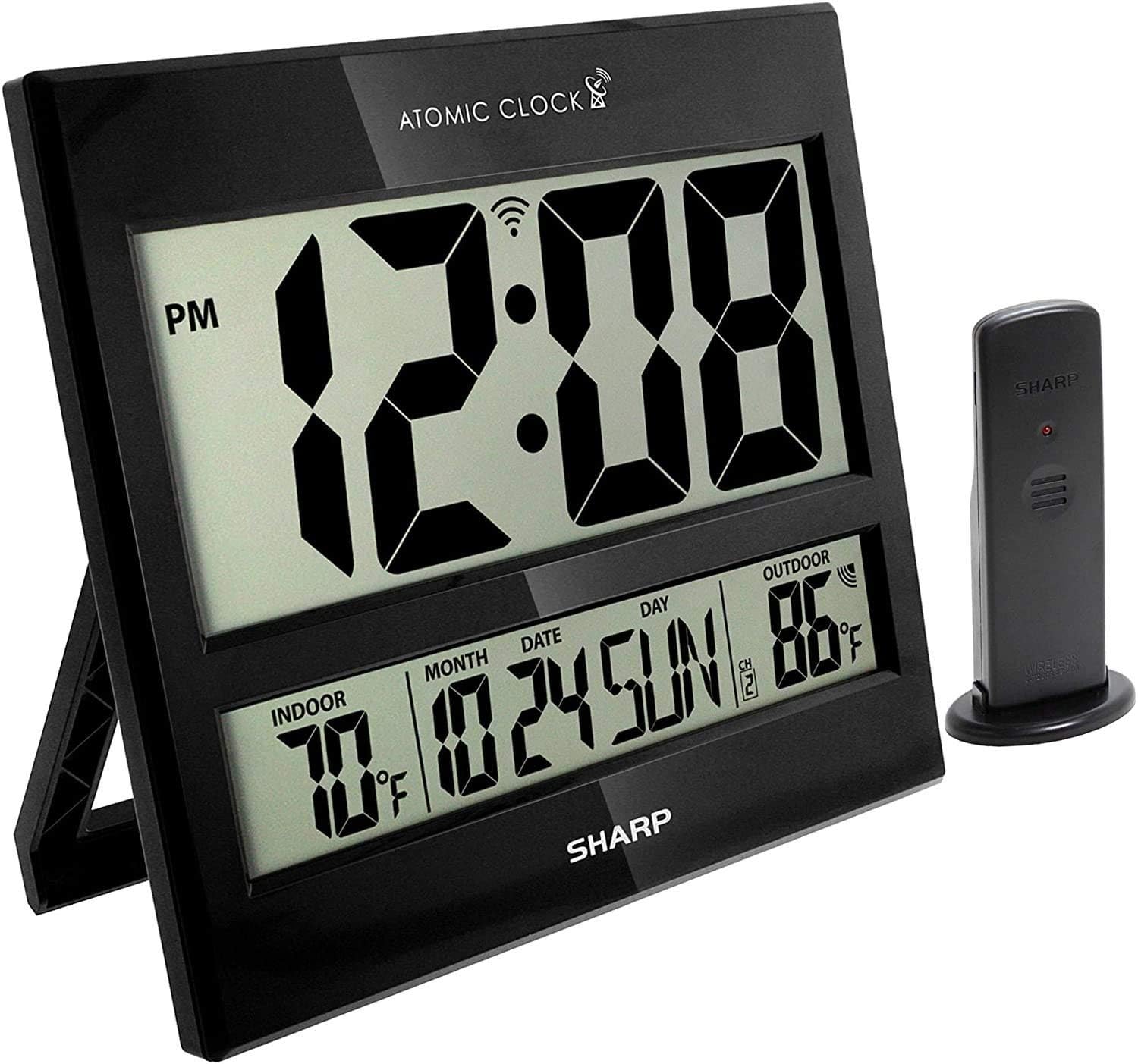
Image: The Sharp Atomic Clock main unit displaying time, indoor temperature, date, and outdoor temperature, alongside its wireless outdoor sensor.
آپريشن
معلومات ڏيکاريو
The clock's large LCD screen displays the following information:
- وقت: Current time in selected 12-hour or 24-hour format.
- پي ايم اشارو: Displays "PM" for afternoon hours in 12-hour format.
- ايٽمي سگنل اشارو: Shows the status of the WWVB atomic time signal reception.
- اندروني درجه حرارت: مکيه يونٽ ذريعي ماپيل موجوده گرمي پد.
- Month/Date/Day: Current calendar information.
- ٻاھرين گرمي پد: Current temperature measured by the wireless outdoor sensor.
- Outdoor Sensor Channel: Indicates the channel the outdoor sensor is transmitting on.
- بيٽري گھٽ اشارو: An icon will appear when batteries are low and need replacement.
Button Functions (Rear Panel)
| بٽڻ | فنڪشن |
|---|---|
| عالمگير | Press and hold for 2 seconds to manually set calendar (Year, Month, Date, Language). Use UP/DOWN buttons to change values. |
| ٽائيم | Press and hold for 2 seconds to manually set time (DST ON/OFF, Hour, Minute). Use UP/DOWN buttons to change values. |
| 12/24 | Switches between 12-hour and 24-hour time display. |
| چينل | Press to switch between outdoor sensor channels (1, 2, 3). Press and hold for 2 seconds to pair with the outdoor sensor. |
| ° سي / ° ايف | سيلسيس ۽ فارنهائيٽ گرمي پد ڊسپلي جي وچ ۾ ٽوگل ڪري ٿو. |
| موج | Initiates a manual search for the WWVB atomic time signal. |
| ري سيٽ ڪريو | Resets the clock to factory default settings. Requires a pointed object (e.g., paperclip). |
| UP / TIME ZONE | Increases values during manual setting. Press to cycle through time zones. |
| هيٺ | Decreases values during manual setting. |
سار سنڀال
- بيٽري مٽائڻ: Replace batteries in both the main unit and outdoor sensor when the low battery indicator appears on the display. Always replace all batteries at the same time with new ones.
- صفائي: Clean the clock and sensor with a soft, dry cloth. Do not use abrasive cleaners or solvents.
- ٻاھرين سينسر جي جڳھ: Periodically check the outdoor sensor's location to ensure it remains protected from extreme weather conditions, direct sunlight, and moisture.
مشڪلاتون
- Clock not syncing with atomic time:
- Ensure the clock is placed away from electronic interference (TVs, computers, microwaves).
- Try placing the clock near a window facing Fort Collins, Colorado (if applicable to your region).
- Press the "WAVE" button to initiate a manual signal search.
- شروعاتي هم وقت سازي لاءِ 24 ڪلاڪن تائين اجازت ڏيو.
- Outdoor temperature not displaying or incorrect:
- Check batteries in the outdoor sensor.
- Ensure the outdoor sensor is within the effective transmission range (typically up to 100 feet, line of sight).
- Press the "CHANNEL" button on the main unit to re-establish connection.
- Verify the outdoor sensor is placed in a location protected from direct sunlight and rain, which can affect readings.
- ڊسپلي مدھم يا خالي آهي:
- Replace all batteries in the main unit with fresh ones.
- پڪ ڪريو ته بيٽريون صحيح پولارٽي سان داخل ڪيون ويون آهن.
- غلط وقت يا تاريخ:
- پڪ ڪريو ته صحيح ٽائيم زون چونڊيو ويو آهي.
- Check if Daylight Saving Time (DST) setting is correct for your region.
- If atomic signal is not received, manually set the time and date using the "TIME" and "CALENDAR" buttons.
وضاحتون
| خاصيت | تفصيل |
|---|---|
| برانڊ | تيز |
| ماڊل نمبر | 8541848315 |
| يو پي سي | 049353998732 |
| رنگ | ڪاروس |
| ڊسپلي جو قسم | ڊجيٽل LCD |
| خاص خصوصيت | Atomic Time Synchronization (WWVB), Indoor/Outdoor Temperature |
| پيداوار جي ماپ | 13"W x 1.5"H (Main Unit) |
| طاقت جو ذريعو | بيٽري سان هلندڙ |
| بيٽرين جو تعداد گھربل | Main Unit: 2 AA; Outdoor Sensor: 2 AA |
| مواد | پلاسٽڪ |
| چڙهڻ جو قسم | Wall Mount / Tabletop Stand |
| اندروني / ٻاهران استعمال | Indoor (Main Unit), Outdoor (Sensor) |
وارنٽي ۽ سپورٽ
Sharp products are manufactured to high-quality standards. For warranty information, technical support, or service inquiries, please refer to the contact information provided with your product packaging or visit the official Sharp webسائيٽ. وارنٽي دعوائن لاءِ خريداري جي ثبوت طور پنهنجي خريداري جي رسيد رکو.