
تعارف
This manual provides essential instructions for the Jam Audio Out There Active Noise Cancelling On-Ear Bluetooth Headphones. Please read this guide thoroughly to ensure proper use, maintenance, and to maximize your listening experience. These headphones offer active noise cancellation, Bluetooth connectivity, hands-free calling, and a comfortable on-ear design.
دٻي ۾ ڇا آهي
پڪ ڪريو ته سڀئي شيون پيڪنگ ۾ موجود آهن:
- Out There Headphones
- AUX Cable (3.5mm)
- USB چارجنگ ڪيبل
- تڪڙي شروعات جي ھدايت (تفصيلي هدايتن لاءِ ھن دستور کي ڏسو)

Image: Contents of the Jam Audio Out There headphone package, including the headphones, AUX cable, and USB charging cable.
پيداوار ختمview ۽ ڪنٽرول
Familiarize yourself with the headphone's layout and controls for optimal use.
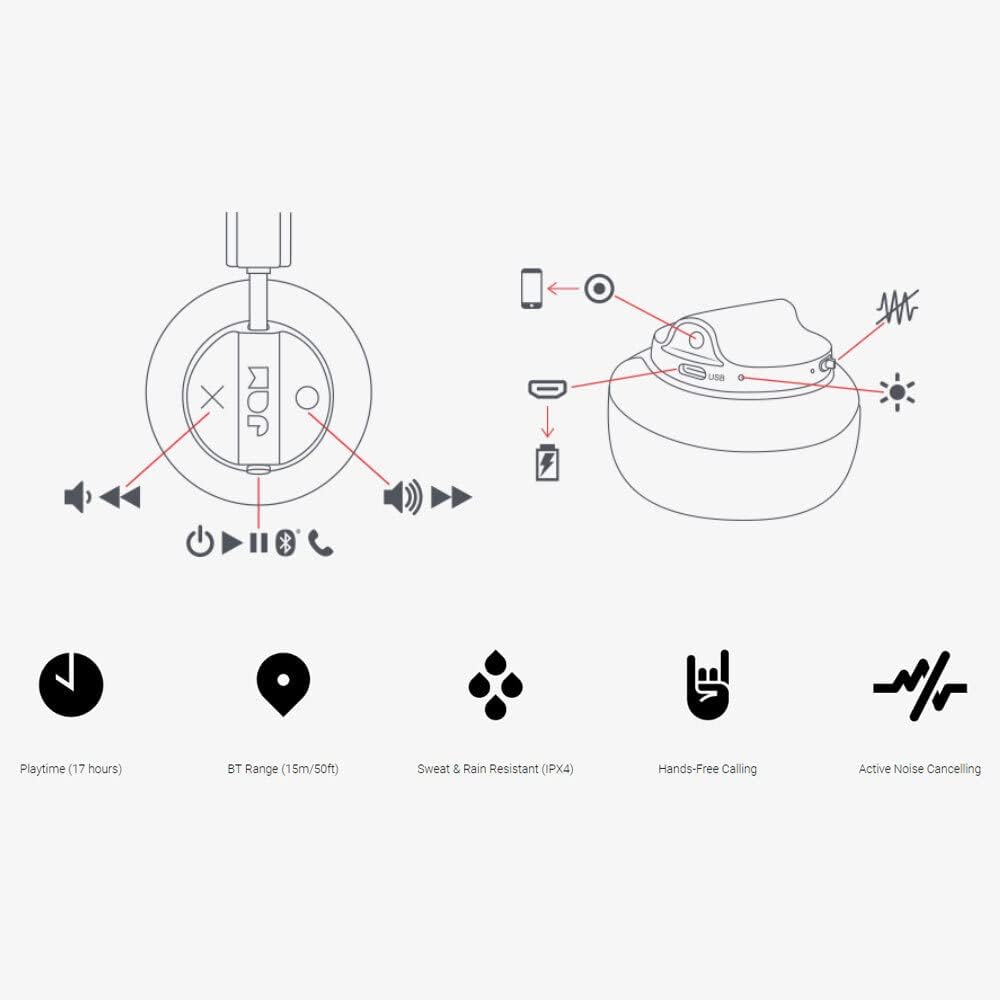
Image: Detailed diagram illustrating the control buttons and ports on the Jam Audio Out There headphones, including power, volume, track navigation, call management, and the charging port.
- پاور بٽڻ: پاور آن / آف ڪرڻ لاءِ دٻايو ۽ رکو.
- حجم مٿي/ا Traيون ٽريڪ: حجم وڌائڻ لاءِ مختصر پريس، ايندڙ ٽريڪ لاءِ ڊگهو پريس.
- حجم ھي//پوئين ٽريڪ: حجم گهٽائڻ لاءِ مختصر پريس، پوئين ٽريڪ لاءِ ڊگهو پريس.
- هلو/روڪ ڪريو/جواب ڏيو ڪال: Single press to play/pause music or answer/end a call.
- Active Noise Cancelling (ANC) Switch: Toggle to activate or deactivate noise cancellation.
- چارج پورٽ: چارج ڪرڻ لاءِ مائڪرو USB پورٽ.
- AUX-ان پورٽ: وائرڊ آڊيو ڪنيڪشن لاءِ 3.5 ايم ايم جيڪ.
سيٽ اپ ڪريو
1. هيڊفون چارج ڪرڻ
Before first use, fully charge your headphones. Connect the provided USB charging cable to the charging port on the headphones and the other end to a USB power source. The LED indicator will show charging status and turn off when fully charged. A full charge takes approximately 2 hours and provides up to 17 hours of playtime.

Image: The Jam Audio Out There headphones provide up to 17 hours of playtime on a single charge.
2. پاور آن/آف
- To power on: Press and hold the Power button for 3 seconds. The LED indicator will flash.
- To power off: Press and hold the Power button for 3 seconds. The LED indicator will turn off.
3. بلوٽوٽ جوئر
- پڪ ڪريو ته هيڊفون بند ٿيل آهن.
- Press and hold the Power button for 5 seconds until the LED indicator flashes red and blue, indicating pairing mode.
- پنهنجي ڊوائيس (اسمارٽ فون، ٽيبليٽ، ڪمپيوٽر) تي، بلوٽوٿ کي فعال ڪريو ۽ موجود ڊوائيسز جي ڳولا ڪريو.
- Select "JAM Out There" from the list of devices.
- Once paired, the LED indicator on the headphones will turn solid blue.
- The headphones have a Bluetooth range of up to 15 meters (50 feet).

Image: The Jam Audio Out There headphones offer Bluetooth compatibility, allowing a range of up to 15 meters or 50 feet from your connected device.
آپريٽنگ هدايتون
موسيقي پلے بیک
- راند/روڪ: دٻايو Play/Pause بٽڻ هڪ ڀيرو.
- اڳيون ٽريڪ: واليوم اپ بٽڻ کي ڊگھو دٻايو.
- پويون ٽريڪ: واليوم ڊائون بٽڻ کي ڊگھو دٻايو.
- حجم جي ترتيب: Short press the Volume Up or Volume Down buttons.
هينڊ فري ڪالنگ
- جواب/آخر ڪال: دٻايو Play/Pause بٽڻ هڪ ڀيرو.
- ڪال رد ڪريو: 2 سيڪنڊن لاءِ Play/Pause بٽڻ کي دٻايو ۽ رکو.
- ڪال ڪريو Initiate the call from your connected device. The audio will automatically transfer to the headphones.
- Music will automatically pause during a call and resume after the call ends.
فعال شور منسوخ ڪرڻ (ANC)
- To activate ANC: Slide the ANC switch to the ON position. The ANC indicator light will illuminate.
- To deactivate ANC: Slide the ANC switch to the OFF position. The ANC indicator light will turn off.
- Using ANC can reduce ambient noise, enhancing your listening experience. Note that ANC can be used independently or with Bluetooth audio.
Wired Connection (AUX-in)
For a wired connection, use the provided 3.5mm AUX cable. Plug one end into the headphone's AUX-in port and the other into your audio device. This allows you to continue listening even if the headphone battery is depleted or if Bluetooth is not available.
سار سنڀال
- صفائي: هيڊفونز کي نرم، سڪل ڪپڙي سان صاف ڪريو. سخت ڪيميڪل يا رگڙيندڙ مواد استعمال نه ڪريو.
- اسٽوريج: هيڊفونز کي انتهائي گرمي پد کان پري ٿڌي، سڪل جاءِ تي رکو.
- پاڻي جي مزاحمت: These headphones are IPX4 rated, meaning they are resistant to sweat and light splashes of water. Do not submerge them in water or expose them to heavy rain. Ensure the charging port cover is securely closed when not charging to maintain water resistance.
- بيٽري جي سنڀال: بيٽري جي زندگي کي وڌائڻ لاءِ، هيڊفونز کي بار بار مڪمل طور تي چارج ڪرڻ کان پاسو ڪريو. انهن کي باقاعدي طور تي چارج ڪريو، جيتوڻيڪ ڊگهي عرصي تائين استعمال ۾ نه هجي.
مشڪلاتون
| مسئلو | حل |
|---|---|
| هيڊفون آن نه ٿي رهيا آهن | Ensure the headphones are charged. Connect to a power source using the USB cable. |
| بلوٽوٿ ذريعي جوڙڻ ۾ ناڪام |
|
| ڪوبه آواز يا گهٽ حجم نه |
|
| Active Noise Cancelling not working | Ensure the ANC switch is in the ON position and the ANC indicator light is illuminated. |
| Headphones falling apart or breaking | While the product is designed for durability, excessive force or improper handling can cause damage. Handle with care. If issues persist, refer to warranty information. |
وضاحتون
- ماڊل نالو: اتي ٻاهر
- ماڊل نمبر: HX-HP303BK
- رابطي: Bluetooth, 3.5 mm Jack (AUX-in)
- وائرليس رينج: 15 ميٽر (50 فوٽ) تائين
- بيٽري جي زندگي: 17 ڪلاڪ تائين
- شور ڪنٽرول: فعال شور منسوخي
- پاڻي جي مزاحمت: IPX4 Rated (Sweat and Rain Resistant)
- ڪن جي جڳھ: ڪن تي
- مواد: رٻڙ، سلڪون
- شيء جو وزن: 5.1 آونس (0.32 پائونڊ)
- پيداوار جي ماپ: 8.58 x 3.19 x 8.66 انچ
- شامل اجزاء: Headphones, Charging Cord, AUX Cable
پراڊڪٽ وڊيو ختمview
بصري جائزو لاءِ هي سرڪاري پراڊڪٽ وڊيو ڏسوview of the Jam Audio product line, including the Out There headphones.
Video: An official Jam Audio sizzle video showcasing various products, including the Out There headphones, highlighting their design and features.
وارنٽي ۽ سپورٽ
For warranty information, product registration, or technical support, please refer to the official Jam Audio webسائيٽ تي وڃو يا انهن جي ڪسٽمر سروس سان رابطو ڪريو. وارنٽي دعوائن لاءِ خريداري جو ثبوت رکو.


