
1. تعارف
This manual provides essential information for the setup, operation, and maintenance of your Epson SureColor P400 Wireless Color Photo Printer. Please read this manual thoroughly before using the printer to ensure optimal performance and longevity.
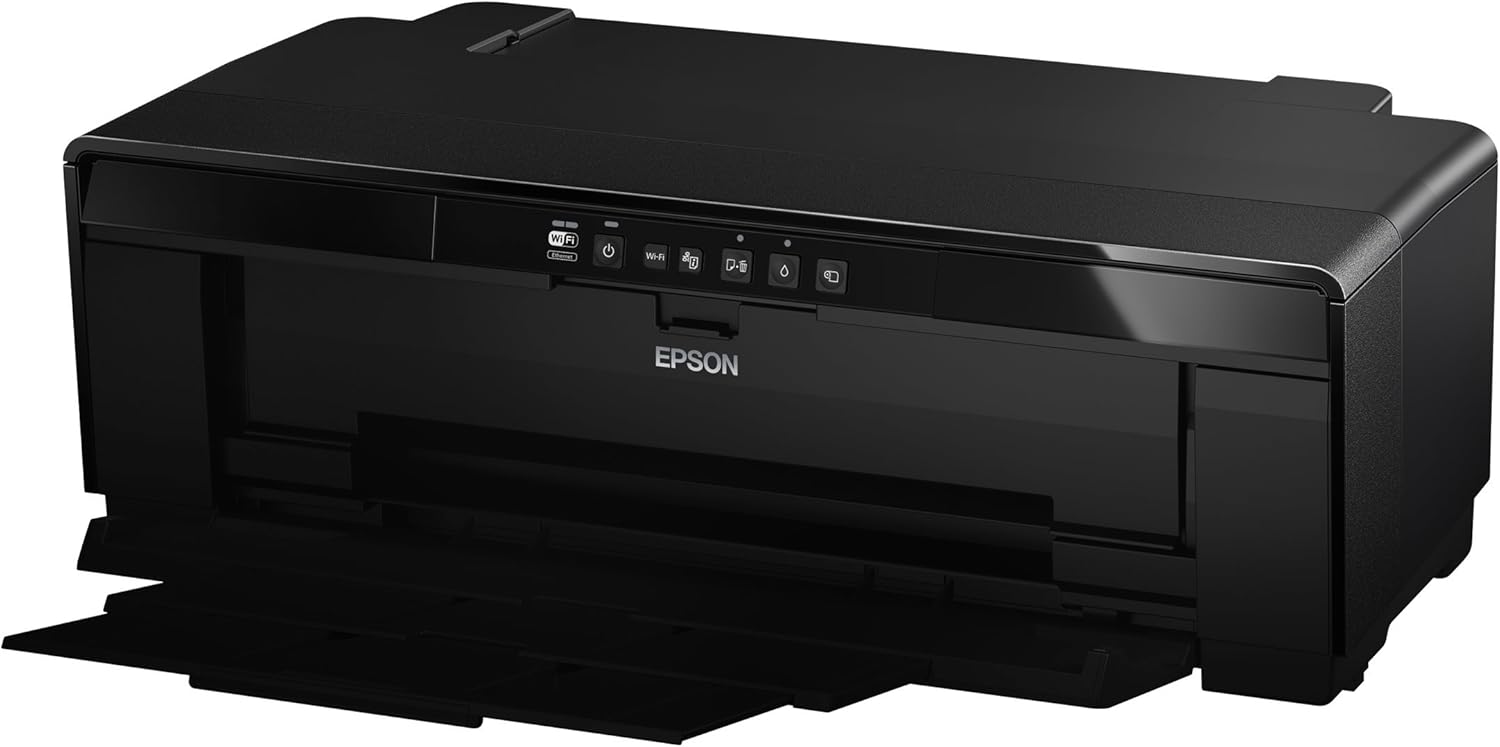
تصوير 1: سامهون view of the Epson SureColor P400 Wireless Color Photo Printer.
2. اهم خاصيتون
- UltraChrome HG2 Ink: Utilizes an 8-color pigment ink set, including Red and Orange inks, for vibrant, true-to-life color and deep blacks.
- Gloss Optimizer: Provides a smooth, professional finish to prints.
- ورسٽائل ميڊيا هينڊلنگ: Supports 13-inch wide cut-sheet and roll paper, fine art paper, and art board up to 1.3 mm thick.
- رابطي: Features Wireless (Wi-Fi), Ethernet, and USB 2.0 for flexible printing options.
- Individual Ink Cartridges: High-capacity 14 mL cartridges allow for replacement of only the color needed.

تصوير 2: مٿيview of the Epson SureColor P400 highlighting advanced paper handling, versatile connectivity, and the MicroPiezo printhead.
3. سيٽ اپ گائيڊ
3.1 Unpacking ۽ لڳائڻ
- ان جي پيڪنگنگ مان پرنٽر کي احتياط سان هٽايو.
- پرنٽر کي هڪ مستحڪم، هموار مٿاڇري تي رکو جنهن جي چوڌاري آپريشن ۽ وينٽيليشن لاءِ مناسب جاءِ هجي.
- پرنٽر مان سڀئي حفاظتي ٽيپ ۽ پيڪنگ مواد هٽايو.
3.2 انڪ ڪارٽريجز لڳائڻ
- Open the printer cover to access the ink cartridge slots.
- Unpack each 14 mL ink cartridge (Cyan, Gloss Optimizer, Magenta, Matte Black, Orange, Photo Black, Red, Yellow).
- Insert each cartridge into its corresponding color-coded slot until it clicks into place.
- پرنٽر ڪپڙا بند ڪريو.
Video 1: Official Epson SureColor P400 overview, demonstrating key features and ink installation. This video provides a visual guide to the printer's capabilities and how to manage ink cartridges.
3.3 پاور ڪنيڪشن
- پاور ڪنڊ کي پرنٽر سان ڳنڍيو ۽ پوءِ پاور آئوٽليٽ سان.
- پرنٽر کي چالو ڪرڻ لاء پاور بٽڻ کي دٻايو.
3.4 سافٽ ويئر جي انسٽاليشن ۽ ڪنيڪٽوٽي
- Install the printer software on your computer (PC or Mac) from the provided CD or Epson's official webسائيٽ.
- Follow the on-screen instructions to set up your preferred connection method:
- وائرليس (وائي فائي): پرنٽر کي پنھنجي وائرليس نيٽ ورڪ سان ڳنيو.
- Ethernet: پرنٽر مان هڪ ايٿرنيٽ ڪيبل پنهنجي روٽر يا نيٽ ورڪ هب سان ڳنڍيو.
- USB 2.0: Connect a USB cable (not included) from the printer to your computer.

Image 3: Illustration of the Epson SureColor P400's compatibility and connectivity features, showing various devices and connection types.
4. آپريٽنگ هدايتون
4.1 لوڊ ڪندي پيپر
The SureColor P400 offers multiple paper loading options:
- Auto Sheet Feeder: For photo, matte, and plain papers. Load paper into the top rear slot.
- Rear Single Sheet Fine Art Paper Path: For heavier fine art papers and specialty media.
- Roll Paper Holder: For 8.3-inch or 13-inch wide roll paper, ideal for panoramas up to 129 inches long.
- Front Straight-Through Path: Handles art board up to 1.3 mm thick.

Image 4: Diagram illustrating the three media feed options available on the Epson SureColor P400, including the top-loading auto-sheet feeder, front fine-art media feed, and roll media feed.

Image 5: The Epson SureColor P400 is capable of printing on a wide range of media, including various types of Epson Legacy Papers, Velvet Fine Art, Premium Photo Paper Luster, and Exhibition Canvas Gloss.
4.2 ڇپائي
- پڪ ڪريو ته پرنٽر آن آهي ۽ توهان جي ڊوائيس سان ڳنڍيل آهي.
- اهو دستاويز يا تصوير کوليو جيڪو توهان پنهنجي ڪمپيوٽر تي پرنٽ ڪرڻ چاهيو ٿا.
- پنھنجي ايپليڪيشن جي مينيو مان "پرنٽ" چونڊيو.
- پنهنجي پرنٽر جي طور تي Epson SureColor P400 چونڊيو.
- Adjust print settings such as paper type, size, and quality in the printer driver dialog box.
- پرنٽ جي عمل کي شروع ڪرڻ لاءِ "پرنٽ" تي ڪلڪ ڪريو.
5. سار سنڀال
5.1 مس ڪارٽريجز کي تبديل ڪرڻ
- When an ink cartridge is low or empty, a notification may appear on your computer or the printer's indicator light will signal.
- Press the ink droplet button on the printer's control panel to move the print head to the replacement position.
- انڪ ڪارٽريج coverڪ کوليو.
- خالي ڪارٽريج تي ٽيب کي دٻايو ته جيئن ان کي ڇڏجي، پوءِ ان کي سڌو ٻاهر ڪڍو.
- Unpack a new genuine Epson ink cartridge and insert it firmly into the correct slot until it clicks.
- Close the ink cartridge cover and press the ink droplet button again to return the print head to its home position.
5.2 پرنٽ هيڊ کي صاف ڪرڻ
If print quality declines or you notice missing lines or incorrect colors, perform a print head cleaning:
- پنهنجي ڪمپيوٽر تي پرنٽر يوٽيلٽي سافٽ ويئر تائين رسائي حاصل ڪريو.
- Select "Head Cleaning" or "Nozzle Check" to initiate the cleaning cycle.
- Follow the on-screen prompts. Repeat if necessary.
5.3 Cleaning the Paper Path
If you experience streaks on your prints, the paper path may need cleaning. Refer to the user guide for detailed instructions on how to clean the internal components, such as the pad that collects excess ink.
6. مسئلا حل ڪرڻ
- پرنٽر جواب نه ڏئي رهيو آهي:
- پاور ڪنيڪشن چيڪ ڪريو ۽ پڪ ڪريو ته پرنٽر آن آهي.
- نيٽ ورڪ يا USB ڪيبل ڪنيڪشن جي تصديق ڪريو.
- پرنٽر ۽ ڪمپيوٽر کي ٻيهر شروع ڪريو.
- خراب پرنٽ معيار (تارون، ختم ٿيڻ):
- مس جي سطح چيڪ ڪريو ۽ ڪنهن به خالي ڪارٽريج کي تبديل ڪريو.
- Perform a print head cleaning and nozzle check.
- پڪ ڪريو ته توهان پنهنجي ميڊيا جي قسم لاءِ مناسب پيپر سيٽنگون استعمال ڪري رهيا آهيو.
- Clean the paper path if streaks persist.
- پيپر جام:
- Turn off the printer and carefully remove any jammed paper from the input or output trays.
- Refer to the user guide for instructions on clearing internal paper jams.
7. وضاحتون
| خاصيت | تفصيل |
|---|---|
| ماڊل نمبر | C11CE85201 |
| پيداوار جا طول و عرض (ڊي x ڊبليو x ايڇ) | 12.8" x 24.5" x 8.6" |
| شيءِ جو وزن | 27.1 پائونڊ |
| ڇپائي ٽيڪنالاجي | Inkjet (Pigment-based ink) |
| پرنٽر آئوٽ | رنگ |
| وڌ ۾ وڌ پرنٽ ريزوليوشن | 5760 x 1440 dpi |
| انيڪ رنگ | Cyan, Magenta, Yellow, Photo Black, Matte Black, Red, Orange, Gloss Optimizer |
| رابطي ٽيڪنالاجي | USB 2.0, Wireless (Wi-Fi), Ethernet |
| سپورٽ ٿيل ميڊيا سائيز | Up to 13" x 129" (roll paper), 13" x 19" (sheet) |
| وڌ ۾ وڌ ان پٽ شيٽ جي گنجائش | 1 (single sheet feed for specialty media) |
| Dual-sided Printing (Duplex) | ها |
| بجلي جو استعمال | Printing: Approx. 20 W; Sleep mode: Approx. 1.4 W; Power off: Approx. 0.15 W |
| مطابقت رکندڙ ڊوائيسز | PC، Mac |

Image 6: Contents of the Epson SureColor P400 box, including the printer, ink cartridges, power cord, and user guide. Note that the USB cable is not included.
8. وارنٽي ڄاڻ
Specific warranty details for the Epson SureColor P400 are not provided in this manual. Please refer to the warranty card included with your product or visit the official Epson website for the most current and comprehensive warranty information.
9. ڪسٽمر سپورٽ
For technical assistance, troubleshooting, or further inquiries, please visit the official Epson support website or contact Epson customer service. Support resources often include FAQs, driver downloads, and contact information for live assistance.
توھان جو دورو ڪري سگھو ٿا ايميزون تي ايپسن اسٽور اضافي پراڊڪٽ جي معلومات ۽ لوازمات لاءِ.